小苏打_
Lv.1
keep thinking
获赞:53收藏:8浏览:672作品收藏:24
签名:felling fish
Lv.1
keep thinking
签名:felling fish
在 【教程】运算符大全 中回复
另外大家要注意避坑:
如图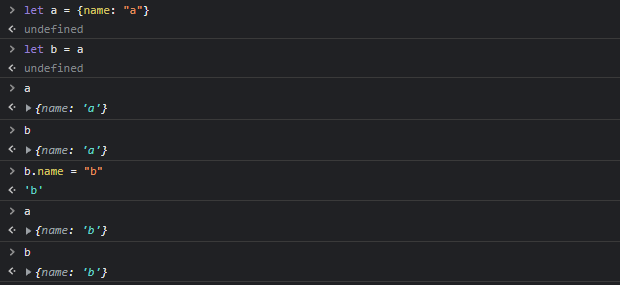
在使用 = 运算符进行赋值的时候,如果是对象,需要注意这仅仅是浅拷贝,即b并非把a复制一份,而是指向a所在的内存空间
这就导致当你修改b时,其实是在修改a所在内存的内容。
2023-01-14T21:10:03 点赞:1
在 我现在在edge浏览器用kitten老是有一些积木失效的情况,换成谷歌会不会好一点? 中回复
理论上chrome和edge都是chromium内核没有差别
(虽然我坚持chrome并且觉得chrome更快
2023-01-14T21:13:22 点赞:1
在 做一个暖手宝 中回复
不可行,javascript最多支持2^1024位(coco是基于其上的)超过2^1024就是Infinty
可以插入大量未经优化的答辩代码,多来点三角函数运算什么的(
2023-01-14T21:46:26 点赞:1
在 python教程print函数(第2次发,上次有错误) 中回复
如果要写入文件,建议使用
with open('./output.txt') as f:
    print('text', file = f)
2023-01-16T11:00:58 点赞:0
在 【mc音效】请问哪里可以下载到mc音效? 中回复
通过第三方启动器下载minecraft, 然后寻找启动器文件夹下 /.minecraft/assets/1.xx(游戏版本号).json
通过vscode或者其他什么东西打开这个.json文件
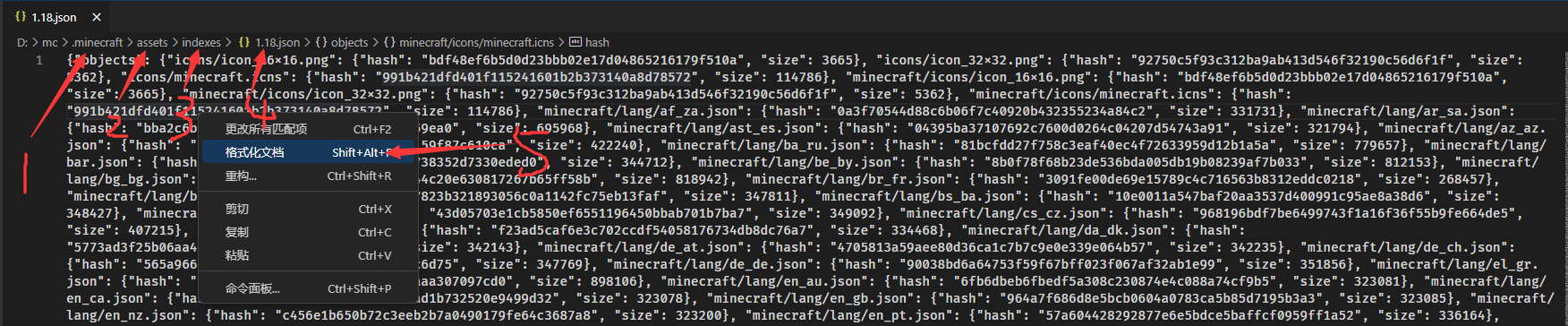
找到../music/...字段
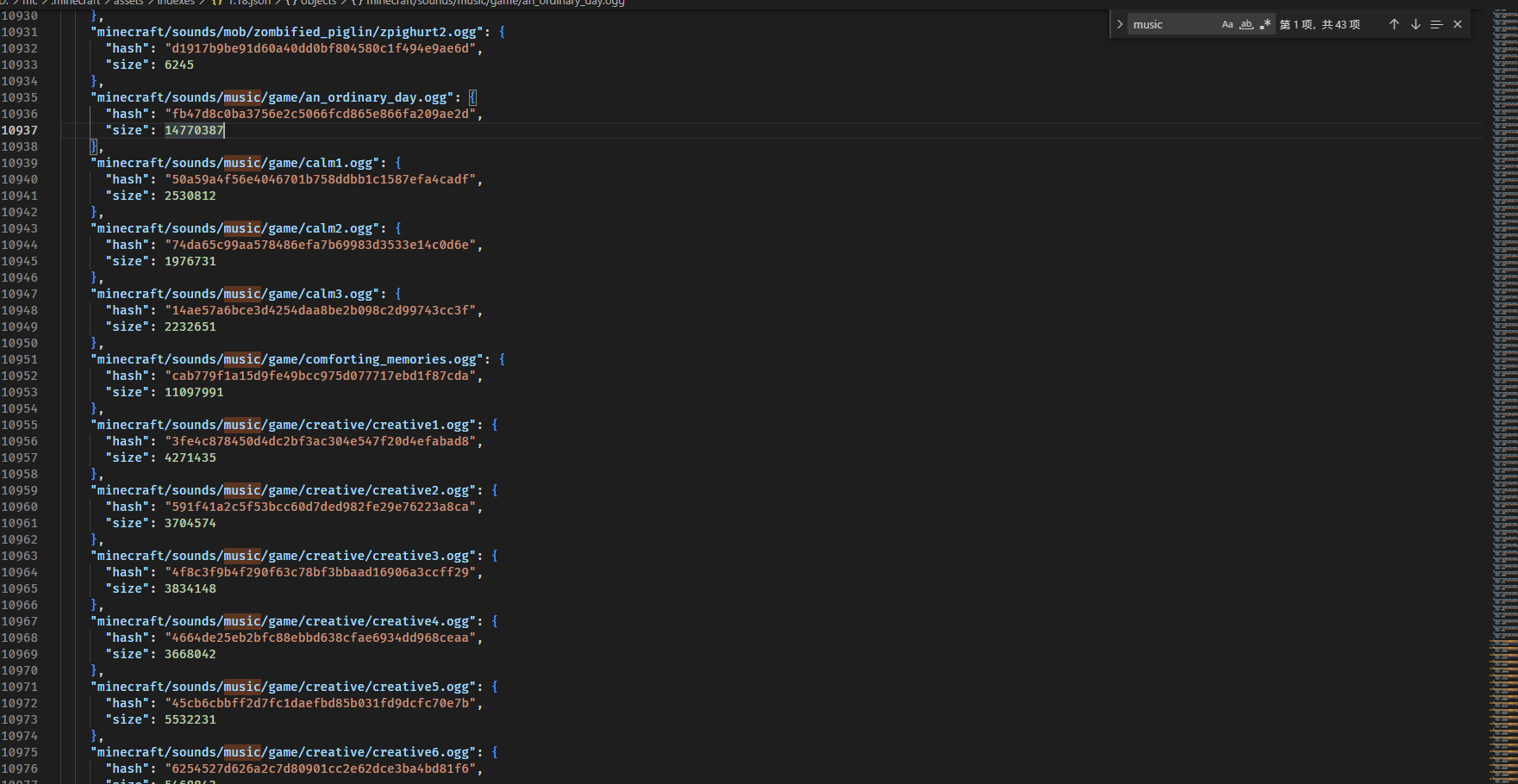
赋值hash,来到.minecraft/asstes/objects里,通过hash搜索文件
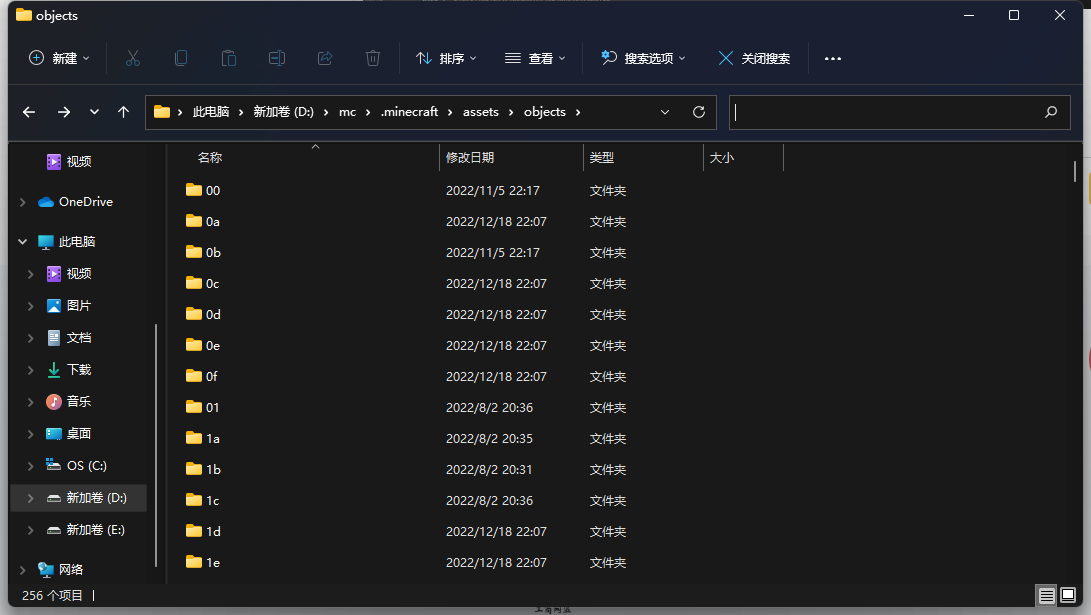
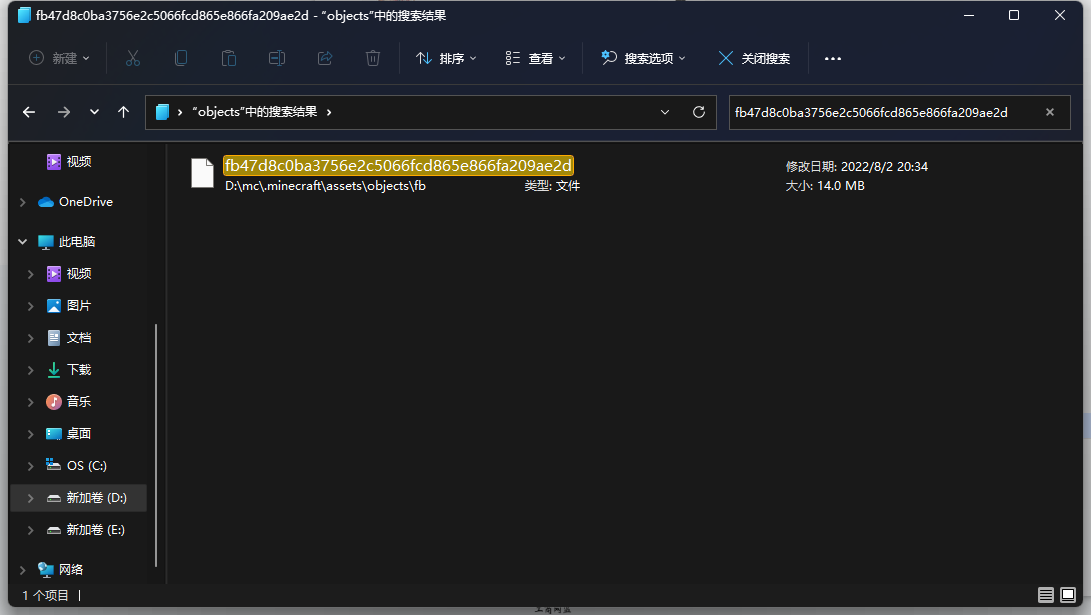
复制文件到你的文件夹,后缀名该成.ogg(不会改后缀的自己搜)
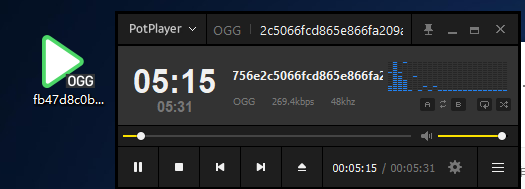
ogg是一种音频文件,用potplayer/vlc media player可以打开。如果想转换成其他格式,可以使用格式工厂。
2023-01-16T14:01:07 点赞:0
在 Python教程4(1)——变量,暂时的银行 中回复
有没有可能……讲完print要先讲 数据结构 再讲变量比较合适……
另外说一个不是很常见的解法(仅对于数字)
a = int(input())
b = int(input())
a = a^b
b = a^b
a = a^b;
print(f'a:{a}\nb:{b}')
2023-01-16T17:03:37 点赞:1
在 Python基础教程 第二节课 中回复
还有python几乎不会有人做的事情:类型声明
a # 非法
a: int #合法

def fn(a: int, b: int) -> int: #合法
    return a+b
主要是为了方便编辑器提供类型提示(
2023-01-16T20:04:51 点赞:0
在 哪位大佬能看一下我这个离奇的问题 中回复
addzone中bounds里lo的每个值都要比对应的hi值小
因此应改为
...bounds: { lo:[82,8,8], hi:[101,15,19] }...2023-01-17T20:57:11 点赞:0
在 python教程3——变量和数据类型 中回复
class rect:
    a: int
    b: int
    def __init__(self, a: int, b: int)->None:
        self.a = a
        self.b = b
    def area(self)->int:
        return (self.a*self.b)
    def length(self)->int:
        return (self.a+self.b)*2

r = rect(int(input('长:')), int(input('宽:')))
print(f'长={r.a} 宽={r.b} 面积={r.area()} 周长={r.length()}')
我满脑子都是对象(bushi
2023-01-19T13:51:33 点赞:0
在 大家,函数是啥,在线等,挺急的 中回复
函数就是一个机器,你给他原料,他就给你结果
假设有一个函数,你想让他计算两个数的和:
function sum(a, b){
    return a+b;
}
当你给名叫“sum”的函数a和b的值,他就给你返回一个a+b的值:
sum(1, 2)上面这段代码返回 “3”。
当然,机器不仅可以计算,还可以做一些事情。
假设有一个函数,你想让他计算两个数的和,同时在控制台输出计算结果,同时在H喵L页面上显示结果:
function sumplus(a, b){
    let result = a+b;
    console.log(result);
    document.write("结果:"+result);
}
现在给这个函数a和b的值:
sumplus(114, 514)你会看到控制态台输出“628”,并且H喵L页面上出现了“结果:628”字样。
当然也可以不给机器任何参数,让他按照规划好的动作做事。
* 以上javascript代码不适用于box3
2023-01-22T19:54:56 点赞:0
在 对猫站的看法《已发灌水》 中回复
发表观点没问题
但请不要重复发
想提高被看见的几率靠的是内容的质量
而不是刷屏谢谢
ps.除了这个帖子其他的都举办了
2023-01-22T22:37:21 点赞:1
在 C++就不行? 中回复
大草,炸鱼是吧
既然这样可以评价一下我的代码吗(doge
/**
 * P0001 两数之和
*/
#include<bits/stdc++.h>

int* sum(int a, int b){
	int c;
	c = a + b;
	return &c;
}

int main(){
	int a, b;
	std::cin>>a>>b;
	int* result = sum(a, b);
	*result = 114514;
	return 1;
}
2023-01-25T17:45:04 点赞:0
在 【box3】地图崩溃代码 中回复
!(async function(){
   for(;;){ //forever
      world.say()
   }
})();
2023-01-26T21:07:06 点赞:0
在 【box3】更简单的旋转 中回复
function dsin(n) {
    return Math.sin(Math.PI * n / 180);
}
function dcos(n) {
    return Math.cos(Math.PI * n / 180);
}
var vector3 = /** @class */ (function () {
function vector3(x, y, z) {
this.x = x;
this.y = y;
this.z = z;
}
vector3.prototype.add = function (v) {
return new vector3(this.x + v.x, this.y + v.y, this.z + v.z);
};
vector3.prototype.reduce = function (v) {
return new vector3(this.x - v.x, this.y - v.y, this.z - v.z);
};
vector3.prototype.mul = function (n) {
return new vector3(this.x * n, this.y * n, this.z * n);
};
return vector3;
}());var matrix3 = /** @class */ (function () {
function matrix3(ihat, jhat, khat) {
this.ihat = ihat;
this.jhat = jhat;
this.khat = khat;
}
matrix3.prototype.linearTransformation = function (v) {
return new vector3(0, 0, 0)
.add(this.ihat.mul(v.x))
.add(this.jhat.mul(v.y))
.add(this.khat.mul(v.z));
};
matrix3.prototype.mul = function (m) {
return new matrix3(m.linearTransformation(this.ihat), m.linearTransformation(this.jhat), m.linearTransformation(this.khat));
};
matrix3.prototype.rotate = function (x, y, z) {
return this
.mul(new matrix3(new vector3(1, 0, 0), new vector3(0, dcos(x), dsin(x)), new vector3(0, -dsin(x), dcos(x))))
.mul(new matrix3(new vector3(dcos(y), 0, dsin(y)), new vector3(0, 1, 0), new vector3(-dsin(y), 0, dcos(y))))
.mul(new matrix3(new vector3(dcos(z), dsin(z), 0), new vector3(-dsin(z), dcos(z), 0), new vector3(0, 0, 1)));
};
return matrix3;
}());var BASE_MATRIX = new matrix3(new vector3(1, 0, 0), new vector3(0, 1, 0), new vector3(0, 0, 1));let ezRouteEntityTemplate = {
TEMPLATE_ROATITION: new Box3Quaternion(0, 1, 0, 0),
/**
* 设置模型旋转
* @param x{Number} x轴
* @param y{Number} y轴
* @param z{Number} z轴
*/
setRotation(x, y, z) {
this.meshOrientation = this.TEMPLATE_ROATITION
.rotateX(x * Math.PI / 180)
.rotateY(y * Math.PI / 180)
.rotateZ(z * Math.PI / 180);
}, /**
* 添加模型旋转
* @param x{Number} x轴
* @param y{Number} y轴
* @param z{Number} z轴
*/
addRotation(x, y, z) {
this.meshOrientation = this.meshOrientation
.rotateX(x * Math.PI / 180)
.rotateY(y * Math.PI / 180)
.rotateZ(z * Math.PI / 180);
},
    /**
     * 带有动画效果的模型旋转
     * @param x{Number} x轴
     * @param y{Number} y轴
     * @param z{Number} z轴
     * @param duringMs{Number} 持续时间
     */
    async showRotation(x, y, z, duringMs, ease=Box3Easing.SINE) {
        return new Promise((reslove, rej)=>{
            let last = this.meshOrientation
                .rotateX(x * Math.PI / 180)
                .rotateY(y * Math.PI / 180)
                .rotateZ(z * Math.PI / 180);
            let animation = this.animate([
                { meshOrientation: last, duration: 1, easeIn:ease},
                { meshOrientation: this.meshOrientation, duration: 0 },
            ]);
            animation.play({
                duration: 16 * duringMs / 1000,
                iterations: 1,
                direction: Box3AnimationDirection.WRAP_REVERSE
            });
            animation.onFinish(() => {
                reslove()
            });
        })
    }
}
/**
* 为实体添加一些好东西
*/
function bind(entity) {
Object.assign(entity, ezRouteEntityTemplate);
entity.setRotation(0, 0, 0);
}/**
* 旋转建筑
* 注意: start的每一项都要比end的**数值小**,并且copyto**不能位于**即将旋转的区域内。造成一切建筑的毁坏作者概不负责。
* @param start{Box3Vector3} 区域开始
* @param end{Box3Vector3} 区域结束
* @param origin{Box3Vector3} 区域原点
* @param copyto{Box3Vector3} 旋转后的新原点
* @param x{Number} x轴旋转角
* @param y{Number} y轴旋转角
* @param z{Number} z轴旋转角
*/
function rotateConstructor(start, end, origin, copyto, x, y, z){
let ro = new vector3(origin.x, origin.y, origin.z);
let rc = new vector3(copyto.x, copyto.y, copyto.z);
let rm = BASE_MATRIX.rotate(x, y, z);
for(let x=start.x; x<=end.x; x++){
for(let y=start.y; y<=end.y; y++){
for(let z=start.z; z<end.z; z++){
let tmp = rm.linearTransformation(new vector3(x, y, z).reduce(ro)).add(rc);
voxels.setVoxelId(tmp.x, tmp.y, tmp.z, voxels.getVoxelId(x, y, z));
}
}
}
}module.exports = {
bind,
rotateConstructor
}
2023-02-04T22:57:50 点赞:1