guxia666查看:296 回复:10 评论:10 创建时间:2023-01-14T20:46:18
用户:guxia666查看:296 回复:10 评论:10 创建时间:2023-01-14T20:46:18
运算符是用来告诉 JavaScript 引擎执行某种操作的符号,例如加号(+)表示执行加法运算,减号(-)表示执行减法运算等,本节我们就来介绍一下 JavaScript 中不同的运算符。
算术运算符算数运算符用来执行常见的数学运算,例如加法、减法、乘法、除法等,下表中列举了 JavaScript 中支持的算术运算符:
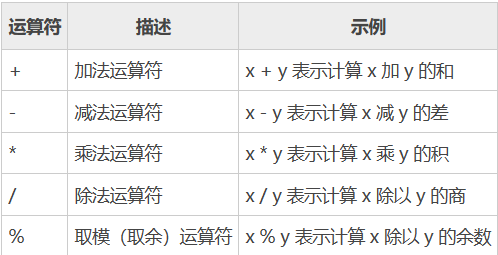
示例代码如下:
var x = 10,
    y = 4;
console.log("x + y =", x + y);  // 输出:x + y = 14
console.log("x - y =", x - y);  // 输出:x - y = 6
console.log("x * y =", x * y);  // 输出:x * y = 40
console.log("x / y =", x / y);  // 输出:x / y = 2.5
console.log("x % y =", x % y);  // 输出:x % y = 2
上述代码中,双引号中的内容是一个字符串,所以其中的运算符会原样输出,并不参与运算。
赋值运算符赋值运算符用来为变量赋值,下表中列举了 JavaScript 中支持的赋值运算符:
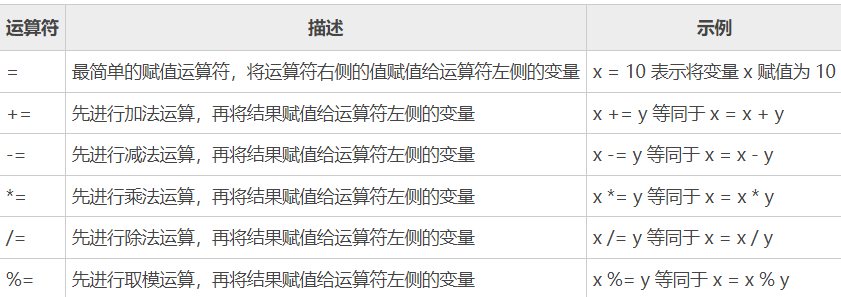
示例代码如下:
var x = 10;
x += 20;
console.log(x);  // 输出:30
var x = 12,
    y = 7;
x -= y;
console.log(x);  // 输出:5
x = 5;
x *= 25;
console.log(x);  // 输出:125
x = 50;
x /= 10;
console.log(x);  // 输出:5
x = 100;
x %= 15;
console.log(x); // 输出:10JavaScript 中的+和+=运算符除了可以进行数学运算外,还可以用来拼接字符串,其中:
+运算符表示将运算符左右两侧的字符串拼接到一起;+=运算符表示先将字符串进行拼接,然后再将结果赋值给运算符左侧的变量。示例代码如下:
var x = "Hello ";
var y = "World!";
var z = x + y;
console.log(z);  // 输出:Hello World!
x += y;
console.log(x); // 输出:Hello World!自增、自减运算符用来对变量的值进行自增(+1)、自减(-1)操作,下表中列举了 JavaScript 中支持的自增、自减运算符:

示例代码如下:
var x;
x = 10;
console.log(++x);  // 输出:11
console.log(x);    // 输出:11
x = 10;
console.log(x++);  // 输出:10
console.log(x);    // 输出:11
x = 10;
console.log(--x);  // 输出:9
console.log(x);    // 输出:9
x = 10;
console.log(x--);  // 输出:10
console.log(x); // 输出:9比较运算符用来比较运算符左右两侧的表达式,比较运算符的运算结果是一个布尔值,结果只有两种,不是 true 就是 false。下表中列举了 JavaScript 中支持的比较运算符:
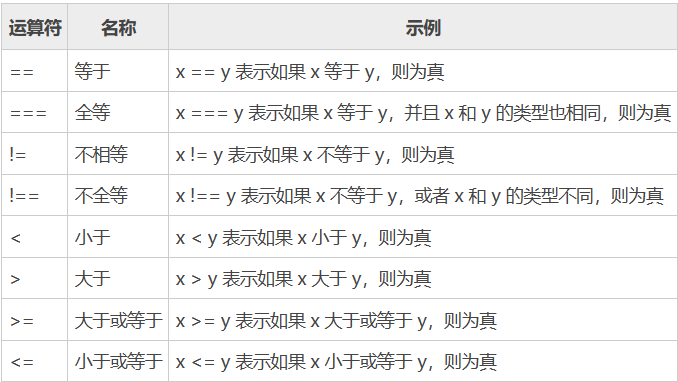
示例代码如下:
var x = 25;
var y = 35;
var z = "25";
console.log(x == z);  // 输出: true
console.log(x === z); // 输出: false
console.log(x != y);  // 输出: true
console.log(x !== z); // 输出: true
console.log(x < y);   // 输出: true
console.log(x > y);   // 输出: false
console.log(x <= y);  // 输出: true
console.log(x >= y); // 输出: false逻辑运算符通常用来组合多个表达式,逻辑运算符的运算结果是一个布尔值,只能有两种结果,不是 true 就是 false。下表中列举了 JavaScript 中支持的逻辑运算符:

示例代码如下:
var year = 2021;
// 闰年可以被 400 整除,也可以被 4 整除,但不能被 100 整除
if((year % 400 == 0) || ((year % 100 != 0) && (year % 4 == 0))){
    console.log(year + " 年是闰年。");
} else{
    console.log(year + " 年是平年。");
}三元运算符(也被称为条件运算符),由一个问号和一个冒号组成,语法格式如下:
条件表达式 ? 表达式1 : 表达式2 ;
如果“条件表达式”的结果为真(true),则执行“表达式1”中的代码,否则就执行“表达式2”中的代码。
示例代码如下:
var x = 11,
    y = 20;
x > y ? console.log("x 大于 y") : console.log("x 小于 y"); // 输出:x 小于 y位运算符用来对二进制位进行操作,JavaScript 中支持的位运算符如下表所示:
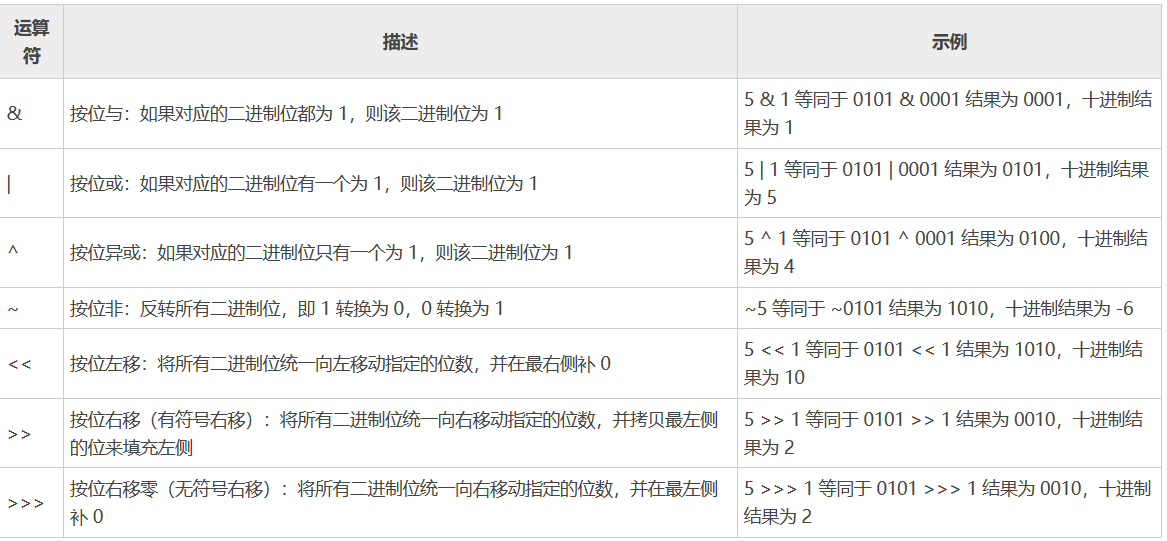
示例代码如下:
var a = 5 & 1,
    b = 5 | 1,
    c = 5 ^ 1,
    d = ~ 5,
    e = 5 << 1,
    f = 5 >> 1,
    g = 5 >>> 1;
console.log(a);  // 输出:1
console.log(b);  // 输出:5
console.log(c);  // 输出:4
console.log(d);  // 输出:-6
console.log(e);  // 输出:10
console.log(f);  // 输出:2
console.log(g); // 输出:2 小苏打_
小苏打_另外大家要注意避坑:
如图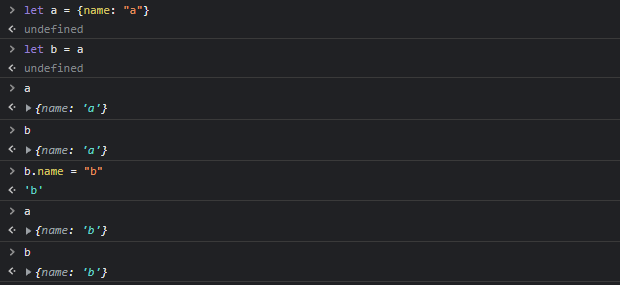
在使用 = 运算符进行赋值的时候,如果是对象,需要注意这仅仅是浅拷贝,即b并非把a复制一份,而是指向a所在的内存空间
这就导致当你修改b时,其实是在修改a所在内存的内容。
点赞1
评论
确实()给你置顶()
awa
 yee089
谢谢你,截图怪(什)
终于有人带位运算玩了(泪目)
点赞0
评论
什么鬼,我拿word整的表格,我想直接复制,但效果不好,所以只能截屏了,这个教程花费我一周时间()
可以试试vscode编辑markdown()很香()
e我电脑现在下不了(),就因为下载个ps,flash大全出病毒了,这几天下不了软件()
没救了,重装吧(
和runoob不能说有些不同,只能说一模一样(
 呵呵0486
算术运算符:
**
示例:x ** y = x的y次方(x^y) = y个x相乘
var x=2,
    y=3;
console.log(x ** y);//输出: 8
点赞0
评论
怎么能漏了这个呢(悲
忘了()