加里翁
Lv.1
你好吗?反正我不好(就怪了)。
获赞:122收藏:9浏览:445作品收藏:1
签名:学Python。
Lv.1
你好吗?反正我不好(就怪了)。
签名:学Python。
在 【Python作品分享】贪吃蛇【作品秀】 中回复
#!/usr/bin/envpython importpygame importsys importtime importrandom #定义颜色变量 redColour=pygame.Color(255,0,0) blackColour=pygame.Color(0,0,0) wilteColour=pygame.Color(255,255,255) greyColour=pygame.Color(150,150,150) #定义gameOver函数 defgameOver(playSurface): gameOverFont=pygame.font.Font('arint.ttf',72) gameOverSurf=gameOverFont.render('GameOver',True,greyColour) gameOverRect=gameOverSurf.get_rect() gameOverRect.midtop=(320,10) playSurface.blit(gameOverSurf.gameOverRect) pygame.display.flip() time.sleep(5) pygame.quit() sys.exit() #定义main函数 defmain(): #初始化pygame pygame.init() fpsClock=pygame.time.Clock() #创建pygame显示层 playSurface=pygame.display.set_mode((喵0,480)) pygame.display.set_caption('RaspberrySnake') #初始化变量 snakePosition=[100,100] snakeSegments=[[100,100],[80,100],[60,100]] raspberryPosition=[300,300] raspberrySpawned=1 direction='right' changDirection=direction whileTrue: #检测例如按键等pygame事件 foreventinpygame.event.get(): ifevent.type==QUIT: pygame.quit() sys.exit() elifevent.type==KEYDOWN: #判断键盘事件 ifevent.key==K_RIGHTorevent.key==ord('d'): changeDirection='right' ifevent.key==K_LEFTorevent.key==ord('a'): changeDirection='left' ifevent.key==K_UPorevent.key==ord('w'): changeDirection='up' ifevent.key==K_DOWNorevent.key==ord('s'): changeDirection='down' ifevent.key==K_ESCAPE: pygame.event.post(pygame.event.Event(QUIT)) #判断是否输入了反方向 ifchangDirection=='right'andnotdirection=='left': direction=changDirection ifchangDirection=='left'andnotdirection=='right': direction=changDirection ifchangDirection=='up'andnotdirection=='down': direction=changDirection ifchangDirection=='down'andnotdirection=='up': direction=changDirection #根据方向移动蛇头的坐标 ifdirection=='right': snakePosition[0]+=20 ifdirection=='left': snakePosition[0]-=20 ifdirection=='up': snakePosition[1]-=20 ifdirection=='down': snakePosition[1]+=20 #增加蛇的长度 snakeSegments.insert(0,list(snakePosition)) #判断蛇是否吃掉了树莓 ifsnakePosition[0]==raspberryPosition[0]andsnakeSegments==raspberryPosition: raspberrySpawned=0 else: snakeSegments.pop() #如果吃掉树莓,则重新生成树梅 ifraspberrySpawned==0: x=random.randrange(1,32) y=random.randrange(1,24) raspberryPosition=[int(x*20),int(y*20)] raspberrySpawned=1 #绘制pygame显示层 playSurface.fill(blackColour) forpositioninsnakeSegments: pygame.draw.rect(playSurface,wilteColour,Rect(position[0],position[1],20,20)) pygame.draw.rect(playSurface,redColour,Rect(raspberryPosition[0],raspberryPosition[1],20,20)) #刷新pygame显示层 pygame.display.flip() #判断是否喵 ifsnakePosition[0]>620orsnakePosition[0]<0: gameOver(playSurface) ifsnakePosition[1]>460orsnakePosition[1]<0: forsnakeBodyinsnakeSegments[1:]: ifsnakePosition[0]==snakeBody[0]andsnakePosition[1]==snakeBody[1]: gameOver(playSurface) #控制游戏速度 fpsClock.tick(1) if__name__=="__main__": main()
2022-08-26T13:58:45 点赞:0
在 找师傅(Python) 中回复
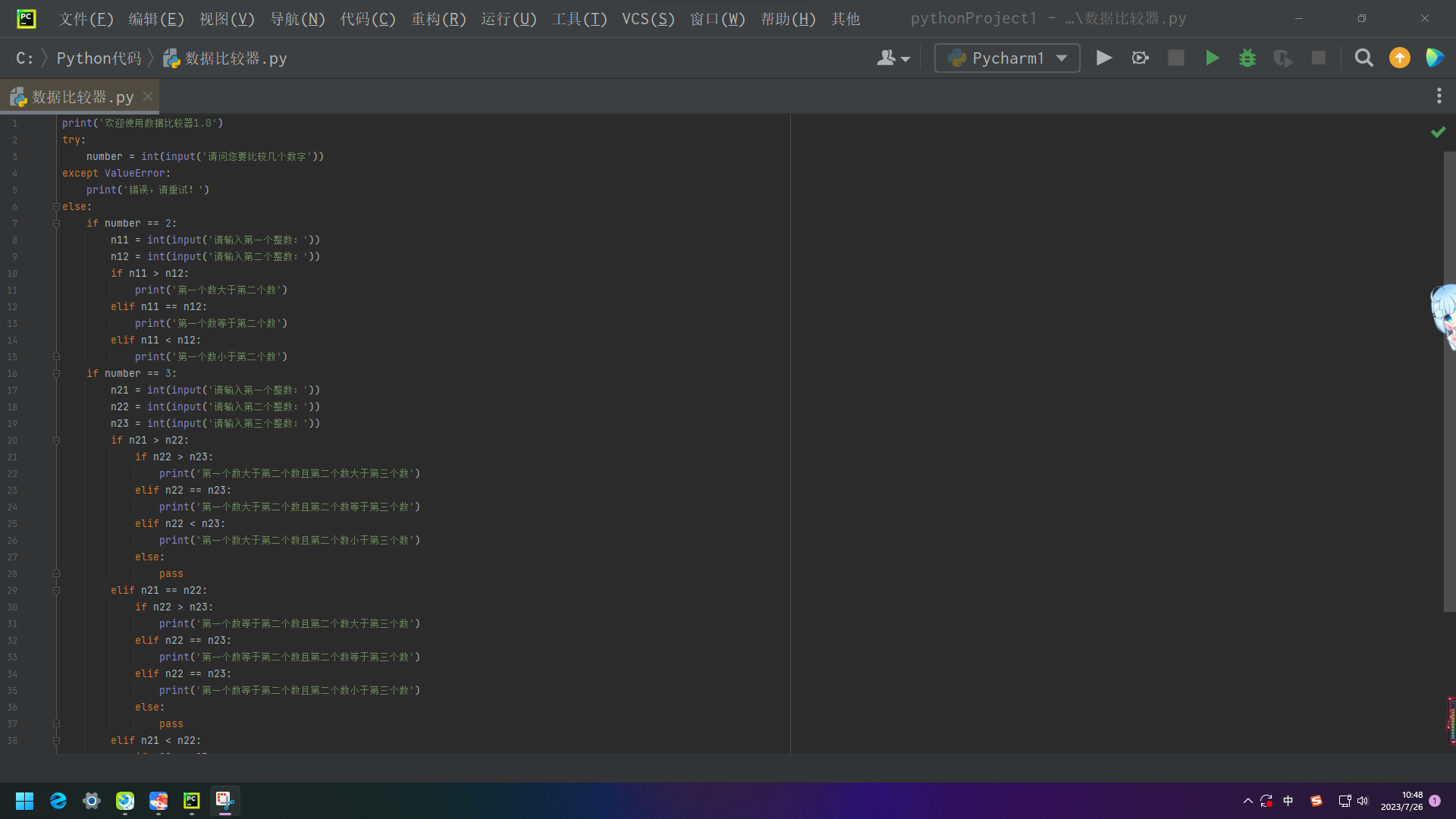
print('欢迎使用数据比较器1.1')
try:
    number = int(input('请问您要比较几个数字'))
except ValueError:
    print('错误,请重试!')
else:
    if number == 2:
        n11 = int(input('请输入第一个整数:'))
        n12 = int(input('请输入第二个整数:'))
        if n11 > n12:
            print('第一个数大于第二个数')
        elif n11 == n12:
            print('第一个数等于第二个数')
        elif n11 < n12:
            print('第一个数小于第二个数')
    if number == 3:
        n21 = int(input('请输入第一个整数:'))
        n22 = int(input('请输入第二个整数:'))
        n23 = int(input('请输入第三个整数:'))
        if n21 > n22:
            if n22 > n23:
                print('第一个数大于第二个数且第二个数大于第三个数')
            elif n22 == n23:
                print('第一个数大于第二个数且第二个数等于第三个数')
            elif n22 < n23:
                print('第一个数大于第二个数且第二个数小于第三个数')
            else:
                pass
        elif n21 == n22:
            if n22 > n23:
                print('第一个数等于第二个数且第二个数大于第三个数')
            elif n22 == n23:
                print('第一个数等于第二个数且第二个数等于第三个数')
            elif n22 == n23:
                print('第一个数等于第二个数且第二个数小于第三个数')
            else:
                pass
        elif n21 < n22:
            if n22 > n23:
                print('第一个数小于第二个数且第二个数大于第三个数')
            elif n22 == n23:
                print('第一个数小于第二个数第二个数等于第三个数')
            elif n22 < n23:
                print('第一个数小于第二个数且第二个数小于第三个数')
    if number != 2 or 3:
        print('该比较器暂未开发其他数据,望各位Python大佬继续开发。')
finally:
    print('执行完成。')
请师傅检验
2023-07-26T16:17:08 点赞:2