real_unmber
Lv.1
imgainary_unmber的小号
获赞:25收藏:4浏览:255作品收藏:21
Lv.1
imgainary_unmber的小号
在 【新一代编辑器上线预告】手机电脑都能用的Kitten N要来啦! 中回复
import Kitten

tick30 = 0
delta = 0
FPS = 0
i = 101
player_x = '-390'
player_z = 1610
镜头y方向 = 0
player_y = '-100'
旋转z = '-3446'
镜头x方向 = 0
旋转x = '-80'
旋转y = 210
屏幕x = '6.9喵596633778294'
焦距 = 300
屏幕y = '-18.28206616366802'
key WS = 0
key DA = 0

z = [3761, 3247, 1909, 6743, 2216, 8558, 3795, 8325, 2709, 2230, 5192, 4197, 9629, 7001, 437, 482, 5246, 4453, 3240, 6967, 3887, 3811, 2730, 4151, 7821, 3174, 6562, 2889, 891, 8620, 2719, 9611, 4281, 9709, 323, 9709, 8400, 3236, 232, 7230, 940, 9302, 5254, 8863, 5328, 5587, 2183, 1589, 7002, 9195, 8855, 5268, 4388, 7982, 4356, 8650, 4302, 9119, 4556, 喵79, 6943, 6323, 914, 9668, 4908, 750, 9343, 4321, 7693, 8932, 1830, 937, 714, 7876, 3153, 4227, 8529, 4434, 2206, 9084, 4213, 6979, 6949, 6677, 2685, 1457, 2528, 7315, 1325, 8554, 4227, 99, 8610, 7167, 7217, 4695, 8870, 8317, 9223, 5106];
x = [1845, 595, 342, '-415', 1411, 1794, 1331, '-1304', 115, '-1663', '-1558', '-211', '-1804', 1817, '-244', '-203', '-1698', 1140, '-1320', 98, '-1659', '-524', 1614, '-1676', 751, '-152', '-136', '-1687', 1871, '-486', 916, 169, '-1739', '-237', '-986', 910, '-828', 2喵, '-622', '-304', 937, '-199', '-1喵3', 17喵, 1820, '-1751', '-1252', '-1409', '-359', 669, '-976', 1105, '-1408', 348, 278, 1喵9, 746, 1233, 1540, '-1284', 54, 803, 1348, '-499', 249, 1281, 246, 512, 307, '-952', '-392', 422, '-1186', '-82', 635, 497, '-145', 474, '-1506', 619, 1342, '-422', 979, '-1092', '-365', 202, 1662, 1536, '-1229', 1110, 404, 1558, '-1570', '-743', 1069, '-814', 1722, 1077, '-1226', '-360'];
y = ['-86', 712, '-72', 274, 98, '-68', '-459', 614, 230, '-342', 296, 529, 361, 455, '-232', '-178', '-200', 690, 377, 499, 36, '-287', '-576', 118, '-655', '-517', '-261', 287, '-607', 496, 79, '-630', '-614', 71, 632, 359, 588, 143, 297, '-549', 581, 607, 218, 590, 5喵, 702, 232, 167, '-44', 236, '-621', '-339', '-404', '-603', '-604', '-514', 155, 621, '-131', '-273', 116, 537, '-677', '-486', 682, '-471', 420, 351, 603, 588, '-70', 128, 350, 571, 668, 557, 134, 343, 33, 711, 225, '-541', '-540', '-553', '-145', 56, '-321', '-638', 296, '-430', '-125', 408, 628, '-712', 134, 138, '-209', 393, 50, '-360'];

def PTS(ti):
  def warp():
    tick30 = Kitten.value_of_timmer() * 30
    delta = tick30 - ti
    FPS = round(30 / delta)

def 生成():
  def warp():
    i = 1
    for _count in range(len(z)):
      渲染xyz(x[i - 1], y[i - 1], z[i - 1])
      i = i + 1

def 在xyz和xyz之间添加一条线(x, y, z, x1, y1, z1):
  移到xyz(x, y, z)
  Kitten.start_drawing()
  移到xyz(x1, y1, z1)
  Kitten.stop_drawing()

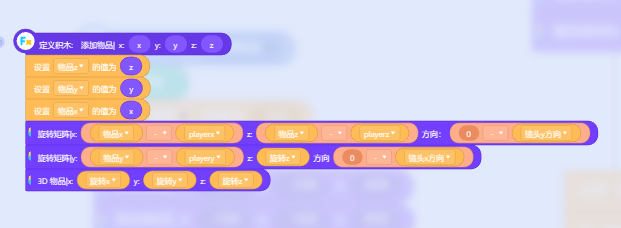
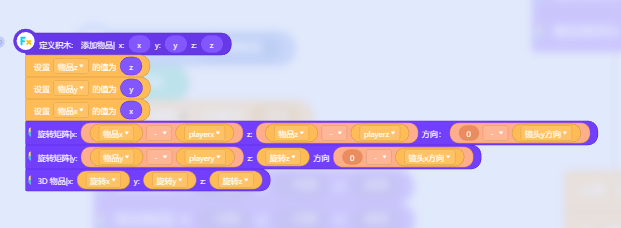
def 移到xyz(x, y, z):
  旋转矩阵xz方向(player_x - x, player_z - z, 0 - 镜头y方向)
  旋转矩阵yz方向(player_y - y, 旋转z, 0 - 镜头x方向)
  添加点xyz(旋转x, 旋转y, 旋转z)

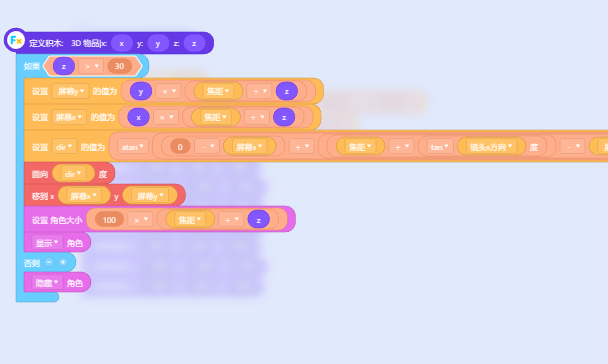
def 添加点xyz(x, y, z):
  屏幕x = x * (焦距 / z)
  屏幕y = y * (焦距 / z)
  if not (z > -1e-7) :
    Kitten.set_xy(屏幕x, 屏幕y)
    Kitten.set_brush_size(2)

def 渲染xyz(x, y, z):
  def warp():
    Kitten.set_brush_color_to('#44CCFF')
    在xyz和xyz之间添加一条线(50 + x, -50 + y, 50 + z, 50 + x, -50 + y, -50 + z)
    在xyz和xyz之间添加一条线(50 + x, -50 + y, -50 + z, -50 + x, -50 + y, -50 + z)
    在xyz和xyz之间添加一条线(-50 + x, -50 + y, -50 + z, -50 + x, -50 + y, 50 + z)
    在xyz和xyz之间添加一条线(-50 + x, -50 + y, 50 + z, 50 + x, -50 + y, 50 + z)
    在xyz和xyz之间添加一条线(50 + x, -50 + y, 50 + z, 50 + x, 50 + y, 50 + z)
    在xyz和xyz之间添加一条线(50 + x, 50 + y, 50 + z, -50 + x, 50 + y, 50 + z)
    在xyz和xyz之间添加一条线(-50 + x, 50 + y, 50 + z, -50 + x, -50 + y, 50 + z)
    在xyz和xyz之间添加一条线(-50 + x, 50 + y, 50 + z, -50 + x, 50 + y, -50 + z)
    在xyz和xyz之间添加一条线(-50 + x, 50 + y, -50 + z, -50 + x, -50 + y, -50 + z)
    在xyz和xyz之间添加一条线(50 + x, 50 + y, -50 + z, 50 + x, 50 + y, 50 + z)
    在xyz和xyz之间添加一条线(50 + x, 50 + y, -50 + z, -50 + x, 50 + y, -50 + z)
    在xyz和xyz之间添加一条线(50 + x, -50 + y, -50 + z, 50 + x, 50 + y, -50 + z)

def 随机数(number or text):
  def warp():
    del x[0]
    del y[0]
    del z[0]
    for _count in range(number or text):
      x.append(random.randint(-3840, 3840))
      y.append(random.randint(-1440, 1440))
      z.append(random.randint(0, 10000))

def bug():
  生成()
  PTS(tick30)

def when_start():
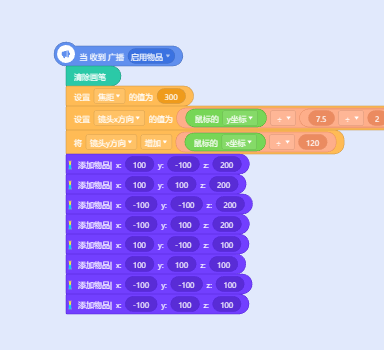
  随机数(50)
  焦距 = 300
  player_y = 0
  player_x = 0
  player_z = -200
  镜头y方向 = 0
  镜头x方向 = 0
  while True :
    Kitten.clear_drawing()
    bug()
    player(20)


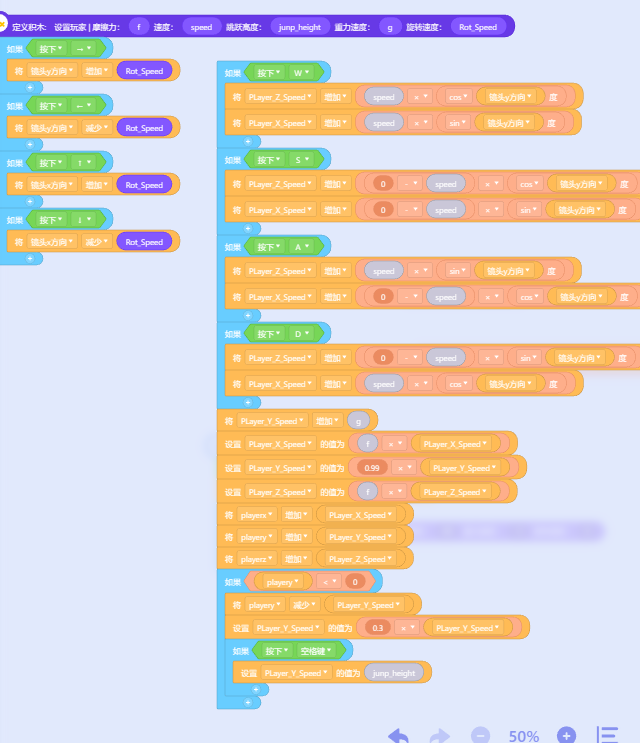
def player(speed):
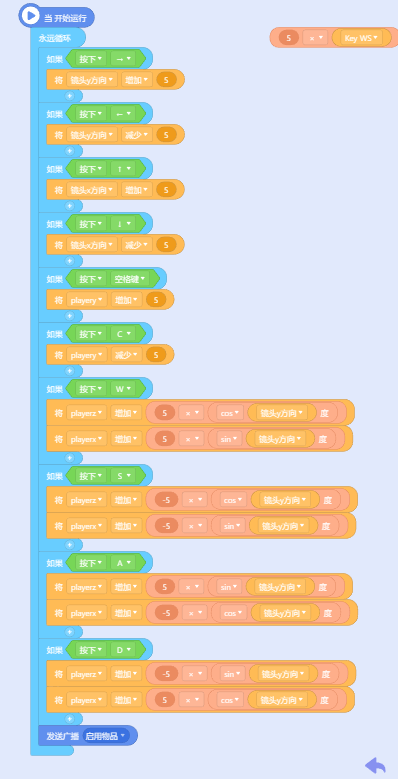
  key WS = Kitten.is_key_pressed(87) - Kitten.is_key_pressed(83)
  key DA = Kitten.is_key_pressed(65) - Kitten.is_key_pressed(68)
  player_y = player_y + (((10 * delta) * (Kitten.is_key_pressed(32) - Kitten.is_key_pressed(67))))
  player_z = player_z + ((((10 * delta) * key WS) * math.cos(镜头y方向)))
  player_x = player_x + ((((10 * delta) * key WS) * math.sin(镜头y方向)))
  player_z = player_z + ((((10 * delta) * key DA) * math.sin(镜头y方向)))
  player_x = player_x + ((((-10 * delta) * key DA) * math.cos(镜头y方向)))
  镜头y方向 = 镜头y方向 + (((4 * delta) * (Kitten.is_key_pressed(39) - Kitten.is_key_pressed(37))))
  镜头x方向 = 镜头x方向 + (((4 * delta) * (Kitten.is_key_pressed(38) - Kitten.is_key_pressed(40))))
  if (镜头x方向 >= 90) :
    镜头x方向 = 90
  if (镜头x方向 <= -90) :
    镜头x方向 = -90

x
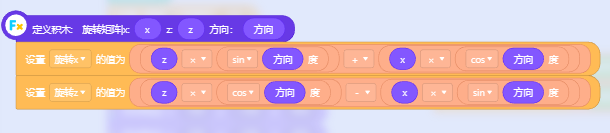
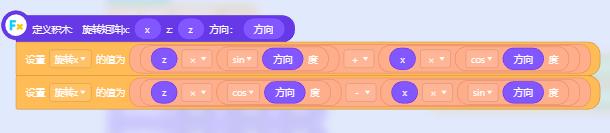
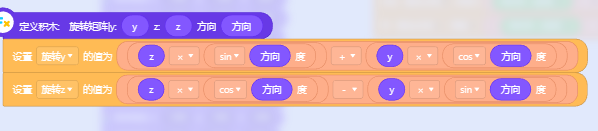
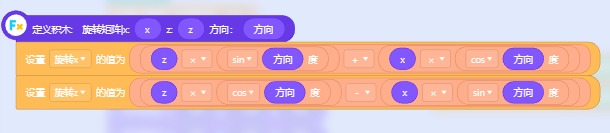
def 旋转矩阵xz方向(x, z, 方向):
  旋转x = z * math.sin(方向) + x * math.cos(方向)
  旋转z = z * math.cos(方向) - x * math.sin(方向)

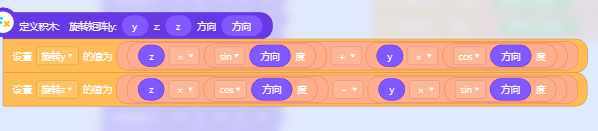
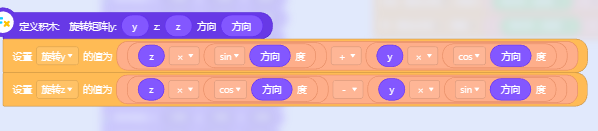
def 旋转矩阵yz方向(y, z, 方向):
  def warp():
    旋转y = z * math.sin(方向) + y * math.cos(方向)
    旋转z = z * math.cos(方向) - y * math.sin(方向)
2023-07-11T13:50:53 点赞:0
在 我做出了3d游戏!!!!!!!!!!!!!!!!!!!!!!!!!!!!!!!!!!!!!!!!!! 中回复
这东西的原理是用“Ryacasting"扫描地图计算出高度从而画出来
算是个只有x和z的3D
2023-07-13T15:02:10 点赞:1
在 【Kitten N公测开始】我来啦我来啦!我带着三端合一走来啦! 中回复
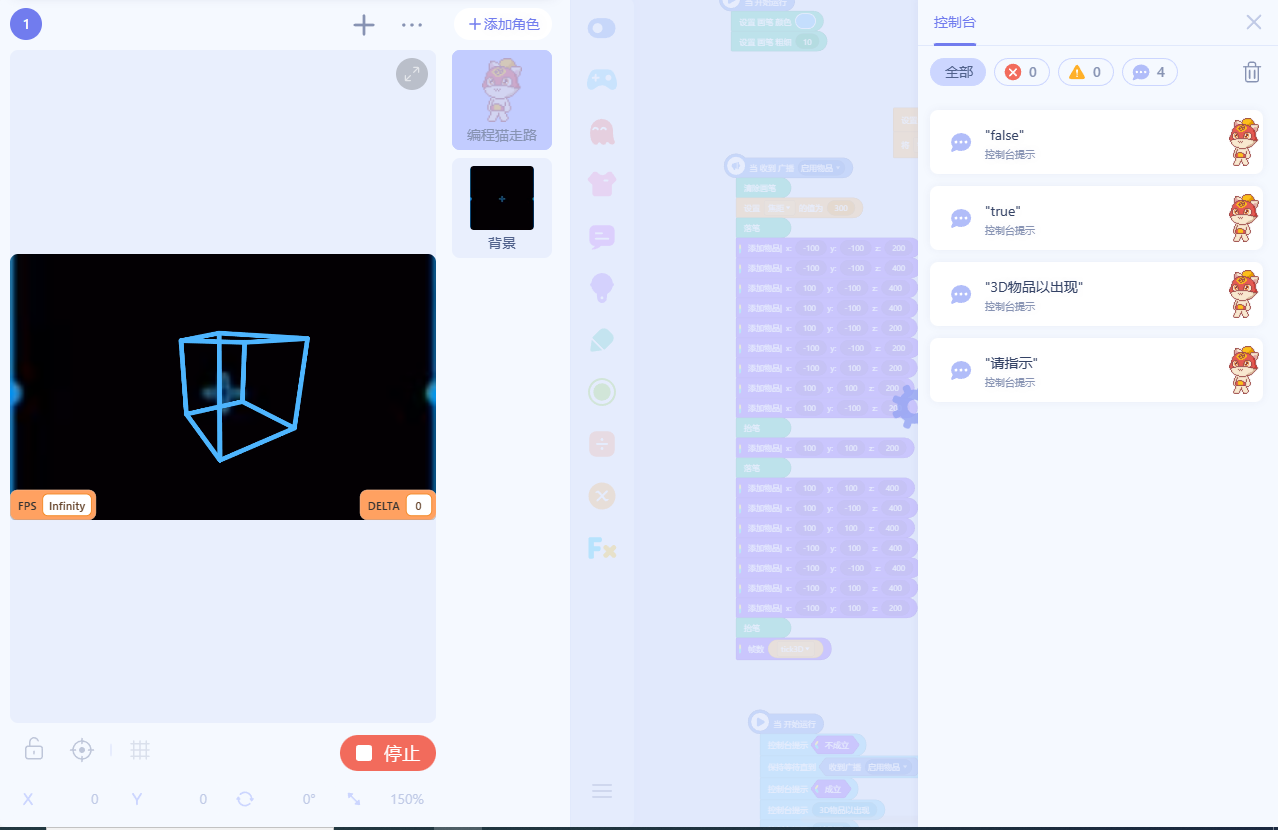
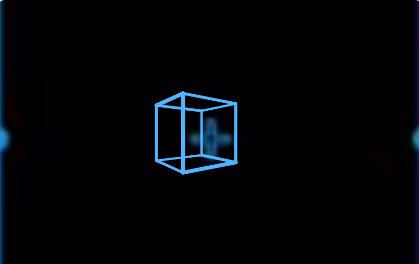
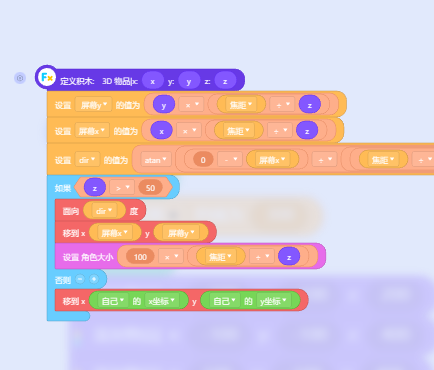
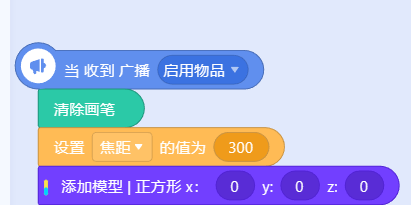
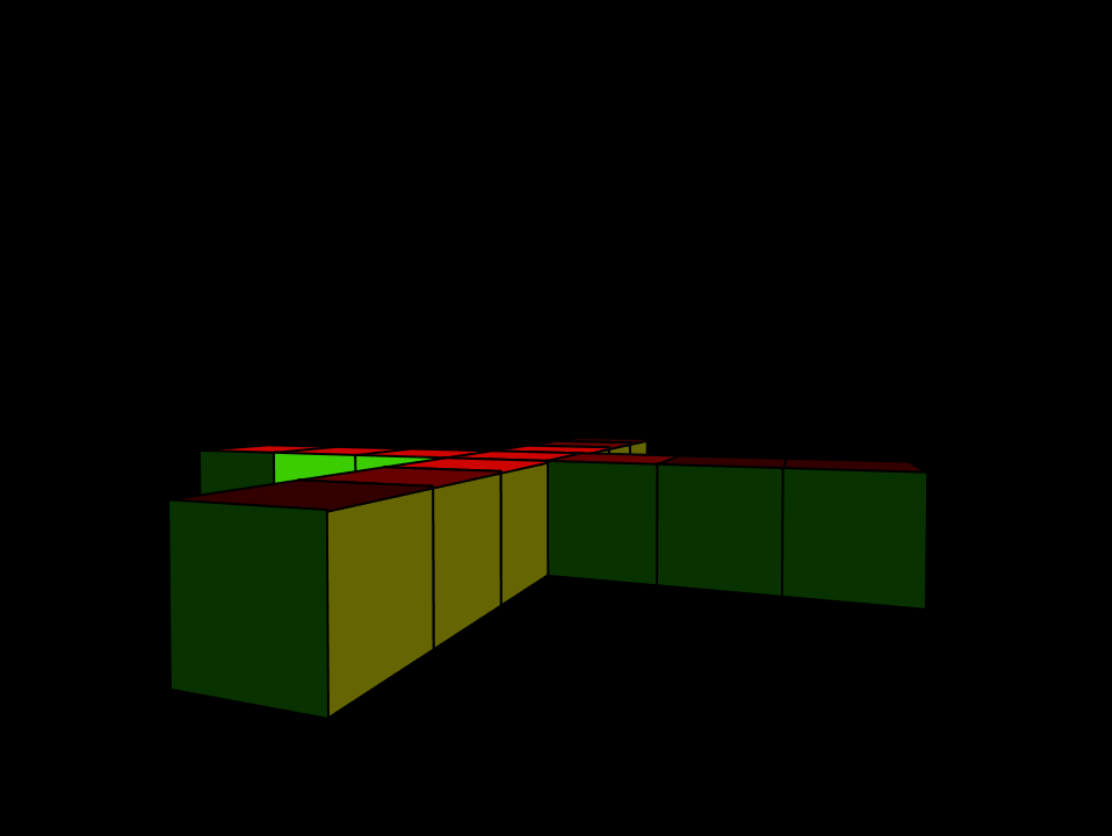
Kitten N也能做3D!!!
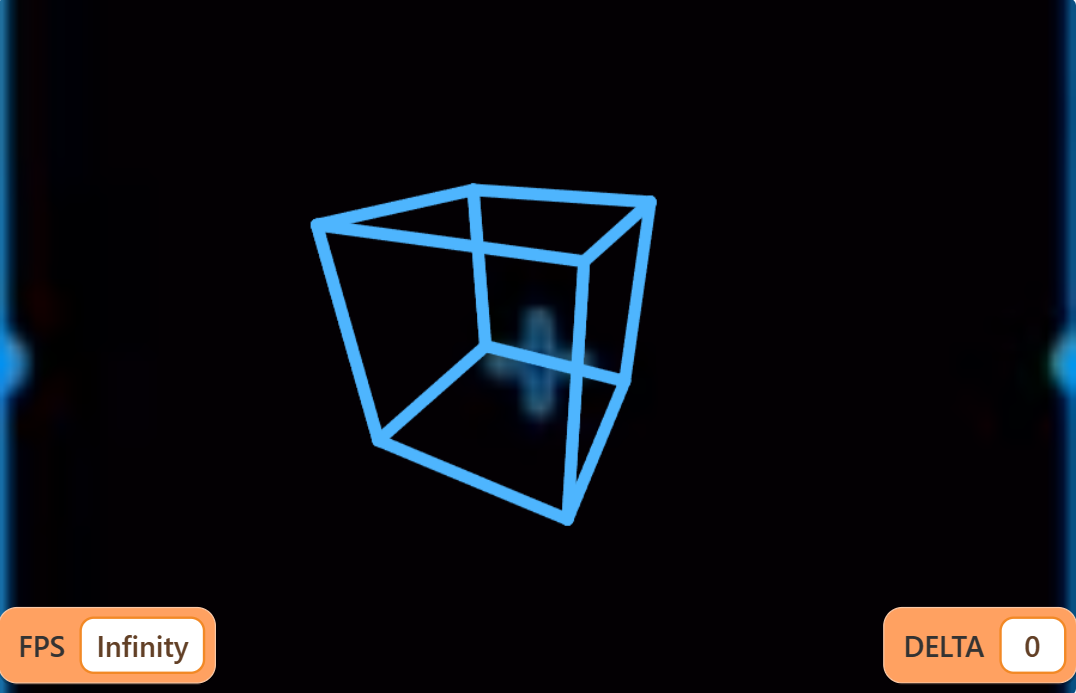
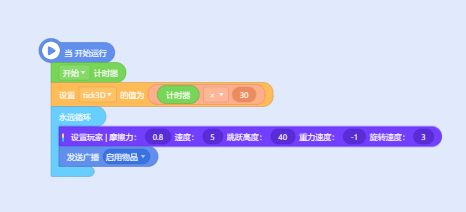
源码:
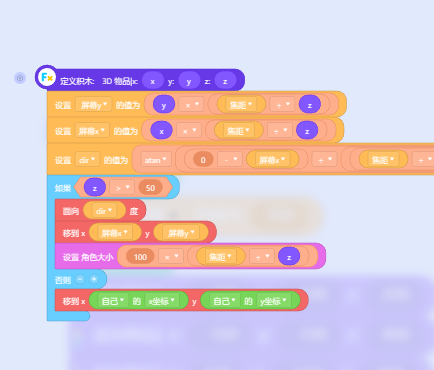
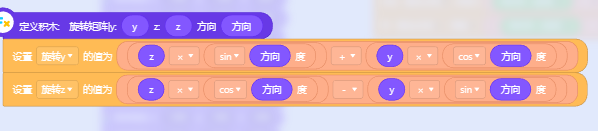
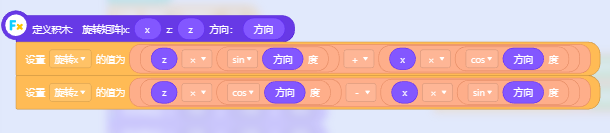
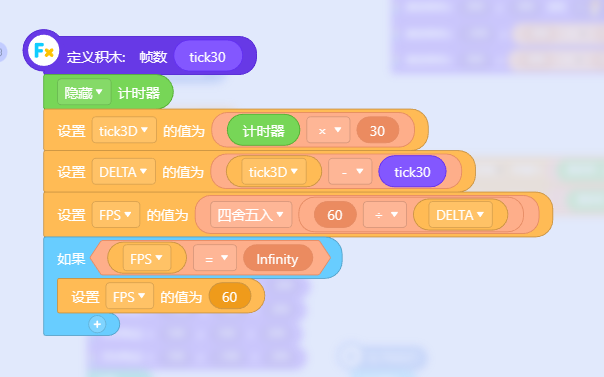
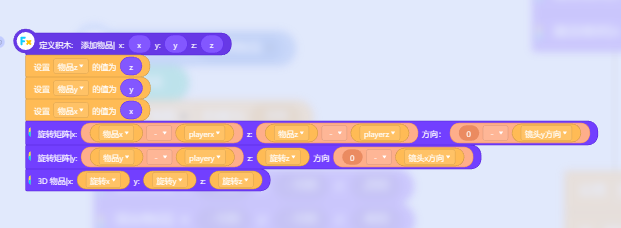
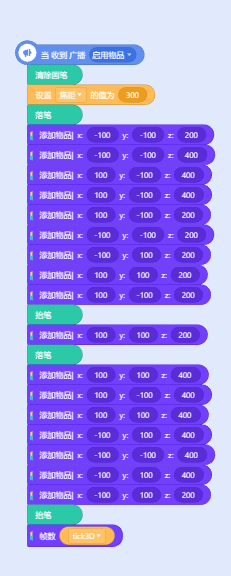
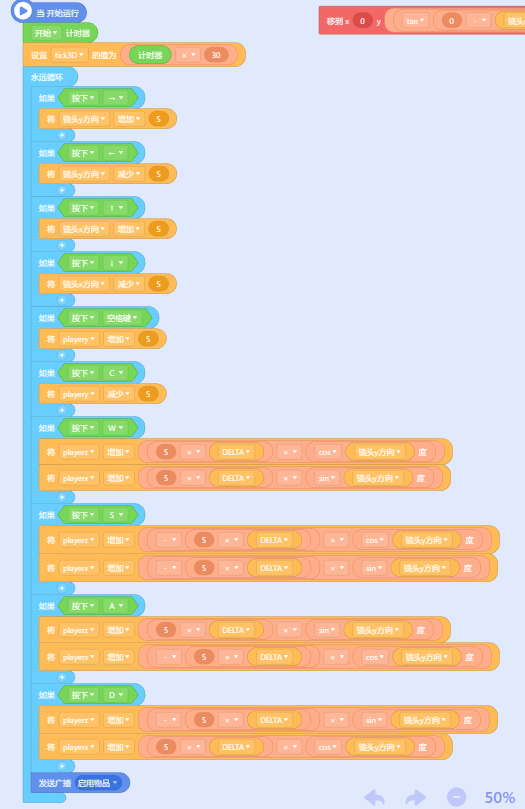
不论你是K3或K4甚至是KN,都能使用
2023-07-27T12:48:11 点赞:4
在 【Kitten N公测开始】我来啦我来啦!我带着三端合一走来啦! 中回复
https://kn.codemao.cn/player?workId=191754514
2023-07-30T11:25:16 点赞:2
在 【Kitten N公测开始】我来啦我来啦!我带着三端合一走来啦! 中回复
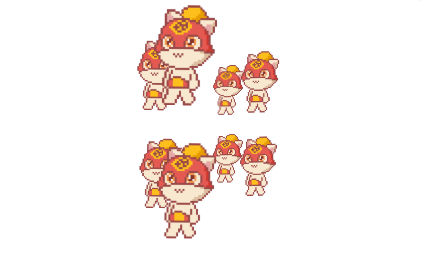
同样是3D引擎
但是这次可以自定义模型位置,自定义模型旋转角度,自定义模型大小!
废话不多说,直接上源码!
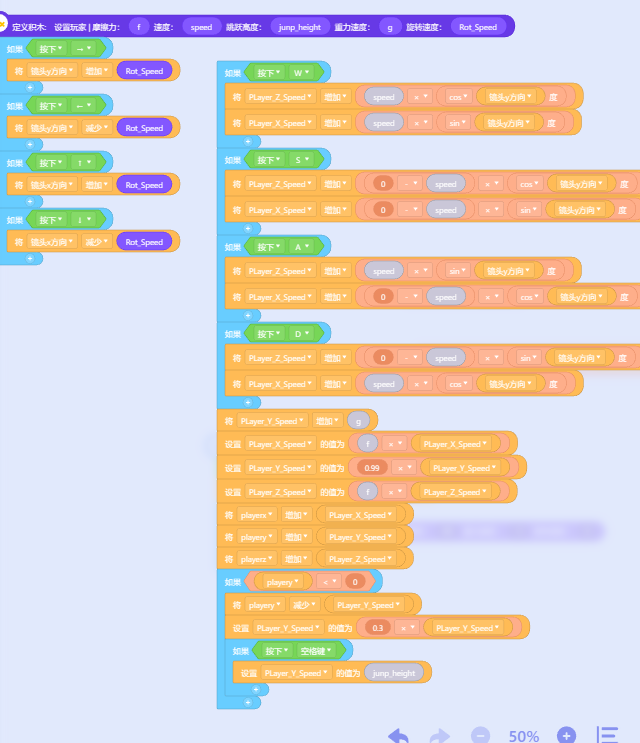
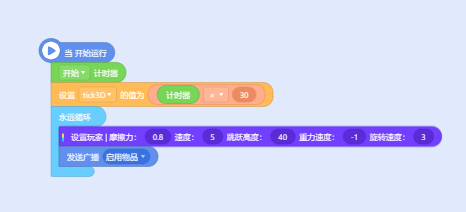
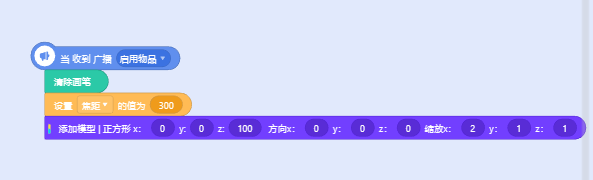
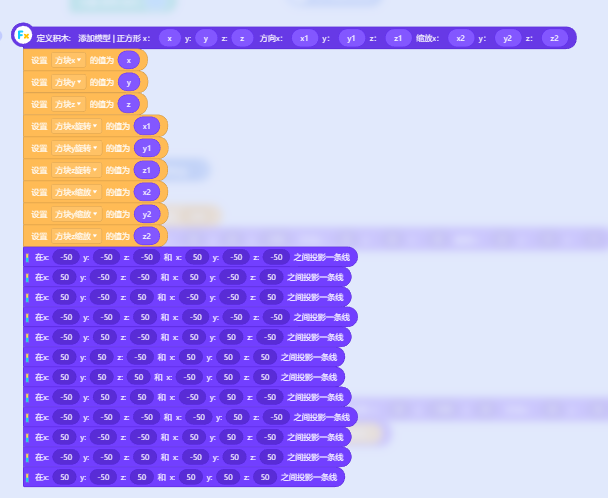
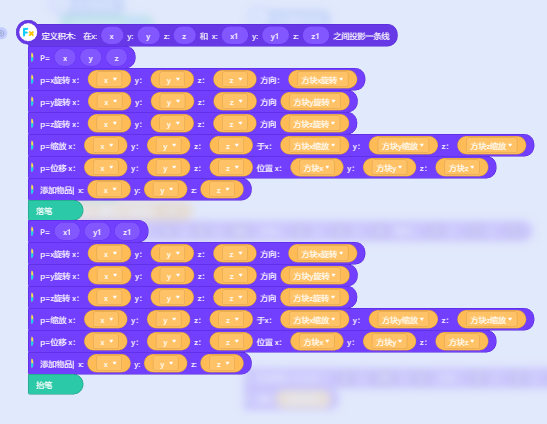
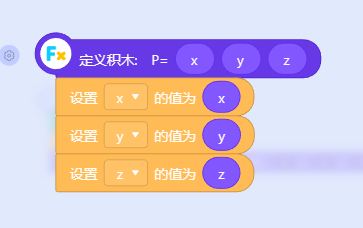
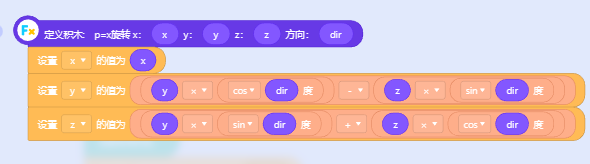
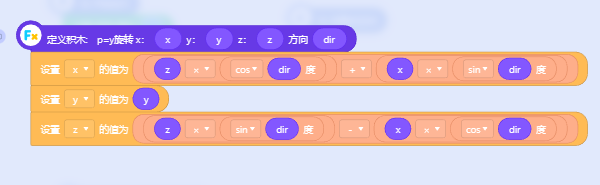
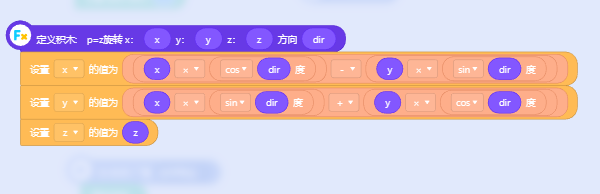
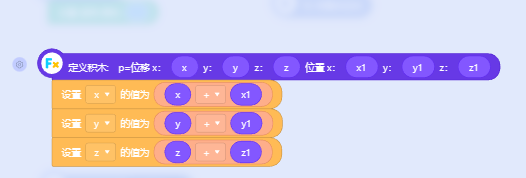
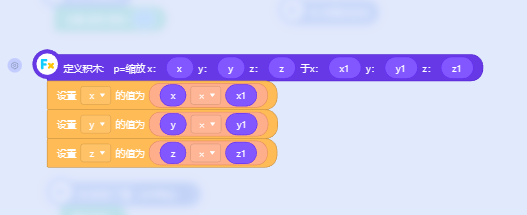
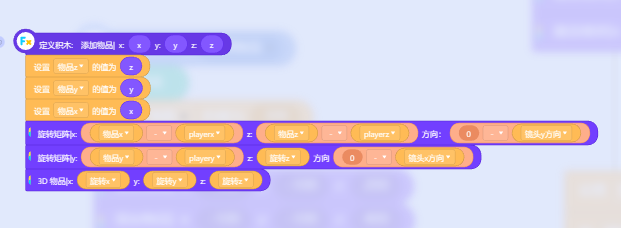
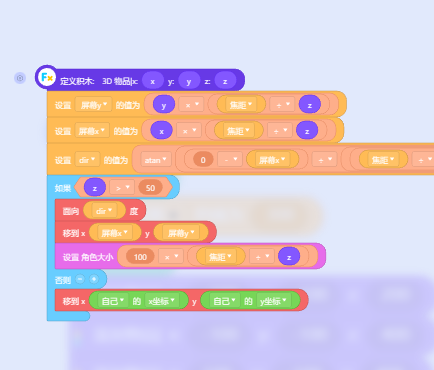
要是抄还抄不出来的话,上链接!
https://creation.codemao.cn/922/user-files/Ft91t7yVCHWi1EQisBlhQjTOu7iK
2023-08-12T12:06:38 点赞:4
在 【Kitten N公测开始】我来啦我来啦!我带着三端合一走来啦! 中回复
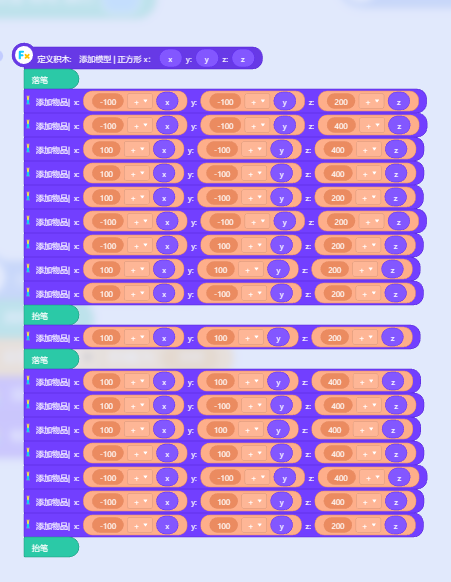
3D引擎填充面来辣
请想拥有的人看源码
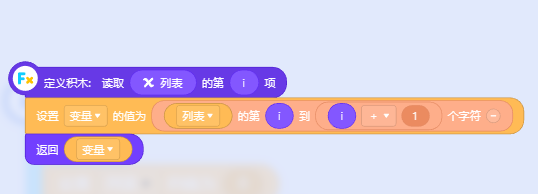
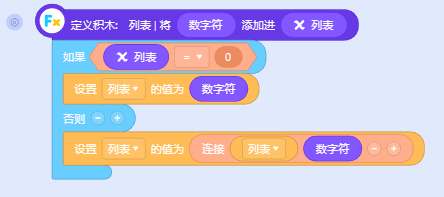
只需要在原本的3D引擎的代码加上这几行代码就行


然后在添加模型的函数下添加以下代码

链接:
https://creation.cod喵/922/user-files/FtCjtw0BtfiuaqbYluovZO87OV072023-08-13T17:22:11 点赞:3
在 大家出一些数学题让我做会儿 中回复
1+1=sin(Π/1)+cos(0)=(sin(Π/1)-sin(0))+(cos(Π/1)-cos(0))=?
2023-08-20T07:38:28 点赞:0
在 什么是返回值? 中回复
函数,说简单点就是方法,除了可以让你的代码看上去更高级,还可以在一定程度的简短你的代码。返回值,就是如果你的函数里有返回值的话,kitten会在函数积木盒里新增一个块,边缘呈圆形,可以用于判断和计算一些东西,所谓的返回值就是你执行了函数之后就会返回一个值,可以是布尔值,数字和字符串,比如在返回值里填1+1,(是代码的1+1)它就会返回2
2023-08-25T13:54:54 点赞:0
在 【Kitten N公测更新】移动端横版来了,画板还会远吗? 中回复
物理引擎没有我理解
但是你憋那么久才整出来画板这么玩意?
是不是我们把列表做出来了就不想做了。
(我不是扫厕所,只是催更列表罢了)
2023-09-03T12:01:25 点赞:1