用户:OLEEEEEEEEEEEEEEEEEE查看:200 回复:29 评论:36 创建时间:2024-07-18T14:56:20
本人在猫站看到的都是一些积木语言的学习者,不知有没有高级语言(没听过的自行百度)的学习者,特发此帖询问
 Dong____dong
python了解×N(部分模块不会用)
点赞0
评论
不会用就不会用,自信一点,库是不断更新的,不用全部都会。多看一下说明书,总会用的
《说明书》
就是库的开发者官方的说明啊,不是中文没关系,用百度翻译翻译一下就是了
会C的不多,还只会一点啊,我还指望能能去讨论一下算法呢imgsrc="https://static.codemao.cn/emoji/codemao/%E7%BC%96%E7%A8%8B%E7%8C%AB_%E6%BA%9C%E4%BA%86%E6%BA%9C%E4%BA%86.gif"alt="emotion_编程猫_溜了溜了"
点赞0
评论
递归?贪心算法?压缩算法?
寻路算法?搜索算法?
1、2、5是算法,3不是,4可以用搜索做
 逍遥CF
逍遥CF在学C++,但是有道题不会···
描述
现有 n 名学生参加了期末考试。已知每名学生的信息:学号、语文、数学、英语成绩(0 ≤ 语文、数学、英语成绩 ≤ 100)。
请将n名同学按三门成绩的平均分从低到高的顺序排序。
输入描述
第 1 行是一个正整数n (n≤100),表示学生人数。
接下来的 n 行,每行有 4 个用空格隔开的整数,依次表示每个学生的学号、语文、数学、英语的成绩。保证每个学生的平均分都不相同。
输出描述
共 n 行,每行一个整数、一个浮点数,用空格隔开。依次表示学生的学号和三门成绩的平均分(保留1位小数)。
样例输入 1
5
1 60 60 70
2 90 91 97
3 90 20 60
4 10 10 10
5 60 60 60
样例输出 1
4 10.0
3 56.7
5 60.0
1 63.3
2 92.7
点赞0
评论
喵,这C喵题太简单了吧,你直接用结构体
总分、学号分别设两个数组,然后排序
呃,已经做完了,之前用了只是报错
这个是个人都知道吧
我刚学一年,请多多指教
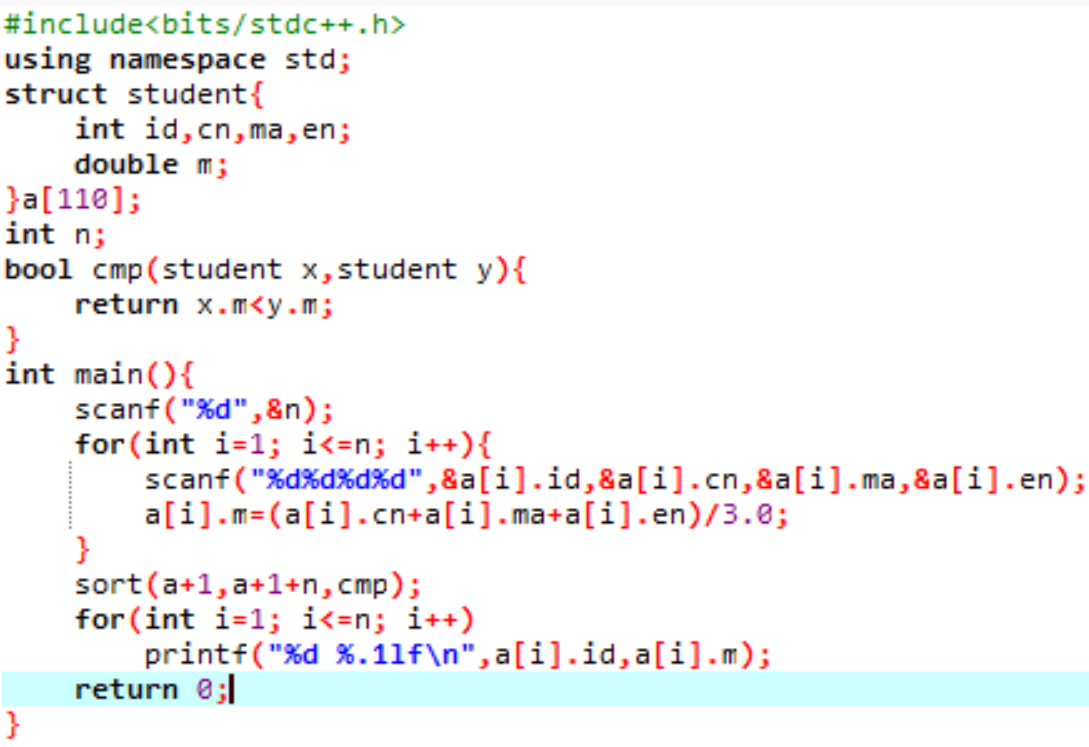
#include<bits/stdc++.h> usingnamespacestd; structstudent{ intid,cn,ma,en; doublem; }a[110]; intn; boolcmp(studentx,studenty){ returnx.m<y.m; } intmain(){ scanf("%d",&n); for(inti=1;i<=n;i++){ scanf("%d%d%d%d",&a[i].id,&a[i].cn,&a[i].ma,&a[i].en); a[i].m=(a[i].cn+a[i].ma+a[i].en)/3.0; } sort(a+1,a+1+n,cmp); for(inti=1;i<=n;i++) printf("%d%.1lf\n",a[i].id,a[i].m); return0; }
点赞0
评论
 _昵称副本_
原野跑酷.py
def Read_cloud_data(name):#读取云变量
    return(requests.post('喵喵喵',data = {'user':'c2345','secret':'a3ea43b6','action':'get','tag':name}).text[8:len(requests.post('喵喵喵',data = {'user':'c2345','secret':'a3ea43b6','action':'get','tag':name}).text) - 2])
def Write_to_cloud_data(name,data):#修改云变量
    update = requests.post('喵喵喵',data = {'user':'c2345','secret':'a3ea43b6','action':'update','tag':name,'value':data})
    #上面的网站被屏蔽了,‘喵喵喵’原本是'h t t p : / / t i n y w e b d b . a p p i n v e n t o r . s p a c e / a p i'
def Clear_cloud ():#清空云变量
    Write_to_cloud_data("p1","0")
    Write_to_cloud_data("p2","0")
    Write_to_cloud_data("p3","0")
    Write_to_cloud_data("p4","0")
    Write_to_cloud_data("p5","0")
    Write_to_cloud_data("p6","0")
    Write_to_cloud_data("p7","0")
    Write_to_cloud_data("p8","0")
    Write_to_cloud_data("UC","0")
def fall(x,decrease):
    global yy
    yy += int(x)
    if collide(rect1, mask1, rect2, mask2, rect3, mask3, 3) and (x != 0):
            yy -= (0 - x) / abs(x)
    else:
        if x > -1 and collide(rect1, mask1, rect2, mask2, rect3, mask3, 3)!=1:
            fall(int(x) - int(decrease),(int(decrease)+5))
def collide(rect1, mask1, rect2, mask2, rect3, mask3, num):
    if keyboard.is_pressed('s'):
        collide_rect = rect1
        collide_mask = mask1
    else:
        collide_rect = rect2
        collide_mask = mask2
    if num == 3:
        other_rect = rect3
        other_mask = mask3
    offset_x = collide_rect.centerx - other_rect.centerx
    offset_y = collide_rect.centery - other_rect.centery
    collision = collide_mask.overlap(other_mask, (offset_x, offset_y))
    if collision:
        return 1
    else:
        return 0

def choose_player_num():
    if Read_cloud_data(P1)==0:
        return 1
    elif Read_cloud_data(P2)==0:
        return 2
    elif Read_cloud_data(P3)==0:
        return 3
    elif Read_cloud_data(P4)==0:
        return 4
    elif Read_cloud_data(P5)==0:
        return 5
    elif Read_cloud_data(P6)==0:
        return 6
    elif Read_cloud_data(P7)==0:
        return 7
    elif Read_cloud_data(P8)==0:
        return 8
    else:
        return 0
import pygame #导入pygame
import math #数学
import time#时间
import pyautogui as pag#鼠标
import requests#云变量
import keyboard#键盘


pygame.init()#pygame初始化
background = pygame.image.load(r"E:\我的\python\原野跑酷\image\backgroud.png")#背景图片设置
font=pygame.font.Font(r"E:\我的\python\原野跑酷\font\站酷快乐体.woff",size=100)#字体设置
bgm=pygame.mixer.Sound(r"E:\我的\python\原野跑酷\media\bgm.mpeg")#游戏BGM
title=pygame.image.load(r"E:\我的\python\原野跑酷\image\title.png")#游戏标题
start=pygame.image.load(r"E:\我的\python\原野跑酷\image\start.png")#开始按钮轮廓
board_and_user=pygame.image.load(r"E:\我的\python\原野跑酷\image\board&user.png")
online=pygame.image.load(r"E:\我的\python\原野跑酷\image\Join online.png")#联机按钮轮廓
player_stand=pygame.image.load(r"E:\我的\python\原野跑酷\image\player stand.png")#玩家站立形态
player_get_down=pygame.image.load(r"E:\我的\python\原野跑酷\image\player Get down.png")#玩家下蹲形态
board=pygame.image.load(r"E:\我的\python\原野跑酷\image\board.png")
grass=pygame.image.load(r"E:\我的\python\原野跑酷\image\grass.png")
mask1 = pygame.mask.from_surface(player_stand)
mask2 = pygame.mask.from_surface(player_get_down)
mask3 = pygame.mask.from_surface(board)
screen=pygame.display.set_mode([1280,720],)#设置窗口大小
pygame.display.set_caption("原野跑酷")#窗口名称设置
bgm.play(-1)#"-1"代表无限循环音乐“BGM”
# 设置开始按钮
x, y = 540, 465
width, height = 144, 喵
button_rect = pygame.Rect(x, y, width, height)
button_color = (170, 229, 113)
text_color = (70,213,120)
button_font = pygame.font.Font(r"E:\我的\python\原野跑酷\font\站酷快乐体.woff",size=60)
button_text = button_font.render("开始", True, text_color)
# 设置联机按钮
x, y = 470, 340
width, height = 280, 70
button2_rect = pygame.Rect(x, y, width, height)
button2_color = (70, 213, 120)
text2_color = (255,0,0)
button2_font = pygame.font.Font(r"E:\我的\python\原野跑酷\font\站酷快乐体.woff",size=60)
button2_text = button_font.render("加喵机", True, text2_color)#>>>>>这是屏蔽词实际上应该是加/入/联/机,不是加/喵/机
#窗口图标更改
icon = pygame.image.load(r"E:\我的\python\原野跑酷\logo\logo.png")
pygame.display.set_icon(icon)


num=0
screen_num=1
increase=0
big_screen=0
xx=0
yy=0
x1=608
x2=610
x3=407
y1=302
y2=330
y3=538
running = True


while running:
    for event in pygame.event.get():
        if event.type == pygame.QUIT:
            running = False

    num += 3
    increase += math.cos(math.radians(num))
    mouse_x,mouse_y = pag.position()
    if keyboard.is_pressed('Enter'):
            big_screen = 1 - big_screen


    if screen_num ==1 or screen_num ==2:
        screen.fill((100,175,255))#浅蓝天空背景绘制
        screen.blit(background,(5,-150 + ( float(increase)*0.4 )))#原野背景绘制
        screen.blit(title,(650,50 + ( float(increase)*1 )))#标题绘制

    if screen_num ==1:
        screen.blit(start,(500,450))#开始按钮轮廓绘制
        #开始按钮绘制
        pygame.draw.rect(screen, button_color, button_rect)
        screen.blit(button_text, (button_rect.centerx - button_text.get_width() / 2, button_rect.centery - button_text.get_height() / 2))
        #侦测按钮是否被鼠标点击
        if event.type == pygame.MOUSEBUTTONDOWN:
            if button_rect.collidepoint(event.pos):
                screen_num = 2

    if screen_num ==2:
        screen.blit(board_and_user,(0,25))
        screen.blit(online,(450,250))#联机按钮轮廓绘制
        #联机按钮绘制
        pygame.draw.rect(screen, button2_color, button2_rect)
        screen.blit(button2_text, (button2_rect.centerx - button2_text.get_width() / 2, button2_rect.centery - button2_text.get_height() / 2))
        #侦测按钮是否被鼠标点击
        if event.type == pygame.MOUSEBUTTONDOWN:
            if button2_rect.collidepoint(event.pos):
                screen_num = 3

    if screen_num ==3:
        screen.fi喵))#游戏背景绘制
        if keyboard.is_pressed('s'):
            x2 = 610 + int(xx)
            y2 = 330 - int(yy)
            x3 = 407-int(x2)+610
            y3 = 538-int(y2)+330
            screen.blit(player_get_down, (610, 330))  # 玩家绘制(下蹲)
        else:
            x1 = 608 + int(xx)
            y1 = 302 - int(yy)
            x3 = 407-int(x1)+608
            y3 = 538-int(y1)+302
            screen.blit(player_stand, (608, 302))  # 玩家绘制(站立)

        board_rect = pygame.Rect(x3, y3, 476, 88)
        screen.blit(board,(x3,y3))
        screen.blit(grass,(x3,y3-50))
        mask3 = pygame.mask.from_surface(board)
        rect1 = player_stand.get_rect(center=(x1, y1))
        rect2 = player_get_down.get_rect(center=(x2, y2))
        rect3 = board.get_rect(center=(x3+400, y3+40))
        decrease=1
        if keyboard.is_pressed('w') and collide(rect1, mask1, rect2, mask2, rect3, mask3, 3):
            count = 0
            for __count in range(120):
                count += 0.05
                yy += int(count)
                screen.fi喵))#游戏背景绘制
                if keyboard.is_pressed('s'):
                    x2 = 610 + int(xx)
                    y2 = 330 - int(yy)
                    x3 = 407-int(x2)+610
                    y3 = 538-int(y2)+330
                    screen.blit(player_get_down, (610, 330))  # 玩家绘制(下蹲)
                else:
                    x1 = 608 + int(xx)
                    y1 = 302 - int(yy)
                    x3 = 407-int(x1)+608
                    y3 = 538-int(y1)+302
                    screen.blit(player_stand, (608, 302))  # 玩家绘制(站立)

                board_rect = pygame.Rect(x3, y3, 476, 88)
                screen.blit(board,(x3,y3))
                screen.blit(grass,(x3,y3-50))
                mask3 = pygame.mask.from_surface(board)
                rect1 = player_stand.get_rect(center=(x1, y1))
                rect2 = player_get_down.get_rect(center=(x2, y2))
                rect3 = board.get_rect(center=(x3+400, y3+40))
                if yy < -500:
                    yy=0
                    xx=0
                if keyboard.is_pressed('a'):
                    xx -= 3
                if keyboard.is_pressed('d'):
                    xx += 3
                pygame.display.flip()
        else:
            fall(0,decrease)
        if yy < -1000:
            yy=0
            xx=0
        if keyboard.is_pressed('a'):
            xx -= 3
        if keyboard.is_pressed('d'):
            xx += 3


    pygame.display.flip()
pygame.quit()#关闭窗口❎点赞0
评论
C P U 废了