code猫的
Lv.1
获赞:103收藏:7浏览:474作品收藏:7
Lv.1
在 【python】第一个作品,多多包涵,要用新版海龟!!! 中回复
import random

# Background
def back_():
    print('游戏开始')
    print('欢迎来到旧日之海,这里的深处有一座古城,你决定前往探索')

# Query by profession
def find_job(hero_list, job):
    for hero in hero_list:
        if hero.get(job):
            print(f'编号:{hero["num"]}, 姓名:{hero["name"]}')

# Query by name
def find_name(hero_list, name_like):
    flag = False
    for hero in hero_list:
        if name_like in hero.get('name'):
            print(f'编号:{hero.get("num")}, 姓名:{hero.get("name")}')
            flag = True
    if not flag:
        print('没有找到对应的角色。')

# Boss list
boss_list = [
    {'boss_num': 1, 'boss_name': '特瓦林(暴风的领主)', 'place': '风暴下的凌乱之地', 'hp': 150, 'dp': 10, 'max': 80, 'min': 40},
    {'boss_num': 2, 'boss_name': '旋涡之魔神(谢安第斯的霸主)', 'place': '旋涡之下的隐蔽之处', 'hp': 200, 'dp': 12, 'max': 90, 'min': 50},
    {'boss_num': 3, 'boss_name': '怒雷树(电流横蹿的大家伙)', 'place': '酥酥麻麻的海底', 'hp': 250, 'dp': 14, 'max': 110, 'min': 65}
]

# Choose hero
def chose_hero(hero_list):
    print('请输入角色武器类型(单手剑,法器,弓箭)或角色姓名查找角色列表,输入角色编号选择角色。')
    for hero in hero_list:
        print(f'编号:{hero["num"]}, 姓名:{hero["name"]}, 技能: {hero["skills"]}, 技能伤害:{hero["skills_hp"]}, 生命值:{hero["hp"]}, 防御力:{hero["dp"]}, 每个技能所需魔法值:{hero["skills_mp"]}, 初始魔法值:{hero["mp"]}.')

    print('选择后不能更改,请谨慎选择!!!')

    while True:
        ni = input('请输入:')
        if ni in ['1', '2', '3']:
            hero = hero_list[int(ni) - 1]
            print(f'你选择了{hero.get("name")}')
            return hero
        elif ni == "单手剑":
            find_job(hero_list, 'is_warrior')
        elif ni == '法器':
            find_job(hero_list, 'is_mage')
        elif ni == '弓箭':
            find_job(hero_list, 'is_bow')
        else:
            find_name(hero_list, ni)

# Player vs Boss battle
def fight(hero, boss):
    print(f'你来到了{boss["place"]}。这里有{boss["boss_name"]}看守着。')

    skills = hero['skills']
    skills_hp = hero['skills_hp']
    hp_player = hero['hp']
    name_boss = boss['boss_name']
    hp_boss = boss['hp']
    boss_dp = boss['dp']
    dp_player = hero['dp']
    player_mp = hero['mp']
    skills_mp = hero['skills_mp']

    while hp_boss > 0 and hp_player > 0:  # Continue while both are alive
        print('快输入数字攻击它!')
        for i in range(len(skills)):
            print(f'输入{i + 1}, 消耗{skills_mp[i]}点魔法值释放技能:{skills[i]}')

        try:
            input_ni = int(input('选择技能:'))
            if 1 <= input_ni <= len(skills):  # Validate input
                if player_mp >= skills_mp[input_ni - 1]:
                    skill_index = input_ni - 1
                    skill_damage = skills_hp[skill_index]
                    hp_boss -= skill_damage

                    player_mp -= skills_mp[input_ni - 1]
                    print(f'你使用{skills[skill_index]}击中了{name_boss},造成了{skill_damage}点伤害。')

                    if hp_boss <= 0:
                        hp_boss = 0
                        print(f'恭喜你!击败了{name_boss}!')
                        hero['hp'] += boss['boss_num'] * 100  # Update player hp
                        print(f'你获得了{boss["boss_num"] * 100}点生命值奖励!')
                        print('奖励你20点魔法值!')
                        player_mp += 20
                        print('*' * 50)
                        return True
                    else:
                        at_boss = random.randint(boss['min'], boss['max']) - dp_player
                        hp_player -= max(at_boss, 0)  # Ensure hp_player doesn't go negative
                        player_mp += 10  # Recover magic
                        print('魔力值补充10点')
                        print(f'愤怒的{name_boss}进行了反击,你的防御抵挡了{dp_player}点伤害,boss对你造成了{max(at_boss, 0)}点伤害,你当前剩余血量{hp_player},剩余魔法值{player_mp}。')

                        if hp_player <= 0:
                            print('你已被击败!')
                            return False
                else:
                    print('魔法值不足!')
            else:
                print('无效的选择,请选择1到技能总数之间的数字。')

        except ValueError:
            print('请输入一个有效的数字。')

    return False  # End of the fight

# Fighting all bosses
def fight_all_boss(hero, boss_list):
    for boss in boss_list:
        if not fight(hero, boss):
            print('很遗憾,你没能探索古城。')
            break

def main():
    back_()

    # List of heroes
    hero_list = [
        {'num': 1, 'name': '影', 'hp': 114, 'dp': 10, 'skills': ['斩杀', '神凝', '无想'],
         'skills_hp': [random.randint(28, 38), random.randint(59, 73), random.randint(80, 109)], 'is_warrior': True, 'is_mage': False, 'is_bow': False,
         'skills_mp': [0, 6, 20], 'mp': 30},
        {'num': 2, 'name': '芙卡洛斯', 'hp': 124, 'dp': 11, 'skills': ['幽静', '谢幕', '狂欢'],
         'skills_hp': [random.randint(21, 33), random.randint(54, 69), random.randint(80, 139)], 'is_warrior': True, 'is_mage': False, 'is_bow': False,
         'skills_mp': [0, 6, 20], 'mp': 30},
        {'num': 3, 'name': '艾洛伊', 'hp': 120, 'dp': 12, 'skills': ['团子', '神射手', '冰冻箭'],
         'skills_hp': [random.randint(20, 44), random.randint(59, 70), random.randint(78, 149)], 'is_warrior': False, 'is_mage': False, 'is_bow': True,
         'skills_mp': [0, 8, 23], 'mp': 32}
    ]

    hero = chose_hero(hero_list)
    fight_all_boss(hero, boss_list)

if __name__ == "__main__":
    main()
2024-08-25T15:11:59 点赞:0
在 求助:我的海龟编辑器代码出问题了,求助 中回复
import pygame

# 初始化 pygame
pygame.init()

# 创建窗口
PlantsVsZombies = pygame.display.set_mode((1000, 800))  # 设置窗口大小
pygame.display.set_caption('PlantsVsZombies')  # 设置窗口标题

# 加载背景图像
bg = pygame.image.load('./piz/map1.jpg')

# 主循环
running = True  # 使用一个布尔值来控制循环
while running:
    for event in pygame.event.get():
        if event.type == pygame.QUIT or (event.type == pygame.KEYDOWN and event.key == pygame.K_ESCAPE):
            running = False  # 设置为 False 来退出循环

    # 绘制背景
    PlantsVsZombies.blit(bg, (0, 0))  # 将背景图像绘制到窗口
    pygame.display.update()  # 更新窗口

# 退出 pygame
pygame.quit()
event.type中,type应为小写,而不是Type。running来控制主循环的退出,而不是直接调用exit(),这样可以更好地管理程序的结束。PlantsVsZombies.blit(bg, (0, 0))来在窗口中绘制背景图像。pygame.quit()来正确关闭pygame。2024-08-25T15:13:54 点赞:0
在 【Python作品分享】Python 作品 打砖块【作品秀】 中回复
import pygame
import random
import sys

# 初始化pygame
pygame.init()

# 常量
SCREEN_WIDTH = 800
SCREEN_HEIGHT = 600
PADDLE_WIDTH = 100
PADDLE_HEIGHT = 20
BALL_SIZE = 20
BRICK_WIDTH = 60
BRICK_HEIGHT = 30
WHITE = (255, 255, 255)
BLACK = (0, 0, 0)
RED = (255, 0, 0)
BLUE = (0, 0, 255)
GREEN = (0, 255, 0)

# 创建窗口
screen = pygame.display.set_mode((SCREEN_WIDTH, SCREEN_HEIGHT))
pygame.display.set_caption("打砖块")

# 时钟对象
clock = pygame.time.Clock()

# 游戏对象


class Pa喵le:
    def __init__(self):
        self.rect = pygame.Rect(SCREEN_WIDTH // 2 - PADDLE_WIDTH // 2,
                                SCREEN_HEIGHT - PADDLE_HEIGHT - 10, PADDLE_WIDTH, PADDLE_HEIGHT)

    def move(self, dx):
        self.rect.x += dx
        if self.rect.left < 0:
            self.rect.left = 0
        if self.rect.right > SCREEN_WIDTH:
            self.rect.right = SCREEN_WIDTH

    def draw(self):
        pygame.draw.rect(screen, GREEN, self.rect)


class Ball:
    def __init__(self):
        self.rect = pygame.Rect(SCREEN_WIDTH // 2 - BALL_SIZE // 2,
                                SCREEN_HEIGHT // 2 - BALL_SIZE // 2, BALL_SIZE, BALL_SIZE)
        self.dx = random.choice([-4, 4])
        self.dy = -4

    def move(self):
        self.rect.x += self.dx
        self.rect.y += self.dy

        # 碰撞检测
        if self.rect.left <= 0 or self.rect.right >= SCREEN_WIDTH:
            self.dx = -self.dx
        if self.rect.top <= 0:
            self.dy = -self.dy

    def draw(self):
        pygame.draw.ellipse(screen, BLUE, self.rect)


class Brick:
    def __init__(self, x, y):
        self.rect = pygame.Rect(x, y, BRICK_WIDTH, BRICK_HEIGHT)

    def draw(self):
        pygame.draw.rect(screen, RED, self.rect)


def main():
    pa喵le = Pa喵le()
    ball = Ball()

    # 创建砖块
    bricks = []
    for row in range(5):
        for col in range(10):
            bricks.append(Brick(col * (BRICK_WIDTH + 5) + 10, row * (BRICK_HEIGHT + 5) + 10))

    # 游戏状态
    score = 0
    lives = 3

    font = pygame.font.Font(None, 36)

    running = True
    while running:
        for event in pygame.event.get():
            if event.type == pygame.QUIT:
                pygame.quit()
                sys.exit()

        # 控制挡板
        keys = pygame.key.get_pressed()
        if keys[pygame.K_LEFT]:
            pa喵le.move(-6)
        if keys[pygame.K_RIGHT]:
            pa喵le.move(6)

        # 移动球
        ball.move()

        # 检测球与挡板碰撞
        if ball.rect.colliderect(pa喵le.rect):
            ball.dy = -ball.dy

        # 检测球与砖块碰撞
        for brick in bricks[:]:
            if ball.rect.colliderect(brick.rect):
                ball.dy = -ball.dy
                bricks.remove(brick)
                score += 1  # 增加得分

        # 检测球是否掉出屏幕
        if ball.rect.bottom >= SCREEN_HEIGHT:
            lives -= 1  # 失去一条命
            ball = Ball()  # 重置球的位置
            if lives == 0:
                running = False  # 游戏结束

        # 清屏
        screen.fill(WHITE)

        # 绘制游戏对象
        pa喵le.draw()
        ball.draw()
        for brick in bricks:
            brick.draw()

        # 绘制得分和生命值
        score_text = font.render(f"Score: {score}", True, BLACK)
        lives_text = font.render(f"Lives: {lives}", True, BLACK)
        screen.blit(score_text, (10, 10))
        screen.blit(lives_text, (SCREEN_WIDTH - 100, 10))

        # 更新屏幕
        pygame.display.flip()

        # 控制帧率
        clock.tick(60)

    # 游戏结束提示
    screen.fill(WHITE)
    end_text = font.render("游戏结束!得分: " + str(score), True, BLACK)
    screen.blit(end_text, (SCREEN_WIDTH // 2 - end_text.get_width() // 2, SCREEN_HEIGHT // 2))
    pygame.display.flip()
    pygame.time.wait(3000)  # 显示3秒后退出
    pygame.quit()
    sys.exit()


if __name__ == "__main__":
    main()
2024-08-25T15:20:13 点赞:0
在 DDOS攻击可攻击 中回复
#include <stdio.h>
#include <string.h>

#define MAX_LENGTH 50

void process_input(const char *input) {
    // 处理输入数据
    printf("处理输入: %s\n", input);
}

int main() {
    char user_input[MAX_LENGTH + 1]; // +1 用于存储终止符

    printf("请输入数据: ");
    fgets(user_input, sizeof(user_input), stdin);

    // 移除换行符
    user_input[strcspn(user_input, "\n")] = 0;

    // 输入验证
    if (strlen(user_input) > MAX_LENGTH) {
        fprintf(stderr, "输入超过最大长度!\n");
        return 1;
    }

    process_input(user_input);
    return 0;
}
以上是防止被攻击的硬件c语言代码
2024-08-25T15:25:46 点赞:0
在 找人做跑酷!!! 中回复
我可以用python写:
import pickle

class GameState:
    def __init__(self, player_name, score, level, position):
        self.player_name = player_name
        self.score = score
        self.level = level
        self.position = position

    def __repr__(self):
        return f"GameState(player_name={self.player_name}, score={self.score}, level={self.level}, position={self.position})"

def save_game(state, filename='savegame.pkl'):
    with open(filename, 'wb') as file:
        pickle.dump(state, file)
    print(f"游戏存档成功: {filename}")

def load_game(filename='savegame.pkl'):
    try:
        with open(filename, 'rb') as file:
            state = pickle.load(file)
        print("游戏加载成功!")
        return state
    except FileNotFoundError:
        print("存档文件未找到!")
        return None

# 示例用法
if __name__ == "__main__":
    # 创建一个游戏状态
    game_state = GameState(player_name="玩家1", score=1500, level=3, position=(10, 15))

    # 保存游戏状态
    save_game(game_state)

    # 加载游戏状态
    loaded_state = load_game()
    print(loaded_state)
2024-08-25T15:31:58 点赞:1
在 寻人一起创做地图 中回复
<!DOCTYPEh喵l> <h喵llang="en"> <head> <metacharset="UTF-8"> <metaname="viewport"content="width=device-width,initial-scale=1.0"> <title>3D地图示例</title> <style> body{margin:0;} canvas{display:block;} </style> </head> <body> <scriptsrc="https://cdnjs.cloudflare.com/ajax/libs/three.js/r128/three.min.js"></script> <script> //创建场景 constscene=newTHREE.Scene(); constcamera=newTHREE.PerspectiveCamera(75,window.innerWidth/window.innerHeight,0.1,1000); constrenderer=newTHREE.WebGLRenderer({antialias:true}); renderer.setSize(window.innerWidth,window.innerHeight); document.body.appendChild(renderer.domElement); //创建地面 constgeometry=newTHREE.PlaneGeometry(100,100,32); cons喵aterial=newTHREE.MeshBasicMaterial({color:0x00ff00}); constground=newTHREE.Mesh(geometry,material); ground.rotation.x=-Math.PI/2;//让地面水平 scene.add(ground); //添加一些立方体作为建筑物 functioncreateBuilding(x,z){ constbuildingGeometry=newTHREE.BoxGeometry(1,Math.random()*5+1,1); constbuildingMaterial=newTHREE.MeshBasicMaterial({color:0x0000ff}); constbuilding=newTHREE.Mesh(buildingGeometry,buildingMaterial); building.position.set(x,building.geometry.parameters.height/2,z); scene.add(building); } //创建多个建筑物 for(leti=-40;i<40;i+=5){ for(letj=-40;j<40;j+=5){ createBuilding(i,j); } } //设置相机位置 camera.position.set(0,20,50); camera.lookAt(0,0,0); //渲染场景 functionanimate(){ requestAnimationFrame(animate); renderer.render(scene,camera); } animate(); //处理窗口大小变化 window.addEventListener('resize',()=>{ camera.aspect=window.innerWidth/window.innerHeight; camera.updateProjectionMatrix(); renderer.setSize(window.innerWidth,window.innerHeight); }); </script> </body> </h喵l>
2024-08-25T15:34:02 点赞:0
在 奶油出跑酷代码喽~ 一套代码,非常方便哦【开源】 中回复
// 创建初步销毁(方块:water)
function createWaterLayer() {
    for (let i = 0; i < 255; ++i) {
        for (let j = 0; j < 255; ++j) {
            voxels.setVoxel(i, 8, j, 'water');
        }
    }
}

// 销毁的销毁程序(方块:water)
function setupVoxelContact() {
    world.onVoxelContact(({ x, y, z, voxel, entity }) => {
        const voxelName = voxels.name(voxel);
        if (voxelName === 'polar_ice') {
            entity.position.set(entity.oldx, entity.oldy, entity.oldz);
        }
    });
}

// 存档点设置
function setupSavePoints() {
    for (const cream_make of world.querySelectorAll('*')) {
        if (cream_make.id.startsWith('存档点')) {
            cream_make.collides = true;
            cream_make.fixed = true;
            cream_make.meshScale = cream_make.meshScale.scale(1);
            cream_make.onEntityContact(({ other }) => {
                if (other.isPlayer) {
                    if (cream_make.position !== other.player.spawnPoint) {
                        other.player.directMessage('到达新存档点()');
                        other.player.spawnPoint = cream_make.position;
                    }
                }
            });
        }
    }
}

// 跑酷终点胜利代码(方块:carpet_08)
function setupVictoryCondition() {
    world.onVoxelContact(async ({ entity, voxel }) => {
        const voxelName = voxels.name(voxel);
        if (voxelName === 'carpet_08') {
            await entity.player.dialog({
                type: GameDialogType.TEXT,
                title: "获胜",
                content: `${entity.player.name},恭喜你通关游戏!你将获得飞行权限`,
            });
            entity.player.canFly = true;
            entity.player.forceRespawn();
        }
    });
}

// 管喵列表
const admin = ['奶油a']; // 请自行添加

// 管喵指令代码($)
function f(name) {
    return world.querySelectorAll('player').find(e => e.player.name === name);
}
global.f = f;

function $help() {
    return '$ 可以运行代码,通过 e 来调用自己,通过 f(名称) 来调用别人';
}
global.$help = $help;

world.onChat(({ message, entity }) => {
    if (admin.includes(entity.player.name) && message.startsWith('$')) {
        try {
            world.say('<~ ' + eval(message.slice(1)));
        } catch (error) {
            world.say('<~ 出错: ' + error + '  (输入 $$help() 来获取帮助)');
        }
    }
});

// 关闭玩家与玩家之间的碰撞
world.addCollisionFilter('player', 'player');

// 私聊代码
async function privateMessage(entity, targetEntity) {
    const msg = await Input_dialog(entity, '私聊', `你要对TA说什么?`, `请输入你要对[${targetEntity.player.name}]说的话`);
    if (!msg || msg === 0) return;
    await Target_msg(targetEntity, entity, msg);
}

world.onPlayerJoin(({ entity }) => {
    entity.enableInteract = true;
    entity.interactRadius = 3;
    entity.onInteract(async ({ entity, targetEntity }) => {
        const other = await entity.player.dialog({
            type: 'select',
            content: `Ta的个人信息:\n\n昵称:${targetEntity.player.name}`,
            options: ['私聊'],
        });
        if (other && other.value === '私聊') {
            await privateMessage(entity, targetEntity);
        }
    });
});

// 右键菜单
world.onPress(async ({ entity, button }) => {
    if (button === 'action1') {
        const result = await entity.player.dialog({
            type: 'select',
            title: entity.player.name,
            titleTextColor: new GameRGBAColor(0, 0, 0, 1),
            titleBackgroundColor: new GameRGBAColor(0.968, 0.702, 0.392, 1),
            contentBackgroundColor: new GameRGBAColor(0.084, 0.894, 0.57, 0.789),
            content: `用户名:${entity.player.name}\nBox3Id: ${entity.player.boxId}`,
            options: ['重新开始', '脱离卡点', '切换人称', '回到存档点', '禁言玩家说话', '管喵工具']
        });
        if (result) {
            handleMenuSelection(result, entity);
        }
    }
});

// 处理右键菜单选择
async function handleMenuSelection(result, entity) {
    switch (result.value) {
        case '重新开始':
            entity.player.directMessage(`已经重新开始了`);
            entity.victory = false;
            entity.player.canFly = false;
            entity.hp = 100;
            entity.player.color = new GameRGBColor(1, 1, 1);
            entity.position.set(4, 13, 4);
            break;
        case '脱离卡点':
            entity.player.forceRespawn();
            entity.player.directMessage('脱离成功!');
            break;
        case '切换人称':
            entity.player.cameraMode = (entity.player.cameraMode === 'follow') ? 'fps' : 'follow';
            entity.player.directMessage(`切换成功`);
            break;
        case '回到存档点':
            entity.player.directMessage('已回到存档点!');
            entity.player.forceRespawn();
            entity.player.invisible = false;
            break;
        case '禁言玩家说话':
            const warningMessage = await entity.player.dialog({
                type: 'input',
                title: '禁言玩家说话',
                content: `你想要说啥`,
                confirmText: '“警告!非禁言玩家尽量不要使用!”',
            });
            if (warningMessage) {
                world.say(entity.player.name + ': ' + warningMessage);
            }
            break;
    }
}

// 执行代码
createWaterLayer();
setupVoxelContact();
setupSavePoints();
setupVictoryCondition();
2024-08-25T15:35:57 点赞:0
在 [代码案例]跨地图复制建筑(可移动位置) 中回复
// 跨地图复制建筑代码(可移动位置)
// 阿流出品,必属精品doge
async function copyBuilding(start, end, newStart) {
    console.clear();
    const items = [];

    // 遍历立方体区域
    for (let x = start[0]; x <= end[0]; x++) {
        for (let y = start[1]; y <= end[1]; y++) {
            for (let z = start[2]; z <= end[2]; z++) {
                const voxelId = voxels.getVoxelId(x, y, z);
                // 只复制非空的方块
                if (voxelId > 0) {
                    items.push(`[${x - start[0]},${y - start[1]},${z - start[2]},${voxelId}]`);
                }
            }
        }
        world.say(`已复制 ${x - start[0]}/${end[0] - start[0]}`);
        await sleep(500);
    }

    world.say('代码生成中……');
    await sleep(500);
    console.log(`var sx = {x : ${newStart[0]}, y : ${newStart[1]}, z : ${newStart[2]}};`);
    console.log(`const ts = [${items}]; for (let i = 0; i < ts.length; i++) { voxels.setVoxel(sx.x + ts[i][0], sx.y + ts[i][1], sx.z + ts[i][2], ts[i][3]); }`);
    world.say('速建代码已完成!!!请打开控制台复制吧!!!建议先运行另一个地图,再放进控制台,确认无误后再结束运行放进控制台!');
}

// 使用示例
const startPoint = [79, 9, 73];  // 起始点坐标
const endPoint = [124, 9, 118];    // 终止点坐标
const newStartPoint = [79, 24, 99]; // 新地图的起始点坐标

copyBuilding(startPoint, endPoint, newStartPoint)
2024-08-25T15:40:43 点赞:0
在 求助:代码求助 中回复
const admin = ['--', '--', '--']; // 在这输入管喵名字
const flightEnabledPlayers = new Set(); // 用于跟踪获得飞行权限的玩家

world.onChat(async ({ entity, message }) => {
    // 检查是否是管喵并且消息以'$'开头
    if (admin.includes(entity.player.name) && message[0] === '$') {
        world.say('<~' + message);
        try {
            // 分割消息以获取指令和目标玩家名称
            const args = message.slice(1).trim().split(' ');
            const command = args[0];
            const targetPlayerName = args[1];

            // 检查指令是否是'fly'
            if (command === 'fly' && targetPlayerName) {
                const targetPlayer = world.getPlayer(targetPlayerName);
                if (targetPlayer) {
                    // 为目标玩家添加飞行权限
                    flightEnabledPlayers.add(targetPlayerName);
                    world.say(`~> 为${targetPlayerName}启用飞行`);
                } else {
                    world.say(`~> 玩家${targetPlayerName}不存在`);
                }
            } else {
                // 其他命令的执行
                world.say('~>' + await eval(message.slice(1)));
            }
        } catch (err) {
            world.say('~>' + err);
        }
    }
});

// 在游戏的逻辑中检查玩家是否可以飞行
world.onPlayerUpdate((player) => {
    if (flightEnabledPlayers.has(player.name)) {
        // 给予飞行能力
        player.setFlying(true);
    } else {
        // 取消飞行能力
        player.setFlying(false);
    }
});
2024-08-25T15:45:09 点赞:0
在 怎么让玩家到终点后获得飞行 中回复
world.onEntityContact(({ entity, other }) => { // 当发生碰撞事件
    if (entity.isPlayer) { // 如果发起碰撞的实体是玩家
        if (other.id === '奖杯') { // 如果碰撞中的另一个实体是奖杯
            entity.player.canFly = true; // 允许玩家飞行
            world.say(entity.player.name + ' 通关了跑酷!'); // 播放广播

            // 让玩家在2秒后恢复飞行状态
            setTimeout(() => {
                entity.player.canFly = false; // 取消飞行能力
                world.say(entity.player.name + ' 的飞行能力已取消。'); // 广播飞行能力被取消
            }, 2000);
        }
    }
});
2024-08-25T15:46:40 点赞:0
在 【代码岛3】【教程】电梯制作 中回复
async function operateElevator(elevator) {
    while (true) {
        openDoor('.下门'); // 打开下门
        await sleep(8000); // 等待8秒

        for (let t = 0; t < 50; t++) {
            elevator.position.y += 0.1; // 向上移动电梯
            await sleep(100); // 等待100毫秒
        }

        openDoor('.上门'); // 打开上门
        await sleep(8000); // 等待8秒

        for (let t = 0; t < 50; t++) {
            elevator.position.y -= 0.1; // 向下移动电梯
            await sleep(100); // 等待100毫秒
        }
    }
}

world.querySelectorAll('.电梯').forEach(elevator => {
    operateElevator(elevator); // 启动电梯操作
});
2024-08-25T15:48:03 点赞:0
在 【求助】【Box3(旧版)】求天气转换代码 中回复
async function getWeather() {
    try {
        // 模拟一个 API 请求返回的天气数据
        const weatherData = await fetchWeatherData();

        // 根据天气数据进行转换
        const weatherMessage = convertWeatherData(weatherData);

        // 输出结果
        console.log(weatherMessage);
    } catch (error) {
        console.error('获取天气失败:', error);
    }
}

// 模拟从 API 获取天气数据的函数
async function fetchWeatherData() {
    // 这里返回模拟数据,实际应用中应替换为真实的 API 调用
    return new Promise((resolve) => {
        setTimeout(() => {
            resolve({
                temperature: 28, // 温度
                condition: '晴朗' // 天气状况
            });
        }, 1000);
    });
}

// 根据天气数据转换成可读的信息
function convertWeatherData(data) {
    let message = `当前温度:${data.temperature}°C,天气情况:${data.condition}`;

    // 根据天气情况生成不同的输出
    if (data.condition.includes('晴朗')) {
        message += ' 🌞今天天气不错,适合外出!';
    } else if (data.condition.includes('雨')) {
        message += ' 🌧️请记得带上雨具!';
    } else if (data.condition.includes('多云')) {
        message += ' ⛅今天是个多云的日子!';
    } else {
        message += ' 🌈有些特别的天气,请注意!';
    }

    return message;
}

// 启动获取天气的过程
getWeather();
2024-08-25T15:50:14 点赞:0
在 自动泡茶机器【可以使用蓝牙】 中回复
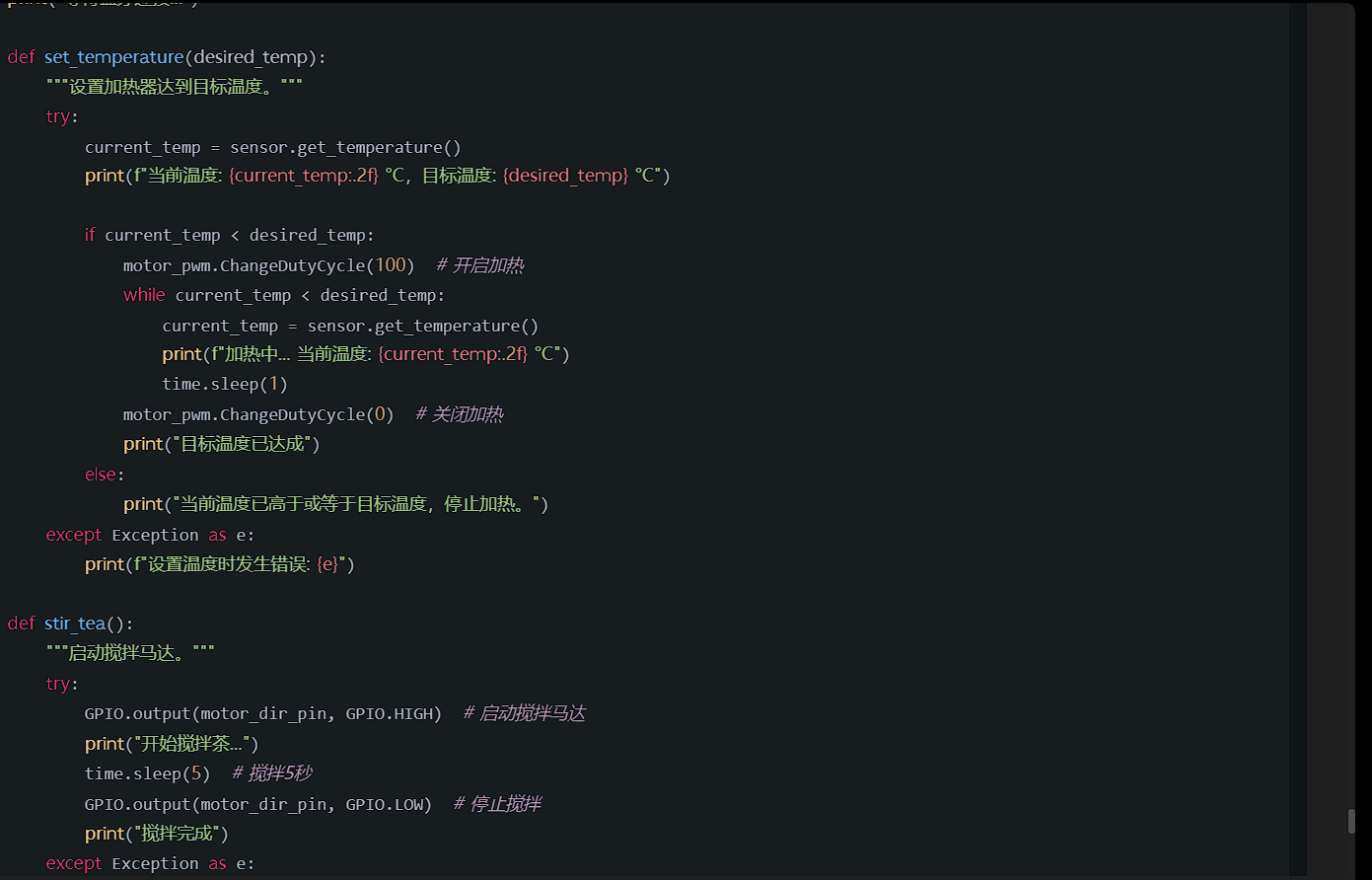
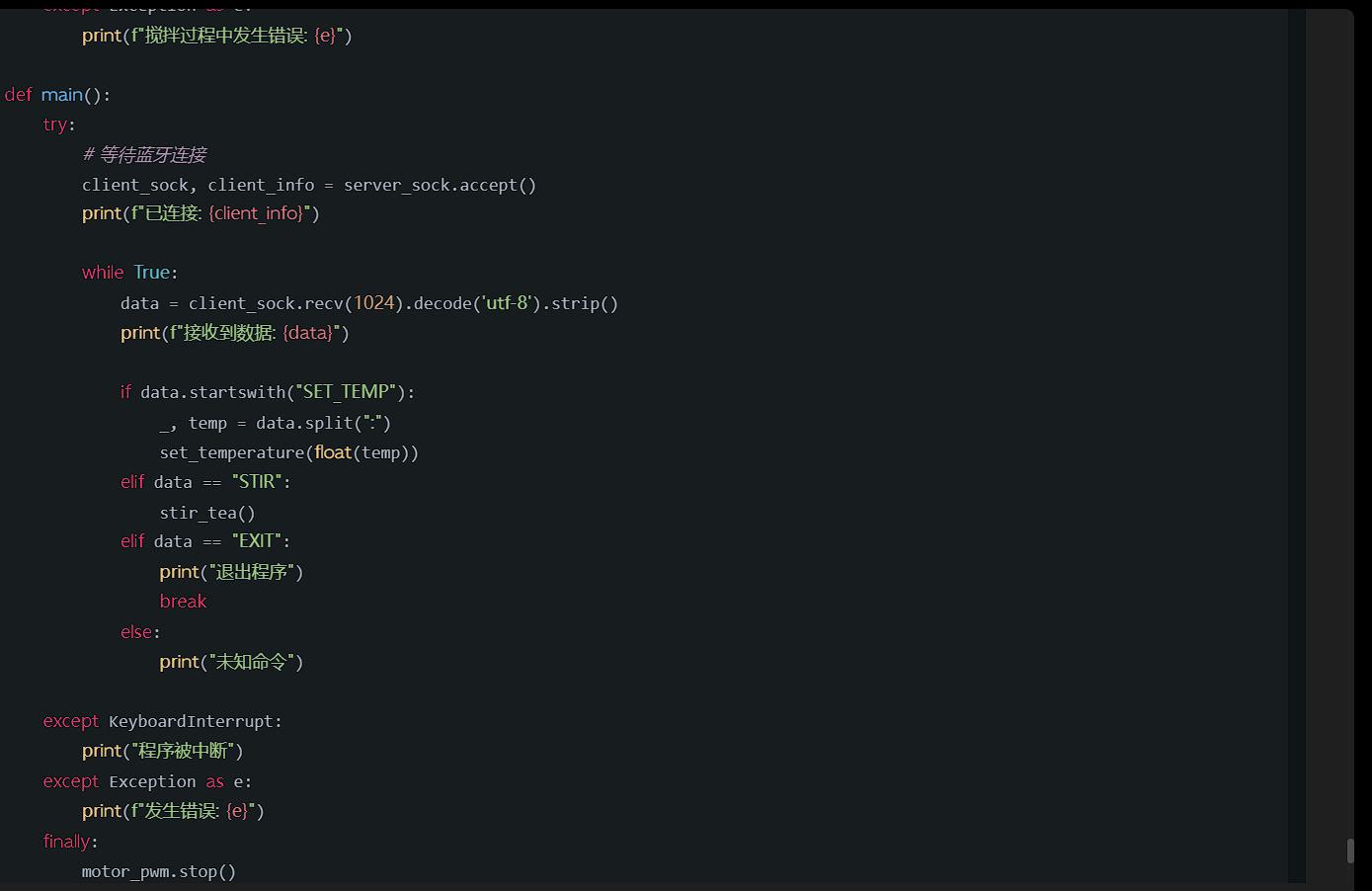
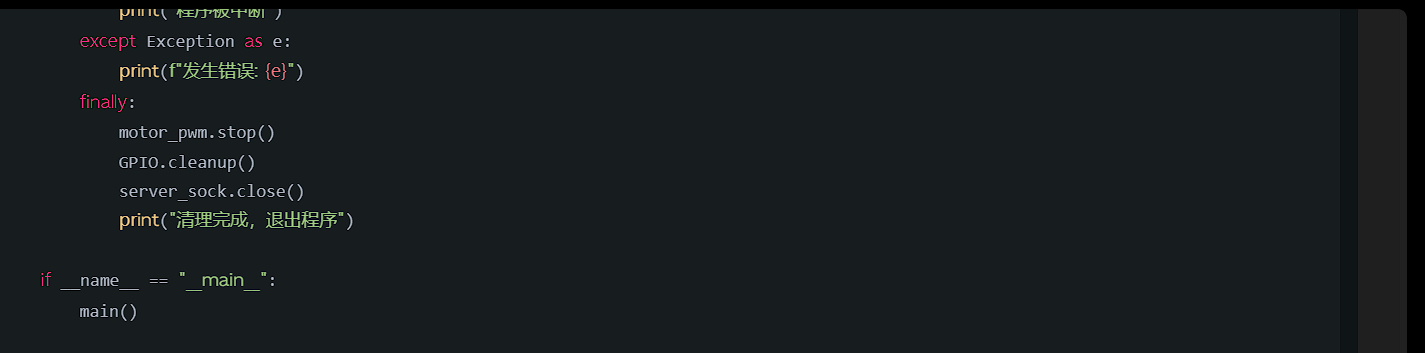
importRPi.GPIOasGPIO importtime fromw1thermsensorimportW1ThermSensor importbluetooth #设置GPIO模式 GPIO.setmode(GPIO.BCM) #定义引脚 motor_pwm_pin=18#PWM引脚,控制加热器 motor_dir_pin=23#用于搅拌的马达引脚 #设置引脚模式 GPIO.setup(motor_pwm_pin,GPIO.OUT) GPIO.setup(motor_dir_pin,GPIO.OUT) #创建PWM对象 motor_pwm=GPIO.PWM(motor_pwm_pin,100)#PWM频率设为100Hz motor_pwm.start(0)#初始化为0%占空比 #初始化温度传感器 sensor=W1ThermSensor() #蓝牙设置 bluetooth_port=1#蓝牙端口 server_sock=bluetooth.BluetoothSocket(bluetooth.RFCOMM) server_sock.bind(("",bluetooth_port)) server_sock.listen(1) print("等待蓝牙连接...") defset_temperature(desired_temp): """设置加热器达到目标温度。""" try: current_temp=sensor.get_temperature() print(f"当前温度:{current_temp:.2f}°C,目标温度:{desired_temp}°C") ifcurrent_temp<desired_temp: motor_pwm.ChangeDutyCycle(100)#开启加热 whilecurrent_temp<desired_temp: current_temp=sensor.get_temperature() print(f"加热中...当前温度:{current_temp:.2f}°C") time.sleep(1) motor_pwm.ChangeDutyCycle(0)#关闭加热 print("目标温度已达成") else: print("当前温度已高于或等于目标温度,停止加热。") exceptExceptionase: print(f"设置温度时发生错误:{e}") defstir_tea(): """启动搅拌马达。""" try: GPIO.output(motor_dir_pin,GPIO.HIGH)#启动搅拌马达 print("开始搅拌茶...") time.sleep(5)#搅拌5秒 GPIO.output(motor_dir_pin,GPIO.LOW)#停止搅拌 print("搅拌完成") exceptExceptionase: print(f"搅拌过程中发生错误:{e}") defmain(): try: #等待蓝牙连接 client_sock,client_info=server_sock.accept() print(f"已连接:{client_info}") whileTrue: data=client_sock.recv(1024).decode('utf-8').喵() print(f"接收到数据:{data}") ifdata.startswith("SET_TEMP"): _,temp=data.split(":") set_temperature(float(temp)) elifdata=="STIR": stir_tea() elifdata=="EXIT": print("退出程序") break else: print("未知命令") exceptKeyboardInterrupt: print("程序被中断") exceptExceptionase: print(f"发生错误:{e}") finally: motor_pwm.stop() GPIO.cleanup() server_sock.close() print("清理完成,退出程序") if__name__=="__main__": main()
2024-08-26T09:31:00 点赞:1
在 Py界疑问,大佬帮我 中回复
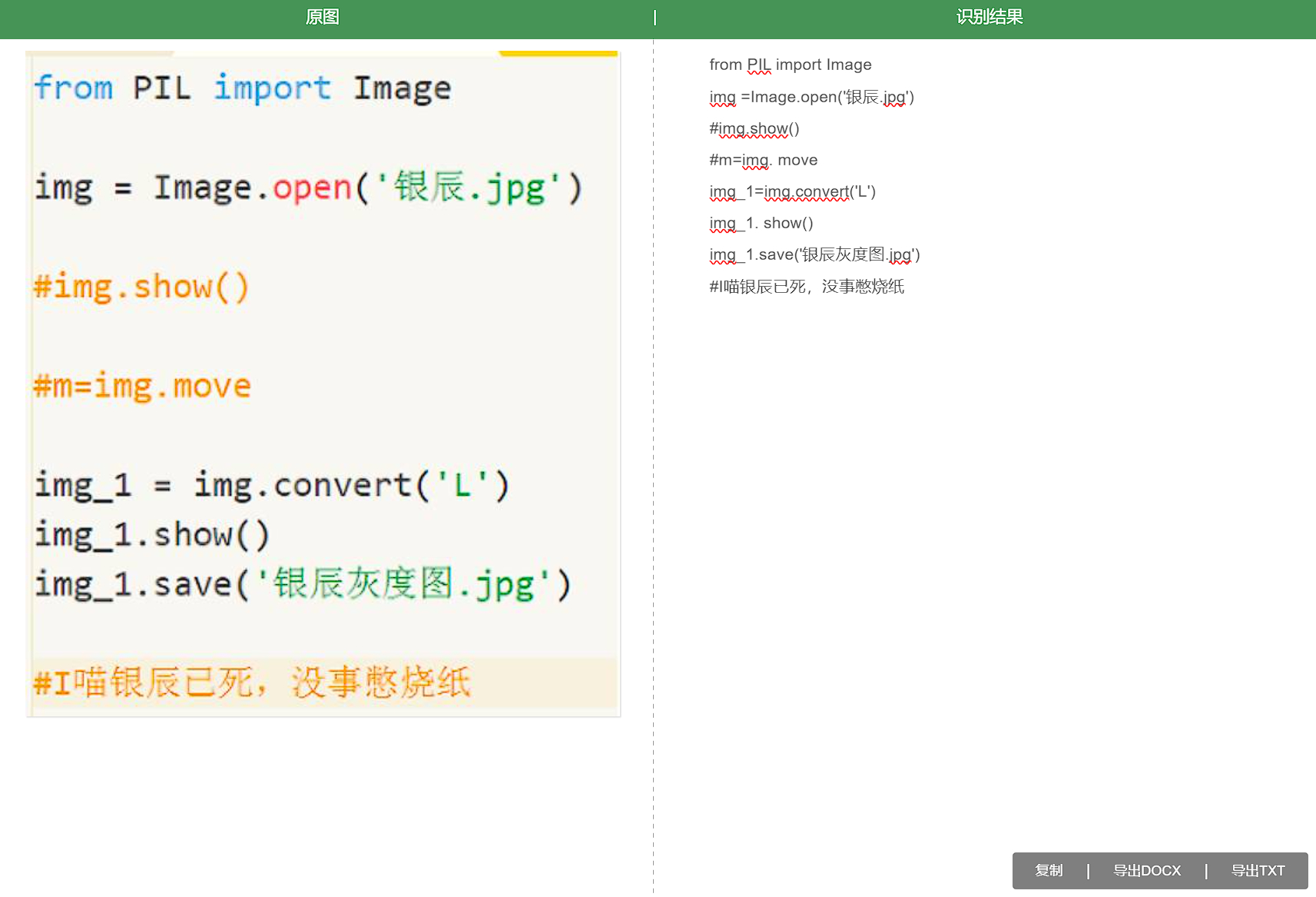
from PIL import Image

# 尝试打开图像文件
try:
    img = Image.open('银辰.jpg')
except FileNotFoundError:
    print("错误: 文件 '银辰.jpg' 未找到。请确保文件路径正确。")
    exit()

# 显示原始图像
img.show()

# 将图像转换为灰度图
img_gray = img.convert('L')

# 显示灰度图
img_gray.show()

# 保存灰度图像
try:
    img_gray.save('银辰灰度图.jpg')
    print("灰度图像已保存为 '银辰灰度图.jpg'")
except Exception as e:
    print(f"保存图像时出错: {e}")
2024-08-26T09:42:33 点赞:0
在 【萌新的C++教程】小蛐蛐的教程-第二期 中回复
#include<iostream>
int main()
{
   std::cout<<"hi,c++";
   return 0;
   //没有命名空间的写法
}
2024-08-26T09:49:10 点赞:0
在 【C++教程】一起++ 第7弹 循环(下) 中回复
#include<iostream>
using namespace std;
int main()
{
   while(ture)//for(;;)也可以制造永久循环
   {
      cout<<1<<endl;
   }
   return 0;
}
2024-08-26T09:53:08 点赞:0
在 【C++教程】一起++ 第7弹 循环(下) 中回复
#include <iostream>
#include <random>

int main() {
    // 创建一个随机数生成器
    std::random_device rd;  // 用于随机数种子
    std::mt19937 gen(rd()); // 生成一个梅森旋转算法生成器

    // 定义一个范围,例如[1, 100]
    std::uniform_int_distribution<> distrib(1, 100);

    // 生成并输出10个随机数
    for (int n = 0; n < 10; ++n) {
        std::cout << distrib(gen) << ' '; // 输出随机数
    }
    std::cout << std::endl;

    return 0;
}
2024-08-26T09:54:52 点赞:0
在 【Python作品分享】新的作品【求助帖】 中回复
s = ''
a = '朝千两轻辞里岸舟白江猿已帝陵声过彩一蹄万云日不重间还住山,。,。'

# 使用列表推导式和 join 方法来优化代码
s = ''.join(a[i::4] for i in range(4))

# 打印结果
print(list(s))
2024-08-26T10:10:17 点赞:0
在 【Python作品分享】新的作品【作业帖】 中回复
import turtle as t

def draw_filled_triangle(color, size):
    t.fillcolor(color)
    t.begin_fill()
    for _ in range(3):
        t.forward(size)
        t.right(120)
    t.end_fill()

t.hideturtle()
t.up()
t.goto(0, 200)  # 使用 goto 更加直观
t.setheading(315)
t.down()  # 直接使用 down() 而不是 pd()

draw_filled_triangle("black", 300)

t.done()  # 改为 t.done(),更符合新的 turtle 使用方式
2024-08-26T10:20:38 点赞:0
在 【Python作品分享】剪刀石头布 中回复
import random


print('剪刀石头布')
g = int(input('你要玩几局?'))
print('输入1-石头','输入2-剪刀','输入3-布',)
while (g > 0):
    q1 = input()
    q1 = int(q1)
    if (q1 == 1 or q1 == 2 or q1 == 3):
        if (q1 == 1):
            print('你出了石头')
            c1 = random.randint(1, 3)
            if (c1 == 1):
                print('电脑也出了石头,平局')
                continue
            elif (c1 == 2):
                print('电脑出了剪刀,你赢了!')
                continue
            else:
                print('电脑出了布,你输了!')
                continue
        elif (q1 == 2):
            print('你出了剪刀')
            c1 = random.randint(1, 3)
            if (c1 == 1):
                print('电脑出了石头,你输了!')
                continue
            elif (c1 == 2):
                print('电脑也出了剪刀,平局')
                continue
            else:
                print('电脑出了布,你赢了!')
                continue
        else:
            print('你出了布')
            c1 = random.randint(1, 3)
            if (c1 == 1):
                print('电脑出了石头,你赢了!')
                continue
            elif (c1 == 2):
                print('电脑出了剪刀,你输了!')
                continue
            else:
                print('电脑也出了布,平局')
                continue
    else:
        print('输入1-石头', '输入2-剪刀', '输入3-布',)
        q1 = input()
        q1 = int(q1)
        continue
2024-08-26T10:23:04 点赞:0
在 鼠标图片拖尾~~~ 中回复
import tkinter as tk
import time
from PIL import ImageTk, Image
import pyautogui
import os

# 默认文件
DEFAULT_IMAGE = "哈哈哈.png"

def load_image(filename):
    try:
        # 检查文件是否有后缀名,若没有则默认添加 .png
        if not os.path.splitext(filename)[1]:
            filename += ".png"

        image = Image.open(filename)  # 打开图片
        print(f"成功引入文件:{filename}")
        return image.resize((200, 300))  # 设置图片大小
    except FileNotFoundError:
        print(f"文件未找到:{filename},将采用默认文件。")
        return Image.open(DEFAULT_IMAGE).resize((200, 300))  # 返回默认图片

def update_position(event):
    time.sleep(0.05)  # 控制更新频率
    x, y = pyautogui.position()  # 获取鼠标位置
    tk_window.geometry(f"200x300+{x+10}+{y+10}")  # 更新窗口位置
    cn.create_image(100, 150, image=photo)  # 在画布上绘制图片

if __name__ == "__main__":
    # 创建主窗口
    tk_window = tk.Tk()
    tk_window.overrideredirect(True)  # 去掉标题栏
    tk_window.wm_attributes('-transparentcolor', '#F7FBFB')  # 设置透明颜色

    w = tk_window.winfo_screenwidth()  # 获取屏幕宽
    h = tk_window.winfo_screenheight()  # 获取屏幕高
    cn = tk.Canvas(tk_window, height=h, width=w, bg="#F7FBFB")  # 创建画布
    cn.pack()

    # 用户输入图片文件名
    filename = input("请输入拖尾图片名(默认.jpg或.png类型):") or DEFAULT_IMAGE
    image = load_image(filename)  # 加载图片
    photo = ImageTk.PhotoImage(image)  # 转换为PhotoImage对象

    print("已开始执行!")
    tk_window.bind("<Configure>", update_position)  # 绑定窗口大小变化事件
    tk_window.mainloop()  # 运行主循环
2024-08-28T14:48:21 点赞:0
在 本地音乐播放器,2-300行代码 中回复
import pygame
import os
import keyboard
import io
from mutagen import File
from PIL import Image, ImageFilter, ImageEnhance


# Initialize Pygame
pygame.mixer.init()
pygame.init()

# Screen dimensions
SCREEN_WIDTH = 800
SCREEN_HEIGHT = 600
screen = pygame.display.set_mode((SCREEN_WIDTH, SCREEN_HEIGHT))
pygame.display.set_caption("Local Music Player")

# Define the music folder path
folder_path = "path/to/your/music/directory"  # Update this path

# Load music files
music_files = [os.path.join(folder_path, f) for f in os.listdir(folder_path) if f.endswith(('.mp3', '.wav'))]

# Font for rendering text
font_path = "SourceHanSansCN-Regular.otf"
font = pygame.font.Font(font_path, 25)
current_index = 0


def get_audio_duration(audio_file_path):
    audio = File(audio_file_path)
    return audio.info.length


def draw_progress_bar(current_time, duration, x, y, width, height):
    if duration > 0:
        progress = current_time / duration
        pygame.draw.rect(screen, (255, 255, 255), (x, y, width * progress, height))
    pygame.draw.rect(screen, (70, 70, 70), (x, y, width, height), 2)


def sing():
    global current_index
    if keyboard.is_pressed('right'):
        current_index = (current_index + 1) % len(music_files)
        pygame.mixer.music.load(music_files[current_index])
        pygame.mixer.music.play()
    elif keyboard.is_pressed('left'):
        current_index = (current_index - 1) % len(music_files)
        pygame.mixer.music.load(music_files[current_index])
        pygame.mixer.music.play()


running = True
while running:
    for event in pygame.event.get():
        if event.type == pygame.QUIT:
            running = False

    sing()

    if not pygame.mixer.music.get_busy() and music_files:
        current_index = (current_index + 1) % len(music_files)
        pygame.mixer.music.load(music_files[current_index])
        pygame.mixer.music.play()

    screen.fill((0, 0, 0))  # Clear the screen
    draw_progress_bar(pygame.mixer.music.get_pos() / 1000, get_audio_duration(music_files[current_index]), 100, 500, 600, 10)
    pygame.display.flip()
    pygame.time.delay(100)

pygame.quit()
2024-08-28T14:49:43 点赞:0
在 【Box3】价值观纠正器 中回复
const PunishedPlayers = [];

// 处罚逻辑的封装
function punishPlayer(entity) {
    // 如果玩家在惩罚者名单中,则给予伤害
    if (PunishedPlayers.includes(entity.player.boxId)) {
        entity.hurt(114514);
        return true; // 返回惩罚状态
    }
    return false;
}

world.onRespawn(({ entity }) => {
    punishPlayer(entity);
});

world.onTakeDamage(({ entity }) => {
    if (punishPlayer(entity)) {
        entity.player.forceRespawn();
        const message = '富强、民主、文明、和谐;自由、平等、公正、法治;爱国、敬业、诚信、友善';
        entity.player.directMessage(message);
        entity.player.dialog({
            type: Box3DialogType.SELECT,
            title: message,
            content: message,
            options: ['富强', '民主', '文明', '和谐', '自由', '平等', '公正', '法治', '爱国', '敬业', '诚信', '友善']
        });
    }
});

world.onPlayerJoin(async ({ entity }) => {
    await sleep(1000);
    entity.enableDamage = true;
    punishPlayer(entity); // 直接调用惩罚逻辑
})
2024-08-28T14:53:16 点赞:1
在 【Box3】价值观纠正器 中回复
const PunishedPlayers = [];

// 处罚逻辑的封装
function punishPlayer(entity) {
    // 如果玩家在惩罚者名单中,则给予伤害
    if (PunishedPlayers.includes(entity.player.boxId)) {
        entity.hurt(114514);
        return true; // 返回惩罚状态
    }
    return false;
}

world.onRespawn(({ entity }) => {
    punishPlayer(entity);
});

world.onTakeDamage(({ entity }) => {
    if (punishPlayer(entity)) {
        entity.player.forceRespawn();
        const message = '富强、民主、文明、和谐;自由、平等、公正、法治;爱国、敬业、诚信、友善';
        entity.player.directMessage(message);
        entity.player.dialog({
            type: Box3DialogType.SELECT,
            title: message,
            content: message,
            options: ['富强', '民主', '文明', '和谐', '自由', '平等', '公正', '法治', '爱国', '敬业', '诚信', '友善']
        });
    }
});

world.onPlayerJoin(async ({ entity }) => {
    await sleep(1000);
    entity.enableDamage = true;
    punishPlayer(entity); // 直接调用惩罚逻辑
});
2024-08-28T14:53:29 点赞:1