VisualProgramer
Lv.1
青霄有路终须到,金榜无名誓不归
获赞:133收藏:19浏览:1128作品收藏:12
签名:Sunburst Studio官方 打字很快,会一部分c++ 小号为VisualOS小助手 个人网站:www.zclgroup.top(正在重新建,还没建好,暂时无法访问) 邮箱 zclgroup@outlook.com 新头像上传不上去……
Lv.1
青霄有路终须到,金榜无名誓不归
签名:Sunburst Studio官方 打字很快,会一部分c++ 小号为VisualOS小助手 个人网站:www.zclgroup.top(正在重新建,还没建好,暂时无法访问) 邮箱 zclgroup@outlook.com 新头像上传不上去……
在 猫武士湖区探索 中回复
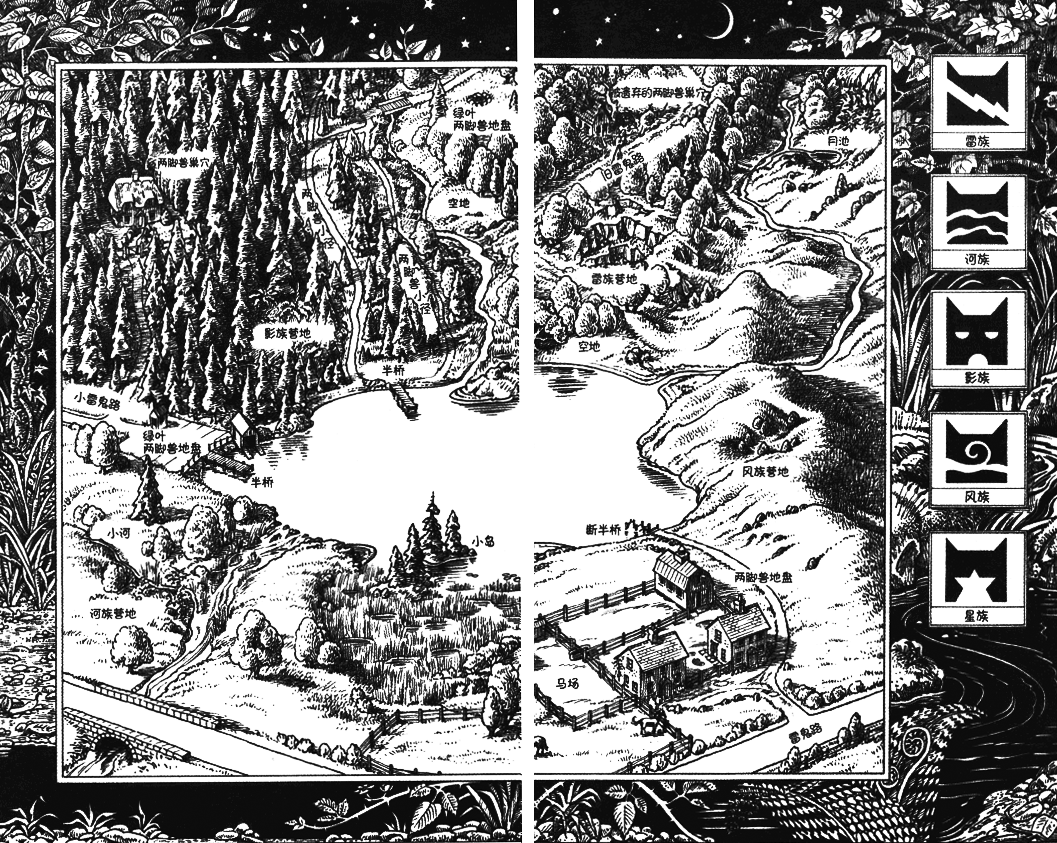
按照这个地图建造https://warriors.huijiwiki.com/wiki/%E5%9C%B0%E5%9B%BE%E9%9B%86#/media/File:Lake_map_cn.png
2022-07-31T15:23:09 点赞:0
在 猫武士湖区探索 中回复
链接已过期,新链接https://box3.codemao.cn/e/192c39d670f142c62afd?p=XFMLynZJ7rRhAp5WpmiKrlaM0V0FvljjsWZlGvyi6IA6SSwhamMAVndWVzdA%3D%3D 附上建造用地图,按照这个建
2022-08-02T16:28:50 点赞:0
在 猫武士湖区探索 中回复
--------------------------------此帖已坟,回复本贴将被删除回复--------------------------------
2022-08-23T16:10:38 点赞:0
在 关于工作室的问题(不是叫你加入) 中回复
其实我也是个小白,不过我还是懂一些的。那个首先回答你的第一个问题:就是说积分就是帮助你升级的,积分越多,级数越高。然后上首页就能加分。积分也是帮助工作室升级,获得荣誉。0级是创建后就是0级,1级需要10积分,2级100,3级1200,4级4500。权利吗没啥区别。副室长0-2级2个,3级3个,4级4个。还有雷电猴官方们都会发工作室规定。自己去论坛上搜工作室新规几.0就可以了
2022-11-26T14:11:31 点赞:1
在 关于工作室的问题(不是叫你加入) 中回复
新作喵喵看10分,官方精选栏目50分,两种可以叠加,就是说你先上了新作喵喵看,后来又上了官方精选,就加60分。另外上首页不看赞数,看作品质量
首页投稿链接是https://shimo.im/forms/gVcgVC9gPdHkYj3w/fill,里面有标准
2022-11-26T14:15:11 点赞:0
在 【妈的,盗版作品真多!】 中回复
------------------------------------满级挖坟----------------------------
2022-12-05T08:53:26 点赞:0
在 如何按E打开背包 中回复
world.onPlayerJoin(async({entity})=>{
    var playerbag=world.querySelector('#背包')
    playerbag.enableInteract = true
    playerbag.interactHint = ''
    playerbag.interactRadius = 1000
    playerbag.onInteract(async ({entity}) => {
        var bagst = await entity.player.dialog({
            type: Box3DialogType.SELECT,
            title: `背包`,
            titleTextColor: new Box3RGBAColor(0, 0, 0, 1),
            titleBackgroundColor: new Box3RGBAColor(0, 0.3, 1, 1),
            content: `坐标:${Math.round(entity.position.x)},${Math.round(entity.position.y)},${Math.round(entity.position.z)}
                    血量:${entity.maxHp}/${entity.hp}
                    饱食度:20/20
                    护甲值:0
                    盔甲韧性:0
                    效果`,
            contentTextColor:  new Box3RGBAColor(0, 0, 0, 1),
            contentBackgroundColor: new Box3RGBAColor(1, 1, 1, 1),
            options: ['快捷栏','物品栏','护甲'],
        })
        if(!bagst||bagst==null){
            return
        }
        if(bagst.index==0){
            var shortcut = await entity.player.dialog({
                type: Box3DialogType.SELECT,
                title: `快捷栏`,
                titleTextColor: new Box3RGBAColor(0, 0, 0, 1),
                titleBackgroundColor: new Box3RGBAColor(0, 0.3, 1, 1),
                contentTextColor:  new Box3RGBAColor(0, 0, 0, 1),
                contentBackgroundColor: new Box3RGBAColor(1, 1, 1, 1),
                options: [],
            })
            if(!shortcut||shortcut==null){
                return
            }
        }else if(bagst.index==1){
            var thing = await entity.player.dialog({
                type: Box3DialogType.SELECT,
                title: `物品栏`,
                titleTextColor: new Box3RGBAColor(0, 0, 0, 1),
                titleBackgroundColor: new Box3RGBAColor(0, 0.3, 1, 1),
                contentTextColor:  new Box3RGBAColor(0, 0, 0, 1),
                contentBackgroundColor: new Box3RGBAColor(1, 1, 1, 1),
                options: [],
            })
            if(!thing||thing==null){
                return
            }
        }else if(bagst.index==2){
            var armor = await entity.player.dialog({
                type: Box3DialogType.SELECT,
                title: `护甲`,
                titleTextColor: new Box3RGBAColor(0, 0, 0, 1),
                titleBackgroundColor: new Box3RGBAColor(0, 0.3, 1, 1),
                contentTextColor:  new Box3RGBAColor(0, 0, 0, 1),
                contentBackgroundColor: new Box3RGBAColor(1, 1, 1, 1),
                options: [],
            })
            if(!armor||armor==null){
                return
            }
        }
    })
})
这里你需要在地图里放一个模型,然后把这一行#后面的内容改为你模型的名字。比如你模型叫菜单就改为
var playerbag=world.querySelector('#菜单')后面可以自己调参数
2022-12-23T09:00:41 点赞:0
在 协作个作品呗 中回复
好给你连接https://kitten4.codemao.cn/?invite_code=T34BGY喵:T34BGY我在编程猫发起了一个协作项目,点击链接即可加入一起创作!
2022-12-26T10:09:45 点赞:1