获赞:10119收藏:526浏览:20652作品收藏:758
签名:2022:入喵(具体是几月几日入喵不记得了)
2022.8.24:发布第一个编程作品
2023.2.5:赞破50
2023.3.26:赞破100(终于破100了)
2024.8.26:单个作品首次破50赞
2025.2.14:拥有进阶高手称号
呜呜呜——为什么我的赞这么少???
我给大家推荐另一个编程社区的网址:https://code.xueersi.com/
这是另一个编程社区里的我:
https://code.xueersi.com/space/42616678?to=homepages
在 The Future Universe发布预告 中回复
很有创意,设计也很好,可以让模块设计成那种有活灵活现的感觉,配一个好的背景音乐加一些特效,比如小球之类的,给鼠标也加以特效也很好
2023-07-13T00:06:01 点赞:1
在 【求助帖】 中回复
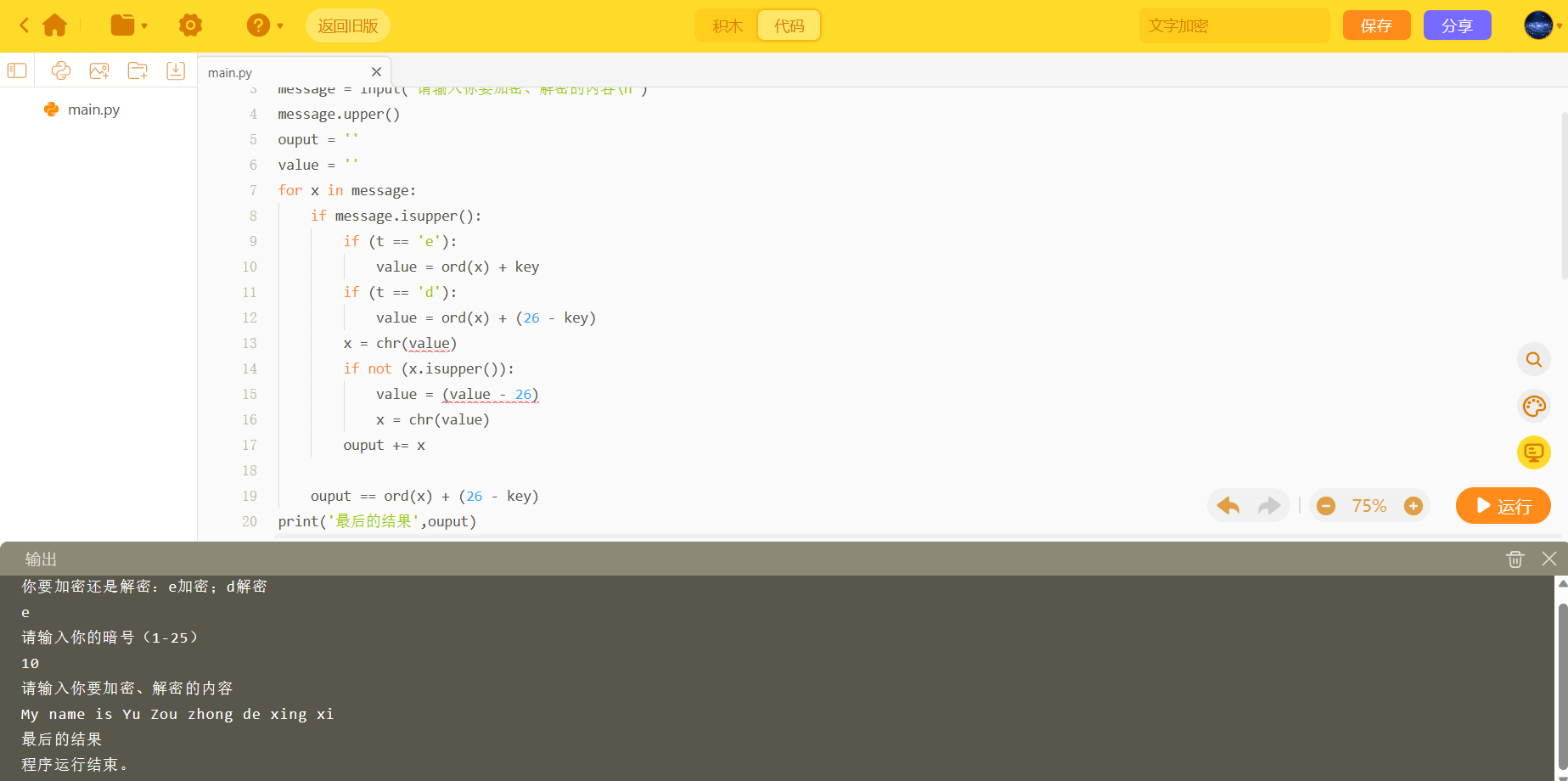
无论是输入“e”或“d”,在“最后的结果”后面都没有显示 加密/解密的内容
2023-07-28T16:54:16 点赞:0
在 【求助帖】 中回复
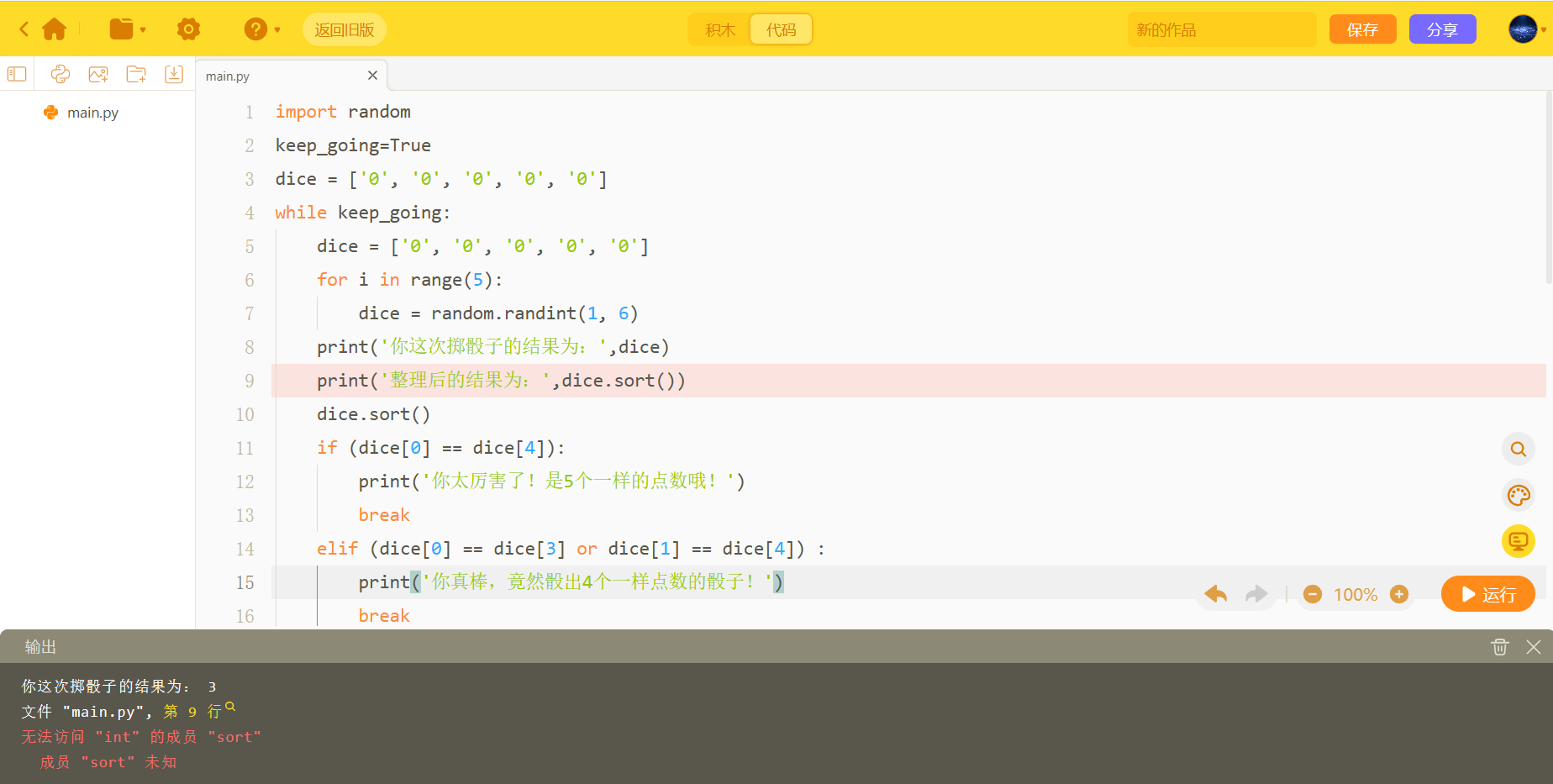
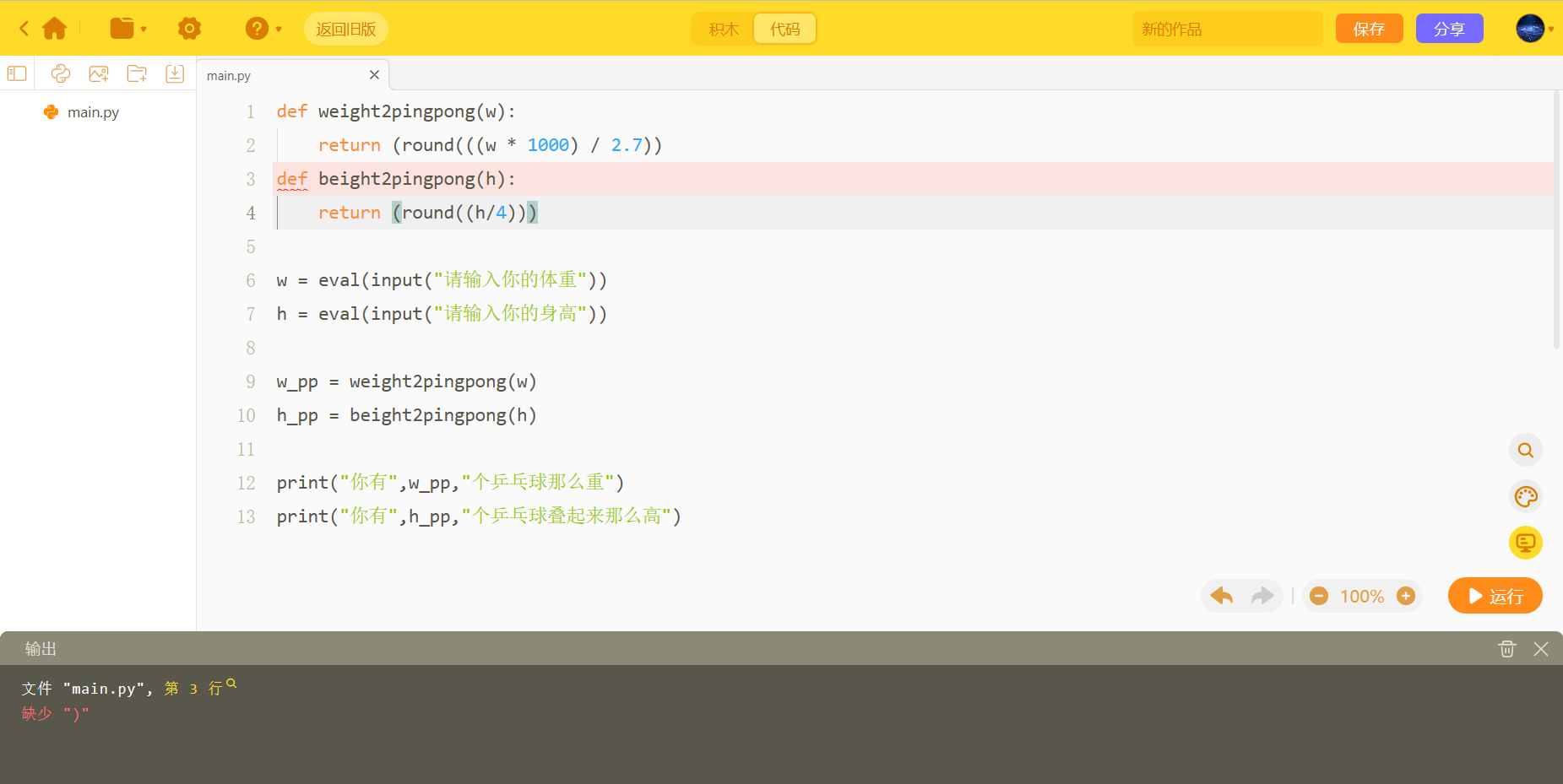
这个问题咋解决?
2023-07-28T20:43:56 点赞:0
在 【求助帖】 中回复
2023-08-03T16:00:27 点赞:0
在 【求助帖】 中回复
2023-08-04T22:49:29 点赞:0
在 【求助帖】 中回复
2023-08-04T22:51:24 点赞:0
在 大家几岁了?性别? 中回复
6666666666666666年级,中性
2023-08-07T10:48:55 点赞:0
在 pygame画圆的bug 中回复
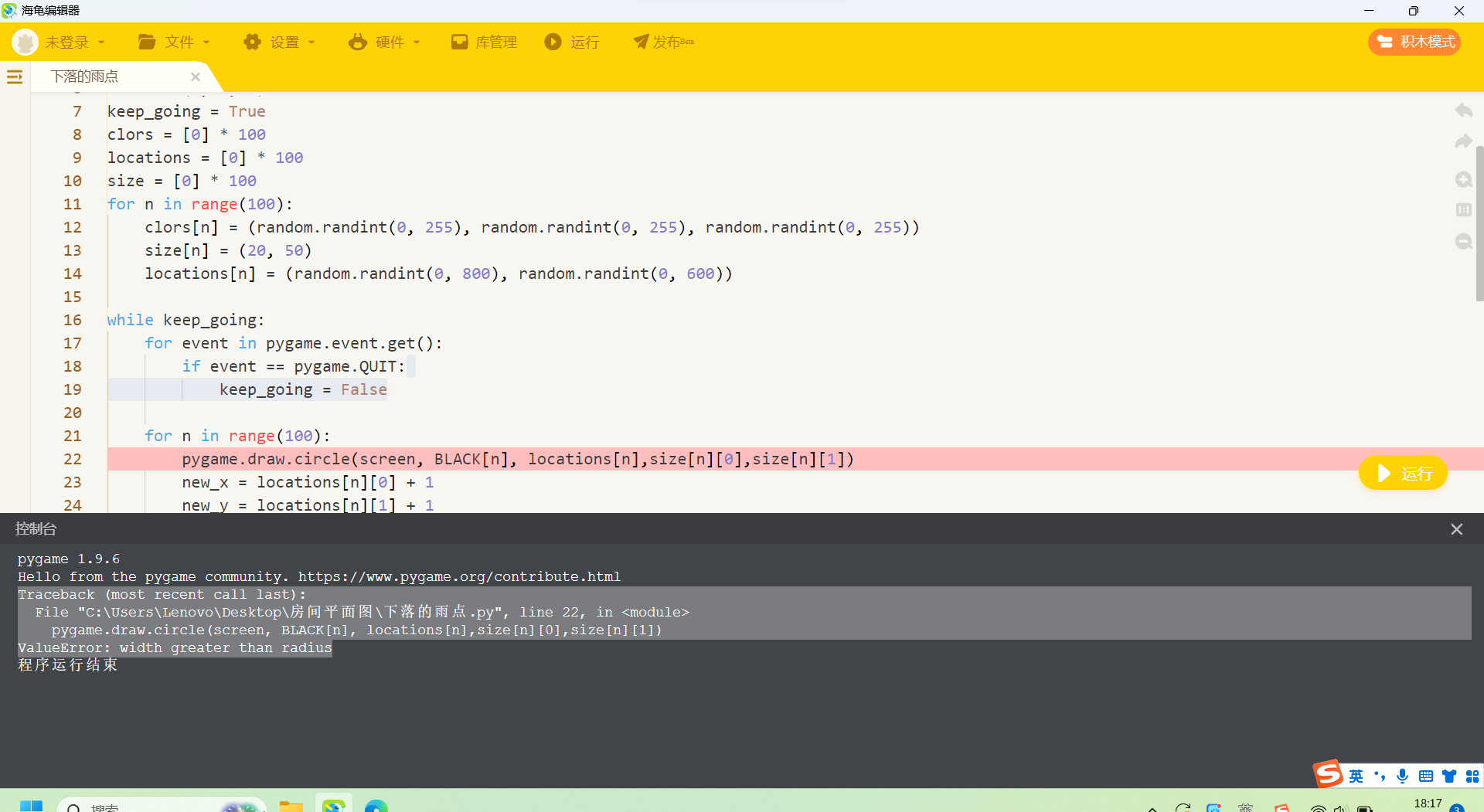
翻译:
回溯(最近一次调用):
文件 “C:UsersLenovoDesktop房间平面图下落的雨点.py”,第 22 行,在<module>
pygame.draw.circle(screen, BLACK[n], locations[n],size[n][0],size[n][1])
索引错误:元组索引超出范围
2023-08-11T19:31:25 点赞:0
在 【Python作品分享】星 中回复
???填充是也不是封闭图形呀?你填充时咋没“漏色”?
2023-08-14T22:30:10 点赞:0
在 【求助帖】 中回复

2023-08-15T17:27:13 点赞:0
在 【求助帖】 中回复
import pygame
import random
pygame.init()
screen = pygame.display.set_mode([800,600])
black = (0,0,0)
pic = pygame.image.load("CrazySmile.bmp")
keep_going = True
colorkey = pic.get_at((0,0))
pic.set_colorkey(colorkey)
mousebutton = False
clock = pygame.time.Clock()
spirte_list = pygame.sprite.Group()

#定义一个类喵iley
class 喵iley(pygame.sprite.Sprite):
    pos = (0,0)     #设置笑脸的位置
    xvel = 1        #设置笑脸的水平移动
    yvel = 1        #设置笑脸的垂直移动
    scale = 100     #笑脸的缩放比
    def __init__(self,pos,xvel,yvel):
        pygame.sprite.Sprite.__init__(self)
        self.image = pic
        self.image = pygame.transform.scale(self,image,(self,scale,self,scale))
        self.scale = random.randint(30,100)
        self.rect = self.image.get__rect()      #得到笑脸的矩形框
        self.pos = pos
        self.rect.x = pos[0] - self.scale/2     #点击时,让笑脸的中间出现在鼠标位置
        self.rect.y = pos[1] - self.scale/2
        self.xvel = xvel
        self.yvel = yvel
        def update(self):
            self.rect.x += self.xvel
            self.ract.y += self.yvel
            if self.rect.x <= 0 or self.rect.x + self.scale > screen.get_width():
                self.xvel = -self.xvel
            if self.rect.y <= 0 or self.rect.y + self.scale > screen.get_height():
                self.yvel = -self.yvel

while keep_going:
    for event in pygame.event.get():
        if event.type == pygame.QUIT:
            keep_going = True
        if event.type == pygame.MOUSEBUTTONDOWN:
            if pygame.mouse.get_pressed()[0]:
                mousebutton = True
            else:
                if pygame.mouse.pressed()[1]:
                    pos = pygame.mouse.get_pos()
                    clicked_喵ileys = [s for s in speite_list if s.rect collidepoint(pos)]
                    sprite_list.remove(clicked_喵ileys)
        if event.type == pygame.MOUSEBUTTONUP:
            mousebutton = False
    screen.fill(black)
    sprite_list.update()
    sprite_list.draw(screen)
    clock.tick(60)
    pygame.display.update()
    if mousebutton:
        speedx = random.randint(-5,5)
        speedy = random.randint(-5,5)
        new喵iley = 喵iley(pygame.mouse.get_pos(),speedx,speedy)
        speed_list.a喵(new喵iley)
pygame.quit()
2023-08-15T17:28:15 点赞:0
在 【找师傅】 中回复
2023-08-15T22:51:46 点赞:0
在 【找师傅】 中回复

2023-08-15T23:09:37 点赞:0
在 【找师傅】 中回复
2023-08-15T23:21:35 点赞:0
在 没有创作喵,有办法吗 中回复
............
2024-02-06T10:39:18 点赞:0
在 大地图怎么做 中回复
大地图制作教程:https://www.bilibili.com/video/BV1qu411S7cc/?spm_id_from=333.337.search-card.all.click&vd_source=d337536cc790d74a3e2c41b057807f5b
2024-08-13T17:19:37 点赞:0
在 大地图怎么做 中回复
你可以看看我新发的作品:大地图跑酷。不过,我有一个小愿望:能不能点个赞或收藏
2024-08-13T17:21:53 点赞:0
在 【求助帖】为什么显示该图片打不开 中回复
import pygame
import random
pygame.init()
screen = pygame.display.set_mode([800,600])
black = (0,0,0)
pic = pygame.image.load("CrazySmile.bmp")
keep_going = True
colorkey = pic.get_at((0,0))
pic.set_colorkey(colorkey)
mousebutton = False
clock = pygame.time.Clock()
spirte_list = pygame.sprite.Group()

#定义一个类喵iley
class 喵iley(pygame.sprite.Sprite):
    pos = (0,0)     #设置笑脸的位置
    xvel = 1        #设置笑脸的水平移动
    yvel = 1        #设置笑脸的垂直移动
    scale = 100     #笑脸的缩放比
    def __init__(self,pos,xvel,yvel):
        pygame.sprite.Sprite.__init__(self)
        self.image = pic
        self.image = pygame.transform.scale(self.image,(self,scale,self,scale))
        self.scale = random.randint(30,100)
        self.rect = self.image.get_rect()      #得到笑脸的矩形框
        self.pos = pos
        self.rect.x = pos[0] - self.scale/2     #点击时,让笑脸的中间出现在鼠标位置
        self.rect.y = pos[1] - self.scale/2
        self.xvel = xvel
        self.yvel = yvel
        def update(self):
            self.rect.x += self.xvel
            self.ract.y += self.yvel
            if self.rect.x <= 0 or self.rect.x + self.scale > screen.get_width():
                self.xvel = -self.xvel
            if self.rect.y <= 0 or self.rect.y + self.scale > screen.get_height():
                self.yvel = -self.yvel

while keep_going:
    for event in pygame.event.get():
        if event.type == pygame.QUIT:
            keep_going = True
        if event.type == pygame.MOUSEBUTTONDOWN:
            if pygame.mouse.get_pressed()[0]:
                mousebutton = True
            else:
                if pygame.mouse.pressed()[1]:
                    pos = pygame.mouse.get_pos()
                    clicked_喵iley = [s for s in speite_list if s.rect.collidepoint(pos)]
                    sprite_list.remove(clicked_喵ileys)
        if event.type == pygame.MOUSEBUTTONUP:
            mousebutton = False
    screen.fill(black)
    sprite_list.update()
    sprite_list.draw(screen)
    clock.tick(60)
    pygame.display.update()
    if mousebutton:
        speedx = random.randint(-5,5)
        speedy = random.randint(-5,5)
        new喵iley = 喵iley(pygame.mouse.get_pos(),speedx,speedy)
        speed_list.add(new喵iley)
pygame.quit()
2024-08-14T14:08:25 点赞:0
在 【作品秀】乒乓游戏 中回复
作品链接喵o.cn/work/233577240
2024-08-17T14:07:29 点赞:0