 me12查看:135 回复:5 评论:2 创建时间:2024-08-13T19:46:24
用户:me12查看:135 回复:5 评论:2 创建时间:2024-08-13T19:46:24
#这个作品千万别用编程猫打开!!!切记!!!否则会出bug把部分代码顶掉,建议用官版(www.python.org)
#在作品目录下创建一个index.txt的文件,写入内容:(第一行)0,(第二行)1,(第三行)0,(第四行)0 (只写入数字,注意换行)
#选一个你喜欢的png图片,改名为logo.png,放入目录下
#窗口位置存档未完工,敬请期待
#部分库需要下载,在’cmd‘中输入“pip install <库名>”(python默认安装pip),请按注释下载
import requests #需要下载
import webbrowser as web #需要下载
from bs4 import BeautifulSoup #需要下载
import tkinter as tk #版本问题,3.x.x被设为标准库,如果关于“tkinter”报错,需要下载
from tkinter import filedialog
from tkinter import ttk
import pyperclip as clip #需要下载
import codecs #需要下载
#部分导入库未被使用,正在开发
import requests
import webbrowser as web
from bs4 import BeautifulSoup
import tkinter as tk
from tkinter import filedialog
from tkinter import ttk
import pyperclip as clip
import json
import codecs


def show_text():
    text = entry.get()
    label.config(text=f"url = {text}",fg = "green")
    try:
        url = text
        headers = {'User-Agent': 'Mozilla/5.0 (Windows NT 10.0; Win喵; x喵) AppleWebKit/537.36 (KH喵L, like Gecko) Chrome/94.0.4606.81 Safari/537.36 Edg/94.0.992.47'}
        resp = requests.get(url,headers=headers)
        txt.delete('1.0','end')
        txt.insert(1.0,resp.text)
        label.config(text=f"url = {text}",fg = "green")
        resp.close()
        response = requests.get(url)
        soup = BeautifulSoup(response.text, 'html.parser')
        title = soup.title.string
        show.delete(1.0,"end")
        show.configure(state="normal")
        show.insert(1.0,f'其他信息:标题:{title}')
        show.configure(state="disabled")
        if open_web.get() == '爬取后自动打开网页:开':
            web.open(url)
    except:
        try:
            url2 = "https://www.喵"
            headers = {'User-Agent': 'Mozilla/5.0 (Windows NT 10.0; Win喵; x喵) AppleWebKit/537.36 (KH喵L, like Gecko) Chrome/94.0.4606.81 Safari/537.36 Edg/94.0.992.47'}
            resp2 = requests.get(url2, headers=headers)
            label.config(text=f"url错误或你无权限访问",fg="red")
        except:
            label.config(text=f"未连接网络",fg = "red")

def paste_text():
    entry.insert(1,clip.paste())
def copy_text():
    clip.copy(txt.get('1.0','end'))
def input_text():
    path = filedialog.askdirectory(title='请选择文件夹')
    input_get.config(text=f"选择路径为:{path}",fg = "black")
    inputname = name.get()
    inputcode = txt.get('1.0','end')
    input_undername = com.get()
    file_path = f"{path}/{inputname}.{input_undername}"
    file_INPUT = open(file_path,'w',encoding='utf-8')
    file_INPUT.write("//欢迎使用web爬取")
    file_INPUT.close()
    with open(file_path,'w',encoding='utf-8') as file:
        file.write(inputcode)
    input_get.config(text=f"选择路径为:{path},下载成功",fg = "black")
def on_index():
    if com.get() == 'html':
        index1 = 0
    elif com.get() == 'css':
        index1 = 1
    elif com.get() == 'js':
        index1 = 2
    else:
        index1 = 3

    if open_web.get() == "爬取后自动打开网页:开":
        index2 = 0
    else:
        index2 = 1
    root_x = root.wino_x
    root_y = root.wino_y
    with open('./index.txt','w') as file:
        file.write(f"{index1}\n{index2}\n{root_x}\n{root_y}")

def back():
    root.destroy()

root = tk.Tk()
root.geometry("1000x800")
root.geometry("+0+0")
root.resizable(False, False)
root.title("WEB代码爬取")
root.iconphoto(False, tk.PhotoImage(file='./logo.png'))

entry = tk.Entry(root)
entry.place(width = 1000,height = 20)
entry.pack()

start = tk.Button(root,text="开始",command=show_text,width = 10,height = 1)
start.place(x = 0,y = 20)
start.pack()

input_text = tk.Button(root,text="下载",command=input_text,width = 10,height = 1)
input_text.place(x = 0,y = 200)
input_text.pack()

paste = tk.Button(root,text="粘贴url",command=paste_text,width = 10,height = 1)
paste.place(x = 80,y = 20)
paste.pack

copy = tk.Button(root,text="复制代码",command=copy_text,width = 10,height = 1)
copy.place(x = 160,y = 20)
copy.pack

label = tk.Label(root)
label.place(width = 800,height = 20)
label.place(x = 0,y = 60)
label.pack()
label.config(text="输入url",fg = "black")

scrollbar = tk.Scrollbar(root)
scrollbar.pack(side=tk.RIGHT, fill=tk.Y)

txt = tk.Text(root,height=10, width=800,yscrollcommand=scrollbar.set)
txt.pack(side=tk.LEFT, fill=tk.BOTH, expand=True)
scrollbar.config(command=txt.yview)
txt.place(x = 0,y = 80)
txt.pack()

show = tk.Text(root,height=10, width=800)
show.place(x = 0,y = 400)
show.pack()
show.configure(state="disabled")

name = tk.Entry(root)
name.place(x = 0,y = 200)
name.place(width = 100,height = 20)
name.pack()

input_get = tk.Label(root)
input_get.place(width = 800,height = 20)
input_get.place(x = 0,y = 200)
input_get.pack()
input_get.config(text="选择路径为:",fg = "black")

com = ttk.Combobox(root)
com.pack()
com["value"] = ("html", "css", "js", "txt")
with open("./index.txt") as f喵obox(root)
open_web.pack()
open_web["value"] = ("爬取后自动打开网页:开", "爬取后自动打开网页:关")
with open("./index.txt") as f:
    data2 = f.readlines()[1]
open_web.current(data2)

on = tk.Button(root,text="保存配置",command=on_index,width = 10,height = 1)
on.place(x = 0,y = 20)
on.pack()

back = tk.Button(root,text="返回",command=back,width = 10,height = 1)
back.pack()

root.wm_attributes('-topmost', True)

root.mainloop()
 code猫的
importrequests importwebbrowserasweb frombs4importBeautifulSoup importtkinterastk fromtkinterimportfiledialog fromtkinterimportttk importpyperclipasclip importjson importcodecs defshow_text(): text=entry.get() label.config(text=f"url={text}",fg="green") try: url=text headers={'User-Agent':'Mozilla/5.0(WindowsNT10.0;Win喵;x喵)AppleWebKit/537.36(KH喵L,likeGecko)Chrome/94.0.4606.81Safari/537.36Edg/94.0.992.47'} resp=requests.get(url,headers=headers) txt.delete('1.0','end') txt.insert('1.0',resp.text) resp.close() soup=BeautifulSoup(resp.text,'html.parser') title=soup.title.stringifsoup.titleelse"无标题" show.configure(state="normal") show.delete('1.0',"end") show.insert('1.0',f'其他信息:标题:{title}') show.configure(state="disabled") ifopen_web.get()=='爬取后自动打开网页:开': web.open(url) exceptrequests.exceptions.RequestException: label.config(text=f"url错误或你无权限访问",fg="red") exceptException: label.config(text=f"未连接网络",fg="red") defpaste_text(): entry.insert('0',clip.paste()) defcopy_text(): clip.copy(txt.get('1.0','end')) definput_text(): path=filedialog.askdirectory(title='请选择文件夹') ifpath: inputname=name.get() inputcode=txt.get('1.0','end') input_undername=com.get() file_path=f"{path}/{inputname}.{input_undername}" withopen(file_path,'w',encoding='utf-8')asfile: file.write("//欢迎使用web爬取\n") file.write(inputcode) input_get.config(text=f"选择路径为:{path},下载成功",fg="black") defon_index(): index1=com.current() index2=0ifopen_web.get()=="爬取后自动打开网页:开"else1 root_x=root.winfo_x() root_y=root.winfo_y() withopen('./index.txt','w')asfile: file.write(f"{index1}\n{index2}\n{root_x}\n{root_y}") defback(): root.destroy() #设置主窗口 root=tk.Tk() root.geometry("1000x800+0+0") root.resizable(False,False) root.title("WEB代码爬取") root.iconphoto(False,tk.PhotoImage(file='./logo.png')) #URL输入框 entry=tk.Entry(root,width=100) entry.pack(pady=20) #按钮 start=tk.Button(root,text="开始",command=show_text,width=10,height=1) start.pack() paste=tk.Button(root,text="粘贴url",command=paste_text,width=10,height=1) paste.pack(pady=5) copy=tk.Button(root,text="复制代码",command=copy_text,width=10,height=1) copy.pack() input_btn=tk.Button(root,text="下载",command=input_text,width=10,height=1) input_btn.pack(pady=5) on=tk.Button(root,text="保存配置",command=on_index,width=10,height=1) on.pack() back_btn=tk.Button(root,text="返回",command=back,width=10,height=1) back_btn.pack(pady=5) #标签 label=tk.Label(root,text="输入url",fg="black") label.pack(pady=10) #滚动文本框 scrollbar=tk.Scrollbar(root) scrollbar.pack(side=tk.RIGHT,fill=tk.Y) txt=tk.Text(root,height=10,width=80,yscrollcommand=scrollbar.set) txt.pack(side=tk.LEFT,fill=tk.BOTH,expand=True) scrollbar.config(command=txt.yview) show=tk.Text(root,height=10,width=80) show.pack(pady=10) show.configure(state="disabled") #文件名输入框 name=tk.Entry(root,width=100) name.pack(pady=5) input_get=tk.Label(root,text="选择路径为:",fg="black") input_get.pack(pady=10) #文件类型选择 com=ttk.Combobox(root,values=("html","css","js","txt")) com.pack(pady=5) com.current(0) #自动打开网页选择 open_web=ttk.Combobox(root,values=("爬取后自动打开网页:开","爬取后自动打开网页:关")) open_web.pack(pady=5) open_web.current(0) #保持窗口在最上方 root.wm_attributes('-topmost',True) #启动主循环 root.mainloop()
点赞0
评论
code猫的importrequests importwebbrowserasweb frombs4importBeautifulSoup importtkinterastk fromtkinterimportfiledialog fromtkinterimportttk importpyperclipasclip importjson importcodecs defshow_text(): text=entry.get() label.config(text=f"url={text}",fg="green") try: url=text headers={'User-Agent':'Mozilla/5.0(WindowsNT10.0;Win喵;x喵)AppleWebKit/537.36(KH喵L,likeGecko)Chrome/94.0.4606.81Safari/537.36Edg/94.0.992.47'} resp=requests.get(url,headers=headers) txt.delete('1.0','end') txt.insert('1.0',resp.text) resp.close() soup=BeautifulSoup(resp.text,'html.parser') title=soup.title.stringifsoup.titleelse"无标题" show.configure(state="normal") show.delete('1.0',"end") show.insert('1.0',f'其他信息:标题:{title}') show.configure(state="disabled") ifopen_web.get()=='爬取后自动打开网页:开': web.open(url) exceptrequests.exceptions.RequestException: label.config(text=f"url错误或你无权限访问",fg="red") exceptException: label.config(text=f"未连接网络",fg="red") defpaste_text(): entry.insert('0',clip.paste()) defcopy_text(): clip.copy(txt.get('1.0','end')) definput_text(): path=filedialog.askdirectory(title='请选择文件夹') ifpath: inputname=name.get() inputcode=txt.get('1.0','end') input_undername=com.get() file_path=f"{path}/{inputname}.{input_undername}" withopen(file_path,'w',encoding='utf-8')asfile: file.write("//欢迎使用web爬取\n") file.write(inputcode) input_get.config(text=f"选择路径为:{path},下载成功",fg="black") defon_index(): index1=com.current() index2=0ifopen_web.get()=="爬取后自动打开网页:开"else1 root_x=root.winfo_x() root_y=root.winfo_y() withopen('./index.txt','w')asfile: file.write(f"{index1}\n{index2}\n{root_x}\n{root_y}") defback(): root.destroy() #设置主窗口 root=tk.Tk() root.geometry("1000x800+0+0") root.resizable(False,False) root.title("WEB代码爬取") root.iconphoto(False,tk.PhotoImage(file='./logo.png')) #URL输入框 entry=tk.Entry(root,width=100) entry.pack(pady=20) #按钮 start=tk.Button(root,text="开始",command=show_text,width=10,height=1) start.pack() paste=tk.Button(root,text="粘贴url",command=paste_text,width=10,height=1) paste.pack(pady=5) copy=tk.Button(root,text="复制代码",command=copy_text,width=10,height=1) copy.pack() input_btn=tk.Button(root,text="下载",command=input_text,width=10,height=1) input_btn.pack(pady=5) on=tk.Button(root,text="保存配置",command=on_index,width=10,height=1) on.pack() back_btn=tk.Button(root,text="返回",command=back,width=10,height=1) back_btn.pack(pady=5) #标签 label=tk.Label(root,text="输入url",fg="black") label.pack(pady=10) #滚动文本框 scrollbar=tk.Scrollbar(root) scrollbar.pack(side=tk.RIGHT,fill=tk.Y) txt=tk.Text(root,height=10,width=80,yscrollcommand=scrollbar.set) txt.pack(side=tk.LEFT,fill=tk.BOTH,expand=True) scrollbar.config(command=txt.yview) show=tk.Text(root,height=10,width=80) show.pack(pady=10) show.configure(state="disabled") #文件名输入框 name=tk.Entry(root,width=100) name.pack(pady=5) input_get=tk.Label(root,text="选择路径为:",fg="black") input_get.pack(pady=10) #文件类型选择 com=ttk.Combobox(root,values=("html","css","js","txt")) com.pack(pady=5) com.current(0) #自动打开网页选择 open_web=ttk.Combobox(root,values=("爬取后自动打开网页:开","爬取后自动打开网页:关")) open_web.pack(pady=5) open_web.current(0) #保持窗口在最上方 root.wm_attributes('-topmost',True) #启动主循环 root.mainloop()
点赞0
评论
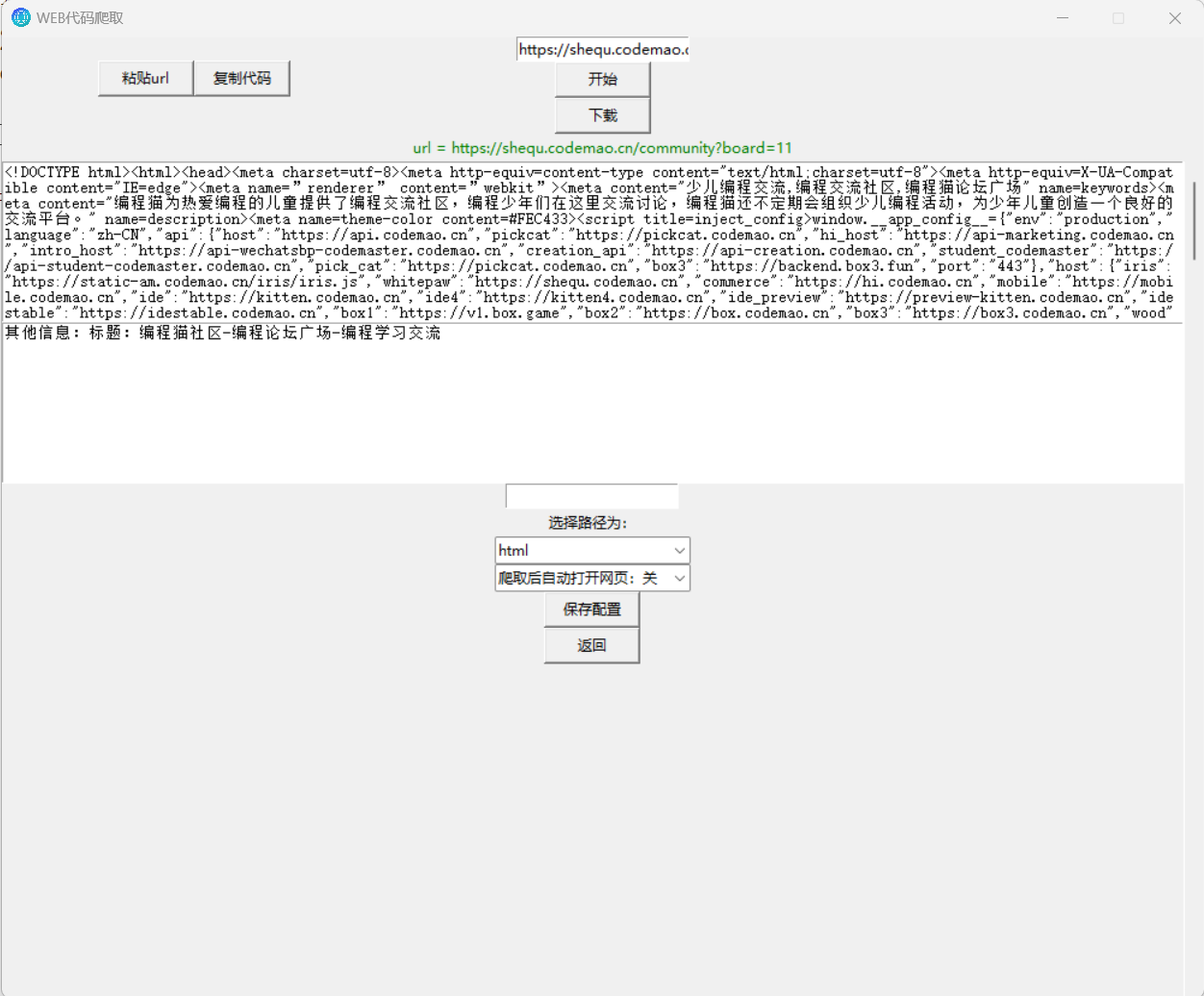 中间部分代码被屏蔽: