 姚国栋udn0查看:39 回复:0 评论:0 创建时间:2024-02-03T19:03:53
用户:
【作品展示】
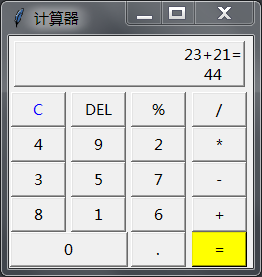
【作品介绍】
洛书计算器
【作品源代码】
from tkinter import*

def calculate():
    result = eval(equ.get())
    equ.set(equ.get() + "=\n" + str(result))

def show(buttonString):
    content = equ.get()
    if content == "0":
        content = ""
    equ.set(content + buttonString)

def backspace():
    equ.set(str(equ.get()[:-1]))
def clear():
    equ.set("0")

root = Tk()
root.title("计算器")

equ = StringVar()
equ.set("0")

label = Label(root,width=25,height=2,relief="raised",anchor=SE,textvariable=equ)
label.grid(row=0,column=0,columnspan=4,padx=5,pady=5)

clearButton = Button(root,text="C",fg="blue",width=5,command=clear)
clearButton.grid(row = 1,column = 0)

Button(root,text="DEL",width=5,command=backspace).grid(row=1,column=1)
Button(root,text="%",width=5,command=lambda:show("%")).grid(row=1,column=2)
Button(root, text="/", width=5, command=lambda: show("/")).grid(row=1, column=3)
Button(root, text="4", width=5, command=lambda: show("7")).grid(row=2, column=0)
Button(root, text="9", width=5, command=lambda: show("8")).grid(row=2, column=1)
Button(root, text="2", width=5, command=lambda: show("9")).grid(row=2, column=2)
Button(root, text="*", width=5, command=lambda: show("*")).grid(row=2, column=3)
Button(root, text="3", width=5, command=lambda: show("4")).grid(row=3, column=0)
Button(root, text="5", width=5, command=lambda: show("5")).grid(row=3, column=1)
Button(root, text="7", width=5, command=lambda: show("6")).grid(row=3, column=2)
Button(root, text="-", width=5, command=lambda: show("-")).grid(row=3, column=3)
Button(root, text="8", width=5, command=lambda: show("1")).grid(row=4, column=0)
Button(root, text="1", width=5, command=lambda: show("2")).grid(row=4, column=1)
Button(root, text="6", width=5, command=lambda: show("3")).grid(row=4, column=2)
Button(root, text="+", width=5, command=lambda: show("+")).grid(row=4, column=3)
Button(root, text="%", width=5, command=lambda: show("%")).grid(row=1, column=2)

Button(root,text="0",width=12,command=lambda:show("0")).grid(row=5,column=0,columnspan=2)
Button(root,text=".",width=5,command=lambda:show(".")).grid(row=5,column=2)
Button(root,text="=",width=5,bg="yellow",command=lambda:calculate()).grid(row=5,column=3)

root.mainloop()
【提示】
部分含有Python第三方库相关内容的作品,在海龟编辑器网页端无法运行哦!如遇到这种情况,可以打开下面的链接,下载海龟编辑器客户端:
https://python.codemao.cn