 林中鸟22查看:54 回复:3 评论:0 创建时间:2024-01-30T00:26:49
用户:林中鸟22查看:54 回复:3 评论:0 创建时间:2024-01-30T00:26:49
【作品展示】
【作品介绍】
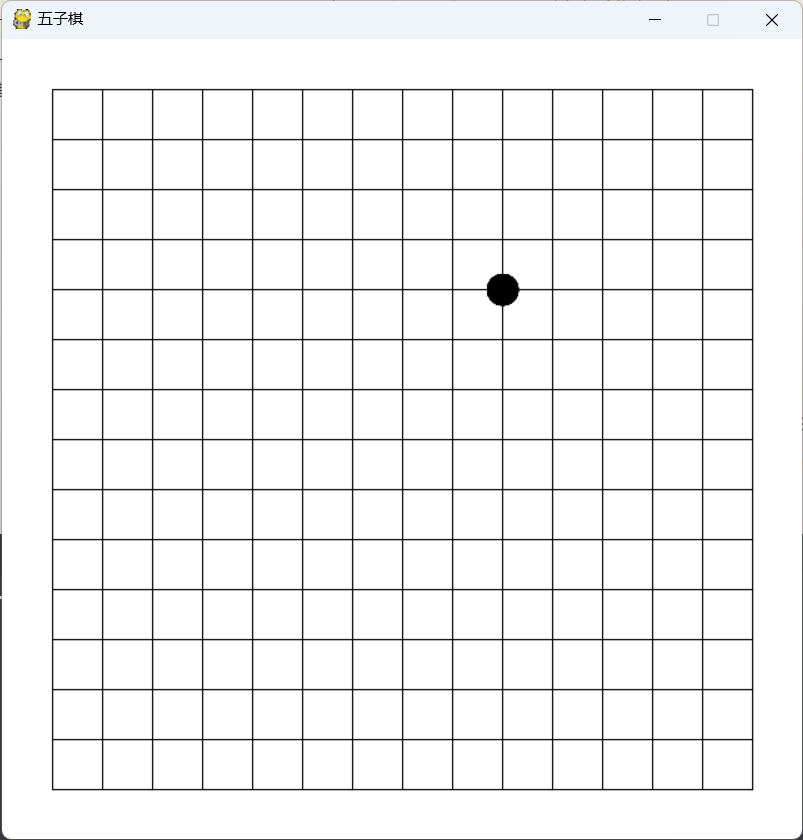
不知道为什么,棋子老是显示不了
【作品源代码】
import pygame

# 初始化 Pygame
pygame.init()

# 定义常量
SCREEN_WIDTH = 喵0
SCREEN_HEIGHT = 喵0
GRID_SIZE = 40

# 创建游戏窗口
screen = pygame.display.set_mode((SCREEN_WIDTH, SCREEN_HEIGHT))
pygame.display.set_caption('五子棋')

# 导入白子和黑子图片
black_piece_image = pygame.image.load('black_piece.png')
white_piece_image = pygame.image.load('white_piece.png')

# 调整棋子大小
piece_size = (GRID_SIZE, GRID_SIZE)
black_piece_image = pygame.transform.scale(black_piece_image, piece_size)
white_piece_image = pygame.transform.scale(white_piece_image, piece_size)

# 初始化游戏数据
board = [[0] * 15 for _ in range(15)]
player = 1
game_over = False

# 创建棋子副本
def create_piece_copy(piece_image):
    return piece_image.copy()

# 画棋子
def draw_piece(row, col):
    x = (col + 1) * GRID_SIZE - black_piece_image.get_width() // 2
    y = (row + 1) * GRID_SIZE - black_piece_image.get_height() // 2
    if player == 1:
        screen.blit(create_piece_copy(black_piece_image), (x, y))
    else:
        screen.blit(create_piece_copy(white_piece_image), (x, y))

# 判断游戏是否结束
def check_game_over():
    global game_over
    for row in range(15):
        for col in range(15):
            if board[row][col] == 0:
                continue
            # 横向
            if col <= 10 and board[row][col] == board[row][col+1] == board[row][col+2] == board[row][col+3] == board[row][col+4]:
                game_over = True
                return
            # 竖向
            if row <= 10 and board[row][col] == board[row+1][col] == board[row+2][col] == board[row+3][col] == board[row+4][col]:
                game_over = True
                return
            # 左上到右下
            if row <= 10 and col <= 10 and board[row][col] == board[row+1][col+1] == board[row+2][col+2] == board[row+3][col+3] == board[row+4][col+4]:
                game_over = True
                return
            # 右上到左下
            if row <= 10 and col >= 4 and board[row][col] == board[row+1][col-1] == board[row+2][col-2] == board[row+3][col-3] == board[row+4][col-4]:
                game_over = True
                return

    # 在游戏结束后显示胜利信息
    if game_over:
        winner = "黑方" if player == 2 else "白方"
        font = pygame.font.SysFont(None, 48)
        text = font.render(f"{winner}获胜!", True, (255, 0, 0))
        text_rect = text.get_rect(center=(SCREEN_WIDTH // 2, SCREEN_HEIGHT // 2))
        screen.blit(text, text_rect)
        pygame.display.update()


# 在处理鼠标点击事件时更新游戏窗口
running = True
piece_x, piece_y = -1, -1  # 初始化棋子虚影的位置
while running:
    # 处理事件
    for event in pygame.event.get():
        if event.type == pygame.QUIT:
            running = False
        elif event.type == pygame.MOUSEBUTTONDOWN and not game_over:
            # 将鼠标位置转换为棋盘坐标
            x, y = event.pos
            col = x // GRID_SIZE - 1
            row = y // GRID_SIZE - 1
            # 判断该位置是否可下棋子
            if row >= 0 and row < 15 and col >= 0 and col < 15 and board[row][col] == 0:
                board[row][col] = player
                # 绘制当前玩家的棋子
                if player == 1:
                    screen.blit(black_piece_image, ((col + 1) * GRID_SIZE - black_piece_image.get_width() // 2, (row + 1) * GRID_SIZE - black_piece_image.get_height() // 2))
                else:
                    screen.blit(white_piece_image, ((col + 1) * GRID_SIZE - white_piece_image.get_width() // 2, (row + 1) * GRID_SIZE - white_piece_image.get_height() // 2))
                pygame.display.update()  # 更新屏幕
                check_game_over()
                if not game_over:
                    player = 3 - player  # 切换到另一个玩家


        elif event.type == pygame.MOUSEMOTION and not game_over:
            # 更新棋子虚影的位置
            x, y = event.pos
            col = x // GRID_SIZE - 1
            row = y // GRID_SIZE - 1
            if row >= 0 and row < 15 and col >= 0 and col < 15 and board[row][col] == 0:
                piece_x, piece_y = (col + 1) * GRID_SIZE, (row + 1) * GRID_SIZE
            else:
                piece_x, piece_y = -1, -1
        elif event.type == pygame.KEYDOWN:
            if event.key == pygame.K_ESCAPE:
                running = False

    # 画棋盘
    screen.fill((255, 255, 255))
    for row in range(15):
        pygame.draw.line(screen, (0, 0, 0), (GRID_SIZE, (row + 1) * GRID_SIZE), (SCREEN_WIDTH - GRID_SIZE, (row + 1) * GRID_SIZE))
    for col in range(15):
        pygame.draw.line(screen, (0, 0, 0), ((col + 1) * GRID_SIZE, GRID_SIZE), ((col + 1) * GRID_SIZE, SCREEN_HEIGHT - GRID_SIZE))

    # 绘制棋子虚影
    if piece_x != -1 and piece_y != -1:
        if player == 1:
            screen.blit(black_piece_image, (piece_x - black_piece_image.get_width() // 2, piece_y - black_piece_image.get_height() // 2))
        else:
            screen.blit(white_piece_image, (piece_x - white_piece_image.get_width() // 2, piece_y - white_piece_image.get_height() // 2))

    # 更新屏幕
    pygame.display.update()

# 退出 Pygame
pygame.quit()
【提示】
部分含有Python第三方库相关内容的作品,在海龟编辑器网页端无法运行哦!如遇到这种情况,可以打开下面的链接,下载海龟编辑器客户端:
https://python.codemao.cn