 姚国栋udn0查看:31 回复:0 评论:0 创建时间:2024-01-05T19:50:51
用户:
【作品展示】
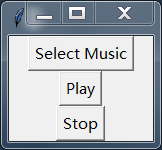
【作品介绍】
音乐播放器
【作品源代码】
import pygame
from tkinter import filedialog
import tkinter as tk


class MusicPlayerApp:
    def __init__(self, root):
        self.root = root
        self.root.title("Music Player")

        self.music_file = None
        self.playing = False

        self.create_widgets()

    def create_widgets(self):
        self.select_button = tk.Button(
            self.root, text="Select Music", command=self.load_music)
        self.select_button.pack()

        self.play_button = tk.Button(
            self.root, text="Play", command=self.play_music)
        self.play_button.pack()

        self.stop_button = tk.Button(
            self.root, text="Stop", command=self.stop_music)
        self.stop_button.pack()

    def load_music(self):
        self.music_file = filedialog.askopenfilename(
            filetypes=[("MP3 files", "*.mp3")])

    def play_music(self):
        if self.music_file and not self.playing:
            pygame.init()
            pygame.mixer.init()
            pygame.mixer.music.load(self.music_file)
            pygame.mixer.music.play()
            self.playing = True

    def stop_music(self):
        if self.playing:
            pygame.mixer.music.stop()
            self.playing = False


if __name__ == "__main__":
    root = tk.Tk()
    app = MusicPlayerApp(root)
    root.mainloop()
【提示】
部分含有Python第三方库相关内容的作品,在海龟编辑器网页端无法运行哦!如遇到这种情况,可以打开下面的链接,下载海龟编辑器客户端:
https://python.codemao.cn