 121115查看:37 回复:0 评论:0 创建时间:2023-12-16T17:56:32
用户:121115查看:37 回复:0 评论:0 创建时间:2023-12-16T17:56:32
【作品展示】
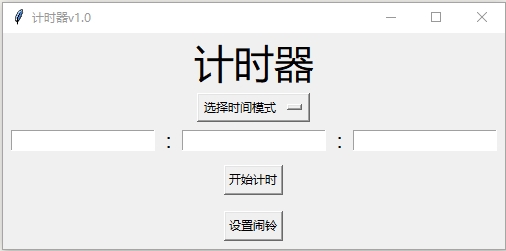
【作品介绍】
这是我用Python做的计时器,可以更换⏰铃声
【作品源代码】
import tkinter as tk
import pygame
import datetime
from tkinter import filedialog

# 初始化
# {
pygame.init()
pygame.mixer.init()
screen = tk.Tk()
screen.title("计时器v1.0")
# }

# 函数集
# {
def time_option_handler(event):
    global choices
    choice = choices.get()
    return choice

def reckon_by_time(event):
    global choices,second_entry,minute_entry,hour_entry
    get_choice = time_option_handler(event)
    get_second = second_entry.get()
    get_minute = minute_entry.get()
    get_hour = hour_entry.get()

    if get_second == "" or get_second == "00":
        get_second = "0"
    if get_minute == "" or get_minute == "00":
        get_minute = "0"
    if get_hour == "" or get_hour == "00":
        get_hour = "0"

    if get_choice == "选择时间模式":
        pass
    elif get_choice == "相对时间":
        if int(get_second)+int(get_minute)+int(get_hour) == 0:
            pass
        elif int(get_second)+int(get_minute)+int(get_hour) != 0:
            wait_time = int(get_second)+int(get_minute)*60+int(get_hour)*60*60
            for wait in range(1,wait_time+1):
                pygame.time.wait(1000)
                if wait == wait_time:
                    break

            play(1)

    elif get_choice == "绝对时间":
        now_time = datetime.datetime.now()
        now_hour = now_time.hour
        now_minute = now_time.minute
        now_second = now_time.second

        this_time = now_hour*3600+now_minute*60+now_second
        sound_time = int(get_hour)*3600+int(get_minute)*60+int(get_second)

        if sound_time == 0:
            pass
        else:
            if sound_time - this_time <= 0:
                pass
            else:
                wait_time = sound_time - this_time
                for wait in range(wait_time+1):
                    pygame.time.wait(1000)
                    if wait == wait_time:
                        break

                play(1)

def set_sound(event):
    sound_file = filedialog.askopenfilename(title="请选择闹铃",filetypes=[("音频文件1",".ogg"),("音频文件2",".wav"),("音频文件3",".mp3")])

    if sound_file == "":
        pass
    else:
        with open("G:\\程雨恬\\项目\\闹钟项目\\项目文件\\sound_path.txt","w") as AlarmClockSound:
            file = AlarmClockSound.write(sound_file)
# }

# 界面控件
# {
title_lable = tk.Label(screen,text="计时器", font="微软雅黑 30")

choices = tk.StringVar(screen)
choices.set('选择时间模式')
time_option = tk.OptionMenu(screen,choices,"相对时间","绝对时间",command=time_option_handler)

second_entry = tk.Entry(screen)

second_minute = tk.Label(screen,text=":",font="微软雅黑 15")

minute_entry = tk.Entry()

minute_hour = tk.Label(screen,text=":",font="微软雅黑 15")

hour_entry = tk.Entry()

reckon_by_time_button = tk.Button(screen,text="开始计时")
reckon_by_time_button.bind("",reckon_by_time)

set_sound_button = tk.Button(screen,text="设置闹铃")
set_sound_button.bind("",set_sound)
# }

# 页面布局
# {
title_lable.grid(row=0,column=2)
time_option.grid(row=1,column=2)
hour_entry.grid(row=2,column=0,padx=8);second_minute.grid(row=2,column=1);minute_entry.grid(row=2,column=2,padx=8);minute_hour.grid(row=2,column=3);second_entry.grid(row=2,column=4,padx=8)
reckon_by_time_button.grid(row=3,column=2,pady=8)
set_sound_button.grid(row=4,column=2,pady=8)
# }

with open("G:\\程雨恬\\项目\\闹钟项目\\项目文件\\sound_path.txt","r") as sound:
    global sound_path
    sound_path = sound.read()

alarm_clock_sound = pygame.mixer.Sound(sound_path)
alarm_clock_sound.set_volume(0.5)

def play(play_number):
    alarm_clock_sound.play(play_number)

screen.mainloop()
【提示】
部分含有Python第三方库相关内容的作品,在海龟编辑器网页端无法运行哦!如遇到这种情况,可以打开下面的链接,下载海龟编辑器客户端:
https://python.codemao.cn