 机智的星能猫sCkZ查看:60 回复:1 评论:0 创建时间:2023-11-12T10:10:23
用户:机智的星能猫sCkZ查看:60 回复:1 评论:0 创建时间:2023-11-12T10:10:23
【作品展示】
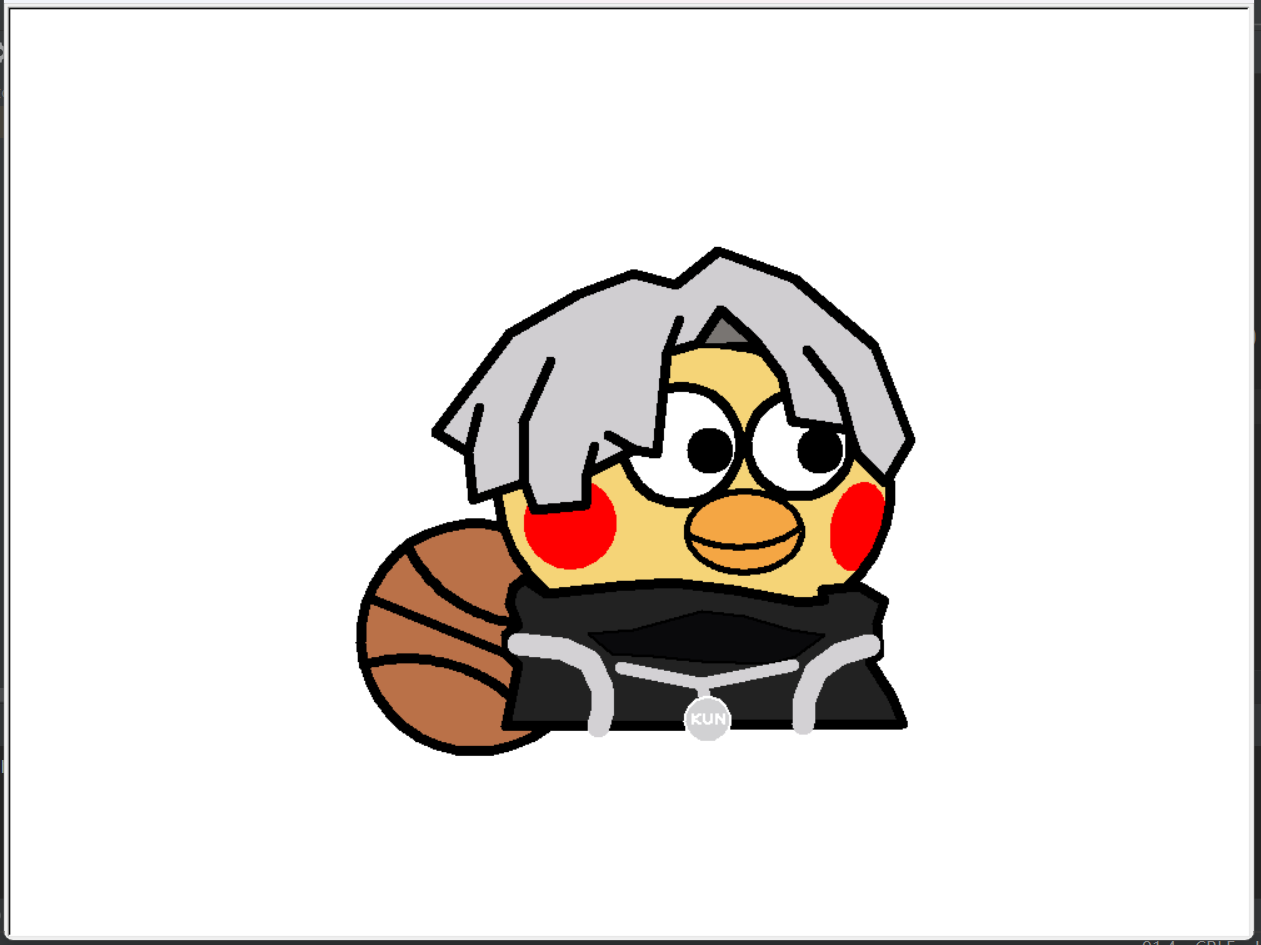
【作品介绍】
喵
【作品源代码】
import turtle as t
import math

t.setup(1000, 750)
t.setworldcoordinates(-800, -600, 800, 600)
t.title('I am ikun!!')
t.width(8)
t.speed(0)
t.pencolor('black')


def my_circle(rad, c_x, c_y, color=None):
    if color is not None:
        t.fillcolor(color)
        t.begin_fill()
    t.penup()
    t.setheading(0)
    t.goto(c_x, c_y-rad)
    t.pendown()
    t.circle(rad)
    if color is not None:
        t.end_fill()


def get_ellipse_xy(a, b, theta):
    if theta < 0:
        theta = theta+math.pi*2
    x = a * b / math.sqrt(b * b + a * a * math.tan(theta) * math.tan(theta))
    if theta < math.pi/2:
        return {'x': x, 'y': x*math.tan(theta)}
    elif theta < math.pi:
        return {'x': x*(-1), 'y': x*(-1)*math.tan(theta)}
    elif theta < math.pi*3/2:
        return {'x': x*(-1), 'y': x*(-1)*math.tan(theta)}
    else:
        return {'x': x, 'y': x*math.tan(theta)}

# 画一个椭圆,shape为椭圆形状参数,start_ang、end_ang为起始角度(相对于椭圆中心)
# shape = {"X0": 0,"Y0": 0,"a": 200,"b": 100,"angle": math.pi/3}


def draw_ellipse(shape, start_ang, end_ang, color=None):
    if color is not None:
        t.fillcolor(color)
        t.begin_fill()
    a = shape['a']
    b = shape['b']
    shape_ang = shape['angle']
    theta = start_ang - shape_ang
    x1, y1 = get_ellipse_xy(a, b, theta).values()
    x = shape['X0'] + x1 * math.cos(shape_ang) - y1 * math.sin(shape_ang)
    y = shape['Y0'] + x1 * math.sin(shape_ang) + y1 * math.cos(shape_ang)
    t.penup()
    t.goto(x, y)
    t.pendown()
    step = math.pi/180*2    # 以方位角2°一步
    num_steps = math.ceil((end_ang-start_ang)/step)  # 总步数
    for i in range(num_steps):
        theta = theta + step
        x1, y1 = get_ellipse_xy(a, b, theta).values()
        t.goto(shape['X0'] + x1 * math.cos(shape_ang) - y1 * math.sin(shape_ang),
               shape['Y0'] + x1 * math.sin(shape_ang) + y1 * math.cos(shape_ang))
    if color is not None:
        t.end_fill()


#画篮球
my_circle(150, -206, -212, '#BA7148')
baskt_line1 = {"X0": -120, "Y0": -34, "a": 186, "b": 162, "angle": 0}
draw_ellipse(baskt_line1, math.pi / 180 * 198, math.pi / 180 * 290)
baskt_line2 = {"X0": -294, "Y0": -402, "a": 186, "b": 162, "angle": 0}
draw_ellipse(baskt_line2, math.pi / 180 * 21, math.pi / 180 * 110)
t.penup()
t.goto(-346, -160)
t.pendown()
t.goto(-66, -274)

# 画脸蛋
face = {"X0": 80, "Y0": -22, "a": 256, "b": 198, "angle": 0}
draw_ellipse(face, 0, math.pi * 2, '#F5D477')

#眼睛
my_circle(77, 63, 41, 'white')
my_circle(68, 217, 41, 'white')
my_circle(24, 100, 34, 'black')
my_circle(24, 244, 34, 'black')

#嘴巴
t.width(5)
mouth = {"X0": 145, "Y0": -73, "a": 75, "b": 53, "angle": 0}
draw_ellipse(mouth, 0, math.pi * 2, '#F4A喵4')
mouse_line = {"X0": 138, "Y0": -40, "a": 92, "b": 53, "angle": 0}
draw_ellipse(mouse_line, math.pi / 180 * 208, math.pi / 180 * 342, '#F4A喵4')

#腮红
t.width(1)
t.pencolor('#F5D477')
my_circle(62, -82, -62, 'red')  # 左边
face_cheek = {"X0": 294, "Y0": -66, "a": 37, "b": 60, "angle": -math.pi/180*12}
draw_ellipse(face_cheek, 0, math.pi * 2, 'red')  # 右边
#腮红有点遮住脸的轮廓,重新绘制一遍
t.pencolor('black')
t.width(8)
draw_ellipse(face, -math.pi / 3, math.pi / 3)

# 定义一个画polygon的函数


def draw_poly(poly_data, color=None):
    x = poly_data['x']
    y = poly_data['y']
    t.penup()
    t.goto(x[0], y[0])
    t.pendown()
    if color is not None:
        t.fillcolor(color)
        t.begin_fill()
    for i in range(len(x)):
        t.goto(x[i], y[i])
    if color is not None:
        t.end_fill()


# 画头发
poly_hair = {'x': [-258, -161, -74, 0, 55, 111, 211, 315, 362,
                   329, 293, 283, 269, 227, 269, 283, 208, 194,
                   160, 160, 85, 44, 61, 44, 31, 1, -33,
                   1, -60, -51, -60, -62, -129, -142, -144, -108,
                   -144, -142, -209, -216, -200, -216, -258],
             'y': [57, 187, 238, 267, 251, 296, 260, 171,
                   47, -9, 29, 61, 110, 166, 110, 61, 72, 132,
                   178, 178, 174, 162, 206, 162,
                   29, 35, 54, 35, 4, 40, 4, -37, -45, -8, 71,
                   152, 71, -8, -31, 31, 90, 31, 57]
             }
draw_poly(poly_hair, '#D0CED1')

# 头发下那个小三角
hair2 = {'x': [160, 114, 85], 'y': [178, 218, 174]}
draw_poly(hair2, '#797572')

# 衣服
poly_cloth = {'x': [-142, -112, -22, 50, 132, 218, 249, 247,
                    295, 328, 318, 321, 309, 338, 353, -167,
                    -150, -165, -166, -150, -162, -157, -142],
              'y': [-135, -155, -144, -140, -150, -166, -163, -150,
                    -145, -165, -194, -233, -244, -290, -326, -328,
                    -248, -233, -209, -195, -167, -146, -135]
              }
draw_poly(poly_cloth, '#222222')
cloth2 = {'x': [-58, 0, 89, 146, 205, 250, 212, 179, 89, 26, -27, -58],
          'y': [-207, -203, -178, -184, -202, -208, -236, -246, -243, -237, -233, -207]
          }
t.width(2)
draw_poly(cloth2, '#0A0A0C')  # 中间黑的那一块

# 左右背带
strap1 = {'x': [-150, -92, -57, -41, -39, -46],
          'y': [-220, -227, -243, -277, -306, -328]}
strap2 = {'x': [309, 269, 238, 224, 222], 'y': [-222, -233, -257, -292, -326]}
t.width(18)
t.pencolor('#D3D1D4')
draw_poly(strap1)
draw_poly(strap2)

#中间背带
t.width(10)
strap3 = {'x': [-17, 90, 209, 90, 93], 'y': [-251, -273, -248, -273, -290]}
draw_poly(strap3)
t.width(2)
t.pencolor('white')
my_circle(30, 97, -320, '#D1D1D3')

# 文字kun
k = {'x': [78, 78, 78, 88, 78, 88], 'y': [-312, -326, -319, -312, -319, -326]}
draw_poly(k)
u = {'x': [93, 93, 98, 103, 103], 'y': [-312, -323, -326, -323, -312]}
draw_poly(u)
n = {'x': [109, 109, 119, 119], 'y': [-326, -312, -326, -312]}
draw_poly(n)

t.resizemode("user")
t.shapesize(0.8, 0.8)
t.hideturtle()
t.done()
【提示】
部分含有Python第三方库相关内容的作品,在海龟编辑器网页端无法运行哦!如遇到这种情况,可以打开下面的链接,下载海龟编辑器客户端:
https://python.codemao.cn ikun桔瓣儿
666,纯种ikun imgsrc="https://static.codemao.cn/emoji/codemao/%E7%BC%96%E7%A8%8B%E7%8C%AB_%E5%8E%89%E5%AE%B3%E4%BA%86.gif"alt="emotion_编程猫_厉害了"
点赞0
评论