 欧布奥特曼yyds查看:25 回复:0 评论:0 创建时间:2023-08-09T19:45:51
用户:欧布奥特曼yyds查看:25 回复:0 评论:0 创建时间:2023-08-09T19:45:51
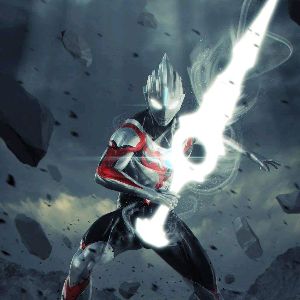
【作品展示】
【作品介绍】
dw
【作品源代码】
'''
惊奇画廊
窗口尺寸800x500,画的宽度为250,高度按比例缩放
'''

import turtle as t
import os, sys
import time

def get_resource_path(path):
    if os.path.isabs(path):
        # 获取当前脚本所在目录的绝对路径
        dir_realpath = repr(os.path.abspath(__file__))
        # 获取传入文件相对于脚本的相对路径
        relative_path = os.path.relpath(path, dir_realpath)
    else:
        relative_path = path
    if getattr(sys, 'frozen', False) and hasattr(sys, '_MEIPASS'):
        return os.path.join(sys._MEIPASS, relative_path)
    return os.path.join(os.path.abspath("."), relative_path)

# 初始设置,窗口大小和位置,隐藏默认画笔
t.setup(800, 500, 0, 0)
t.screensize(bg='black')
t.tracer(False)
t.hideturtle()
# 移动速度
move_speed = 6

bg = t.Pen() # 背景
flo = t.Pen()  # 地面
fra1 = t.Pen() # 画框1
fra2 = t.Pen() # 画框2
fra3 = t.Pen() # 画框3
pic1 = t.Pen() # 画1
pic2 = t.Pen() # 画2
pic3 = t.Pen() # 画3
act = t.Pen()  # 角色

l_pen = [bg, flo, fra1, fra2, fra3, pic1, pic2, pic3, act] # 画笔列表
for i in l_pen:
    i.penup()
    i.hideturtle()
l_x = [0, 500, 1000] # 画框和画的横坐标变化队列
l_x_bg = [-600, 0, 600] # 背景的位置变化队列
x1, x2, x3 = l_x # 画框和画1,2,3的水平坐标
y = 0 # 画框和画1,2,3的纵坐标

exh = [0, 1, 2, 3, 4, 5] # 展览馆:0大厅,1涂鸦、2星空、3穿越、4游戏、5惊奇
exh_number = 1 # 当前场馆

# 全部抬笔
for i in l_pen:
    i.penup()

# 画笔落位
fra1.goto(x1, y)
pic1.goto(x1, y)
fra2.goto(x2, y)
pic2.goto(x2, y)
fra3.goto(x3, y)
pic3.goto(x3, y)

# 画笔外观初始设置
# 背景
l_bgs = [get_resource_path('涂鸦.gif'),
        get_resource_path('涂鸦.gif'),
        get_resource_path('涂鸦.gif'),
        get_resource_path('涂鸦.gif'),
        get_resource_path('涂鸦.gif'),
        get_resource_path('涂鸦.gif')]
for i in l_bgs:
    t.addshape(i)
bg.shape(l_bgs[exh_number])
l_pic0 = []
# 将画挂在画廊中
l_pic1 = [get_resource_path('works/out/作品1_小图.gif'),
          get_resource_path('works/out/作品2_小图.gif'),
          get_resource_path('works/out/作品3_小图.gif'),
          get_resource_path('works/out/作品4_小图.gif'),
          get_resource_path('works/out/作品5_小图.gif'),
          get_resource_path('works/out/作品6_小图.gif')]
l_pic2 = []
l_pic3 = []
l_pic4 = []
l_pic5 = []
l_pics = [l_pic0, l_pic1, l_pic2, l_pic3, l_pic4, l_pic5]
for j in l_pics:
    for i in j:
        t.addshape(i)
for j in l_pics:
    for i in j:
        t.addshape(i[:-6]+'大图.gif')

pic_number = 0  # 当前画序
pic1.shape(l_pics[exh_number][pic_number])
# 空图加载
t.addshape(get_resource_path('空.gif'))
# 角色初始外观
t.addshape(get_resource_path('角色左.gif'))
t.addshape(get_resource_path('角色右.gif'))
act.shape(get_resource_path('角色右.gif'))
# 角色初始位置
act_x = -280
act_y = -150
act.goto(act_x, act_y)
# 角色位置状态
act_ud = 0
# 角色位置计数器
act_i = 0
# 是否可以移动,1可以,0不可
ifmove = 1
# 查看大图状态
pic_focus_i = 0

# 功能函数区
def pen_move():
    '''画笔移动'''
    fra1.goto(x1, y)
    pic1.goto(x1, y)
    fra2.goto(x2, y)
    pic2.goto(x2, y)
    fra3.goto(x3, y)
    pic3.goto(x3, y)

def move_right_start():
    '''角色向右移动'''
    global x1, x2, x3, pic_number, act_i, act_ud
    # 大厅不让移动
    if exh_number == 0:
        return
    # 读图时禁止移动
    if ifmove == 0:
        return
    # 背景的移动
    if l_x_bg[0] < -900:
        l_x_bg[0] += 600
        l_x_bg[1] += 600
        l_x_bg[2] += 600
    l_x_bg[0] -= move_speed
    l_x_bg[1] -= move_speed
    l_x_bg[2] -= move_speed
    # 画的移动
    if l_x[0] < -625 and pic_number < len(l_pics[exh_number]) - 1:
        l_x[0] += 1500
        l_x[0], l_x[1], l_x[2] = l_x[1], l_x[2], l_x[0]
        pic_number += 1
        pic1.shape(l_pics[exh_number][pic_number-2])
        pic2.shape(l_pics[exh_number][pic_number-1])
        pic3.shape(l_pics[exh_number][pic_number])
    l_x[0] -= move_speed
    l_x[1] -= move_speed
    l_x[2] -= move_speed
    x1, x2, x3 = l_x
    pen_move()
    # 角色的转向和跳动
    act.shape(get_resource_path('角色右.gif'))
    if act_ud == 0:
        act.goto(act_x, act_y+5)
        act_i += 1
    elif act_ud == 1:
        act.goto(act_x, act_y)
        act_i -= 1
    if act_i > 10:
        act_ud = 1
    elif act_i < 0:
        act_ud = 0

def move_left_start():
    '''角色向左移动'''
    global x1, x2, x3, pic_number, act_i, act_ud
    # 大厅不让移动
    if exh_number == 0:
        return
    # 读图时禁止移动
    if ifmove == 0:
        return
    # 背景的移动
    if l_x_bg[2] > 900:
        l_x_bg[0] -= 600
        l_x_bg[1] -= 600
        l_x_bg[2] -= 600
    l_x_bg[0] += move_speed
    l_x_bg[1] += move_speed
    l_x_bg[2] += move_speed
    # 画的移动
    if l_x[2] > 625 and pic_number > 2:
        l_x[2] -= 1500
        l_x[0], l_x[1], l_x[2] = l_x[2], l_x[0], l_x[1]
        pic_number -= 1
        pic3.shape(l_pics[exh_number][pic_number])
        pic1.shape(l_pics[exh_number][pic_number-2])
        pic2.shape(l_pics[exh_number][pic_number-1])
    l_x[0] += move_speed
    l_x[1] += move_speed
    l_x[2] += move_speed
    x1, x2, x3 = l_x
    pen_move()
    # 角色的转向和跳动
    act.shape(get_resource_path('角色左.gif'))
    if act_ud == 0:
        act.goto(act_x, act_y+5)
        act_i += 1
    elif act_ud == 1:
        act.goto(act_x, act_y)
        act_i -= 1
    if act_i > 10:
        act_ud = 1
    elif act_i < 0:
        act_ud = 0

def load_map(n):
    '''读图'''
    global ifmove
    ifmove = 0
    # act.shape('喵')
    # act.shapesize(70)
    # act.goto(0, 0)
    # for i in range(100):
    #     act.color(i/100, i/100, i/100)
    #     act.stamp()
    ifmove = 1

def goto_dating():
    '''前往大厅'''
    global exh_number, l_x, l_x_bg, x1, x2, x3, y, act_x, act_y, act_ud, act_i, pic_number
    exh_number = 0  # 当前场馆
    l_x = [0, 500, 1000] # 画框和画的横坐标变化队列
    l_x_bg = [-600, 0, 600] # 背景的位置变化队列
    x1, x2, x3 = l_x # 画框和画1,2,3的水平坐标
    y = 0 # 画框和画1,2,3的纵坐标
    # 画笔落位
    fra1.goto(x1, y)
    pic1.goto(x1, y)
    fra2.goto(x2, y)
    pic2.goto(x2, y)
    fra3.goto(x3, y)
    pic3.goto(x3, y)
    # 背景设置
    bg.shape(l_bgs[exh_number])
    pic_number = 0 # 当前画序
    pic1.shape(l_pics[exh_number][pic_number])
    pic2.shape(get_resource_path('空.gif'))
    pic3.shape(get_resource_path('空.gif'))
    # 角色初始外观
    act.shape(get_resource_path('角色右.gif'))
    # 角色初始位置
    act_x = -280
    act_y = -150
    act.goto(act_x, act_y)
    # 角色位置状态
    act_ud = 0
    # 角色位置计数器
    act_i = 0

def goto_changguan(n):
    '''前往不同场馆的初始设置'''
    global exh_number, l_x, l_x_bg, x1, x2, x3, y, act_x, act_y, act_ud, act_i, pic_number
    exh_number = n  # 当前场馆
    l_x = [0, 500, 1000] # 画框和画的横坐标变化队列
    l_x_bg = [-600, 0, 600] # 背景的位置变化队列
    x1, x2, x3 = l_x # 画框和画1,2,3的水平坐标
    y = 0 # 画框和画1,2,3的纵坐标
    # 画笔落位
    fra1.goto(x1, y)
    pic1.goto(x1, y)
    fra2.goto(x2, y)
    pic2.goto(x2, y)
    fra3.goto(x3, y)
    pic3.goto(x3, y)
    # 背景设置
    bg.shape(l_bgs[exh_number])
    pic_number = 2 # 当前画序
    pic1.shape(l_pics[exh_number][pic_number-2])
    pic2.shape(l_pics[exh_number][pic_number-1])
    pic3.shape(l_pics[exh_number][pic_number])
    # 角色初始外观
    act.shape(get_resource_path('角色右.gif'))
    # 角色初始位置
    act_x = -280
    act_y = -150
    act.goto(act_x, act_y)
    # 角色位置状态
    act_ud = 0
    # 角色位置计数器
    act_i = 0

def goto_tuya():
    '''前往涂鸦馆'''
    goto_changguan(1)

def goto_xingkong():
    '''前往星空馆'''
    goto_changguan(2)

def goto_chuanyue():
    '''前往穿越馆'''
    goto_changguan(3)

def goto_youxi():
    '''前往游戏馆'''
    goto_changguan(4)

def goto_jingqi():
    '''前往惊奇馆'''
    goto_changguan(5)

def pic_focus():
    '''查看作品大图'''
    global ifmove, pic_focus_i, _pic_x, _pic_y, _i
    ifmove = 0
    if pic_focus_i == 0:
        pic_focus_i = 1
    else:
        pic_focus_i = 0
        ifmove = 1
        if exh_number == 0:
            pic1.shape(l_pics[exh_number][pic_number])
            pic2.shape(get_resource_path('空.gif'))
            pic3.shape(get_resource_path('空.gif'))
        else:
            pic1.shape(l_pics[exh_number][pic_number-2])
            pic2.shape(l_pics[exh_number][pic_number-1])
            pic3.shape(l_pics[exh_number][pic_number])
        if _i == 1:
            pic1.goto(_pic_x, _pic_y)
        elif _i == 2:
            pic2.goto(_pic_x, _pic_y)
        elif _i == 3:
            pic3.goto(_pic_x, _pic_y)
        return
    x1, y1 = pic1.pos()
    x2, y2 = pic2.pos()
    x3, y3 = pic3.pos()
    print(x1, x2, x3)
    x1 = abs(x1)
    x2 = abs(x2)
    x3 = abs(x3)
    if exh_number == 0:
        name = l_pics[exh_number][pic_number][:-6] + '大图.gif'
        _pic_x, _pic_y = pic3.pos()
        _i = 3
        pic3.goto(0, 0)
        pic3.shape(name)
        pic1.shape(get_resource_path('空.gif'))
        pic2.shape(get_resource_path('空.gif'))
        return
    if min([x1, x2, x3]) == x1:
        name = l_pics[exh_number][pic_number-2][:-6] + '大图.gif'
        _pic_x, _pic_y = pic1.pos()
        _i = 1
        pic1.goto(0, 0)
        pic1.shape(name)
        pic2.shape(get_resource_path('空.gif'))
        pic3.shape(get_resource_path('空.gif'))
    elif min([x1, x2, x3]) == x2:
        name = l_pics[exh_number][pic_number-1][:-6] + '大图.gif'
        _pic_x, _pic_y = pic2.pos()
        _i = 2
        pic2.goto(0, 0)
        pic2.shape(name)
        pic1.shape(get_resource_path('空.gif'))
        pic3.shape(get_resource_path('空.gif'))
    elif min([x1, x2, x3]) == x3:
        name = l_pics[exh_number][pic_number][:-6] + '大图.gif'
        _pic_x, _pic_y = pic3.pos()
        _i = 3
        pic3.goto(0, 0)
        pic3.shape(name)
        pic1.shape(get_resource_path('空.gif'))
        pic2.shape(get_resource_path('空.gif'))

# 按键监听
t.onkeypress(move_right_start, 'Right')
t.onkeypress(move_left_start, 'Left')
t.onkey(goto_tuya, '1')
t.onkey(pic_focus, 'space')
t.listen()

goto_changguan(1)
# 主循环
while True:
    for i in l_pen:
        i.clear()
    bg.goto(l_x_bg[0], 0)
    bg.stamp()
    bg.goto(l_x_bg[2], 0)
    bg.stamp()
    bg.goto(l_x_bg[1], 0)
    bg.stamp()
    fra1.stamp()
    fra2.stamp()
    fra3.stamp()
    pic1.stamp()
    pic2.stamp()
    pic3.stamp()
    act.stamp()

    t.update()

t.done()
【提示】
部分含有Python第三方库相关内容的作品,在海龟编辑器网页端无法运行哦!如遇到这种情况,可以打开下面的链接,下载海龟编辑器客户端:
https://python.codemao.cn