 vocal查看:60 回复:0 评论:0 创建时间:2023-06-24T21:59:19
用户:vocal查看:60 回复:0 评论:0 创建时间:2023-06-24T21:59:19
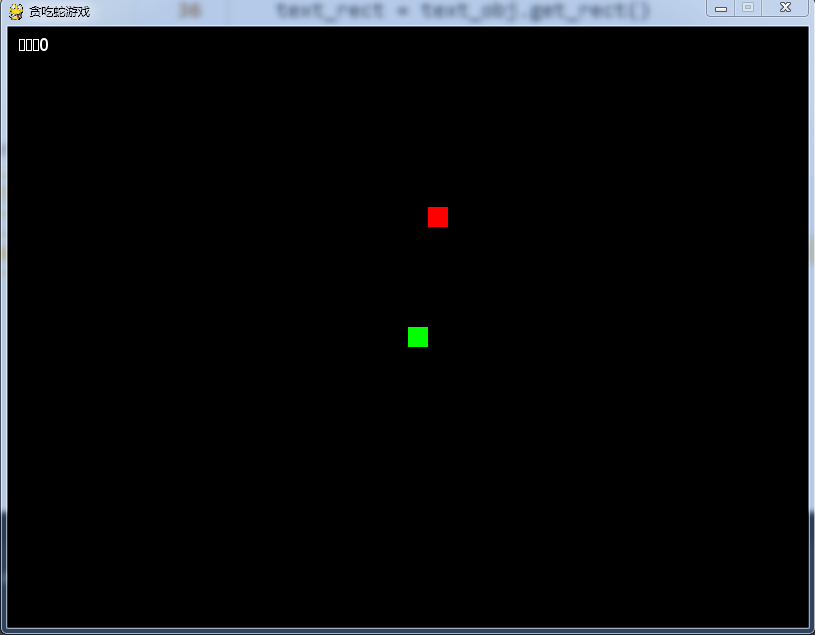
【作品展示】
【作品介绍】
基于ChatGPT使用ai制作的无插件贪吃蛇
【作品源代码】
import pygame
import random

# 定义各种颜色
WHITE = (255, 255, 255)
BLACK = (0, 0, 0)
GREEN = (0, 255, 0)
RED = (255, 0, 0)

# 设置屏幕大小
WIDTH = 800
HEIGHT = 600

# 设置一个方格的大小
BLOCK_SIZE = 20

# 初始化pygame
pygame.init()

# 创建屏幕
screen = pygame.display.set_mode((WIDTH, HEIGHT))

# 设置游戏标题
pygame.display.set_caption("贪吃蛇游戏")

# 设置时钟
clock = pygame.time.Clock()

# 定义文字输出
font = pygame.font.SysFont(None, 25)


# 绘制文字
def draw_text(text, font, color, surface, x, y):
    text_obj = font.render(text, True, color)
    text_rect = text_obj.get_rect()
    text_rect.topleft = (x, y)
    surface.blit(text_obj, text_rect)


# 绘制蛇
def draw_snake(snake_block, snake_list):
    for x in snake_list:
        pygame.draw.rect(screen, GREEN, [x[0], x[1], snake_block, snake_block])


# 循环进行游戏
def game_loop():
    # 设置初始位置
    x1 = WIDTH / 2
    y1 = HEIGHT / 2

    # 设置初始方向
    x1_change = 0
    y1_change = 0

    # 初始化蛇列表
    snake_list = []
    snake_length = 1

    # 设置食物
    foodx = round(random.randrange(0, WIDTH - BLOCK_SIZE) / 20.0) * 20.0
    foody = round(random.randrange(0, HEIGHT - BLOCK_SIZE) / 20.0) * 20.0

    # 定义游戏结束标志
    game_close = False

    # 开始游戏循环
    while not game_close:
        for event in pygame.event.get():
            if event.type == pygame.QUIT:
                game_close = True
            # 获取键盘事件
            if event.type == pygame.KEYDOWN:
                if event.key == pygame.K_LEFT:
                    x1_change = -BLOCK_SIZE
                    y1_change = 0
                elif event.key == pygame.K_RIGHT:
                    x1_change = BLOCK_SIZE
                    y1_change = 0
                elif event.key == pygame.K_UP:
                    y1_change = -BLOCK_SIZE
                    x1_change = 0
                elif event.key == pygame.K_DOWN:
                    y1_change = BLOCK_SIZE
                    x1_change = 0

        # 判断是否蛇吃到食物
        if x1 == foodx and y1 == foody:
            foodx = round(random.randrange(
                0, WIDTH - BLOCK_SIZE) / 20.0) * 20.0
            foody = round(random.randrange(
                0, HEIGHT - BLOCK_SIZE) / 20.0) * 20.0
            snake_length += 1

        # 确定下一步蛇头的位置
        x1 += x1_change
        y1 += y1_change

        # 判断蛇是否超出了屏幕边界
        if x1 >= WIDTH or x1 < 0 or y1 >= HEIGHT or y1 < 0:
            game_close = True

        # 设置蛇身体的位置
        snake_head = []
        snake_head.append(x1)
        snake_head.append(y1)
        snake_list.append(snake_head)

        # 如果蛇身体的长度大于 snake_length,删除最后一个方块
        if len(snake_list) > snake_length:
            del snake_list[0]

        # 判断蛇头是否和蛇身体相撞
        for x in snake_list[:-1]:
            if x == snake_head:
                game_close = True

        # 设置蛇的颜色和大小
        screen.fill(BLACK)
        draw_snake(BLOCK_SIZE, snake_list)
        pygame.draw.rect(screen, RED, [foodx, foody, BLOCK_SIZE, BLOCK_SIZE])

        # 显示得分
        draw_text("得分:" + str(snake_length - 1), font, WHITE, screen, 10, 10)

        # 更新屏幕
        pygame.display.update()

        # 设置帧数
        clock.tick(15)

    # 结束pygame
    pygame.quit()

    # 退出程序
    quit()


# 开始游戏
game_loop()
【提示】
部分含有Python第三方库相关内容的作品,在海龟编辑器网页端无法运行哦!如遇到这种情况,可以打开下面的链接,下载海龟编辑器客户端:
https://python.codemao.cn