 Moss查看:131 回复:1 评论:0 创建时间:2023-04-30T22:13:24
用户:Moss查看:131 回复:1 评论:0 创建时间:2023-04-30T22:13:24
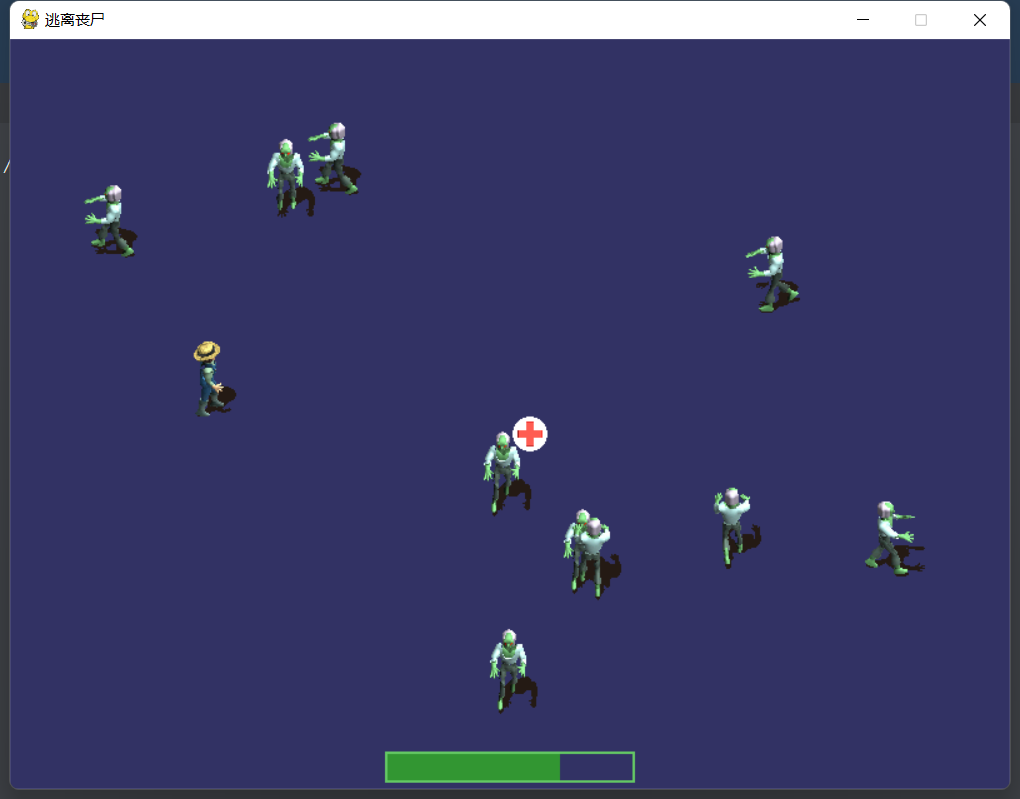
【作品展示】
【作品介绍】
逃离丧尸
【作品源代码】
# Zombie Mob Game
# Chapter 8

import itertools
import sys
import time
import random
import math
import pygame
from pygame.locals import *
from MyLibrary import *


def calc_velocity(direction, vel=1.0):
    velocity = Point(0, 0)
    if direction == 0:  # north
        velocity.y = -vel
    elif direction == 2:  # east
        velocity.x = vel
    elif direction == 4:  # south
        velocity.y = vel
    elif direction == 6:  # west
        velocity.x = -vel
    return velocity


def reverse_direction(sprite):
    if sprite.direction == 0:
        sprite.direction = 4
    elif sprite.direction == 2:
        sprite.direction = 6
    elif sprite.direction == 4:
        sprite.direction = 0
    elif sprite.direction == 6:
        sprite.direction = 2


#main program begins
pygame.init()
screen = pygame.display.set_mode((800, 600))
pygame.display.set_caption("逃离丧尸")
font = pygame.font.Font(None, 36)
timer = pygame.time.Clock()

#create sprite groups
player_group = pygame.sprite.Group()
zombie_group = pygame.sprite.Group()
health_group = pygame.sprite.Group()

#create the player sprite
player = MySprite()
player.load("farmer walk.png", 96, 96, 8)
player.position = 80, 80
player.direction = 4
player_group.add(player)


#create the zombie sprite
zombie_image = pygame.image.load("zombie walk.png").convert_alpha()
for n in range(0, 10):
    zombie = MySprite()
    zombie.load("zombie walk.png", 96, 96, 8)
    zombie.position = random.randint(0, 700), random.randint(0, 500)
    zombie.direction = random.randint(0, 3) * 2
    zombie_group.add(zombie)

#create heath sprite
health = MySprite()
health.load("health.png", 32, 32, 1)
health.position = 400, 300
health_group.add(health)

game_over = False
player_moving = False
player_health = 100


#repeating loop
while True:
    timer.tick(30)
    ticks = pygame.time.get_ticks()

    for event in pygame.event.get():
        if event.type == QUIT:
            sys.exit()
    keys = pygame.key.get_pressed()
    if keys[K_ESCAPE]:
        sys.exit()
    elif keys[K_UP] or keys[K_w]:
        player.direction = 0
        player_moving = True
    elif keys[K_RIGHT] or keys[K_d]:
        player.direction = 2
        player_moving = True
    elif keys[K_DOWN] or keys[K_s]:
        player.direction = 4
        player_moving = True
    elif keys[K_LEFT] or keys[K_a]:
        player.direction = 6
        player_moving = True
    else:
        player_moving = False

    if not game_over:
        #set animation frames based on player's direction
        player.first_frame = player.direction * player.columns
        player.last_frame = player.first_frame + player.columns-1
        if player.frame < player.first_frame:
            player.frame = player.first_frame

        if not player_moving:
            #stop animating when player is not pressing a key
            player.frame = player.first_frame = player.last_frame
        else:
            #move player in direction
            player.velocity = calc_velocity(player.direction, 1.5)
            player.velocity.x *= 1.5
            player.velocity.y *= 1.5

        #update player sprite
        player_group.update(ticks, 50)

        #manually move the player
        if player_moving:
            player.X += player.velocity.x
            player.Y += player.velocity.y
            if player.X < 0:
                player.X = 0
            elif player.X > 700:
                player.X = 700
            if player.Y < 0:
                player.Y = 0
            elif player.Y > 500:
                player.Y = 500

        #update zombie sprites
        zombie_group.update(ticks, 50)

        #manually iterate through all the zombies
        for z in zombie_group:
            #set the zombie's animation range
            z.first_frame = z.direction * z.columns
            z.last_frame = z.first_frame + z.columns-1
            if z.frame < z.first_frame:
                z.frame = z.first_frame
            z.velocity = calc_velocity(z.direction)

            #keep the zombie on the screen
            z.X += z.velocity.x
            z.Y += z.velocity.y
            if z.X < 0 or z.X > 700 or z.Y < 0 or z.Y > 500:
                reverse_direction(z)

        #check for collision with zombies
        attacker = None
        attacker = pygame.sprite.spritecollideany(player, zombie_group)
        if attacker != None:
            #we got a hit, now do a more precise check
            if pygame.sprite.collide_rect_ratio(0.5)(player, attacker):
                player_health -= 10
                if attacker.X < player.X:
                    attacker.X -= 10
                elif attacker.X > player.X:
                    attacker.X += 10
            else:
                attacker = None

        #update the health drop
        health_group.update(ticks, 50)

        #check for collision with health
        if pygame.sprite.collide_rect_ratio(0.5)(player, health):
            player_health += 30
            if player_health > 100:
                player_health = 100
            health.X = random.randint(0, 700)
            health.Y = random.randint(0, 500)

    #is player dead?
    if player_health <= 0:
        game_over = True

    #clear the screen
    screen.fill((50, 50, 100))

    #draw sprites
    health_group.draw(screen)
    zombie_group.draw(screen)
    player_group.draw(screen)

    #draw energy bar
    pygame.draw.rect(screen, (50, 150, 50, 180),
                     Rect(300, 570, player_health*2, 25))
    pygame.draw.rect(screen, (100, 200, 100, 180), Rect(300, 570, 200, 25), 2)

    if game_over:
        print_text(font, 300, 100, "G A M E   O V E R")

    pygame.display.update()
【提示】
部分含有Python第三方库相关内容的作品,在海龟编辑器网页端无法运行哦!如遇到这种情况,可以打开下面的链接,下载海龟编辑器客户端:
https://python.codemao.cn