 dangxiaKpxL查看:63 回复:1 评论:0 创建时间:2023-04-20T18:02:47
用户:
【作品展示】
【作品介绍】
help
【作品源代码】
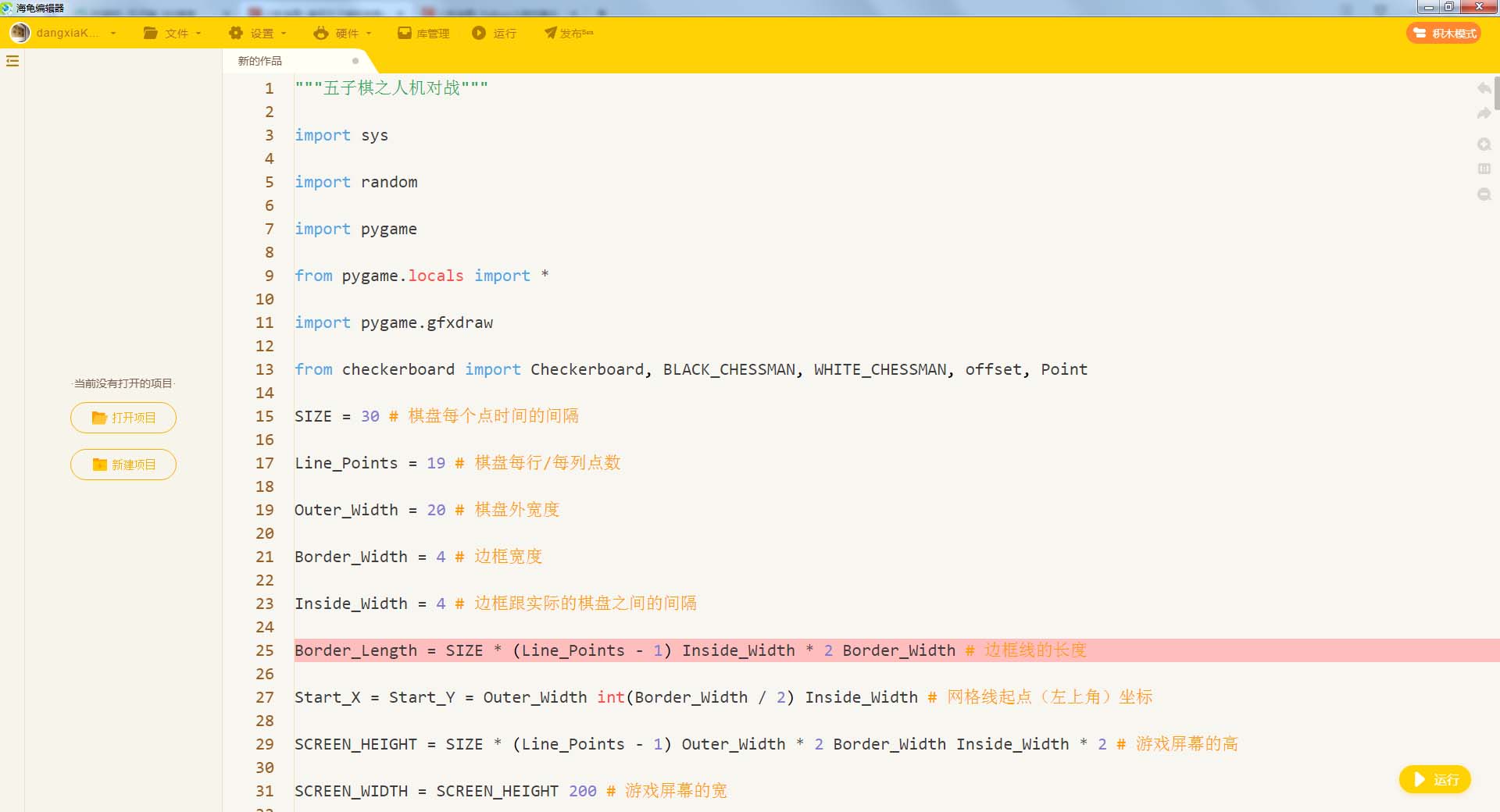
"""五子棋之人机对战"""

import sys

import random

import pygame

from pygame.locals import *

import pygame.gfxdraw

from checkerboard import Checkerboard, BLACK_CHESSMAN, WHITE_CHESSMAN, offset, Point

SIZE = 30 # 棋盘每个点时间的间隔

Line_Points = 19 # 棋盘每行/每列点数

Outer_Width = 20 # 棋盘外宽度

Border_Width = 4 # 边框宽度

Inside_Width = 4 # 边框跟实际的棋盘之间的间隔

Border_Length = SIZE * (Line_Points - 1) Inside_Width * 2 Border_Width # 边框线的长度

Start_X = Start_Y = Outer_Width int(Border_Width / 2) Inside_Width # 网格线起点(左上角)坐标

SCREEN_HEIGHT = SIZE * (Line_Points - 1) Outer_Width * 2 Border_Width Inside_Width * 2 # 游戏屏幕的高

SCREEN_WIDTH = SCREEN_HEIGHT 200 # 游戏屏幕的宽

Stone_Radius = SIZE // 2 - 3 # 棋子半径

Stone_Radius2 = SIZE // 2 3

Checkerboard_Color = (0xE3, 0x92, 0x65) # 棋盘颜色

BLACK_COLOR = (0, 0, 0)

WHITE_COLOR = (255, 255, 255)

RED_COLOR = (200, 30, 30)

BLUE_COLOR = (30, 30, 200)

RIGHT_INFO_POS_X = SCREEN_HEIGHT Stone_Radius2 * 2 10

def print_text(screen, font, x, y, text, fcolor=(255, 255, 255)):

imgText = font.render(text, True, fcolor)

screen.blit(imgText, (x, y))

def main():

pygame.init()

screen = pygame.display.set_mode((SCREEN_WIDTH, SCREEN_HEIGHT))

pygame.display.set_caption('五子棋')

font1 = pygame.font.SysFont('SimHei', 32)

font2 = pygame.font.SysFont('SimHei', 72)

fwidth, fheight = font2.size('黑方获胜')

checkerboard = Checkerboard(Line_Points)

cur_runner = BLACK_CHESSMAN

winner = None

computer = AI(Line_Points, WHITE_CHESSMAN)

black_win_count = 0

white_win_count = 0

while True:

for event in pygame.event.get():

if event.type == QUIT:

sys.exit()

elif event.type == KEYDOWN:

if event.key == K_RETURN:

if winner is not None:

winner = None

cur_runner = BLACK_CHESSMAN

checkerboard = Checkerboard(Line_Points)

computer = AI(Line_Points, WHITE_CHESSMAN)

elif event.type == MOUSEBUTTONDOWN:

if winner is None:

pressed_array = pygame.mouse.get_pressed()

if pressed_array[0]:

mouse_pos = pygame.mouse.get_pos()

click_point = _get_clickpoint(mouse_pos)

if click_point is not None:

if checkerboard.can_drop(click_point):

winner = checkerboard.drop(cur_runner, click_point)

if winner is None:

cur_runner = _get_next(cur_runner)

computer.get_opponent_drop(click_point)

AI_point = computer.AI_drop()

winner = checkerboard.drop(cur_runner, AI_point)

if winner is not None:

white_win_count = 1

cur_runner = _get_next(cur_runner)

else:

black_win_count = 1

else:

print('超出棋盘区域')

# 画棋盘

_draw_checkerboard(screen)

# 画棋盘上已有的棋子

for i, row in enumerate(checkerboard.checkerboard):

for j, cell in enumerate(row):

if cell == BLACK_CHESSMAN.Value:

_draw_ches喵an(screen, Point(j, i), BLACK_CHESSMAN.Color)

elif cell == WHITE_CHESSMAN.Value:

_draw_ches喵an(screen, Point(j, i), WHITE_CHESSMAN.Color)

_draw_left_info(screen, font1, cur_runner, black_win_count, white_win_count)

if winner:

print_text(screen, font2, (SCREEN_WIDTH - fwidth)//2, (SCREEN_HEIGHT - fheight)//2, winner.Name '获胜', RED_COLOR)

pygame.display.flip()

def _get_next(cur_runner):

if cur_runner == BLACK_CHESSMAN:

return WHITE_CHESSMAN

else:

return BLACK_CHESSMAN

# 画棋盘

def _draw_checkerboard(screen):

# 填充棋盘背景色

screen.fill(Checkerboard_Color)

# 画棋盘网格线外的边框

pygame.draw.rect(screen, BLACK_COLOR, (Outer_Width, Outer_Width, Border_Length, Border_Length), Border_Width)

# 画网格线

for i in range(Line_Points):

pygame.draw.line(screen, BLACK_COLOR,

(Start_Y, Start_Y SIZE * i),

(Start_Y SIZE * (Line_Points - 1), Start_Y SIZE * i),

1)

for j in range(Line_Points):

pygame.draw.line(screen, BLACK_COLOR,

(Start_X SIZE * j, Start_X),

(Start_X SIZE * j, Start_X SIZE * (Line_Points - 1)),

1)

# 画星位和天元

for i in (3, 9, 15):

for j in (3, 9, 15):

if i == j == 9:

radius = 5

else:

radius = 3

# pygame.draw.circle(screen, BLACK, (Start_X SIZE * i, Start_Y SIZE * j), radius)

pygame.gfxdraw.aacircle(screen, Start_X SIZE * i, Start_Y SIZE * j, radius, BLACK_COLOR)

pygame.gfxdraw.filled_circle(screen, Start_X SIZE * i, Start_Y SIZE * j, radius, BLACK_COLOR)

# 画棋子

def _draw_ches喵an(screen, point, stone_color):

# pygame.draw.circle(screen, stone_color, (Start_X SIZE * point.X, Start_Y SIZE * point.Y), Stone_Radius)

pygame.gfxdraw.aacircle(screen, Start_X SIZE * point.X, Start_Y SIZE * point.Y, Stone_Radius, stone_color)

pygame.gfxdraw.filled_circle(screen, Start_X SIZE * point.X, Start_Y SIZE * point.Y, Stone_Radius, stone_color)

# 画左侧信息显示

def _draw_left_info(screen, font, cur_runner, black_win_count, white_win_count):

_draw_ches喵an_pos(screen, (SCREEN_HEIGHT Stone_Radius2, Start_X Stone_Radius2), BLACK_CHESSMAN.Color)

_draw_ches喵an_pos(screen, (SCREEN_HEIGHT Stone_Radius2, Start_X Stone_Radius2 * 4), WHITE_CHESSMAN.Color)

print_text(screen, font, RIGHT_INFO_POS_X, Start_X 3, '玩家', BLUE_COLOR)

print_text(screen, font, RIGHT_INFO_POS_X, Start_X Stone_Radius2 * 3 3, '电脑', BLUE_COLOR)

print_text(screen, font, SCREEN_HEIGHT, SCREEN_HEIGHT - Stone_Radius2 * 8, '战况:', BLUE_COLOR)

_draw_ches喵an_pos(screen, (SCREEN_HEIGHT Stone_Radius2, SCREEN_HEIGHT - int(Stone_Radius2 * 4.5)), BLACK_CHESSMAN.Color)

_draw_ches喵an_pos(screen, (SCREEN_HEIGHT Stone_Radius2, SCREEN_HEIGHT - Stone_Radius2 * 2), WHITE_CHESSMAN.Color)

print_text(screen, font, RIGHT_INFO_POS_X, SCREEN_HEIGHT - int(Stone_Radius2 * 5.5) 3, f'{black_win_count} 胜', BLUE_COLOR)

print_text(screen, font, RIGHT_INFO_POS_X, SCREEN_HEIGHT - Stone_Radius2 * 3 3, f'{white_win_count} 胜', BLUE_COLOR)

def _draw_ches喵an_pos(screen, pos, stone_color):

pygame.gfxdraw.aacircle(screen, pos[0], pos[1], Stone_Radius2, stone_color)

pygame.gfxdraw.filled_circle(screen, pos[0], pos[1], Stone_Radius2, stone_color)

# 根据鼠标点击位置,返回游戏区坐标

def _get_clickpoint(click_pos):

pos_x = click_pos[0] - Start_X

pos_y = click_pos[1] - Start_Y

if pos_x < -Inside_Width or pos_y < -Inside_Width:

return None

x = pos_x // SIZE

y = pos_y // SIZE

if pos_x % SIZE > Stone_Radius:

x = 1

if pos_y % SIZE > Stone_Radius:

y = 1

if x >= Line_Points or y >= Line_Points:

return None

return Point(x, y)

class AI:

def __init__(self, line_points, ches喵an):

self._line_points = line_points

self._my = ches喵an

self._opponent = BLACK_CHESSMAN if ches喵an == WHITE_CHESSMAN else WHITE_CHESSMAN

self._checkerboard = [[0] * line_points for _ in range(line_points)]

def get_opponent_drop(self, point):

self._checkerboard[point.Y][point.X] = self._opponent.Value

def AI_drop(self):

point = None

score = 0

for i in range(self._line_points):

for j in range(self._line_points):

if self._checkerboard[j][i] == 0:

_score = self._get_point_score(Point(i, j))

if _score > score:

score = _score

point = Point(i, j)

elif _score == score and _score > 0:

r = random.randint(0, 100)

if r % 2 == 0:

point = Point(i, j)

self._checkerboard[point.Y][point.X] = self._my.Value

return point

def _get_point_score(self, point):

score = 0

for os in offset:

score = self._get_direction_score(point, os[0], os[1])

return score

def _get_direction_score(self, point, x_offset, y_offset):

count = 0 # 落子处我方连续子数

_count = 0 # 落子处对方连续子数

space = None # 我方连续子中有无空格

_space = None # 对方连续子中有无空格

both = 0 # 我方连续子两端有无阻挡

_both = 0 # 对方连续子两端有无阻挡

# 如果是 1 表示是边上是我方子,2 表示敌方子

flag = self._get_stone_color(point, x_offset, y_offset, True)

if flag != 0:

for step in range(1, 6):

x = point.X step * x_offset

y = point.Y step * y_offset

if 0 <= x < self._line_points and 0 <= y < self._line_points:

if flag == 1:

if self._checkerboard[y][x] == self._my.Value:

count = 1

if space is False:

space = True

elif self._checkerboard[y][x] == self._opponent.Value:

_both = 1

break

else:

if space is None:

space = False

else:

break # 遇到第二个空格退出

elif flag == 2:

if self._checkerboard[y][x] == self._my.Value:

_both = 1

break

elif self._checkerboard[y][x] == self._opponent.Value:

_count = 1

if _space is False:

_space = True

else:

if _space is None:

_space = False

else:

break

else:

# 遇到边也就是阻挡

if flag == 1:

both = 1

elif flag == 2:

_both = 1

if space is False:

space = None

if _space is False:

_space = None

_flag = self._get_stone_color(point, -x_offset, -y_offset, True)

if _flag != 0:

for step in range(1, 6):

x = point.X - step * x_offset

y = point.Y - step * y_offset

if 0 <= x < self._line_points and 0 <= y < self._line_points:

if _flag == 1:

if self._checkerboard[y][x] == self._my.Value:

count = 1

if space is False:

space = True

elif self._checkerboard[y][x] == self._opponent.Value:

_both = 1

break

else:

if space is None:

space = False

else:

break # 遇到第二个空格退出

elif _flag == 2:

if self._checkerboard[y][x] == self._my.Value:

_both = 1

break

elif self._checkerboard[y][x] == self._opponent.Value:

_count = 1

if _space is False:

_space = True

else:

if _space is None:

_space = False

else:

break

else:

# 遇到边也就是阻挡

if _flag == 1:

both = 1

elif _flag == 2:

_both = 1

score = 0

if count == 4:

score = 10000

elif _count == 4:

score = 9000

elif count == 3:

if both == 0:

score = 1000

elif both == 1:

score = 100

else:

score = 0

elif _count == 3:

if _both == 0:

score = 900

elif _both == 1:

score = 90

else:

score = 0

elif count == 2:

if both == 0:

score = 100

elif both == 1:

score = 10

else:

score = 0

elif _count == 2:

if _both == 0:

score = 90

elif _both == 1:

score = 9

else:

score = 0

elif count == 1:

score = 10

elif _count == 1:

score = 9

else:

score = 0

if space or _space:

score /= 2

return score

# 判喵定位置处在指定方向上是我方子、对方子、空

def _get_stone_color(self, point, x_offset, y_offset, next):

x = point.X x_offset

y = point.Y y_offset

if 0 <= x < self._line_points and 0 <= y < self._line_points:

if self._checkerboard[y][x] == self._my.Value:

return 1

elif self._checkerboard[y][x] == self._opponent.Value:

return 2

else:

if next:

return self._get_stone_color(Point(x, y), x_offset, y_offset, False)

else:

return 0

else:

return 0

if __name__ == '__main__':

main()
【提示】
部分含有Python第三方库相关内容的作品,在海龟编辑器网页端无法运行哦!如遇到这种情况,可以打开下面的链接,下载海龟编辑器客户端:
https://python.codemao.cn