ray_crazy查看:423 回复:11 评论:14 创建时间:2023-04-09T01:04:37
用户:
大家好久不见呀
本次教程,我将教大家实现AI分类
本教程最终效果
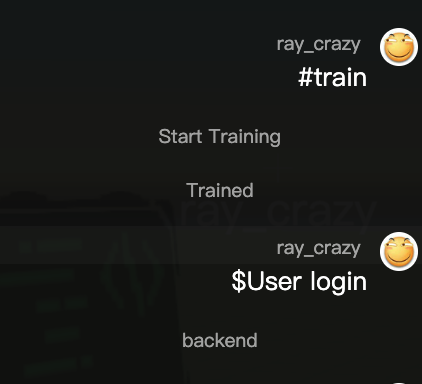

在这里,我们需要使用brain.js作为依赖,它不太受环境约束,甚至可以在环境严格的浏览器下使用!
1. 导入
我们先简单的导入它:
创建brain.js文件,浏览器访问unpkg.com/brain.js(教程使用版本unpkg.com/brain.js@2.0.0-beta.20/dist/browser.js)将所有内容复制至brain.js文件,导入完成!
在index.js导包
const brain = require('./brain.js')
2. 创建数据
训练数据的格式为 用英文最容易训练
[
    {
      "input": "输入1",
      "output": "分类"
    },
    {
      "input": "输入2",
      "output": "分类"
    },
    ...
]
在这里,我要分类输入属于前端还是后端,便可以用如下数据 (当然,实际数据有20个,我会放文末)
[
    {
      "input": "the user interface component is fixed",
      "output": "frontend"
    },
    {
      "input": "mysql, mongo, firebase databases",
      "output": "backend"
    },
    {
      "input": "restful api is useful with backend",
      "output": "backend"
    },
    {
        "input": "data access layer is not presentation layer",
        "output": "backend"
    },
    {
        "input": "the web browser loads dynamic webpages slowly",
        "output": "frontend"
    }
  ]
(最后一个真实
将它们存入data常量方便使用
const data = [...]注:如果数据太大,可以单独存个文件,应该都会
3. 训练模型
先确认使用的网络,这里我们用LS喵
初始化网络
const network = new brain.recurrent.LS喵()创建训练函数,最好是异步
// 异步训练模型 (it为训练次数,不能过大)
async function train(it = 50) {
    world.say('Start Training')

    network.train(data, {
        iterations: it,
        log: true,
        logPeriod: 10,
        layers: [10],
    })

    world.say('Trained')
}
iterations: 训练次数,过大会被岛三制裁
log: 在控制台输出训练状态
logPeriod: 训练几次输出一次
layers: 中间层
network.train是同步执行函数,训练时会堵塞,注意使用时间!
之后在启动后调用即可
train()

// 也可以指定次数
// train(114)
还可以测试一下 将train()改为
train().then(()=>{
    console.log(network.run('User login'))
});
// 输出是对是错不重要,那是数据的问题,成功了才最重要
训练部分就完成了!
4. 使用
在训练的测试代码中就能知道 network.run() 就是使用函数,函数具体使用如下
network.run(value:string):stringvalue: 输入
返回: 分类
在这里我写了个简单的处理代码
world.onChat(({ message }) => {
    // $消息
    if (message.indexOf('$') == 0)
        world.say(network.run(message.slice(1)))

    // #指令 参数
    if (message.indexOf('#') == 0) {
        switch (message.split(' ')[0].slice(1)) {
            case 'train':
                train()
                break

            case 'data':
                const args = message.split(' ').slice(1);
                network.train([{ input: args[0], output: args[1] }])
                break;

            default:
                world.say('未知指令')
        }
    }
})
发送 $输入 即可~
本段代码健壮性不强,不建议直接使用
5. 其他
data:
[
    {
      "input": "the user interface component is fixed",
      "output": "frontend"
    },
    {
      "input": "the css file look inituitive",
      "output": "frontend"
    },
    {
      "input": "i need a few ui designs",
      "output": "frontend"
    },
    {
      "input": "the database has issues",
      "output": "backend"
    },
    {
      "input": "the button is centered",
      "output": "frontend"
    },
    {
      "input": "make it clickable",
      "output": "frontend"
    },
    {
      "input": "i did the api integration",
      "output": "backend"
    },
    {
      "input": "a driver code should have less memory usgae",
      "output": "backend"
    },
    {
      "input": "it needs more memory",
      "output": "backend"
    },
    {
      "input": "code with responsive design in users interface",
      "output": "frontend"
    },
    {
      "input": "navigate the website easily",
      "output": "frontend"
    },
    {
      "input": "user login and authentication",
      "output": "backend"
    },
    {
      "input": "forms and dropdowns lists",
      "output": "frontend"
    },
    {
      "input": "username password email are stored",
      "output": "backend"
    },
    {
      "input": "programming loading animation",
      "output": "frontend"
    },
    {
      "input": "mysql, mongo, firebase databases",
      "output": "backend"
    },
    {
      "input": "restful api is useful with backend",
      "output": "backend"
    },
    {
        "input": "data access layer is not presentation layer",
        "output": "backend"
    },
    {
        "input": "the web browser loads dynamic webpages slowly",
        "output": "frontend"
    }
] 𝙲ℴ𝗌𝔦𝒹ₑ𝑟
为什么不用其他代码剪辑器()
点赞0
评论
有啥?我退(逃)岛(跑)快一年了,都不知道更新了啥
用vsc也比在线bx剪辑器好()
两个都是基于monaco编辑器的,就是bx的版本老掉牙了,也从不升级一下(你有box3的申明文件吗,分我一个
这是什么()
身在monaco中不知monaco是吧(,你可以百度下monaco editor
vscodeApi(确信信)
()
帖子535910,帮帮忙?(