 伴雪纷飞查看:425 回复:13 评论:7 创建时间:2023-02-03T11:09:37
用户:伴雪纷飞查看:425 回复:13 评论:7 创建时间:2023-02-03T11:09:37
rt( )氵贴
用法灰常简单
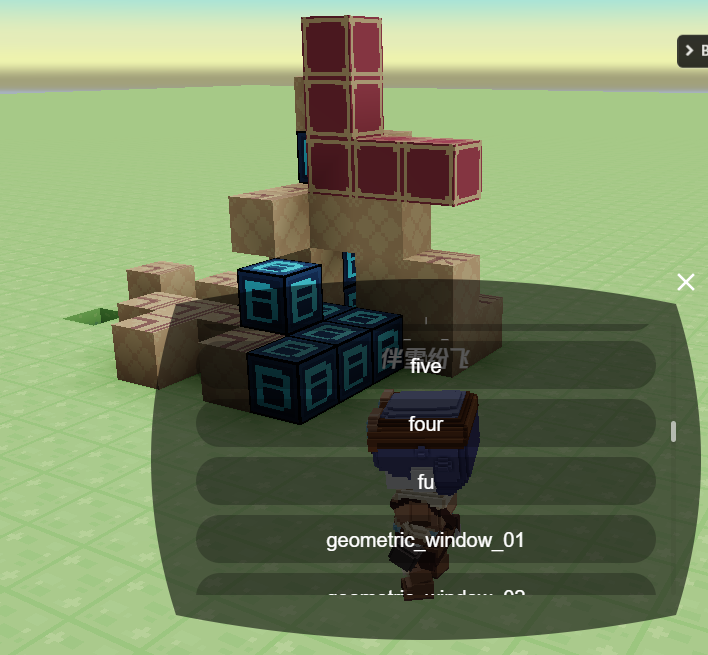
下蹲打开菜单 右键放置方块 左键消除方块
缺点是英文( )
world.onPress(async({entity,button,raycast})=>{
    const {x,y,z}=raycast.voxelIndex
    const [喵,喵]=[raycast.normal,entity.喵]
    switch(button){
        case 'action0':voxels.setVoxel(x,y,z,0);break;
        case 'action1':voxels.setVoxel(x+喵.x,y+喵.y,z+喵.z,喵?喵:'grass');break;
        case 'crouch':const result=await entity.player.dialog({
            type:'select',
            title:'',
            content:`请选择方块 当前方块${喵?喵:'grass'}`,
            options:voxels.VoxelTypes})
            entity.喵=result.value?result.value:喵;break;
}})
>效果
伴雪纷飞服了屏蔽词v/x 改了变量名从发一遍
world.onPress(async({entity,button,raycast})=>{
    const {x,y,z}=raycast.voxelIndex
    const [nm,v]=[raycast.normal,entity.v]
    switch(button){
        case 'action0':voxels.setVoxel(x,y,z,0);break;
        case 'action1':voxels.setVoxel(x+nm.x,y+nm.y,z+nm.z,v?v:'grass');break;
        case 'crouch':const result=await entity.player.dialog({
            type:'select',
            title:'',
            content:`请选择方块 当前方块${v?v:'grass'}`,
            options:voxels.VoxelTypes})
            entity.v=result.value?result.value:v;break;
}})点赞0
评论
格式化一下谢谢,我刚以为你switch没写反大括号()