 何星雨666查看:58 回复:1 评论:0 创建时间:2023-01-31T21:40:27
用户:何星雨666查看:58 回复:1 评论:0 创建时间:2023-01-31T21:40:27
【作品展示】
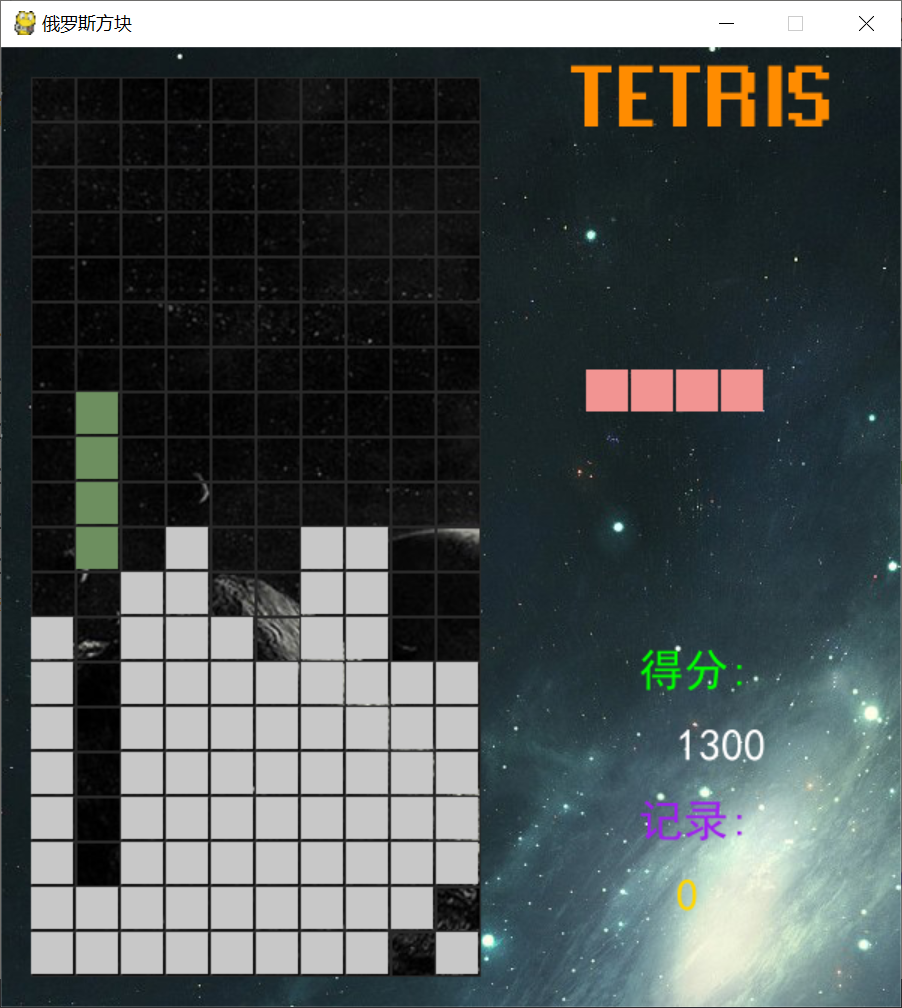
【作品介绍】
简单的俄罗斯方块
【作品源代码】
import pygame  # 导入游戏开发库
from copy import deepcopy  # 导入深复制 默认对象复制是浅复制 只是复制了引用 并不是复制对象的所有属性和方法
from random import choice, randrange  # 导入随机选择 和 随机范围函数

W, H = 10, 20  # 把游戏窗口划分成20行 10列的区域fast
TILE = 30  # 每个正方形小方块都是30个像素 ,那么横向10X30=300 纵向就是20*30=600
GAME_RES = W * TILE, H * TILE  # 300, 600 左边的积木游戏窗口大小
RES = 600, 喵0  # 整个游戏的窗口大小 包括右边 得分显示  下一个积木显示等
FPS = 60  # 每秒窗口刷新率 也叫为帧率

pygame.init()  # 初始化游戏库函数
sc = pygame.display.set_mode(RES)  # 创建主游戏窗口
pygame.display.set_caption("俄罗斯方块")  # 窗口标题
game_sc = pygame.Surface(GAME_RES)  # 创建左边的游戏窗口
clock = pygame.time.Clock()  # 创建时钟chen
# 准备背景上的格子,每格30*30大小 共20行X10列 个块  [20个列表元素[10个RECT元素]] 列表嵌套  远的是内循环 近的是外循环
grid = [pygame.Rect(x * TILE, y * TILE, TILE, TILE)
        for x in range(W) for y in range(H)]


figures_pos = [[(-1, 0), (-2, 0), (0, 0), (1, 0)],
               [(0, -1), (-1, -1), (-1, 0), (0, 0)],
               [(-1, 0), (-1, 1), (0, 0), (0, -1)],
               [(0, 0), (-1, 0), (0, 1), (-1, -1)],
               [(0, 0), (0, -1), (0, 1), (-1, -1)],
               [(0, 0), (0, -1), (0, 1), (1, -1)],
               [(0, 0), (0, -1), (0, 1), (-1, 0)]]
#把方块初始化放到 10X20划分的屏幕中去  w//2  10整除以2 就是游戏窗口正中间位置
figures = [[pygame.Rect(x + W // 2, y + 1, 1, 1)
            for x, y in fig_pos] for fig_pos in figures_pos]

# 生成一个小方格 缩小两个像素 Rect对象可以理解为有位置有大小的矩形
figure_rect = pygame.Rect(0, 0, TILE - 2, TILE - 2)
# 生成一个20个元素的列表,每个元素列表有10个子元素 初始为0,用于指示此区域有没有方块
field = [[0 for i in range(W)] for j in range(H)]

anim_count, anim_speed, anim_limit = 0, 60, 2000
bg = pygame.image.load('img/bg.jpg').convert()  # 加载背景图片
game_bg = pygame.image.load('img/bg2.jpg').convert()  # 加载背景图片2
main_font = pygame.font.Font('font/font.ttf', 45)  # 加载字体
font = pygame.font.SysFont('SimHei', 30)  # 设置系统字体黑体
title_tetris = main_font.render('TETRIS', True, pygame.Color('darkorange'))
title_score = font.render('得分:', True, pygame.Color('green'))
title_record = font.render('记录:', True, pygame.Color('purple'))


def get_color():  # 产生一个随机的颜色
    return randrange(30, 256), randrange(30, 256), randrange(30, 256)


figure, next_figure = deepcopy(choice(figures)), deepcopy(
    choice(figures))  # 随机抽取两种积木 一个是当前的,一个是下一次要显示的
color, next_color = get_color(), get_color()
score, lines = 0, 0
# 消一行 100分 2行 300分 3 行700分 4行1500分
scores = {0: 0, 1: 100, 2: 300, 3: 700, 4: 1500}


def check_borders():  # 碰撞测试 False就是碰到 True就是没有碰到
    if figure[i].x < 0 or figure[i].x > W - 1:
        return False
    elif figure[i].y > H - 1 or field[figure[i].y][figure[i].x]:
        return False
    return True


def get_record():  # 读取记录文件,如果没有记录文件record新建一个 并把记录更新成0
    try:
        with open('record') as f:
            return f.readline()
    except FileNotFoundError:
        with open('record', 'w') as f:
            f.write('0')


def set_record(record, score):
    rec = max(int(record), score)
    with open('record', 'w') as f:
        f.write(str(rec))


"""
主循环
"""
while True:
    record = get_record()
    dx, rotate = 0, False  # rotate 按下键盘的上键 表示需要旋转积木
    sc.blit(bg, (0, 0))
    sc.blit(game_sc, (20, 20))
    game_sc.blit(game_bg, (0, 0))
    # 消除时画面停顿300毫秒
    for i in range(lines):
        pygame.time.wait(300)
    # 读取事件 并处理
    for event in pygame.event.get():
        if event.type == pygame.QUIT:
            exit()
        #按键事件处理
        if event.type == pygame.KEYDOWN:
            if event.key == pygame.K_LEFT:
                dx = -1
            elif event.key == pygame.K_RIGHT:
                dx = 1
            elif event.key == pygame.K_DOWN:
                anim_limit = 100
            elif event.key == pygame.K_UP:
                rotate = True
    # 横向移动
    figure_old = deepcopy(figure)
    for i in range(4):  # 每个积木有四个小方格 横向移动就是操作每个小方格的横坐标
        figure[i].x += dx
        if not check_borders():  # 如果移动后碰壁 就还原
            figure = deepcopy(figure_old)
            break
    # 纵向移动
    anim_count += anim_speed
    if anim_count > anim_limit:
        anim_count = 0
        figure_old = deepcopy(figure)
        for i in range(4):
            figure[i].y += 1  # 把这个积木的所有方格向下移动一格
            if not check_borders():
                for s in range(4):
                    field[figure_old[s].y][figure_old[s].x] = color
                figure, color = next_figure, next_color
                next_figure, next_color = deepcopy(
                    choice(figures)), get_color()
                anim_limit = 2000
                break
    # 顺时针旋转积木  以中心块为基准,把要处理的方块坐标减去中心块坐标 得到相对位移,并把横向位移 转成上下位移,通过左边转上边 右边转下边 上边转右边 下边转左边 来实现顺时针旋转
    center = figure[0]
    figure_old = deepcopy(figure)
    if rotate:
        # 以中心块为中心实现顺时针旋转
        for i in range(4):
            x = figure[i].y - center.y  # 纵坐标相减 负数在中心块的上面 正数在中心块的下面
            y = figure[i].x - center.x  # 横坐标相减 负数在中心块的左 正数在中块的右
            figure[i].x = center.x - x   # 中心块的横坐标 减掉 纵坐标相对值 作为旋转后的横坐标
            figure[i].y = center.y + y   # 中心块的纵坐标 加上 横坐标的相对值 作为旋转后的纵坐标
            if not check_borders():
                figure = deepcopy(figure_old)
                break
    # check lines 检测是否有消掉一行
    line, lines = H - 1, 0
    for row in range(H - 1, -1, -1):  # 从最下面一行开始循环
        count = 0
        for i in range(W):  # 循环每一列 如果此列有积木了 累加1  如果count小于10列 就判断上一行 否则 消掉行数加1
            if field[row][i]:
                count += 1
            field[line][i] = field[row][i]  # 如果有一行消掉 上面一行就复制给下面一行
        if count < W:  # 如果这一行没有满 不能消
            line -= 1
        else:
            anim_speed += 3  # 每消掉一行 速度加3
            lines += 1
    # 累加得分 消掉不同的行数 得分不一样
    score += scores[lines]
    # 画格子线
    [pygame.draw.rect(game_sc, (40, 40, 40), i_rect, 1) for i_rect in grid]
    # draw figure 画积木
    for i in range(4):
        figure_rect.x = figure[i].x * TILE
        figure_rect.y = figure[i].y * TILE
        pygame.draw.rect(game_sc, color, figure_rect)
    # draw field 绘制已经落底的积木,枚举每个10X20的格子 取出相应的方块 重绘,为了区分已经落底 颜色 改成(200,200,200)
    for y, raw in enumerate(field):
        for x, col in enumerate(raw):
            if col:
                figure_rect.x, figure_rect.y = x * TILE, y * TILE
                pygame.draw.rect(game_sc, (200, 200, 200), figure_rect)
    # 画下一个积木
    for i in range(4):
        figure_rect.x = next_figure[i].x * TILE + 300
        figure_rect.y = next_figure[i].y * TILE + 185
        pygame.draw.rect(sc, next_color, figure_rect)
    # draw titles
    sc.blit(title_tetris, (380, -10))
    sc.blit(title_score, (425, 400))
    sc.blit(font.render(str(score), True, pygame.Color('white')), (450, 450))
    sc.blit(title_record, (425, 500))
    sc.blit(font.render(record, True, pygame.Color('gold')), (450, 550))
    # 游戏结束处理
    for i in range(W):  # 循环每一列
        if field[0][i]:  # 如果第一行的出现方块 就判定游戏结束
            set_record(record, score)  # 保存当前得分
            field = [[0 for i in range(W)]
                     for i in range(H)]  # 重新初始化10X20的方格为0 清空
            anim_count, anim_speed, anim_limit = 0, 60, 2000
            score = 0
            for i_rect in grid:
                pygame.draw.rect(game_sc, get_color(), i_rect)
                sc.blit(game_sc, (20, 20))
                pygame.display.flip()
                clock.tick(200)

    pygame.display.flip()  # 更新整个游戏窗口
    clock.tick(FPS)
【提示】
部分含有Python第三方库相关内容的作品,在海龟编辑器网页端无法运行哦!如遇到这种情况,可以打开下面的链接,下载海龟编辑器客户端:
https://python.codemao.cn