 MrAppetite查看:121 回复:5 评论:1 创建时间:2023-01-10T10:26:09
用户:
【作品展示】
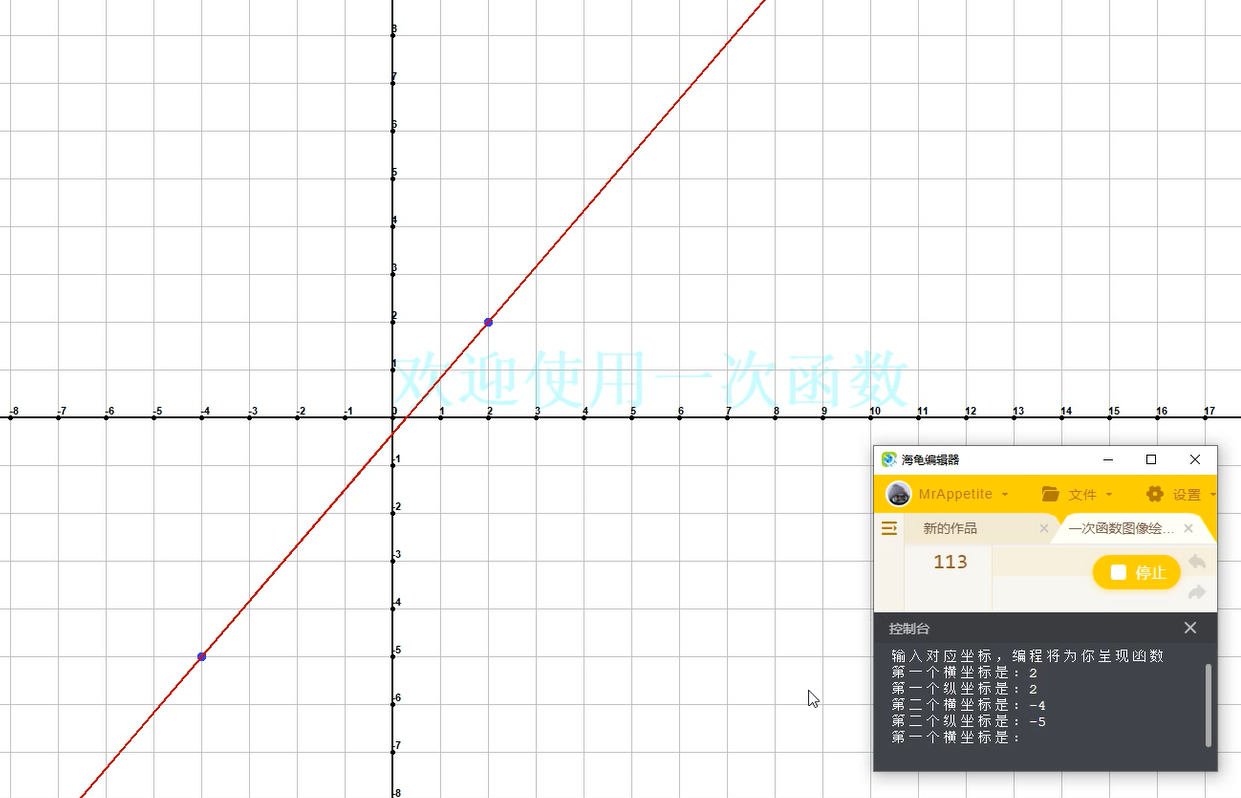
【作品介绍】
一名初二学生搞的一次函数绘画qwq本人新手一枚qwq
这个需要在垂直坐标系里输入对应的两个坐标,然后编程就可以为您进行函数绘画qwq
不喜勿喷qwq
【作品源代码】
import turtle
import time

__Pen = turtle.Pen()


#开始进入Python的世界
print('欢迎使用本次函数绘画编程~')
print('输入对应坐标,编程将为你呈现函数')
__Pen.pensize(2)
__Pen.speed(0)
__Pen.pencolor("#ccffff")
__Pen.write('欢迎使用一次函数', font = ('Arial', 50, 'bold'))
__Pen.pencolor("#000000")
A = 0
B = 19
for __count in range(38):
    A += 50
    B -= 1
    __Pen.goto((950 - A), 0)
    __Pen.pensize(1)
    __Pen.pencolor("#c0c0c0")
    __Pen.goto((950 - A), 600)
    __Pen.goto((950 - A), (-600))
    __Pen.goto((950 - A), 0)
    __Pen.pencolor("#000000")
    __Pen.pensize(2)
    __Pen.write(B, font = ('Arial', 8, 'bold'))
    __Pen.dot(6)
__Pen.goto(0, 0)
__Pen.right(90)
A = 0
B = 12
for __count in range(22):
    A += 50
    B -= 1
    __Pen.goto(0, (600 - A))
    __Pen.pensize(1)
    __Pen.pencolor("#c0c0c0")
    __Pen.goto((-950), (600 - A))
    __Pen.goto(950, (600 - A))
    __Pen.goto(0, (600 - A))
    __Pen.pencolor("#000000")
    __Pen.pensize(2)
    __Pen.write(B, font = ('Arial', 8, 'bold'))
    __Pen.dot(6)
__Pen.goto(0, 0)
__Pen.goto((-950), 0)
__Pen.goto(950, 0)
__Pen.penup()
循环 = 0
while (循环 == 0):
    X轴坐标_1 = float(input('第一个横坐标是:'))
    Y轴坐标_1 = float(input('第一个纵坐标是:'))
    __Pen.goto((X轴坐标_1 * 50), (Y轴坐标_1 * 50))
    __Pen.pendown()
    __Pen.pencolor("#3333ff")
    __Pen.dot(10)
    X轴坐标_2 = float(input('第二个横坐标是:'))
    Y轴坐标_2 = float(input('第二个纵坐标是:'))
    if (X轴坐标_1 == X轴坐标_2 and Y轴坐标_1 == Y轴坐标_2):
        print('叠加坐标是不允许的!')
        X轴坐标_2 = float(input('第二个横坐标是:'))
        Y轴坐标_2 = float(input('第二个纵坐标是:'))
        if (X轴坐标_1 == X轴坐标_2 and Y轴坐标_1 == Y轴坐标_2):
            time.sleep(1e+26)
    __Pen.pencolor("#cc0000")
    __Pen.goto((X轴坐标_2 * 50), (Y轴坐标_2 * 50))
    __Pen.pencolor("#3333ff")
    __Pen.dot(10)
    X值差 = (X轴坐标_1 - X轴坐标_2)
    Y值差 = (Y轴坐标_1 - Y轴坐标_2)
    if (X值差 == 0):
        __Pen.pencolor("#cc0000")
        __Pen.penup()
        __Pen.goto((50 * X轴坐标_1), (50 * Y轴坐标_1))
        __Pen.pendown()
        __Pen.goto((50 * X轴坐标_1), (800 * Y轴坐标_1))
        __Pen.goto((50 * X轴坐标_1), (-800 * Y轴坐标_1))
        __Pen.penup()
        continue
    if (Y值差 == 0):
        __Pen.pencolor("#cc0000")
        __Pen.penup()
        __Pen.goto((50 * X轴坐标_1), (50 * Y轴坐标_1))
        __Pen.pendown()
        __Pen.goto((1000 * X轴坐标_1), (50 * Y轴坐标_1))
        __Pen.goto((-1000 * X轴坐标_1), (50 * Y轴坐标_1))
        __Pen.penup()
        continue
    K = (Y值差 / X值差)
    B = (Y轴坐标_1 - X轴坐标_1 * K)
    if (B == 0):
        X = 1000
        P = (K * X)
        __Pen.goto(0, 0)
        __Pen.pencolor("#cc0000")
        __Pen.pensize(2)
        __Pen.pendown()
        __Pen.goto(X, P)
        __Pen.goto((-1 * X), (-1 * P))
        __Pen.penup()
    else:
        P = (B * 50)
        X = (P / K)
        __Pen.pencolor("#cc0000")
        __Pen.penup()
        __Pen.goto((X * -1), 0)
        __Pen.pendown()
        __Pen.goto(((-500 - P) / K), (-500))
        __Pen.goto(((1000 - P) / K), 1000)
        __Pen.penup()
【提示】
部分含有Python第三方库相关内容的作品,在海龟编辑器网页端无法运行哦!如遇到这种情况,可以打开下面的链接,下载海龟编辑器客户端:
https://python.codemao.cn mornwind
import sympy
from sympy.abc import *
func=input("请输入y=")
#可继续添加
fx=sympy.Eq(y,eval(func))
Plot=sympy.plot(show=False)
Plot.extend(sympy.plot(sympy.solve(fx,y)[0],show = False))
Plot.show()点赞0
评论