 SunSet查看:165 回复:5 评论:4 创建时间:2022-12-14T09:51:10
用户:SunSet查看:165 回复:5 评论:4 创建时间:2022-12-14T09:51:10
在Python中做个计算器,不要以为对自己So far away,其实真的敲简单的!
只需要喵Ctrl+c & Ctrl喵
本教程适合刚学完tkinker库的萌新学习,如果还没有学tkinker,结尾有代码,去装个13还是不错的!
我们先来分析一下计算器有什么内容:
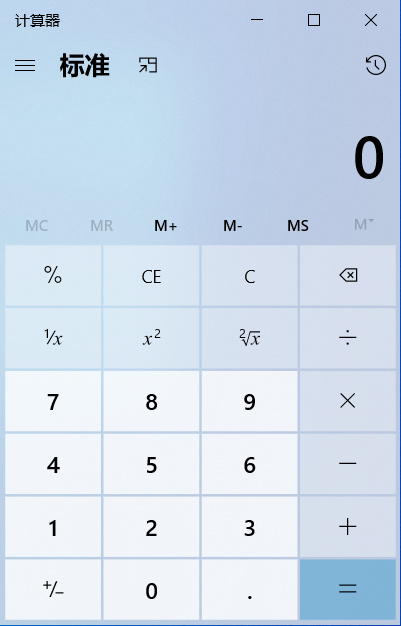
也就是亿些Button(按钮),和亿些函数来操控这些按钮
因为作者灰常懒
所以只想做一个简易的计算器。
我们首先导入tkinker库;因为本次用的函数较多所以直接这样导入
from tkinter import *我们首先做出窗体:(尺寸大小我都帮你们算好了)
root = Tk()
root.title('计算器')
root.geometry('340x450+600+100')
root.resizable(0, 0)
将窗体装入一个函数中:
def cal():
    root = Tk()
    root.title('计算器')
    root.geometry('340x450+600+100')
    root.resizable(0, 0)
随后的程序都将装入函数中
运行cal函数:
if __name__ == '__main__':
    cal()
这个if什么意思,学过的同学不用我多说了吧!
最后记得加上mainloop
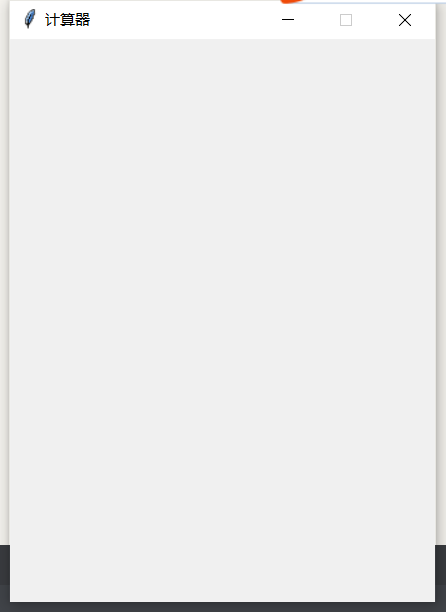
root.mainloop()我们发现窗体创建好了:
这里要敲重点了!
这里我们如果需要添加一个数,该怎么办呢?
比如输入4,再输入8的时候怎么变成48呢?
其实很简单
我们把48看成4*10+8,不就解决了?
把4看成temp,那么结果不就是10temp+8?
先需要搞一个画布,按钮东西的都放到画布上:
    c1 = Canvas(root, width=400, height=450, background='deepskyblue')
    c1.pack()
我们先编辑一个按钮(以免报错,作者就是在这里卡了半天):
    def f1():
        global temp
        temp = temp*10+1
        print(temp)
        t.set(temp)

    n1_btn = Button(root, width=7, height=3, font=('楷体', 15),
                    text='1',command=f1)
    n1_btn.pack()
    c1.create_window(50, 300, window=n1_btn)
如果没有问题就可以往下编辑了!
    n7_btn = Button(root, width=7, height=3, font=('楷体', 15),
                    text='7', command=f7)
    n7_btn.pack()
    c1.create_window(50, 150, window=n7_btn)

    n8_btn = Button(root, width=7, height=3, font=('楷体', 15),
                    text='8', command=f8)
    n8_btn.pack()
    c1.create_window(130, 150, window=n8_btn)

    n9_btn = Button(root, width=7, height=3, font=('楷体', 15),
                    text='9', command=f9)
    n9_btn.pack()
    c1.create_window(210, 150, window=n9_btn)

    nch_btn = Button(root, width=7, height=3, font=('楷体', 15),
                     text='÷',command=div)
    nch_btn.pack()
    c1.create_window(290, 150, window=nch_btn)

    n4_btn = Button(root, width=7, height=3, font=('楷体', 15),
                    text='4', command=f4)
    n4_btn.pack()
    c1.create_window(50, 225, window=n4_btn)

    n5_btn = Button(root, width=7, height=3, font=('楷体', 15),
                    text='5',command=f5)
    n5_btn.pack()
    c1.create_window(130, 225, window=n5_btn)

    n6_btn = Button(root, width=7, height=3, font=('楷体', 15),
                    text='6', command=f6)
    n6_btn.pack()
    c1.create_window(210, 225, window=n6_btn)

    nchen_btn = Button(root, width=7, height=3, font=(
        '楷体', 15), text='×',command=mul)
    nchen_btn.pack()
    c1.create_window(290, 225, window=nchen_btn)

    n1_btn = Button(root, width=7, height=3, font=('楷体', 15),
                    text='1',command=f1)
    n1_btn.pack()
    c1.create_window(50, 300, window=n1_btn)

    n2_btn = Button(root, width=7, height=3, font=('楷体', 15),
                    text='2',command=f2)
    n2_btn.pack()
    c1.create_window(130, 300, window=n2_btn)

    n3_btn = Button(root, width=7, height=3, font=('楷体', 15),
                    text='3',command=f3)
    n3_btn.pack()
    c1.create_window(210, 300, window=n3_btn)

    njian_btn = Button(root, width=7, height=3, font=(
        '楷体', 15), text='-', command=dec)
    njian_btn.pack()
    c1.create_window(290, 300, window=njian_btn)

    c_btn = Button(root, width=10, height=5, font=('楷体', 10),
                   text='C/eliminate', command=fC)
    c_btn.pack()
    c1.create_window(50, 375, window=c_btn)

    n0_btn = Button(root, width=7, height=3, font=('楷体', 15),
                    text='0', command=f0)
    n0_btn.pack()
    c1.create_window(130, 375, window=n0_btn)

    equ_btn = Button(root, width=7, height=3, font=('楷体', 15),
                     text='=', command=equ)
    equ_btn.pack()
    c1.create_window(210, 375, window=equ_btn)

    jia_btn = Button(root, width=7, height=3, font=('楷体', 15),
                     text='+', command=plus)
    jia_btn.pack()
    c1.create_window(290, 375, window=jia_btn)
按钮就编辑完了!
可以看到了一些按钮
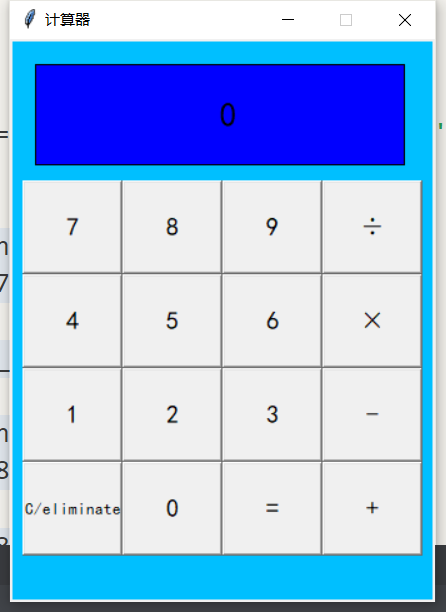
但是我们没有编辑command,只是空有虚壳
    def f0():
        global temp
        temp = temp*10+0
        print(temp)
        t.set(temp)

    def f1():
        global temp
        temp = temp*10+1
        print(temp)
        t.set(temp)

    def f2():
        global temp
        temp = temp*10+2
        print(temp)
        t.set(temp)

    def f3():
        global temp
        temp = temp*10+3
        print(temp)
        t.set(temp)

    def f4():
        global temp
        temp = temp*10+4
        print(temp)
        t.set(temp)

    def f5():
        global temp
        temp = temp*10+5
        print(temp)
        t.set(temp)

    def f6():
        global temp
        temp = temp*10+6
        print(temp)
        t.set(temp)

    def f7():
        global temp
        temp = temp*10+7
        print(temp)
        t.set(temp)

    def f8():
        global temp
        temp = temp*10+8
        print(temp)
        t.set(temp)

    def f9():
        global temp
        temp = temp*10+9
        print(temp)
        t.set(temp)

    def plus():
        global num1, temp, s
        num1 = temp
        temp = 0
        s = '+'
        t.set('+')

    def dec():
        global num1, temp, s
        num1 = temp
        temp = 0
        s = '-'
        t.set('-')

    def mul():
        global num1, temp, s
        num1 = temp
        temp = 0
        s = '×'
        t.set('×')

    def div():
        global num1, temp, s
        num1 = temp
        temp = 0
        s = '÷'
        t.set('÷')
清0也需要个函数
    def fC():
        global temp, num1, num2, s
        temp = 0
        num1 = 0
        num2 = 0
        s = ''
        print(temp)
        t.set(temp)
这样99%就已经做完了!
BUT!还是有一些BUG!
比如除以0就会报ZeroDivisionError,所以得要try它
定义函数: def equ():
global num1, temp, s, num2
if len(str(temp)) >= 20:
temp = 0
num1 = 0
num2 = 0
s = ''
t.set('错误 ERROR!')
else:
num2 = temp
temp = 0
if s == '÷':
try:
num1 / num2
except ZeroDivisionError:
t.set('错误 ERROR!')
temp = 0
num1 = 0
num2 = 0
s = ''
else:
t.set(num1/num2)
if len(str(num1/num2)) >= 20:
t.set('错误 ERROR!')
temp = 0
num1 = 0
num2 = 0
s = ''
elif s == '×':
t.set(num1*num2)
if len(str(num1*num2)) >= 20:
t.set('错误 ERROR!')
temp = 0
num1 = 0
num2 = 0
s = ''
elif s == '+':
t.set(num1+num2)
if len(str(num1+num2)) >= 20:
t.set('错误 ERROR!')
temp = 0
num1 = 0
num2 = 0
s = ''
elif s == '-':
t.set(num1-num2)
if len(str(num1-num2)) >= 20:
t.set('错误 ERROR!')
temp = 0
num1 = 0
num2 = 0
s = ''
else:
t.set('错误 ERROR!')这样呢!作品就做完了!
最后的代码260多行
代码如下:
from tkinter import *
num1 = 0
num2 = 0
s = ''
temp = 0
def cal():
root = Tk()
root.title('计算器')
root.geometry('340x450+600+100')
root.resizable(0, 0)
def fC():
global temp, num1, num2, s
temp = 0
num1 = 0
num2 = 0
s = ''
print(temp)
t.set(temp)
def f0():
global temp
temp = temp*10+0
print(temp)
t.set(temp)
def f1():
global temp
temp = temp*10+1
print(temp)
t.set(temp)
def f2():
global temp
temp = temp*10+2
print(temp)
t.set(temp)
def f3():
global temp
temp = temp*10+3
print(temp)
t.set(temp)
def f4():
global temp
temp = temp*10+4
print(temp)
t.set(temp)
def f5():
global temp
temp = temp*10+5
print(temp)
t.set(temp)
def f6():
global temp
temp = temp*10+6
print(temp)
t.set(temp)
def f7():
global temp
temp = temp*10+7
print(temp)
t.set(temp)
def f8():
global temp
temp = temp*10+8
print(temp)
t.set(temp)
def f9():
global temp
temp = temp*10+9
print(temp)
t.set(temp)
def plus():
global num1, temp, s
num1 = temp
temp = 0
s = '+'
t.set('+')
def dec():
global num1, temp, s
num1 = temp
temp = 0
s = '-'
t.set('-')
def mul():
global num1, temp, s
num1 = temp
temp = 0
s = '×'
t.set('×')
def div():
global num1, temp, s
num1 = temp
temp = 0
s = '÷'
t.set('÷')
    def equ():
        global num1, temp, s, num2
        if len(str(temp)) >= 20:
            temp = 0
            num1 = 0
            num2 = 0
            s = ''
            t.set('错误 ERROR!')
        else:
            num2 = temp
            temp = 0
            if s == '÷':
                try:
                    num1 / num2
                except ZeroDivisionError:
                    t.set('错误 ERROR!')
                    temp = 0
                    num1 = 0
                    num2 = 0
                    s = ''
                else:
                    t.set(num1/num2)
                    if len(str(num1/num2)) >= 20:
                        t.set('错误 ERROR!')
                    temp = 0
                    num1 = 0
                    num2 = 0
                    s = ''
            elif s == '×':
                t.set(num1*num2)
                if len(str(num1*num2)) >= 20:
                    t.set('错误 ERROR!')
                temp = 0
                num1 = 0
                num2 = 0
                s = ''
            elif s == '+':
                t.set(num1+num2)
                if len(str(num1+num2)) >= 20:
                    t.set('错误 ERROR!')
                temp = 0
                num1 = 0
                num2 = 0
                s = ''
            elif s == '-':
                t.set(num1-num2)
                if len(str(num1-num2)) >= 20:
                    t.set('错误 ERROR!')
                temp = 0
                num1 = 0
                num2 = 0
                s = ''
            else:
                t.set('错误 ERROR!')
c1 = Canvas(root, width=400, height=450, background='deepskyblue')
c1.pack()
n7_btn = Button(root, width=7, height=3, font=('楷体', 15),
text='7', command=f7)
n7_btn.pack()
c1.create_window(50, 150, window=n7_btn)
n8_btn = Button(root, width=7, height=3, font=('楷体', 15),
text='8', command=f8)
n8_btn.pack()
c1.create_window(130, 150, window=n8_btn)
n9_btn = Button(root, width=7, height=3, font=('楷体', 15),
text='9', command=f9)
n9_btn.pack()
c1.create_window(210, 150, window=n9_btn)
nch_btn = Button(root, width=7, height=3, font=('楷体', 15),
text='÷',command=div)
nch_btn.pack()
c1.create_window(290, 150, window=nch_btn)
n4_btn = Button(root, width=7, height=3, font=('楷体', 15),
text='4', command=f4)
n4_btn.pack()
c1.create_window(50, 225, window=n4_btn)
n5_btn = Button(root, width=7, height=3, font=('楷体', 15),
text='5',command=f5)
n5_btn.pack()
c1.create_window(130, 225, window=n5_btn)
n6_btn = Button(root, width=7, height=3, font=('楷体', 15),
text='6', command=f6)
n6_btn.pack()
c1.create_window(210, 225, window=n6_btn)
nchen_btn = Button(root, width=7, height=3, font=(
'楷体', 15), text='×',command=mul)
nchen_btn.pack()
c1.create_window(290, 225, window=nchen_btn)
n1_btn = Button(root, width=7, height=3, font=('楷体', 15),
text='1',command=f1)
n1_btn.pack()
c1.create_window(50, 300, window=n1_btn)
n2_btn = Button(root, width=7, height=3, font=('楷体', 15),
text='2',command=f2)
n2_btn.pack()
c1.create_window(130, 300, window=n2_btn)
n3_btn = Button(root, width=7, height=3, font=('楷体', 15),
text='3',command=f3)
n3_btn.pack()
c1.create_window(210, 300, window=n3_btn)
njian_btn = Button(root, width=7, height=3, font=(
'楷体', 15), text='-', command=dec)
njian_btn.pack()
c1.create_window(290, 300, window=njian_btn)
c_btn = Button(root, width=10, height=5, font=('楷体', 10),
text='C/eliminate', command=fC)
c_btn.pack()
c1.create_window(50, 375, window=c_btn)
n0_btn = Button(root, width=7, height=3, font=('楷体', 15),
text='0', command=f0)
n0_btn.pack()
c1.create_window(130, 375, window=n0_btn)
equ_btn = Button(root, width=7, height=3, font=('楷体', 15),
text='=', command=equ)
equ_btn.pack()
c1.create_window(210, 375, window=equ_btn)
jia_btn = Button(root, width=7, height=3, font=('楷体', 15),
text='+', command=plus)
jia_btn.pack()
c1.create_window(290, 375, window=jia_btn)
c1.create_rectangle((20, 20, 315, 100), fill='Blue')
t = StringVar()
num_label = Label(root, textvariable=t, font=('楷体', 20), background='Blue')
num_label.pack()
c1.create_window(175, 60, window=num_label)
t.set(temp)
root.mainloop()
if __name__ == '__main__':
cal()