 开朗的网友1145141919810查看:115 回复:1 评论:3 创建时间:2022-08-16T21:42:43
用户:开朗的网友1145141919810查看:115 回复:1 评论:3 创建时间:2022-08-16T21:42:43
【作品展示】
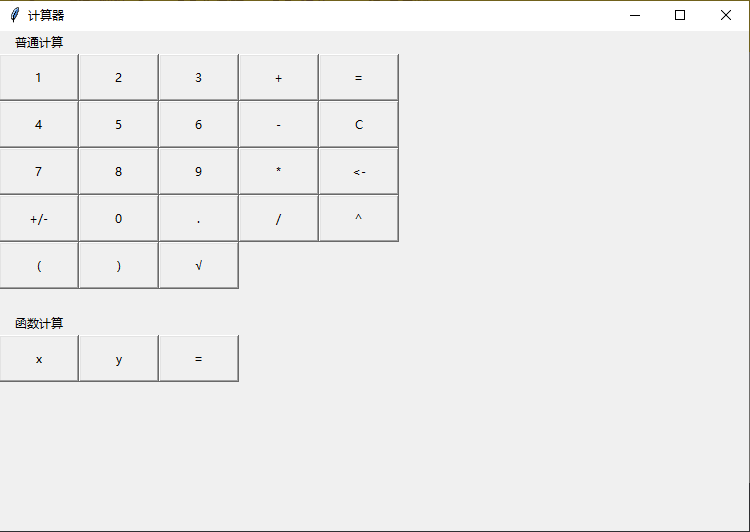
【作品介绍】
一个可以进行普通与函数计算的计算器。
【作品源代码】
import tkinter
import math
import matplotlib.pyplot
import numpy
import sympy

a = ""
b = ""
c = ""
x = []
y = 0
d = ""
e = ""

#初始化
tt = tkinter.Tk()
tt.title("计算器")
tt.geometry("750x500")

#按钮(函数)
def n(n):
    global a
    a += n
    tkinter.Label(tt, text = a).grid(row = 6, column = 0)
    pass

def plus_or_minus():
    global a, c
    c = a
    clear()
    a = str(-1 * eval(c))
    tkinter.Label(tt, text = a).grid(row = 6, column = 0)
    pass

def equal():
    global a, b, e
    e = b
    if "x" not in a:
        if a == "":
            b = ""
            pass
        else:
            b = str(eval(a))
            pass
        tkinter.Label(tt, text = b).grid(row = 6, column = 2)
        pass
    else:
        global x, y, d
        x = numpy.arange(-1000, 1000, 0.1)
        if "y" in a:
            f = a.replace("y=", "")
            y = eval(f)
            d = "y == 0, x == " + str(sympy.solve(f, "x"))
            pass
        else:
            y = eval(a)
            d = "y == 0, x == " + str(sympy.solve(a, "x"))
            pass
        tkinter.Label(tt, text=d).grid(row=7, column=0)
        matplotlib.pyplot.figure()
        matplotlib.pyplot.plot(x, y)
        matplotlib.pyplot.show()
        pass
    pass

def clear():
    global a, b, d, e
    b = e
    for i in range(max(len(a), len(b), len(d))):
        backspace()
        b = b[0:-1]
        d = d[0:-1]
        tkinter.Label(tt, text = b).grid(row = 6, column = 2)
        tkinter.Label(tt, text = d).grid(row = 7, column = 0)
        pass
    pass

def backspace():
    global a
    a = a[0:-1]
    tkinter.Label(tt, text = a).grid(row = 6, column = 0)
    pass

def buttons():
    tkinter.Label(tt, text = "普通计算").grid(row = 0, column = 0)

    bt_1 = tkinter.Button(tt, text = "1", command = lambda: n("1"))
    bt_1.grid(row = 1, column = 0)

    bt_2 = tkinter.Button(tt, text = "2", command = lambda: n("2"))
    bt_2.grid(row = 1, column = 1)

    bt_3 = tkinter.Button(tt, text = "3", command = lambda: n("3"))
    bt_3.grid(row = 1, column = 2)

    bt_4 = tkinter.Button(tt, text = "4", command = lambda: n("4"))
    bt_4.grid(row = 2, column = 0)

    bt_5 = tkinter.Button(tt, text = "5", command = lambda: n("5"))
    bt_5.grid(row = 2, column = 1)

    bt_6 = tkinter.Button(tt, text = "6", command = lambda: n("6"))
    bt_6.grid(row = 2, column = 2)

    bt_7 = tkinter.Button(tt, text = "7", command = lambda: n("7"))
    bt_7.grid(row = 3, column = 0)

    bt_8 = tkinter.Button(tt, text = "8", command = lambda: n("8"))
    bt_8.grid(row = 3, column = 1)

    bt_9 = tkinter.Button(tt, text = "9", command = lambda: n("9"))
    bt_9.grid(row = 3, column = 2)

    bt_0 = tkinter.Button(tt, text = "0", command = lambda: n("0"))
    bt_0.grid(row = 4, column = 1)

    bt_plus_or_minus = tkinter.Button(tt, text = "+/-", command = plus_or_minus)
    bt_plus_or_minus.grid(row = 4, column = 0)

    bt_plus = tkinter.Button(tt, text = "+", command = lambda: n("+"))
    bt_plus.grid(row = 1, column = 3)

    bt_minus = tkinter.Button(tt, text = "-", command = lambda: n("-"))
    bt_minus.grid(row = 2, column = 3)

    bt_multiply = tkinter.Button(tt, text = "*", command = lambda: n("*"))
    bt_multiply.grid(row = 3, column = 3)

    bt_divide = tkinter.Button(tt, text = "/", command = lambda: n("/"))
    bt_divide.grid(row = 4, column = 3)

    bt_dot = tkinter.Button(tt, text = ".", command = lambda: n("."))
    bt_dot.grid(row = 4, column = 2)

    bt_equal_1 = tkinter.Button(tt, text = "=", command = equal)
    bt_equal_1.grid(row = 1, column = 4)

    bt_clear = tkinter.Button(tt, text = "C", command = clear)
    bt_clear.grid(row = 2, column = 4)

    bt_backspace = tkinter.Button(tt, text = "<-", command = backspace)
    bt_backspace.grid(row = 3, column = 4)

    bt_power = tkinter.Button(tt, text = "^", command = lambda: n("**"))
    bt_power.grid(row = 4, column = 4)

    bt_bracket1 = tkinter.Button(tt, text = "(", command = lambda: n("("))
    bt_bracket1.grid(row = 5, column = 0)

    bt_bracket2 = tkinter.Button(tt, text = ")", command = lambda: n(")"))
    bt_bracket2.grid(row = 5, column = 1)

    bt_sqrt = tkinter.Button(tt, text = "√", command = lambda: n("math.sqrt("))
    bt_sqrt.grid(row = 5, column = 2)

    tkinter.Label(tt, text = "").grid(row = 6, column = 0)
    tkinter.Label(tt, text = "函数计算").grid(row = 7, column = 0)

    bt_x = tkinter.Button(tt, text = "x", command = lambda: n("x"))
    bt_x.grid(row = 8, column = 0)

    bt_y = tkinter.Button(tt, text="y", command=lambda: n("y"))
    bt_y.grid(row = 8, column = 1)

    bt_equal_2 = tkinter.Button(tt, text = "=", command = lambda: n("="))
    bt_equal_2.grid(row = 8, column = 2)

    button_list = [bt_1, bt_2, bt_3, bt_4, bt_5, bt_6, bt_7, bt_8, bt_9, bt_0, bt_x, bt_y,
                   bt_plus, bt_minus, bt_multiply, bt_divide, bt_power,
                   bt_plus_or_minus, bt_dot, bt_bracket1, bt_bracket2, bt_sqrt, \
                   bt_equal_1, bt_equal_2, bt_clear, bt_backspace]

    for i in button_list:
        i.config(width = 10, height = 2)
        pass
    pass

buttons()
tt.mainloop()
【提示】
部分含有Python第三方库相关内容的作品,在海龟编辑器网页端无法运行哦!如遇到这种情况,可以打开下面的链接,下载海龟编辑器客户端:
https://python.codemao.cn