 mi-program查看:64 回复:2 评论:1 创建时间:2022-08-12T18:24:21
用户:mi-program查看:64 回复:2 评论:1 创建时间:2022-08-12T18:24:21
【作品展示】
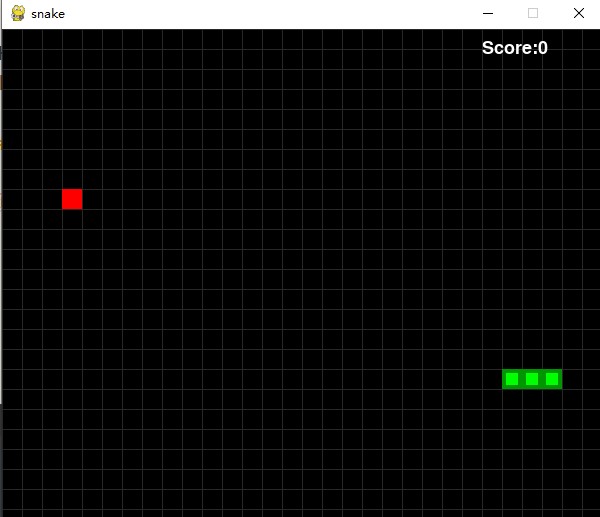
【作品介绍】
哪位大神能帮忙解决一下按下按键后加载缓慢的问题优化一下
万分感谢
转载请声明原作者地址
【作品源代码】
from random import randint  # 调用随机库
import pygame as pg  # 调用pygame库
import sys  # 调用sys系统库
from pygame.locals import *  # 导入常量库

FPS = 10  # 画面帧数,代表蛇的移动速度
window_width = 600  # 画面宽度
window_height = 500  # 画面高度
cellsize = 20  # 游戏窗口内每一小格的大小
cell_width = int(window_width/cellsize)
# 屏幕宽度被每一格的宽度整除——横向的格子数
cell_height = int(window_height/cellsize)
# 屏幕高度被每一格的高度整除——纵向的格子数

BGcolor = (0, 0, 0)  # 背景:黑色
BLUE = (0, 0, 255)  # 字幕:蓝色
RED = (255, 0, 0)  # 字幕:红色
apple_color = (255, 0, 0)  # 蛇吃的苹果——红色
snake_color = (0, 150, 0)  # 蛇身的边缘为深绿色
GREEN = (0, 255, 0)  # 蛇身绿色
WHITE = (255, 255, 255)  # 白色 “game over",score
DARKGRAY = (40, 40, 40)  # 深灰  格子边框的颜色

UP = "up"  # 定义蛇移动的四个方向
DOWN = "down"
LEFT = "left"
RIGHT = "right"
HEAD = 0  # 定义蛇头的变量,设置蛇头吃苹果时使用。


def main():  # 主函数
    global FPSclock, window, BASICFONT  # 全局变量 时间,窗口,基础字体
    pg.init()  # 初始化游戏
    FPSclock = pg.time.Clock()  # 获取pygame时钟进行计时
    window = pg.display.set_mode((window_width, window_height))
    # 设置屏幕的宽高
    BASICFONT = pg.font.Font("freesansbold.ttf", 18)  # 字体,字号
    pg.display.set_caption("贪吃蛇 --by 程序专家 转载请声明原作者地址!!")  # 游戏标题
    showStartScreen()  # 显示开始画面

    while True:  # 保证整个过程在运动游戏和结束游戏之间循环
        runGame()  # 运行游戏函数(后面会单独定义此函数)
        showGameOverScreen()  # 游戏结束画面(后面单独定义此函数)


def runGame():  # 定义运行游戏函数
    startx = randint(5, cell_width-6)  # 随机生成:蛇的起点X坐标
    starty = randint(5, cell_height-6)  # 随机生成:蛇的起点Y坐标
    # 设置蛇的身体,长度为X轴的3个格子
    snakeCoords = [{"x": startx, "y": starty},
                   {"x": startx-1, "y": starty},
                   {"x": startx-2, "y": starty}]
    direction = RIGHT  # 蛇的初始运动方向 向右
    apple = getRandomLocation()  # 随机生成苹果

    while True:  # 游戏过程的循环
        for event in pg.event.get():  # 获取事件
            if event.type == QUIT:  # 如果获取的事件类型是“退出”
                terminate()  # 触发退出函数(后面单独定义)

            elif event.type == KEYDOWN:
                # 如果获取的事件类型是“按下键盘按键”
                if event.key == K_LEFT and direction != RIGHT:
                    # 如果按下键盘左键
                    direction = LEFT  # 方向向左
                elif event.key == K_RIGHT and direction != LEFT:  # 右键
                    direction = RIGHT  # 方向向右
                elif event.key == K_UP and direction != DOWN:  # 上键
                    direction = UP  # 方向向上
                elif event.key == K_DOWN and direction != UP:  # 下键
                    direction = DOWN  # 方向向下
                elif event.key == K_ESCAPE:  # ESC键
                    print("游戏结束")
                    terminate()  # 触发退出函数,退出游戏

        # 判断蛇头是否碰壁
        if snakeCoords[HEAD]["x"] == -1 or snakeCoords[HEAD]["x"] == cell_width or snakeCoords[HEAD]["y"] == -1 or snakeCoords[HEAD]["y"] == cell_height:
            return  # 游戏结束,重新开始
        # 判断蛇头是否碰到自己的身体
        for snakeBody in snakeCoords[1:]:
            # 如果蛇头碰到蛇身
            if snakeBody["x"] == snakeCoords[HEAD]["x"] and snakeBody["y"] == snakeCoords[HEAD]["y"]:
                return  # 游戏结束,重新开始

            # 判断蛇吃到苹果
            if snakeCoords[HEAD]["x"] == apple["x"] and snakeCoords[HEAD]["y"] == apple["y"]:
                apple = getRandomLocation()  # 重新生成一个苹果
            else:
                del snakeCoords[-1]  # 没吃到苹果,就删除掉蛇身的最后一个格
            # 根据方向添加新的蛇头
            if direction == UP:
                newHead = {"x": snakeCoords[HEAD]
                           ["x"], "y": snakeCoords[HEAD]["y"]-1}
            elif direction == DOWN:
                newHead = {"x": snakeCoords[HEAD]
                           ["x"], "y": snakeCoords[HEAD]["y"]+1}
            elif direction == LEFT:
                newHead = {"x": snakeCoords[HEAD]
                           ["x"]-1, "y": snakeCoords[HEAD]["y"]}
            elif direction == RIGHT:
                newHead = {"x": snakeCoords[HEAD]
                           ["x"]+1, "y": snakeCoords[HEAD]["y"]}

            snakeCoords.insert(0, newHead)  # 添加新蛇头在蛇的最前面

            window.fill(BGcolor)  # 填充背景颜色
            drawGrid()  # 画方格
            drawSnake(snakeCoords)  # 画蛇
            drawApple(apple)  # 画苹果
            # 显示分数
            drawScore(len(snakeCoords)-3)
            # 蛇的总长度-初始长度=吃掉的苹果数

            pg.display.update()  # 图像更新
            FPSclock.tick(FPS)  # 设置帧率


def drawPressKeyMsg():  # 定义函数:绘制开始游戏提示信息
    pressKeySurf = BASICFONT.render("Press a key to play", True, BLUE)
    # 提示信息
    pressKeyRect = pressKeySurf.get_rect()  # 获取文字大小
    pressKeyRect.topleft = (window_width-200, window_height-30)
    # 文字放在左下角位置
    window.blit(pressKeySurf, pressKeyRect)  # 在屏幕上显示出来


def checkForKeyPress():  # 定义函数:检查是否触发按键事件
    if len(pg.event.get(QUIT)) > 0:
        terminate()  # 退出函数
    keyUpEvents = pg.event.get(KEYUP)  # 不按按键
    if len(keyUpEvents) == 0:
        return None  # 无动作
    if keyUpEvents[0].key == K_ESCAPE:  # 按ESC
        terminate()  # 退出
    return keyUpEvents[0].key


def showStartScreen():  # 定义函数:开始画面
    window.fill(BGcolor)  # 填充背景
    titleFont = pg.font.Font("freesansbold.ttf", 100)  # 字体,字号
    titleSurf = titleFont.render("snake!", True, RED)  # 写出snake  红色
    titleRect = titleSurf.get_rect()  # 获取矩形大小
    titleRect.center = (window_width/2, window_height/2)
    window.blit(titleSurf, titleRect)  # 显示在屏幕上
    drawPressKeyMsg()  # 调用画文本函数
    pg.display.update()
    while True:
        if checkForKeyPress():  # 如果触发了按键事件
            pg.event.get()
            return


def terminate():  # 定义函数:退出
    pg.quit()  # 退出游戏
    sys.exit()  # 退出系统


def getRandomLocation():  # 定义函数:苹果出现的位置
    return{"x": randint(0, cell_width-1), "y": randint(0, cell_height-1)}


def showGameOverScreen():  # 定义函数:游戏结束
    gameOverFont = pg.font.Font("freesansbold.ttf", 150)
    gameSurf = gameOverFont.render("Game", True, WHITE)  # 显示Game
    overSurf = gameOverFont.render("Over", True, WHITE)  # 显示over
    gameRect = gameSurf.get_rect()  # Game 大小
    overRect = overSurf.get_rect()  # Game 大小
    gameRect.midtop = (window_width/2, 10)  # Game 中心点位置
    overRect.midtop = (window_width/2, gameRect.height+10+25)  # Game中心点
    window.blit(gameSurf, gameRect)  # 显示Game
    window.blit(overSurf, overRect)  # 显示Over
    drawPressKeyMsg()
    pg.display.update()
    pg.time.wait(500)
    checkForKeyPress()
    while True:
        if checkForKeyPress():
            pg.event.get()
            return


def drawScore(score):  # 定义函数:显示分数
    scoreSurf = BASICFONT.render("Score:%s" % (score), True, WHITE)  # 字体颜色
    scoreRect = scoreSurf.get_rect()  # 获取大小
    scoreRect.topleft = (window_width-120, 10)  # 位置
    window.blit(scoreSurf, scoreRect)  # 显示


def drawSnake(snakeCoords):  # 定义函数:画蛇
    for coord in snakeCoords:
        x = coord["x"]*cellsize
        y = coord["y"]*cellsize
        snakeSegmentRect = pg.Rect(x, y, cellsize, cellsize)  # 蛇的大小
        pg.draw.rect(window, snake_color, snakeSegmentRect)
        snakeInnerSegmentRect = pg.Rect(x+4, y+4, cellsize-8, cellsize-8)
        pg.draw.rect(window, GREEN, snakeInnerSegmentRect)


def drawApple(coord):  # 定义函数:画苹果
    x = coord["x"]*cellsize
    y = coord["y"]*cellsize
    appleRect = pg.Rect(x, y, cellsize, cellsize)
    pg.draw.rect(window, apple_color, appleRect)


def drawGrid():  # 定义函数:绘制所有方格
    for x in range(0, window_width, cellsize):
        pg.draw.line(window, DARKGRAY, (x, 0), (x, window_height))  # X轴
    for y in range(0, window_height, cellsize):
        pg.draw.line(window, DARKGRAY, (0, y), (window_width, y))  # Y轴


if __name__ == "__main__":  # 如果运行主程序
    main()
【提示】
部分含有Python第三方库相关内容的作品,在海龟编辑器网页端无法运行哦!如遇到这种情况,可以打开下面的链接,下载海龟编辑器客户端:
https://python.codemao.cn