 不学编程终不还查看:129 回复:4 评论:6 创建时间:2022-08-08T16:22:43
用户:不学编程终不还查看:129 回复:4 评论:6 创建时间:2022-08-08T16:22:43
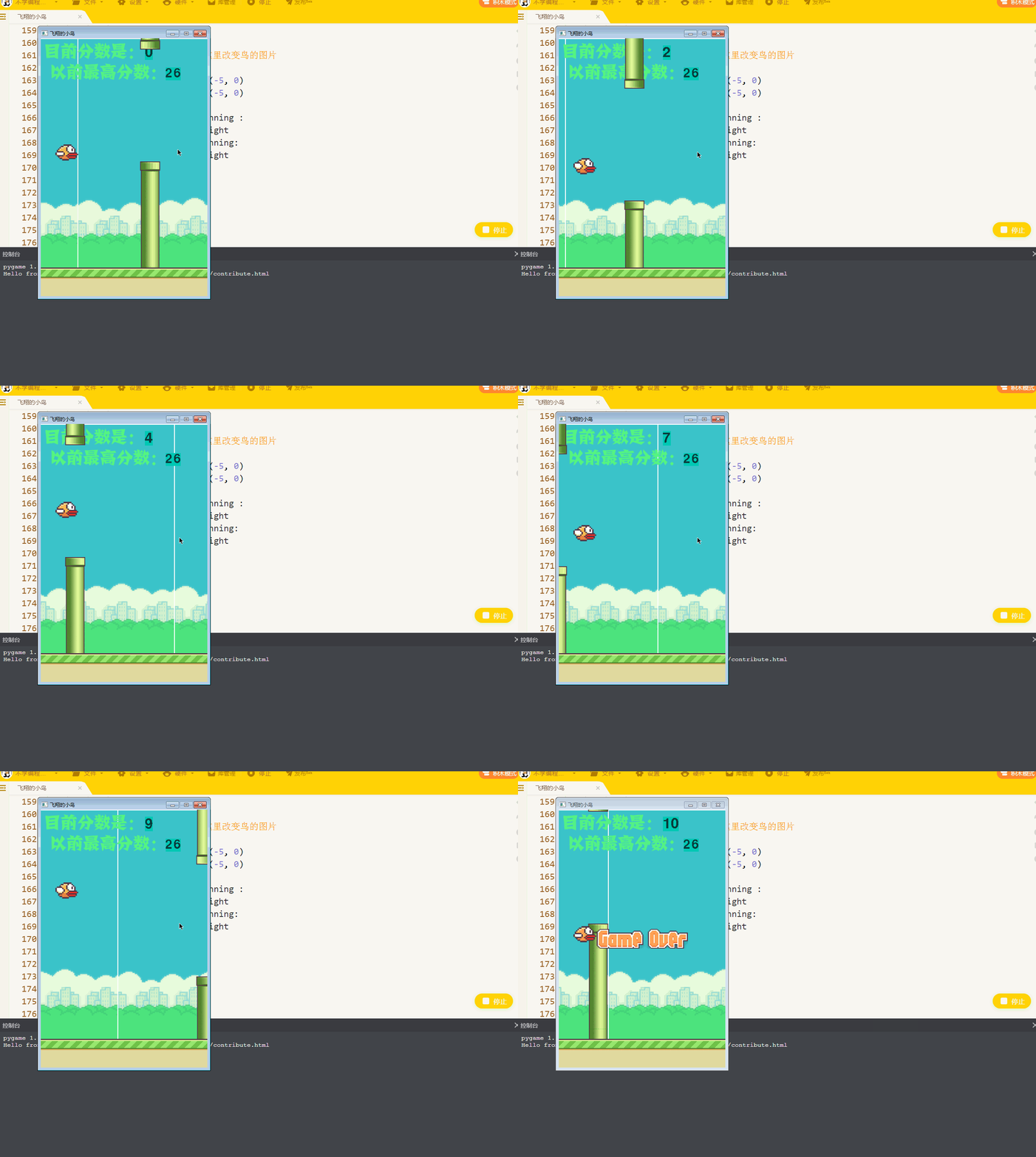
【作品展示】
【作品介绍】
优化了上次的作品,玩起来也更加接近了。加了注释,不过还是很少(>_<)
更新了移动背景的特效。
更新了小鸟飞行扇翅膀的特效。
增加了地面。
有问题的请指出·。
【作品源代码】
import pygame,sys
import random
import pickle
pygame.init()

screen = pygame.display.set_mode((400,620))
pygame.display.set_caption('飞翔的小鸟')
best_handle = True
try :
    best_scor = open("bird.pkl",'rb')
except:
    best_handle = False
if best_handle:
    best_scor_q = pickle.load(best_scor)
    best_scor.close()
else:
    best_scor_q = 0#新建一个二进制文件来保存最高分数

pygame.mixer.music.load("Town.mp3")
pygame.mixer.music.set_volume(1)
pygame.mixer.music.play(-1)
sound_1 = pygame.mixer.Sound("hit_wall.wav")
sound_1.set_volume(0.1)
sound_2 = pygame.mixer.Sound("game_over.wav")
sound_2.set_volume(0.1)


class Bird (pygame.sprite.Sprite):
    def __init__(self,image_load,loacation):
        pygame.sprite.Sprite.__init__(self)
        self.image = pygame.image.load(image_load)
        self.rect = self.image.get_rect()
        self.rect.left,self.rect.top = loacation
        self.rect.center = loacation
    def fly (self):
        global bird_y, bird_speed
        screen.blit(bird.image, [25, bird_speed])
        if running:
            bird_y += 0.3
            bird_speed += bird_y


class Down_Obstructions(pygame.sprite.Sprite):
    def __init__ (self,image_load,loacation=[25,25]):
        pygame.sprite.Sprite.__init__(self)
        self.image = pygame.image.load(image_load)
        self.rect = self.image.get_rect()
        self.rect.left, self.rect.top = loacation
        self.rect.center = loacation
    def move (self):
        if running :
            global Obstructions_x
            global Obstructions_y
            Obstructions_x = Obstructions_x - 3
            self.rect.x = Obstructions_x
            self.rect.y = Obstructions_y
            if Obstructions_x <= -50:
                Obstructions_x = 420
                Obstructions_y = random.randint(200,400)

class UP_Obstructions(pygame.sprite.Sprite):
    def __init__ (self,image_load,loacation):
        pygame.sprite.Sprite.__init__(self)
        self.image = pygame.image.load(image_load)
        self.rect = self.image.get_rect()
        self.rect.center = loacation
    def move (self):
        self.rect.x = Obstructions_x
        self.rect.bottom = Obstructions_down.rect.top -250

class Ground(pygame.sprite.Sprite):
    def __init__(self,image_load,loacation):
        pygame.sprite.Sprite.__init__(self)
        self.image = pygame.image.load(image_load)
        self.rect = self.image.get_rect()
        self.rect.center = loacation

pygame.time.set_timer(pygame.USEREVENT,100)#自己定义一个计时器

bird_image = ["小鸟.png","小鸟(1).png"]
scor_image_1 = pygame.image.load("新角色.png")
scor_best = pygame.image.load('新角色 (1).png')
scor_best_rect = scor_best.get_rect()
scor_image_1_rect = scor_image_1.get_rect()
scor = 0
Failure = pygame.image.load('失败.png')
running = True
bj1 = pygame.image.load('背景1.png')
bj2 = pygame.image.load('背景2.png')
Obstructions_y = random.randint(200,400)
Obstructions_x = 420
Obstructions_down = Down_Obstructions('柱子下.png',[Obstructions_x,Obstructions_y])
Obstructions_up = UP_Obstructions('柱子上.png', [Obstructions_x, Obstructions_y - 850])
bird_y = 0
bird_speed = 25

clock = pygame.time.Clock()#时钟

screen_rect = screen.get_rect()
Failure_rect = Failure.get_rect()
Failure_rect.center = screen_rect.center
bj1_rect = bj1.get_rect()
bj2_rect = bj2.get_rect()
bj2_rect[0] = bj1_rect.right

image_bird = 0

run = True
ground = Ground("地面.png", [screen_rect.center[0], 600])

group = pygame.sprite.Group(Obstructions_down,Obstructions_up,ground)
while run:
    bird = Bird(bird_image[image_bird], [25, bird_speed])
    scre喵5, 255])
    screen.blit(bj1,bj1_rect)
    screen.blit(bj2, bj2_rect)
    txt_font = pygame.font.SysFont(None, 50)
    txt_image = txt_font.render(str(scor), False, (10, 60, 60), (0, 200, 180))
    txt_rect = txt_image.get_rect()
    txt_rect.x = 250
    txt_rect.y = 17
    screen.blit(txt_image, txt_rect)

    txt_font_2 = pygame.font.SysFont(None, 45)
    txt_image_2 = txt_font_2.render(str(best_scor_q), False, (10, 60, 60), (0, 200,180 ))
    txt_rect_2 = txt_image.get_rect()
    txt_rect_2.x = 300
    txt_rect_2.y = 70
    screen.blit(txt_image_2, txt_rect_2)
    scor_best_rect.center = [150,80]

    screen.blit(scor_image_1, scor_image_1_rect)
    screen.blit(scor_best,scor_best_rect)
    screen.blit(Obstructions_down.image,Obstructions_down.rect)
    screen.blit(Obstructions_up.image,Obstructions_up.rect)
    screen.blit(ground.image,ground.rect)
    #打印角色
    if not running:
        screen.blit(Failure,Failure_rect)
    if pygame.sprite.spritecollide(bird,group,False):
        sound_2.play()
        running = False
    if bird.rect.right == Obstructions_down.rect.right and  running:
        scor += 1
    for event in pygame.event.get():
        if event.type == pygame.QUIT:
            if scor > best_scor_q :
                pickle_file = open('bird.pkl','wb')
                pickle.dump(scor,pickle_file)
                pickle_file.close()
            run = False
        elif event.type == pygame.KEYDOWN:
            if event.key == pygame.K_UP:
                bird_y = -7
                sound_1.play()
                #让鸟作出物理动作
        elif event.type == pygame.USEREVENT and running:
            if image_bird == 0:
                image_bird =1
            else :
                image_bird = 0#这里改变鸟的图片
    if running :
        bj1_rect = bj1_rect.move(-5, 0)
        bj2_rect = bj2_rect.move(-5, 0)

    if bj1_rect.right < 0 and running :
        bj1_rect[0] = bj2_rect.right
    if bj2_rect.right < 0 and running:
        bj2_rect[0] = bj1_rect.right

    Obstructions_down.move()
    Obstructions_up.move()
    bird.fly()
    pygame.display.flip()
    clock.tick(60)#设置时钟
pygame.quit()
【提示】
部分含有Python第三方库相关内容的作品,在海龟编辑器网页端无法运行哦!如遇到这种情况,可以打开下面的链接,下载海龟编辑器客户端:
https://python.codemao.cn 尬聊boy
尬聊boy声音和图片都没有放出来这该怎么用?
点赞0
评论
你把代码保存起来,放到一个文件夹里,按照代码中末尾有.png的把素材搬过来,.mp3,.wav的改成你喜欢的音乐,(新角色)和(新角色1)的分别是目前分数和最高分数,你就把他们弄成一个图片就可以了
你会pygame吗,一般学过的人都会
我的意思是你素材没有放出来啊,素材:图片和音乐之类的文件,难不成让我们自己找吗?
好吧