 小小小嘟嘟查看:312 回复:3 评论:11 创建时间:2022-08-05T16:38:41
用户:小小小嘟嘟查看:312 回复:3 评论:11 创建时间:2022-08-05T16:38:41
【作品展示】
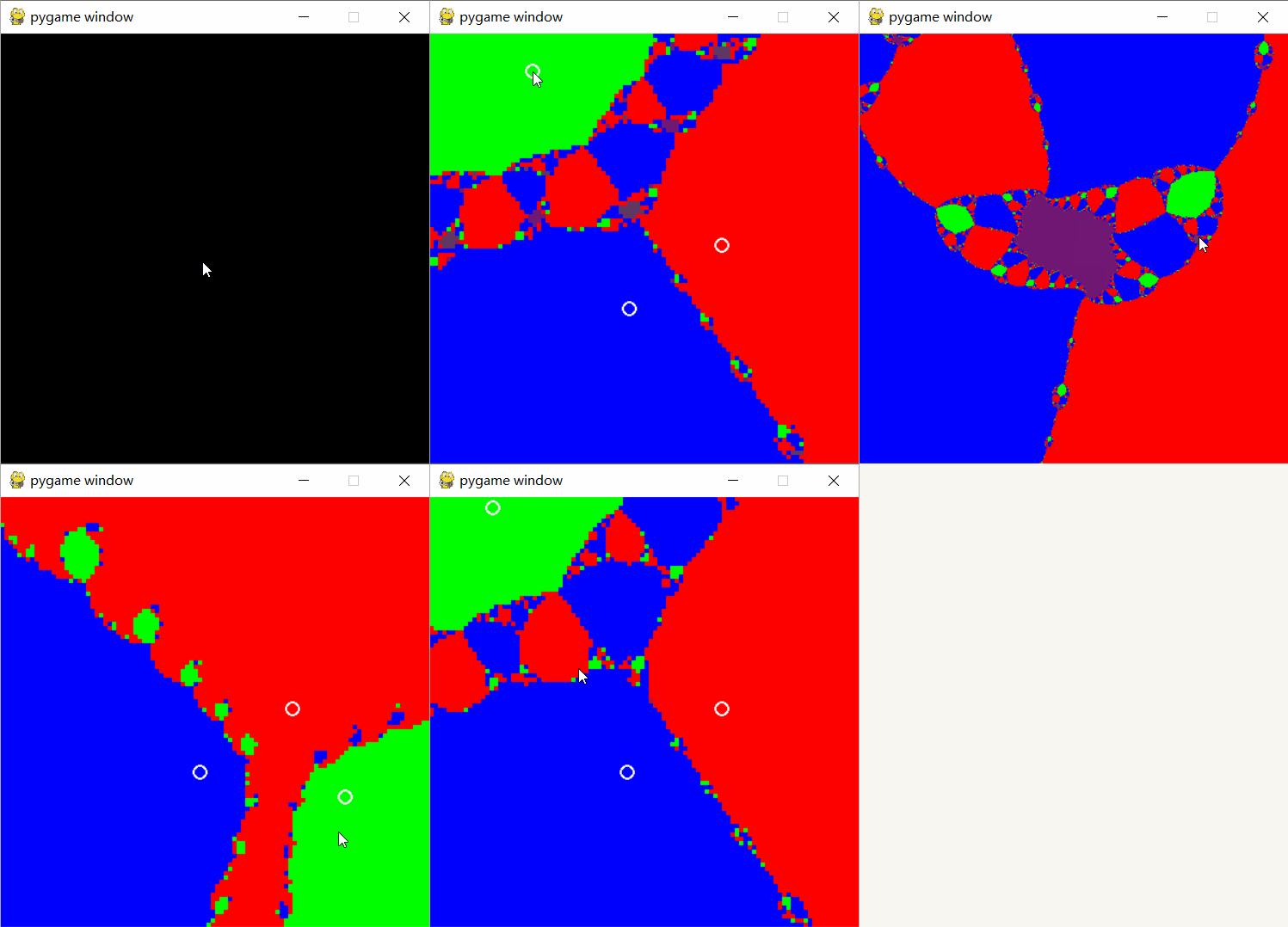
【作品介绍】
更新:修复了中心middle不等于0.0+0.0j时无法移动根的问题
修复了一些小问题
往期版本:
https://shequ.codemao.cn/community/475077
【作品源代码】
import numpy as np
import pygame, sys


print()
Iter = 20  # iterations
roots = np.array([1.0+0.0j, -0.5+0.8660254037844386j, -0.5-0.8660254037844386j], dtype='c16')

def f(x):
    a, b, c = x-roots[0], x-roots[1], x-roots[2]
    return x-a*b*c/(a*b+b*c+c*a)

def get_z(x):
    for i in range(Iter):
        x = f(x)
    return x

def get_index():
    x0 = np.resize(np.linspace(-focus, focus, pl, dtype='c16'), (pl, pl))
    x0 = x0+x0.transpose()*1j+middle  # initial values
    z = get_z(x0)  # calculate limities

    # calculate colors
    zc = np.zeros(shape=(pl, pl, 3), dtype='u1')
    npsum = np.sum
    for i in range(pl):
        for j in range(pl):
            w = 1/(abs(roots-z[i][j])+1e-6)
            zc[i][j] = 256*w/npsum(w)-1
    return zc

pygame.init()

rslt = 200  # resolution
middle = 0.0+0.0j
focus = 2
pl = 2*rslt+1  # real and imaginary part len
size = 200
d = size/rslt

screen = pygame.display.set_mode((2*size, 2*size))
pygame.display.set_caption("Newton's Fractal")

def render(zc):
    for j in range(pl):
        for i in range(pl):
            pygame.draw.rect(screen, zc[i][j], (j*d, 2*size-i*d, d, d), 0)
    pygame.display.update()

button_size = 7

def draw_button(touched_index=-1):
    i = 0
    for pos in (roots_cpos):
        pygame.draw.circle(screen, (255, 255, 255), (pos.real, pos.imag), button_size, 2)
        i += 1
    pygame.display.update()

    char = 'roots = {}, focus = {}, middle = {}'.format(roots, focus, middle)
    print(char+' '*(171-len(char)), end='\r')

def roots_trans(cpos):
    return (cpos/size-(1+1j)).conjugate()*focus+middle

def roots_invtrans(cpos):
    return size*(((cpos-middle)/focus).conjugate()+(1+1j))

roots_cpos = roots_invtrans(roots)

def check_pos(cpos):
    is_touch_buttons = (abs(roots_cpos-cpos) <= 2*button_size)
    for i in range(3):
        if is_touch_buttons[i]:
            return i
    return -1

def set_rslt(val):
    global rslt, pl, d
    rslt = val
    pl = 2*rslt+1
    d = size/rslt

def caround(c, decimals=9):
    return np.around(c.real, decimals)+np.around(c.imag, decimals)*1j

render(get_index())
draw_button()

down = 0
while True:
    for event in pygame.event.get():
        if event.type == pygame.QUIT:
            sys.exit()
        elif event.type == pygame.KEYDOWN:
            if event.key == pygame.K_UP:
                if Iter <= 50:
                    Iter += 1
            elif event.key == pygame.K_DOWN:
                if Iter > 0:
                    Iter -= 1
            elif event.key == pygame.K_LEFT:
                focus *= np.sqrt(2)
                roots_cpos = roots_invtrans(roots)
            elif event.key == pygame.K_RIGHT:
                focus /= np.sqrt(2)
                roots_cpos = roots_invtrans(roots)
            elif event.key == pygame.K_f:
                middle += (cpos.conjugate()/size-1+1j)*focus
                middle = caround(middle)
                roots_cpos = roots_invtrans(roots)
            elif event.key == pygame.K_h:
                focus, middle = 2, 0.0+0.0j
                roots_cpos = roots_invtrans(roots)
            elif event.key == pygame.K_g:
                middle = caround(np.mean(roots), 9)
                focus = np.max(abs(roots-middle))
                roots_cpos = roots_invtrans(roots)
            elif event.key == pygame.K_RETURN:
                set_rslt(200)
                render(get_index())
                draw_button()
            elif event.key == pygame.K_SPACE:
                set_rslt(50)
                render(get_index())
                draw_button()
        elif event.type == pygame.MOUSEBUTTONUP:
            down = 0
            set_rslt(200)
            render(get_index())
            draw_button()
        elif event.type == pygame.MOUSEBUTTONDOWN:
            down = 1
            set_rslt(50)
            break
    x, y = pygame.mouse.get_pos()
    cpos = complex(x, y)
    if down == 0:
        index = check_pos(cpos)
    else:
        if index != -1:
            roots_cpos[index] = cpos
            roots[index] = roots_trans(cpos)

            render(get_index())
            draw_button()

# https://www.bilibili.com/video/BV1HQ4y1q78v?spm_id_from=333.337.search-card.all.click
# https://www.3blue1brown.com/lessons/newtons-fractal
【提示】
部分含有Python第三方库相关内容的作品,在海龟编辑器网页端无法运行哦!如遇到这种情况,可以打开下面的链接,下载海龟编辑器客户端:
https://python.codemao.cn Planet_Cube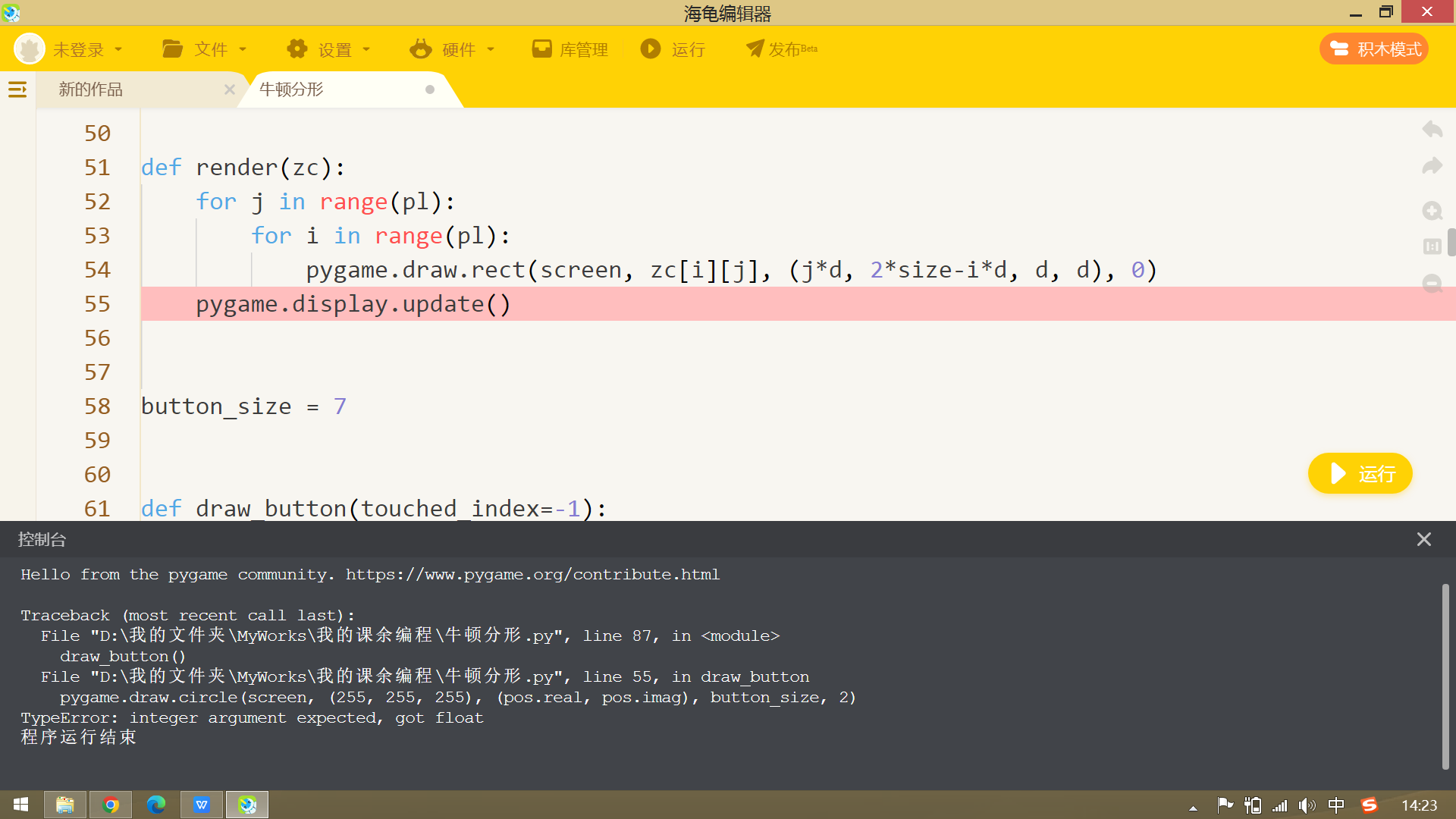
报错了
点赞0
评论
??
抱歉,我现在看到的时候手头没有电脑,到时候看看。我最近好像打开过这个作品,发现报错,于是修改了一下就可以了
额,我用网页版复制了过来,发了一条回帖,你自己点进来看看新的代码还会不会报错
OK,我看看
你可以看看我【作品介绍】里提到的旧版本,旧版本的【作品介绍】里讲了操作方法
小小小嘟嘟这个是修改后的,其中在 get_index 中有一部分注释提供了另一种上色的算法,没注释的是默认算法,改成另一种算法同时要改动后面的少许内容,不懂的不建议改,想尝试的可以试着理解代码,然后自己改。
import numpy as np
import pygame
import sys


iter = 20  # iterations
roots = np.array([1.0+0.0j, -0.5+0.8660254037844386j, -0.5-0.8660254037844386j], dtype='c16')
# roots = np.array([1.5+0.0j, -0.75+0.5j, -0.75-0.5j], dtype = 'c16')


def f(x):
    a, b, c = x-roots[0], x-roots[1], x-roots[2]
    return x-a*b*c/(a*b+b*c+c*a)
def get_z(x):
    for i in range(iter):
        x = f(x)
    return x

def get_index():
    x0 = np.resize(np.linspace(-focus, focus, pl, dtype='c16'), (pl, pl))
    x0 = x0+x0.T*1j+middle  # initial values
    z = get_z(x0)  # calculate limities
    # calculate colors (Here are two methods)
    # zc = np.zeros(shape=(pl, pl, 3), dtype='u1')
    # npsum = np.sum
    # for i in range(pl):
    #     for j in range(pl):
    #         w = 1/(abs(roots-z[i][j])+1e-3)
    #         zc[i][j] = w/npsum(w)
    C = ((1, 0, 0), (0, 1, 0), (0, 0, 1))
    zc = np.zeros(shape=(pl, pl, 3), dtype='u1')
    for i in range(pl):
        for j in range(pl):
            dt = [abs(root-z[i][j]) for root in roots]
            c = 0
            for k in range(1, 3):
                if dt[c] > dt[k]:
                    c = k
            zc[i][j] = C[c]
    return zc

pygame.init()

rslt = 200  # resolution
middle = 0.0+0.0j
focus = 2
pl = 2*rslt+1  # real and imaginary part len
size = 200
d = size/rslt

screen = pygame.display.set_mode((2*size, 2*size))
pygame.display.set_caption("Newton's Fractal")

def render(zc):
    for j in range(pl):
        for i in range(pl):
            pygame.draw.rect(screen, 255*zc[i][j], (j*d, 2*size-i*d, d, d), 0)
    pygame.display.update()

button_size = 7
def draw_button(touched_index=-1):
    i = 0
    for pos in (roots_cpos):
        pygame.draw.circle(screen, (255, 255, 255),
                           (pos.real, pos.imag), button_size, 2)
        i += 1
    pygame.display.update()
    char = 'roots = {}, focus = {}, middle = {}'.format(roots, focus, middle)
    print(char+' '*(171-len(char)), end='\r')

def roots_trans(cpos):
    return (cpos/size-(1+1j)).conjugate()*focus+middle
def roots_invtrans(cpos):
    return size*(((cpos-middle)/focus).conjugate()+(1+1j))

roots_cpos = roots_invtrans(roots)
def check_pos(cpos):
    is_touch_buttons = (abs(roots_cpos-cpos) <= 2*button_size)
    for i in range(3):
        if is_touch_buttons[i]:
            return i
    return -1

def set_rslt(val):
    global rslt, pl, d
    rslt = val
    pl = 2*rslt+1
    d = size/rslt

render(get_index())
draw_button()

down = 0
while True:
    for event in pygame.event.get():
        if event.type == pygame.QUIT:
            sys.exit()
        elif event.type == pygame.KEYDOWN:
            if event.key == pygame.K_UP:
                iter += 1
            elif event.key == pygame.K_DOWN:
                if iter > 0:
                    iter -= 1
            elif event.key == pygame.K_LEFT:
                focus *= np.sqrt(2)
                roots_cpos = roots_invtrans(roots)
            elif event.key == pygame.K_RIGHT:
                focus /= np.sqrt(2)
                roots_cpos = roots_invtrans(roots)
            elif event.key == pygame.K_f:
                middle += (cpos.conjugate()/size-1+1j)*focus
                roots_cpos = roots_invtrans(roots)
            elif event.key == pygame.K_h:
                focus, middle = 2, 0.0+0.0j
                roots_cpos = roots_invtrans(roots)
            elif event.key == pygame.K_g:
                middle = np.mean(roots)
                focus = np.max(abs(roots-middle))
                roots_cpos = roots_invtrans(roots)
            elif event.key == pygame.K_RETURN:
                set_rslt(200)
            elif event.key == pygame.K_SPACE:
                set_rslt(50)
            render(get_index())
            draw_button()
        elif event.type == pygame.MOUSEBUTTONUP:
            down = 0
            set_rslt(200)
            render(get_index())
            draw_button()
        elif event.type == pygame.MOUSEBUTTONDOWN:
            down = 1
            set_rslt(50)
            break
    x, y = pygame.mouse.get_pos()
    cpos = complex(x, y)
    if down == 0:
        index = check_pos(cpos)
    else:
        if index != -1:
            roots_cpos[index] = cpos
            roots[index] = roots_trans(cpos)

            render(get_index())
            draw_button()

# https://www.bilibili.com/video/BV1HQ4y1q78v?spm_id_from=333.337.search-card.all.click
# https://www.3blue1brown.com/lessons/newtons-fractal
点赞0
评论
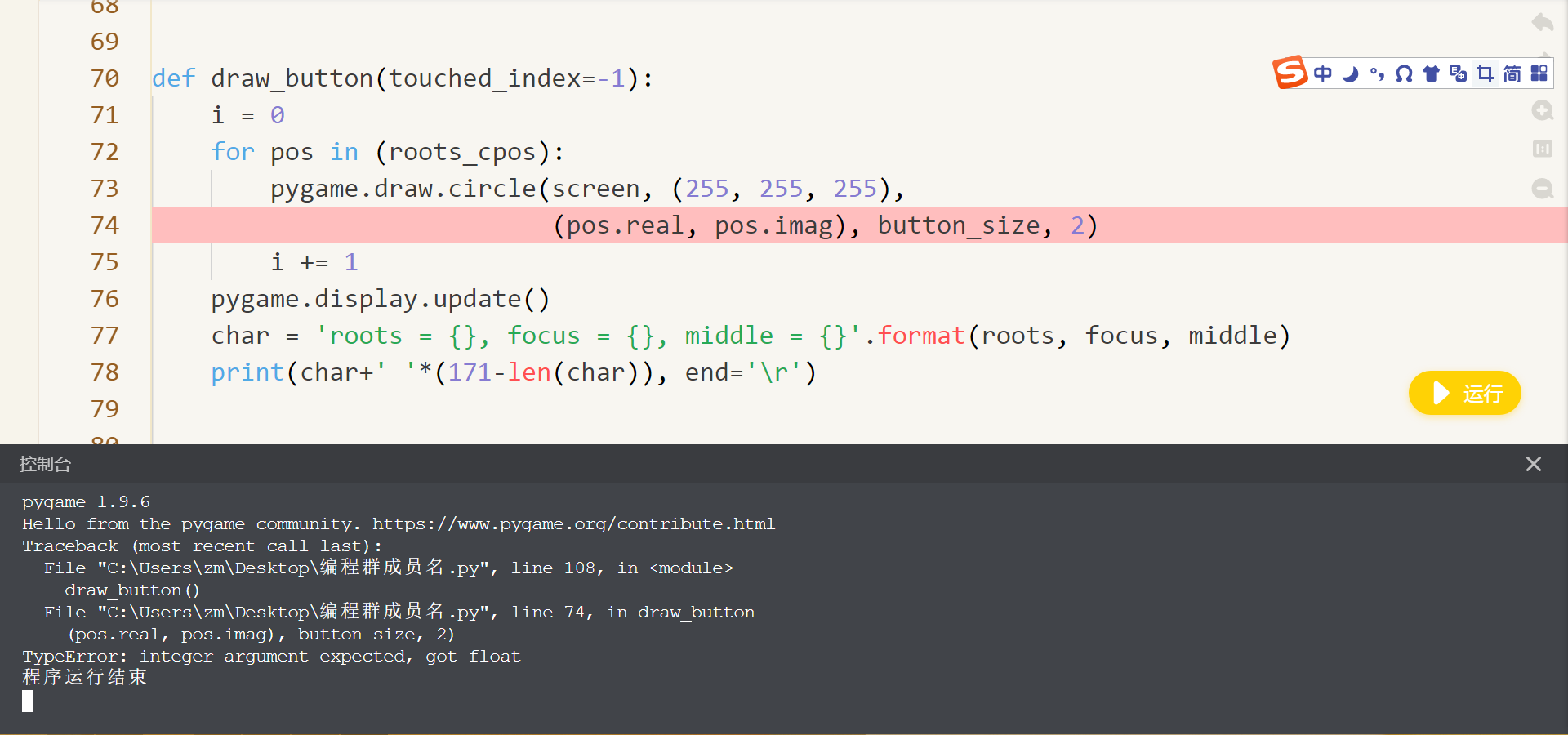
Planet_Cube还是会报错
点赞0
评论
但是这次可以短暂地出现一次图像
这就怪了,我的代码上个月才运行过,都没问题啊!
难道你的 pygame 是旧版?试一下在库管理删除再下载
你可以看看报错的内容
最后一行:integer argument expected, got float 意思是:期望得到整数的参数,结果是浮 所以可能是因为 pos.real 和 pos.imag 是两个浮点数,只需在外面分别加上 int() 然后再试试就可以了
谢谢!