 茶山麋鹿查看:59 回复:1 评论:0 创建时间:2022-07-07T20:27:45
用户:茶山麋鹿查看:59 回复:1 评论:0 创建时间:2022-07-07T20:27:45
【作品展示】
【作品介绍】
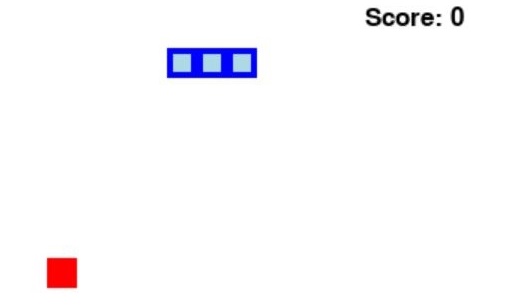
这是一个是原始的贪吃蛇。space键开始游戏。
【作品源代码】
import random, pygame, sys
from pygame.locals import *


global Speed, Trackingtime, Displayobject, WindowTypeface
pygame.init()
Speed = 8
Trackingtime = pygame.time.Clock()
Displayobject = pygame.display.set_mode((喵0, 480))
WindowTypeface = pygame.font.SysFont('Callibri.ttf',25)
pygame.display.set_caption('贪吃蛇')
cellsize = 20
backgroundcolor = (255, 255, 255)


def CheckKeyboardPress():
    if len(pygame.event.get(QUIT)) > 0:
        pygame.quit()
        sys.exit()
    keyUpEvents = pygame.event.get(KEYUP)
    if len(keyUpEvents) == 0:
        return None
    return keyUpEvents[0].key


def DesignStartScreen():
    global Speed
    titleTypeface1 = pygame.font.SysFont('Callibri.ttf', 200)
    titleTypeface2 = pygame.font.SysFont('Callibri.ttf', 60)
    KeyboardTypeface = pygame.font.SysFont('Callibri.ttf', 15)
    titleContent1 = titleTypeface1.render('RETRO SNAKER', True, (0, 0, 0), (0, 0, 0))
    titleContent2 = titleTypeface2.render('RETRO SNAKER', True, (255, 0, 0))
    KeyboardContent = WindowTypeface.render('Press any key to star', True, (0, 0, 0))
    Displayobject.fill(backgroundcolor)
    revolveContent1 = pygame.transform.rotate(titleContent1, 0)
    revolveRect2 = revolveContent1.get_rect()
    revolveRect2.center = (喵0 / 2, 480 / 2)
    Displayobject.blit(revolveContent1, revolveRect2)
    KeyboardRect = KeyboardContent.get_rect()
    KeyboardRect.topleft = (喵0 - 200, 480 - 30)
    Displayobject.blit(KeyboardContent, KeyboardRect.topleft)
    pygame.display.update()
    Trackingtime.tick(Speed)
    while True:
        if CheckKeyboardPress():
            pygame.event.get()
            return


def DesignGameOverScreen():
    gameOverTypeface = pygame.font.SysFont('Callibri.ttf', 100)
    KeyboardTypeface = pygame.font.SysFont('Callibri.ttf', 20)
    gameOverContent = gameOverTypeface.render('Game Over', True, (0, 0, 0))
    KeyboardContent = WindowTypeface.render('Press any key to restart', True, (0, 0, 0))
    gameOverRect = gameOverContent.get_rect()
    gameOverRect.center = (喵0 / 2, 480 / 2)
    Displayobject.blit(gameOverContent, gameOverRect)
    KeyboardRect = KeyboardContent.get_rect()
    KeyboardRect.topleft = (喵0 - 220, 480 - 30)
    Displayobject.blit(KeyboardContent, KeyboardRect.topleft)
    pygame.display.update()
    pygame.time.wait(500)
    while True:
        if CheckKeyboardPress():
            pygame.event.get()
            return


def DesignRetroSnaker(RetroSnakerCoords):
    for coord in RetroSnakerCoords:
        x = coord['x'] * 20
        y = coord['y'] * 20
        RetroSnakerSegmentRect = pygame.Rect(x, y, 20, 20)
        pygame.draw.rect(Displayobject, (0, 0, 255),RetroSnakerSegmentRect)
        RetroSnakerInnerSegmentRect = pygame.Rect(x + 4, y + 4, 20 - 8, 20 - 8)
        pygame.draw.rect(Displayobject, (173, 216, 230), RetroSnakerInnerSegmentRect)


def DesignApple(coord):
    x = coord['x'] * 20
    y = coord['y'] * 20
    appleRect = pygame.Rect(x, y, 20, 20)
    pygame.draw.rect(Displayobject, (255, 0, 0), appleRect)


def DesignScore(score):
    scoreContent = WindowTypeface.render('Score: %s' % (score), True, (0, 0, 0))
    scoreRest = scoreContent.get_rect()
    scoreRest.topleft = (喵0 - 100, 10)
    Displayobject.blit(scoreContent, scoreRest)


def DesignBorderline():
    for x in range(0, 喵0, 喵0 - 1):
        pygame.draw.line(Displayobject, (0, 0, 0), (x, 0), (x, 480), 5)
    for y in range(0, 480, 480 - 1):
        pygame.draw.line(Displayobject, (0, 0, 0), (0, y), (喵0, y), 5)


def GameRunning():
    global Speed
    startx = random.randint(5, 26)
    starty = random.randint(5, 18)
    RetroSnakerCoords = [{'x': startx, 'y': starty}, {'x': startx - 1, 'y': starty}, {'x': startx - 2, 'y': starty}]
    direction = 'right'
    apple = {'x':random.randint(0, 31), 'y':random.randint(0, 23)}

    while True:
        for event in pygame.event.get():
            if event.type == KEYDOWN:
                if event.key == K_LEFT and direction != 'right':
                    direction = 'left'
                elif event.key == K_RIGHT and direction != 'left':
                    direction = 'right'
                elif event.key == K_UP and direction != 'down':
                    direction = 'up'
                elif event.key == K_DOWN and direction != 'up':
                    direction = 'down'

        if direction == 'up':
            m = {'x': RetroSnakerCoords[0]['x'], 'y':RetroSnakerCoords[0]['y'] - 1}
        elif direction == 'down':
            m = {'x': RetroSnakerCoords[0]['x'], 'y':RetroSnakerCoords[0]['y'] + 1}
        elif direction == 'left':
            m = {'x': RetroSnakerCoords[0]['x'] - 1, 'y':RetroSnakerCoords[0]['y']}
        elif direction == 'right':
            m = {'x': RetroSnakerCoords[0]['x'] + 1, 'y': RetroSnakerCoords[0]['y']}

        RetroSnakerCoords.insert(0, m)

        if RetroSnakerCoords[0]['x'] == apple['x'] and RetroSnakerCoords[0]['y'] == apple['y']:
            apple = {'x': random.randint(0, 31), 'y': random.randint(0, 23)}
            Speed = Speed + 0.2
        else:
            del RetroSnakerCoords[-1]

        if RetroSnakerCoords[0]['x'] == RetroSnakerCoords[0]['x'] == 32 or RetroSnakerCoords[0]['y'] == -1 or RetroSnakerCoords[0]['y'] == 24:
            return
        for RetroSnakerBaby in RetroSnakerCoords[1:]:
            if RetroSnakerCoords[0]['x'] == RetroSnakerBaby['x'] and RetroSnakerCoords[0]['y'] == RetroSnakerBaby['y']:
                return

            Displayobject.fill(backgroundcolor)
            CheckKeyboardPress()
            DesignRetroSnaker(RetroSnakerCoords)
            DesignApple(apple)
            DesignScore(len(RetroSnakerCoords) - 3)
            DesignBorderline()
            pygame.display.update()
            Trackingtime.tick(Speed)

if __name__ == '__main__':
    DesignStartScreen()
    while True:
        GameRunning()
        DesignGameOverScreen()
【提示】
部分含有Python第三方库相关内容的作品,在海龟编辑器网页端无法运行哦!如遇到这种情况,可以打开下面的链接,下载海龟编辑器客户端:
https://python.codemao.cn