 细心的血翼蝠WF1y查看:51 回复:0 评论:0 创建时间:2022-06-26T14:30:27
用户:细心的血翼蝠WF1y查看:51 回复:0 评论:0 创建时间:2022-06-26T14:30:27
【作品展示】
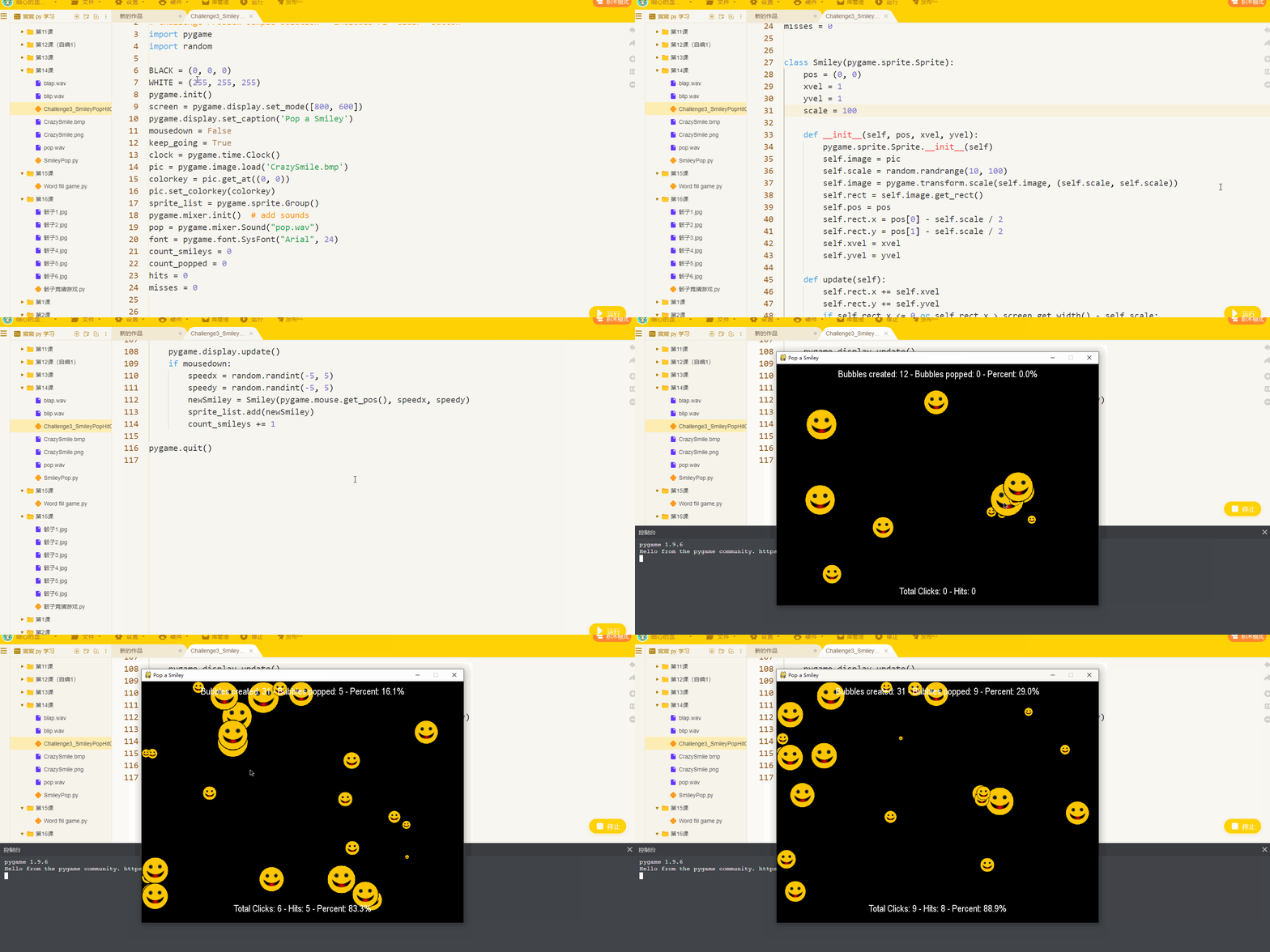
【作品介绍】
左键生成笑脸,右键点击可击破笑脸。上排第一项数据是生成笑脸数量,
第二项是击破数量,
第三项是击破率(百分比),
下派第一项是一共右键点击次数,
第二项是点破的次数,
第三项是点击准确率(百分比)。
【作品源代码】
# SmileyPopHitCounter2.py
# Challenge Problem sample solution - includes F1 "clear" button
import pygame
import random

BLACK = (0, 0, 0)
WHITE = (255, 255, 255)
pygame.init()
screen = pygame.display.set_mode([800, 600])
pygame.display.set_caption('Pop a Smiley')
mousedown = False
keep_going = True
clock = pygame.time.Clock()
pic = pygame.image.load('CrazySmile.bmp')
colorkey = pic.get_at((0, 0))
pic.set_colorkey(colorkey)
sprite_list = pygame.sprite.Group()
pygame.mixer.init()  # add sounds
pop = pygame.mixer.Sound("pop.wav")
font = pygame.font.SysFont("Arial", 24)
count_喵ileys = 0
count_popped = 0
hits = 0
misses = 0


class Smiley(pygame.sprite.Sprite):
    pos = (0, 0)
    xvel = 1
    yvel = 1
    scale = 100

    def __init__(self, pos, xvel, yvel):
        pygame.sprite.Sprite.__init__(self)
        self.image = pic
        self.scale = random.randrange(10, 100)
        self.image = pygame.transform.scale(self.image, (self.scale, self.scale))
        self.rect = self.image.get_rect()
        self.pos = pos
        self.rect.x = pos[0] - self.scale / 2
        self.rect.y = pos[1] - self.scale / 2
        self.xvel = xvel
        self.yvel = yvel

    def update(self):
        self.rect.x += self.xvel
        self.rect.y += self.yvel
        if self.rect.x <= 0 or self.rect.x > screen.get_width() - self.scale:
            self.xvel = -self.xvel * 0.95
        if self.rect.y <= 0 or self.rect.y > screen.get_height() - self.scale:
            self.yvel = -self.yvel * 0.95


while keep_going:
    for event in pygame.event.get():
        if event.type == pygame.QUIT:
            keep_going = False
        if event.type == pygame.KEYDOWN:
            if event.key == pygame.K_F1:  # F1 = cheat/pop all 喵ileys
                count_popped += len(sprite_list)
                sprite_list = pygame.sprite.Group()  # clear sprite_list
                pop.play()

        if event.type == pygame.MOUSEBUTTONDOWN:
            if pygame.mouse.get_pressed()[0]:  # regular left mouse button, draw
                mousedown = True
            elif pygame.mouse.get_pressed()[2]:  # right mouse button, pop
                pos = pygame.mouse.get_pos()
                clicked_喵ileys = [s for s in sprite_list if s.rect.collidepoint(pos)]
                sprite_list.remove(clicked_喵ileys)
                if len(clicked_喵ileys) > 0:
                    pop.play()
                    count_popped += len(clicked_喵ileys)
                    hits += 1  # track a "hit" click
                else:
                    misses += 1  # track a "miss" click
        if event.type == pygame.MOUSEBUTTONUP:
            mousedown = False
    screen.fill(BLACK)
    sprite_list.update()
    sprite_list.draw(screen)
    clock.tick(60)
    draw_string = "Bubbles created: " + str(count_喵ileys)
    draw_string += " - Bubbles popped: " + str(count_popped)
    if count_喵ileys > 0:
        draw_string += " - Percent: "
        draw_string += str(round(count_popped * 100 / count_喵ileys, 1)) + "%"

    text = font.render(draw_string, True, WHITE)
    text_rect = text.get_rect()
    text_rect.centerx = screen.get_rect().centerx
    text_rect.y = 10
    screen.blit(text, text_rect)

    # Hit/Miss counter
    hit_string = "Total Clicks: " + str(hits + misses)
    hit_string += " - Hits: " + str(hits)
    if hits + misses > 0:
        hit_string += " - Percent: "
        hit_string += str(round(hits * 100 / (hits + misses), 1)) + "%"

    hit_text = font.render(hit_string, True, WHITE)
    hit_text_rect = hit_text.get_rect()
    hit_text_rect.centerx = screen.get_rect().centerx
    hit_text_rect.y = 550
    screen.blit(hit_text, hit_text_rect)

    pygame.display.update()
    if mousedown:
        speedx = random.randint(-5, 5)
        speedy = random.randint(-5, 5)
        newSmiley = Smiley(pygame.mouse.get_pos(), speedx, speedy)
        sprite_list.add(newSmiley)
        count_喵ileys += 1

pygame.quit()
【提示】
部分含有Python第三方库相关内容的作品,在海龟编辑器网页端无法运行哦!如遇到这种情况,可以打开下面的链接,下载海龟编辑器客户端:
https://python.codemao.cn