 某位无名士查看:86 回复:0 评论:0 创建时间:2022-05-15T12:57:09
用户:某位无名士查看:86 回复:0 评论:0 创建时间:2022-05-15T12:57:09
具体图片:
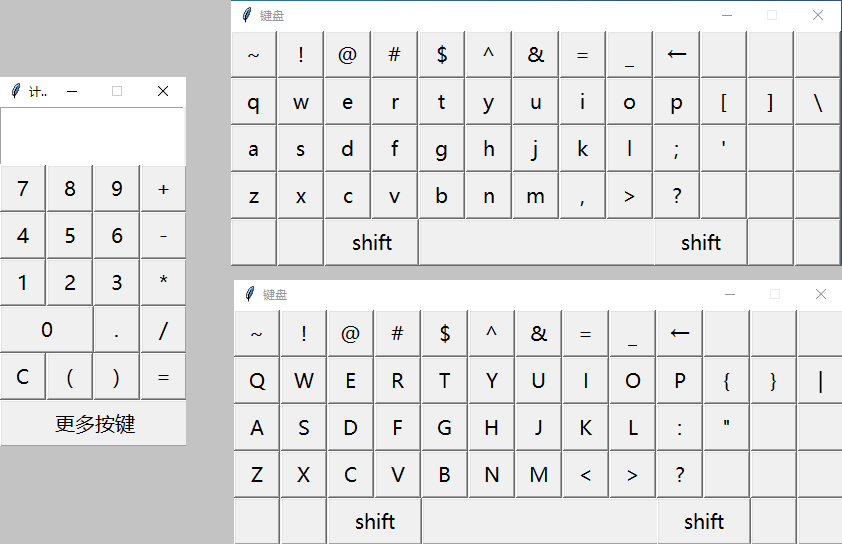
可以做普通运算、数学的各种方法(math库)、逻辑运算、进制转换
源代码:
from tkinter import *
from math import *
calculator=Tk()
calculator.title('计算器')
calculator.geometry('186x339')
calculator.resizable(0,0)
text=Text(calculator,width=15,height=2,font=('微软雅黑',15))
text.place(x=0,y=0)
def input(n):
    global text
    text.insert(INSERT,n)
def clear():
    global text
    text=Text(calculator,width=15,height=2,font=('微软雅黑',15))
    text.place(x=0,y=0)
def start():
    global text
    try:
        result=eval(text.get('1.0',END))
    except:
        result='error'
    text=Text(calculator,width=15,height=2,font=('微软雅黑',15))
    text.place(x=0,y=0)
    text.insert(INSERT,result)
def btn(x,y,text,width=3):
    button=Button(calculator,text=text,font=('微软雅黑',15),width=width,height=1,command=lambda:input(text))
    button.place(x=x,y=y)
def back():
    global text
    temp=text.get('1.0',END)[:-2]
    del text
    text=Text(calculator,width=15,height=2,font=('微软雅黑',15))
    text.place(x=0,y=0)
    text.insert(INSERT,temp)
    calculator.mainloop()
shift=None
def open_keyborad():
    global keyboard,shift
    keyboard=Tk()
    keyboard.title('键盘')
    keyboard.geometry('610x235')
    keyboard.resizable(0,0)
    def btn(x,y,text,width=3):
        Button(keyboard,text=text,font=('微软雅黑',15),width=width,height=1,command=lambda:input(text)).place(x=x,y=y)
    if shift == None:
        shift=False
    #没有按下shift效果的键
    #第一行
    btn(0,0,'~')
    btn(47,0,'!')
    btn(94,0,'@')
    btn(141,0,'#')
    btn(188,0,'$')
    btn(235,0,'^')
    btn(282,0,'&')
    btn(329,0,'=')
    Button(keyboard,text='←',font=('微软雅黑',15),width=3,height=1,command=back).place(x=423,y=0)
    btn(376,0,'_')
    #第一行对齐
    btn(470,0,'')
    btn(517,0,'')
    btn(5喵,0,'')
    #第三行对齐
    btn(517,94,'')
    btn(5喵,94,'')
    #第四行
    btn(376,141,'>')
    btn(423,141,'?')
    #第四行对齐
    btn(470,141,'')
    btn(517,141,'')
    btn(5喵,141,'')
    #第五行
    Button(keyboard,text='shift',font=('微软雅黑',15),width=7,height=1,command=shift_).place(x=94,y=188)
    btn(188,188,' ',19)
    Button(keyboard,text='shift',font=('微软雅黑',15),width=7,height=1,command=shift_).place(x=423,y=188)
    #第五行对齐
    btn(0,188,'')
    btn(47,188,'')
    btn(517,188,'')
    btn(5喵,188,'')
    if shift:
        #第二行
        btn(0,47,'Q')
        btn(47,47,'W')
        btn(94,47,'E')
        btn(141,47,'R')
        btn(188,47,'T')
        btn(235,47,'Y')
        btn(282,47,'U')
        btn(329,47,'I')
        btn(376,47,'O')
        btn(423,47,'P')
        btn(470,47,'{')
        btn(517,47,'}')
        btn(5喵,47,'|')
        #第三行
        btn(0,94,'A')
        btn(47,94,'S')
        btn(94,94,'D')
        btn(141,94,'F')
        btn(188,94,'G')
        btn(235,94,'H')
        btn(282,94,'J')
        btn(329,94,'K')
        btn(376,94,'L')
        btn(423,94,':')
        btn(470,94,'"')
        #第四行
        btn(0,141,'Z')
        btn(47,141,'X')
        btn(94,141,'C')
        btn(141,141,'V')
        btn(188,141,'B')
        btn(235,141,'N')
        btn(282,141,'M')
        btn(329,141,'<')
    else:
        #第二行
        btn(0,47,'q')
        btn(47,47,'w')
        btn(94,47,'e')
        btn(141,47,'r')
        btn(188,47,'t')
        btn(235,47,'y')
        btn(282,47,'u')
        btn(329,47,'i')
        btn(376,47,'o')
        btn(423,47,'p')
        btn(470,47,'[')
        btn(517,47,']')
        btn(5喵,47,'\\')
        #第三行
        btn(0,94,'a')
        btn(47,94,'s')
        btn(94,94,'d')
        btn(141,94,'f')
        btn(188,94,'g')
        btn(235,94,'h')
        btn(282,94,'j')
        btn(329,94,'k')
        btn(376,94,'l')
        btn(423,94,';')
        btn(470,94,'\'')
        #第四行
        btn(0,141,'z')
        btn(47,141,'x')
        btn(94,141,'c')
        btn(141,141,'v')
        btn(188,141,'b')
        btn(235,141,'n')
        btn(282,141,'m')
        btn(329,141,',')
def shift_():
    global shift,keyboard
    if shift:
        shift=False
    else:
        shift=True
    keyboard.destroy()
    open_keyborad()
#第一行
btn(0,58,'7')
btn(47,58,'8')
btn(94,58,'9')
btn(141,58,'+')
#第二行
four=btn(0,105,'4')
btn(47,105,'5')
btn(94,105,'6')
btn(141,105,'-')
#第三行
btn(0,152,'1')
btn(47,152,'2')
btn(94,152,'3')
btn(141,152,'*')
#第四行
btn(0,199,'0',7)
btn(94,199,'.')
btn(141,199,'/')
#第五行
Button(calculator,text='C',font=('微软雅黑',15),width=3,height=1,command=clear).place(x=0,y=246)
btn(47,246,'(')
btn(94,246,')')
Button(calculator,text='=',font=('微软雅黑',15),width=3,height=1,command=start).place(x=141,y=246)
#第六行
Button(calculator,text='更多按键',font=('微软雅黑',15),width=15,height=1,command=open_keyborad).place(x=0,y=293)
calculator.mainloop()