 Robot一只屑代码师查看:147 回复:1 评论:0 创建时间:2022-04-30T21:17:02
用户:Robot一只屑代码师查看:147 回复:1 评论:0 创建时间:2022-04-30T21:17:02
哈喽,你好a我是..........
今天给大家一个完美的代码,可以在地图里用哦~
首先,先把一个模型拿出来,当然就是上次圣诞创作获奖的模型了,登场! Annabelle
然后捏,给Annabelle取一个名字叫Annabelle头
还有个叫Annabelle身体
然后呢放了模型后打开文件,把那个模型找到,点那三个点
最右边的三个点,点编辑
把它编辑成分别是一个头和一个身体,用消除就可以
把头名字改成 头0
把身体改成 对1(自己随便改,我是为了简便一点)
然后上代码
const bodyData = [
 { bodyPart: Box3BodyPart.HEAD, name: '头', mesh: 'mesh/头0.vb', offset: [0, 0.2, -0.01], rotate: [0, 450, 0], scale: [1.2, 1.2, 1.2] },
 { bodyPart: Box3BodyPart.TORSO, name: '躯干', mesh: 'mesh/对1.vb', offset: [0, 0.1, 0], rotate: [0, 90, 0], scale: [1.1, 1.1, 1.1] },
 { bodyPart: Box3BodyPart.TORSO, name: '臀部', mesh: 'mesh/臀部.vb', offset: [0, -0.25, 0], rotate: [0, 90, 0], scale: [0.6, 0.6, 0.3] },
 { bodyPart: Box3BodyPart.LEFT_UPPER_ARM, name: '左上臂', mesh: 'mesh/右上臂.vb', offset: [0.1, 0.07,-0.1], rotate: [40, 120, -85], scale: [0.5, 0.5, 0.5] },
 { bodyPart: Box3BodyPart.RIGHT_UPPER_ARM, name: '右上臂', mesh: 'mesh/左上臂.vb', offset: [-0.1, 0.07,-0.1], rotate: [135, -120, -85], scale: [0.5, 0.5, 0.5] },
 { bodyPart: Box3BodyPart.LEFT_LOWER_ARM, name: '左下臂', mesh: 'mesh/右下臂.vb', offset: [0, 0.11, 0], rotate: [40, 120, -85], scale: [0.5, 0.5, 0.5] },
 { bodyPart: Box3BodyPart.RIGHT_LOWER_ARM, name: '右下臂', mesh: 'mesh/左下臂.vb', offset: [0, 0.09, 0], rotate: [135, -120, -85], scale: [0.5, 0.5, 0.5] },
 { bodyPart: Box3BodyPart.LEFT_UPPER_LEG, name: '左上腿', mesh: 'mesh/右上腿.vb', offset: [0, 0.05, 0.1], rotate: [0, 90, 0], scale: [0.5, 0.5, 0.5] },
 { bodyPart: Box3BodyPart.RIGHT_UPPER_LEG, name: '右上腿', mesh: 'mesh/左上腿.vb', offset: [0, 0.1, 0.1], rotate: [0, 90, 0], scale: [0.5, 0.5, 0.5] },
 { bodyPart: Box3BodyPart.LEFT_LOWER_LEG, name: '左下腿', mesh: 'mesh/右下腿.vb', offset: [0, 0.2, 0], rotate: [0, 90, 0], scale: [0.5, 0.5, 0.5] },
 { bodyPart: Box3BodyPart.RIGHT_LOWER_LEG, name: '右下腿', mesh: 'mesh/左下腿.vb', offset: [0, 0.2, 0], rotate: [0, 90, 0], scale: [0.5, 0.5, 0.5] },
 { bodyPart: Box3BodyPart.LEFT_FOOT, name: '左脚', mesh: 'mesh/左脚.vb', offset: [0, 0.06, 0.05], rotate: [0, 90, 0], scale: [0.5, 0.5, 0.5] },
 { bodyPart: Box3BodyPart.RIGHT_FOOT, name: '右脚', mesh: 'mesh/右脚.vb', offset: [0, 0.06, 0.05], rotate: [0, 90, 0], scale: [0.5, 0.5, 0.5] },
 { bodyPart: Box3BodyPart.LEFT_LOWER_ARM, name: '左手', mesh: 'mesh/左手.vb', offset: [0.16, 0.16, 0.09], rotate: [-1, -喵, 90], scale: [0.5, 0.5, 0.5] },
 { bodyPart: Box3BodyPart.RIGHT_LOWER_ARM, name: '右手', mesh: 'mesh/右手.vb', offset: [-0.16, 0.05, 0.01], rotate: [-138, 60, 95], scale: [0.5, 0.5, 0.5] },
    ]
    world.onPlayerJoin(({ entity }) => {

        // 隐藏所有身体部件!
        for (const bodyPart in entity.player.skinInvisible) {
            entity.player.skinInvisible[bodyPart] = true;
        }

        // 根据配置穿戴身体各个部件
        for (const data of bodyData) {
            addWearable(entity, data)
        }
    });

    // 添加部件
    function addWearable(entity, data) {
        // 这一步是把角度转成弧度
        const orientation = new Box3Quaternion(0, 0, 0, 1)
                .rotateZ(data.rotate[2] * Math.PI / 180)
                .rotateX(data.rotate[0] * Math.PI / 180)
                .rotateY(data.rotate[1] * Math.PI / 180)
        // 将上面声明的配置一一对应地传递给传递API
        entity.player.addWearable({
            bodyPart: data.bodyPart,
            mesh: data.mesh,
            orientation: orientation,
            scale: data.scale,
            offset: data.offset,
        })
    }
然后那些右上臂左下腿左手右手什么的自己去模型里搜
搜得到的
你搜出来的就用第一个模型,结果是
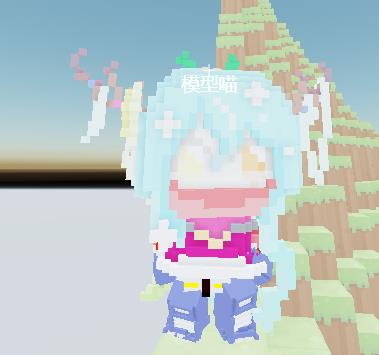
没了
Robot一只屑代码师. . . . . . . . . . . . . . . . . . . . . . . . . . . . . . . . . . . . . . . . . . . . . . . .
点赞0
评论