 沫丶星辰查看:123 回复:2 评论:0 创建时间:2022-04-13T11:08:03
用户:沫丶星辰查看:123 回复:2 评论:0 创建时间:2022-04-13T11:08:03
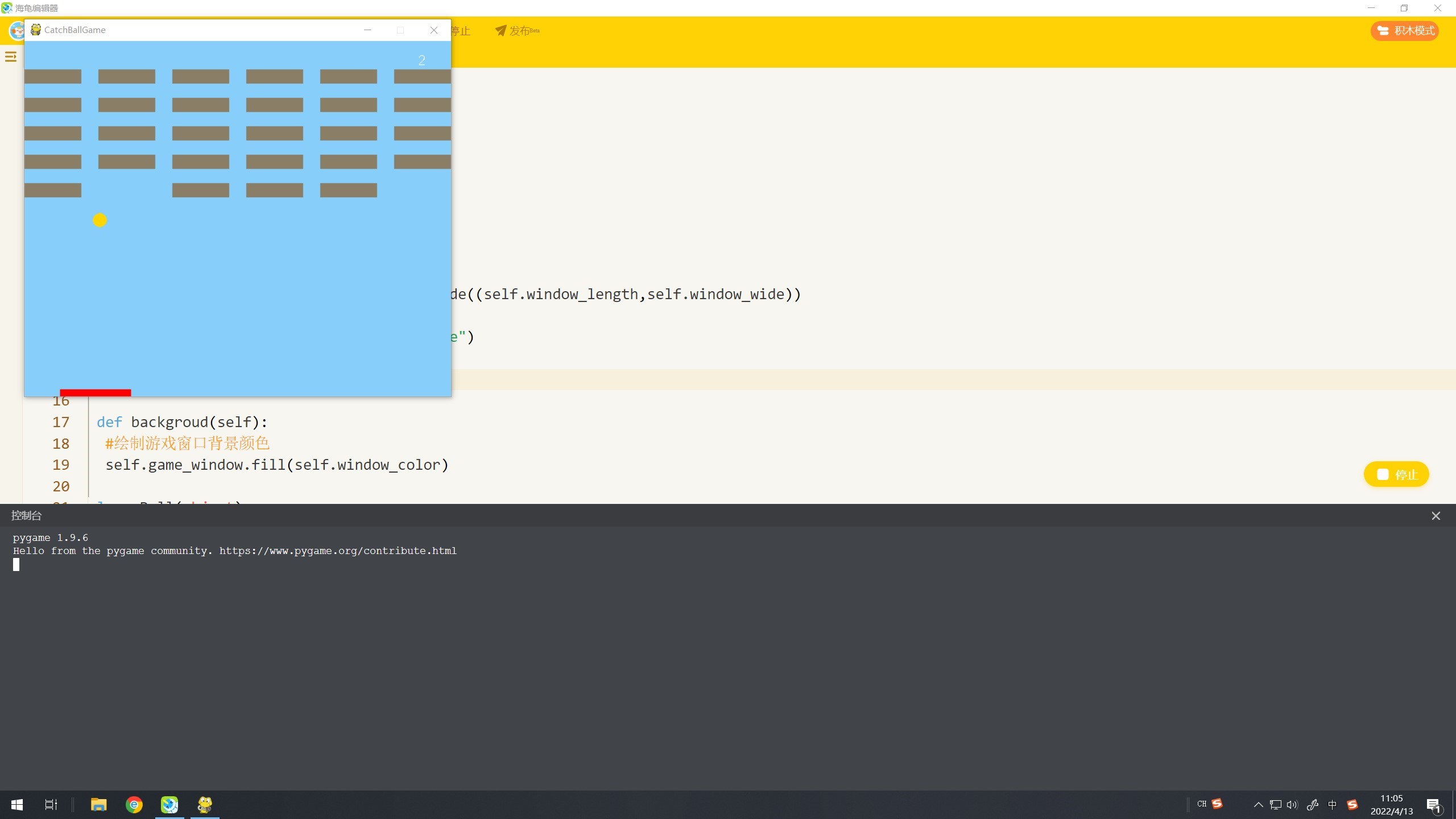
【作品展示】
【作品介绍】
游戏杆子随鼠标移动
very simple
一万多的代码
【作品源代码】
import pygame
from pygame.locals import *
import sys,random,time,math

class GameWindow(object):
 '''创建游戏窗口类'''
 def __init__(self,*args,**kw):
  self.window_length = 600
  self.window_wide = 500
  #绘制游戏窗口,设置窗口尺寸
  self.game_window = pygame.display.set_mode((self.window_length,self.window_wide))
  #设置游戏窗口标题
  pygame.display.set_caption("CatchBallGame")
  #定义游戏窗口背景颜色参数
  self.window_color = (135,206,250)

 def backgroud(self):
  #绘制游戏窗口背景颜色
  self.game_window.fill(self.window_color)

class Ball(object):
 '''创建球类'''
 def __init__(self,*args,**kw):
  #设置球的半径、颜色、移动速度参数
  self.ball_color = (255,215,0)
  self.move_x = 1
  self.move_y = 1
  self.radius = 10

 def ballready(self):
  #设置球的初始位置
  self.ball_x = self.mouse_x
  self.ball_y = self.window_wide-self.rect_wide-self.radius
  #绘制球,设置反弹触发条件
  pygame.draw.circle(self.game_window,self.ball_color,(self.ball_x,self.ball_y),self.radius)

 def ballmove(self):
  #绘制球,设置反弹触发条件
  pygame.draw.circle(self.game_window,self.ball_color,(self.ball_x,self.ball_y),self.radius)
  self.ball_x += self.move_x
  self.ball_y -= self.move_y
  #调用碰撞检测函数
  self.ball_window()
  self.ball_rect()
  #每接5次球球速增加一倍
  if self.distance < self.radius:
   self.frequency += 1
   if self.frequency == 5:
    self.frequency = 0
    self.move_x += self.move_x
    self.move_y += self.move_y
    self.point += self.point
  #设置游戏失败条件
  if self.ball_y > 520:
   self.gameover = self.over_font.render("Game Over",False,(0,0,0))
   self.game_window.blit(self.gameover,(100,130))
   self.over_sign = 1

class Rect(object):
 '''创建球拍类'''
 def __init__(self,*args,**kw):
  #设置球拍颜色参数
  self.rect_color = (255,0,0)
  self.rect_length = 100
  self.rect_wide = 10

 def rectmove(self):
  #获取鼠标位置参数
  self.mouse_x,self.mouse_y = pygame.mouse.get_pos()
  #绘制球拍,限定横向边界
  if self.mouse_x >= self.window_length-self.rect_length//2:
   self.mouse_x = self.window_length-self.rect_length//2
  if self.mouse_x <= self.rect_length//2:
   self.mouse_x = self.rect_length//2
  pygame.draw.rect(self.game_window,self.rect_color,((self.mouse_x-self.rect_length//2),(self.window_wide-self.rect_wide),self.rect_length,self.rect_wide))

class Brick(object):
 def __init__(self,*args,**kw):
  #设置砖块颜色参数
  self.brick_color = (139,126,102)
  self.brick_list = [[1,1,1,1,1,1],[1,1,1,1,1,1],[1,1,1,1,1,1],[1,1,1,1,1,1],[1,1,1,1,1,1]]
  self.brick_length = 80
  self.brick_wide = 20

 def brickarrange(self):
  for i in range(5):
   for j in range(6):
    self.brick_x = j*(self.brick_length+24)
    self.brick_y = i*(self.brick_wide+20)+40
    if self.brick_list[i][j] == 1:
     #绘制砖块
     pygame.draw.rect(self.game_window,self.brick_color,(self.brick_x,self.brick_y,self.brick_length,self.brick_wide))
     #调用碰撞检测函数
     self.ball_brick()
     if self.distanceb < self.radius:
      self.brick_list[i][j] = 0
      self.score += self.point
  #设置游戏胜利条件
  if self.brick_list == [[0,0,0,0,0,0],[0,0,0,0,0,0],[0,0,0,0,0,0],[0,0,0,0,0,0],[0,0,0,0,0,0]]:
   self.win = self.win_font.render("You Win",False,(0,0,0))
   self.game_window.blit(self.win,(100,130))
   self.win_sign = 1

class Score(object):
 '''创建分数类'''
 def __init__(self,*args,**kw):
  #设置初始分数
  self.score = 0
  #设置分数字体
  self.score_font = pygame.font.SysFont('arial',20)
  #设置初始加分点数
  self.point = 1
  #设置初始接球次数
  self.frequency = 0

 def countscore(self):
  #绘制玩家分数
  my_score = self.score_font.render(str(self.score),False,(255,255,255))
  self.game_window.blit(my_score,(555,15))

class GameOver(object):
 '''创建游戏结束类'''
 def __init__(self,*args,**kw):
  #设置Game Over字体
  self.over_font = pygame.font.SysFont('arial',80)
  #定义GameOver标识
  self.over_sign = 0

class Win(object):
 '''创建游戏胜利类'''
 def __init__(self,*args,**kw):
  #设置You Win字体
  self.win_font = pygame.font.SysFont('arial',80)
  #定义Win标识
  self.win_sign = 0

class Collision(object):
 '''碰撞检测类'''
 #球与窗口边框的碰撞检测
 def ball_window(self):
  if self.ball_x <= self.radius or self.ball_x >= (self.window_length-self.radius):
   self.move_x = -self.move_x
  if self.ball_y <= self.radius:
   self.move_y = -self.move_y

 #球与球拍的碰撞检测
 def ball_rect(self):
  #定义碰撞标识
  self.collision_sign_x = 0
  self.collision_sign_y = 0

  if self.ball_x < (self.mouse_x-self.rect_length//2):
   self.closestpoint_x = self.mouse_x-self.rect_length//2
   self.collision_sign_x = 1
  elif self.ball_x > (self.mouse_x+self.rect_length//2):
   self.closestpoint_x = self.mouse_x+self.rect_length//2
   self.collision_sign_x = 2
  else:
   self.closestpoint_x = self.ball_x
   self.collision_sign_x = 3

  if self.ball_y < (self.window_wide-self.rect_wide):
   self.closestpoint_y = (self.window_wide-self.rect_wide)
   self.collision_sign_y = 1
  elif self.ball_y > self.window_wide:
   self.closestpoint_y = self.window_wide
   self.collision_sign_y = 2
  else:
   self.closestpoint_y = self.ball_y
   self.collision_sign_y = 3
  #定义球拍到圆心最近点与圆心的距离
  self.distance = math.sqrt(math.pow(self.closestpoint_x-self.ball_x,2)+math.pow(self.closestpoint_y-self.ball_y,2))
  #球在球拍上左、上中、上右3种情况的碰撞检测
  if self.distance < self.radius and self.collision_sign_y == 1 and (self.collision_sign_x == 1 or self.collision_sign_x == 2):
   if self.collision_sign_x == 1 and self.move_x > 0:
    self.move_x = - self.move_x
    self.move_y = - self.move_y
   if self.collision_sign_x == 1 and self.move_x < 0:
    self.move_y = - self.move_y
   if self.collision_sign_x == 2 and self.move_x < 0:
    self.move_x = - self.move_x
    self.move_y = - self.move_y
   if self.collision_sign_x == 2 and self.move_x > 0:
    self.move_y = - self.move_y
  if self.distance < self.radius and self.collision_sign_y == 1 and self.collision_sign_x == 3:
   self.move_y = - self.move_y
  #球在球拍左、右两侧中间的碰撞检测
  if self.distance < self.radius and self.collision_sign_y == 3:
   self.move_x = - self.move_x

 #球与砖块的碰撞检测
 def ball_brick(self):
  #定义碰撞标识
  self.collision_sign_bx = 0
  self.collision_sign_by = 0

  if self.ball_x < self.brick_x:
   self.closestpoint_bx = self.brick_x
   self.collision_sign_bx = 1
  elif self.ball_x > self.brick_x+self.brick_length:
   self.closestpoint_bx = self.brick_x+self.brick_length
   self.collision_sign_bx = 2
  else:
   self.closestpoint_bx = self.ball_x
   self.collision_sign_bx = 3

  if self.ball_y < self.brick_y:
   self.closestpoint_by = self.brick_y
   self.collision_sign_by = 1
  elif self.ball_y > self.brick_y+self.brick_wide:
   self.closestpoint_by = self.brick_y+self.brick_wide
   self.collision_sign_by = 2
  else:
   self.closestpoint_by = self.ball_y
   self.collision_sign_by = 3
  #定义砖块到圆心最近点与圆心的距离
  self.distanceb = math.sqrt(math.pow(self.closestpoint_bx-self.ball_x,2)+math.pow(self.closestpoint_by-self.ball_y,2))
  #球在砖块上左、上中、上右3种情况的碰撞检测
  if self.distanceb < self.radius and self.collision_sign_by == 1 and (self.collision_sign_bx == 1 or self.collision_sign_bx == 2):
   if self.collision_sign_bx == 1 and self.move_x > 0:
    self.move_x = - self.move_x
    self.move_y = - self.move_y
   if self.collision_sign_bx == 1 and self.move_x < 0:
    self.move_y = - self.move_y
   if self.collision_sign_bx == 2 and self.move_x < 0:
    self.move_x = - self.move_x
    self.move_y = - self.move_y
   if self.collision_sign_bx == 2 and self.move_x > 0:
    self.move_y = - self.move_y
  if self.distanceb < self.radius and self.collision_sign_by == 1 and self.collision_sign_bx == 3:
   self.move_y = - self.move_y
  #球在砖块下左、下中、下右3种情况的碰撞检测
  if self.distanceb < self.radius and self.collision_sign_by == 2 and (self.collision_sign_bx == 1 or self.collision_sign_bx == 2):
   if self.collision_sign_bx == 1 and self.move_x > 0:
    self.move_x = - self.move_x
    self.move_y = - self.move_y
   if self.collision_sign_bx == 1 and self.move_x < 0:
    self.move_y = - self.move_y
   if self.collision_sign_bx == 2 and self.move_x < 0:
    self.move_x = - self.move_x
    self.move_y = - self.move_y
   if self.collision_sign_bx == 2 and self.move_x > 0:
    self.move_y = - self.move_y
  if self.distanceb < self.radius and self.collision_sign_by == 2 and self.collision_sign_bx == 3:
   self.move_y = - self.move_y
  #球在砖块左、右两侧中间的碰撞检测
  if self.distanceb < self.radius and self.collision_sign_by == 3:
   self.move_x = - self.move_x

class Main(GameWindow,Rect,Ball,Brick,Collision,Score,Win,GameOver):
 '''创建主程序类'''
 def __init__(self,*args,**kw):
  super(Main,self).__init__(*args,**kw)
  super(GameWindow,self).__init__(*args,**kw)
  super(Rect,self).__init__(*args,**kw)
  super(Ball,self).__init__(*args,**kw)
  super(Brick,self).__init__(*args,**kw)
  super(Collision,self).__init__(*args,**kw)
  super(Score,self).__init__(*args,**kw)
  super(Win,self).__init__(*args,**kw)
  #定义游戏开始标识
  start_sign = 0

  while True:
   self.backgroud()
   self.rectmove()
   self.countscore()
   if self.over_sign == 1 or self.win_sign == 1:
    break
   #获取游戏窗口状态
   for event in pygame.event.get():
    if event.type == pygame.QUIT:
     sys.exit()
    if event.type == MOUSEBUTTONDOWN:
     pressed_array = pygame.mouse.get_pressed()
     if pressed_array[0]:
      start_sign = 1
   if start_sign == 0:
    self.ballready()
   else:
    self.ballmove()

   self.brickarrange()

   #更新游戏窗口
   pygame.display.update()
   #控制游戏窗口刷新频率
   time.sleep(0.010)

if __name__ == '__main__':
 pygame.init()
 pygame.font.init()
 catchball = Main()
【提示】
部分含有Python第三方库相关内容的作品,在海龟编辑器网页端无法运行哦!如遇到这种情况,可以打开下面的链接,下载海龟编辑器客户端:
https://python.codemao.cn KLCCxnkl
6666666666imgsrc="https://static.codemao.cn/emoji/codemao/%E7%BC%96%E7%A8%8B%E7%8C%AB_%E5%8E%89%E5%AE%B3%E4%BA%86.gif"alt="emotion_编程猫_厉害了"
点赞0
评论