 Vincent_xiaobo查看:92 回复:1 评论:0 创建时间:2022-02-14T09:48:45
用户:Vincent_xiaobo查看:92 回复:1 评论:0 创建时间:2022-02-14T09:48:45
【作品展示】
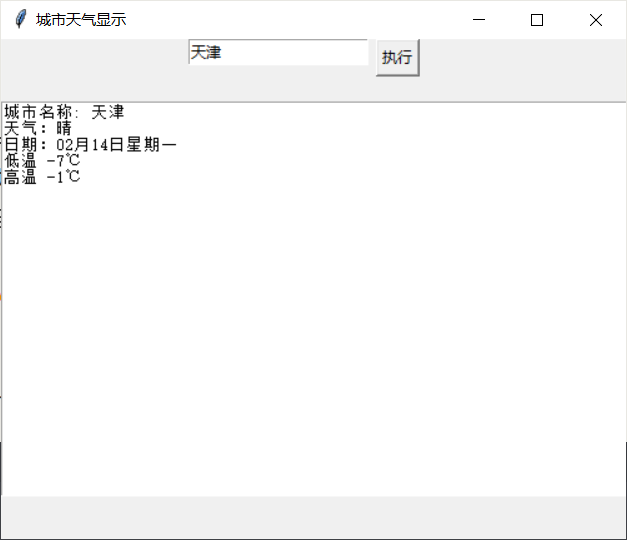
【作品介绍】
1.仅支持中国城市,国外的还尽请期待2.本程序利用了爬虫,请您提前安装
requests(用于获取数据)、tkinter(用于将天气显示在页面中)
【作品源代码】
from tkinter import *
import requests
import time


root = Tk()
root.title('城市天气显示') #窗体名称显示
root.geometry('500x400')  #设置窗体大小

#Entry创建单行文本

var = StringVar()                   #输入框变量
e = Entry(root, textvariable = var) #绑定变量
# city = var.get()
e.place(x = 150, y = 0)         #单行文本框显示出来
def getweather():
    city = var.get()  # 用来获得单行文本框输入的内容
    url = 'http://wthrcdn.etouch.cn/weather_mini?city='
    response = requests.get(url+city)
    try:
        data = response.json()['data']['forecast'][0]
        month = time.strftime('%m')
        date = month+'月'+data['date']
    # {'date': '6日星期三', 'fengxiang': '西风', 'high': '高温 25℃', 'fengli': '<3级', 'type': '晴', 'low': '低温 13℃'}
        s = '城市名称: %s\n天气:%s\n日期:%s\n%s\n%s\n ' % (city, data['type'], date, data['low'], data['high'])
    except:
    # 用于判断用户是否输入城市正确
        s = '城市输入错误!\n'
    t.insert('1.0', s+'\n')  # 在多行文本框中插入获取的天气内容


    #定义个多行文本框
t = Text(root)
t.place(x = 0, y = 50)


    #按钮 command参数等于要执行的函数,在这里我们要获取天气
Button(root,text='执行', command = getweather).place(x = 300, y = 0)
root.mainloop()
【提示】
部分含有Python第三方库相关内容的作品,在海龟编辑器网页端无法运行哦!如遇到这种情况,可以打开下面的链接,下载海龟编辑器客户端:
https://python.codemao.cn