天启若风查看:106 回复:4 评论:0 创建时间:2022-02-07T18:33:39
用户:天启若风查看:106 回复:4 评论:0 创建时间:2022-02-07T18:33:39
【作品展示】
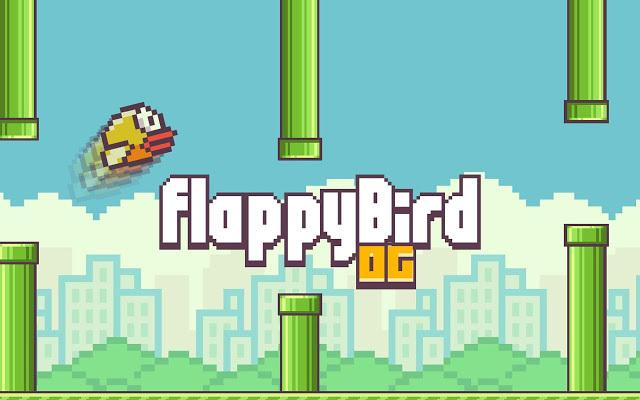
【作品介绍】
简易版flappybird,部分功能未完善
【作品源代码】
import pygame
import random
pygame.init()
sh = pygame.display.set_mode((500, 800))
pygame.display.set_caption('FlppyBird')
pic=pygame.image.load('工作室(1).png')
c = pygame.time.Clock()
CR = pygame.USEREVENT
pygame.time.set_timer(CR, 1500)
s='go'
x=0
y=800
pygame.display.update()
sp = pygame.sprite.Group()
hoseG = pygame.sprite.Group()
overNO = pygame.sprite.Group()
class bird(pygame.sprite.Sprite):
    def __init__(self, speed):
        pygame.sprite.Sprite.__init__(self)
        self.image = pygame.image.load('b(1).png')
        self.rect = self.image.get_rect()
        self.rect.x = 50
        self.rect.y = 400
        self.speed = speed
    def update(self, *args):
        self.rect.y+=3
        if(s=='go'):
            self.rect.x = 0
            self.rect.y = 80
    def up(self, speed):
        self.rect.y-=speed
class pic_bird(pygame.sprite.Sprite):
    def __init__(self, speed):
        pygame.sprite.Sprite.__init__(self)
        self.image = pygame.image.load('b(1).png')
        self.rect = self.image.get_rect()
        self.rect.x = 250
        self.rect.y = 100
class hose(pygame.sprite.Sprite):
    def __init__(self, speed):
        pygame.sprite.Sprite.__init__(self)
        self.image = pygame.image.load('管道11.png')
        self.rect = self.image.get_rect()
        self.rect.x = 500
        self.rect.y = random.randint(-500,-100)
        self.speed = speed
    def update(self,*args):
        self.rect.x -= 3
    def down(self):
        b = hose2()
        b.rect.x = self.rect.centerx-53
        b.rect.y = self.rect.centery+500
        hoseG.add(b)
class hose2(pygame.sprite.Sprite):
    def __init__(self):
        pygame.sprite.Sprite.__init__(self)
        self.image = pygame.image.load('管道22.png')
        self.rect = self.image.get_rect()
    def update(self,*args):
        self.rect.x-=3
while s == 'ready':
    for i in pygame.event.get():
        if i.type == pygame.QUIT:
            pygame.quit()
            exit()
        if i.type == pygame.MOUSEBUTTONDOWN:
            s='go'
    pygame.display.update()
    if(y<0):
        continue
    sh.blit(pic, (x, y))
    y -= 1
if(s == 'go'):
    sh.fill('skyblue')
    pic = pygame.image.load('背景.jpeg')
    x=100
    y=100
    sh.blit(pic, (x, y))
while s == 'go':
    c.tick(60)
    for i in pygame.event.get():
        if i.type == pygame.QUIT:
            pygame.quit()
            exit()
        if i.type==pygame.MOUSEBUTTONDOWN:
            s='start'
    for g in [sp]:
        g.update()
        g.draw(sh)
    pygame.display.update()
if s=='start':
    pic = pygame.image.load('游戏中2.png')
    x=1
    y=1
    sh.blit(pic,(x,y))
    bird_1 = bird(5)
    sp.add(bird_1)
while s == 'start':
    pic = pygame.image.load('游戏中2.png')
    x = 0
    y=0
    sh.blit(pic, (x, y))
    c.tick(60)
    for i in pygame.event.get():
        if i.type == pygame.QUIT:
            pygame.quit()
            exit()
        if i.type == pygame.MOUSEBUTTONDOWN:
           bird_1.up(60)
        if i.type == CR:
            hose_1 = hose(5)
            hoseG.add(hose_1)
            hose_1.down()
    if (pygame.sprite.groupcollide(sp,hoseG,False,False)):
        pass
    for g in [sp,hoseG]:
        g.update()
        g.draw(sh)
    pygame.display.update()
【提示】
部分含有Python第三方库相关内容的作品,在海龟编辑器网页端无法运行哦!如遇到这种情况,可以打开下面的链接,下载海龟编辑器客户端:
https://python.codemao.cn