 白茶两碗查看:134 回复:3 评论:0 创建时间:2022-02-05T19:29:15
用户:
【作品展示】
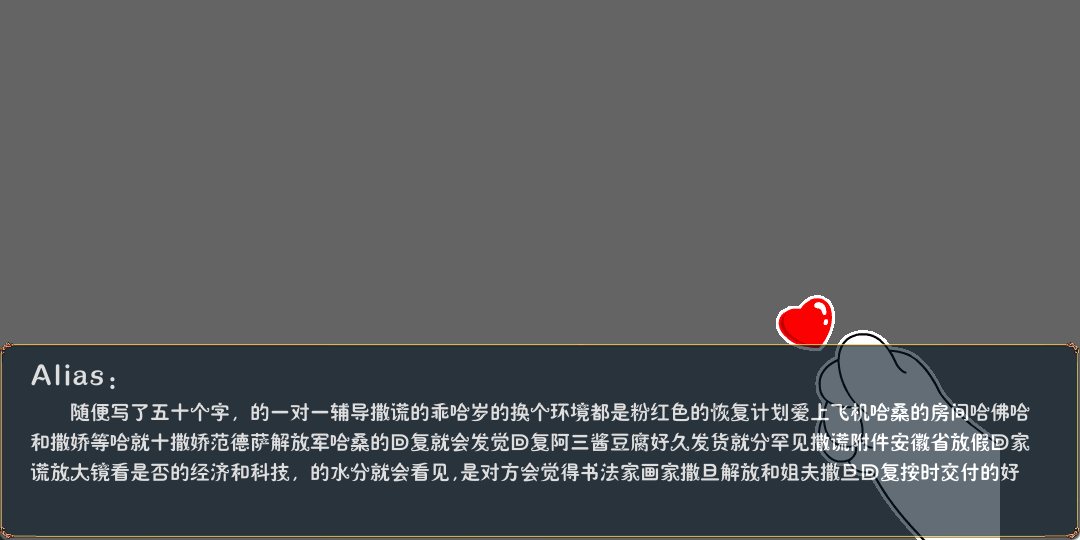
【作品介绍】
带立绘的对话框封装类主游戏逻辑文件中调用:
xx = 对话框(“立绘路径”,”昵称”,“对话内容”)
(游戏新手向),因为我也是刚从别的转碰python
【作品源代码】
import pygame
from pygame.locals import *
import 共享数据


class 对话框(pygame.sprite.Sprite):
    # 定义构造函数
    def __init__(this, 立绘路径, 名称, 对话内容):
        # 调父类来初始化子类
        pygame.sprite.Sprite.__init__(this)
        # 加载图片
        this.立绘 = pygame.image.load(立绘路径).convert_alpha()  # 此处填写立绘路径
        this.对话框 = pygame.image.load("img\对话框.png").convert_alpha()
        this.对话框.set_alpha(200)
        #换行定义
        this.第一行 = 对话内容[0:48]
        this.第二行 = 对话内容[49:99]
        this.第三行 = 对话内容[100:150]
        #建立文本表面
        this.对话_昵称 = 共享数据.昵称.render(名称+":", True, (255, 255, 255))
        this.对话_第一行 = 共享数据.对话.render("    "+this.第一行, True, (255, 255, 255))
        this.对话_第二行 = 共享数据.对话.render(this.第二行, True, (255, 255, 255))
        this.对话_第三行 = 共享数据.对话.render(this.第三行, True, (255, 255, 255))
        # 获取rect区域
        this.rect1 = this.立绘.get_rect()
        this.rect2 = this.对话框.get_rect()
        # 设置rect位置
        this.rect1.bottomright = (1000, 540)
        this.rect2.bottomright = 共享数据.size

        共享数据.screen.blit(this.立绘, this.rect1)
        this.对话框.blit(this.对话_昵称, (30, 20))
        this.对话框.blit(this.对话_第一行, (30, 60))
        this.对话框.blit(this.对话_第二行, (30, 90))
        this.对话框.blit(this.对话_第三行, (30, 120))
        共享数据.screen.blit(this.对话框, this.rect2)
【提示】
部分含有Python第三方库相关内容的作品,在海龟编辑器网页端无法运行哦!如遇到这种情况,可以打开下面的链接,下载海龟编辑器客户端:
https://python.codemao.cn