 五二刘家旭无虑的小编喵查看:92 回复:0 评论:0 创建时间:2022-02-02T14:14:40
用户:五二刘家旭无虑的小编喵查看:92 回复:0 评论:0 创建时间:2022-02-02T14:14:40
【作品展示】
【作品介绍】
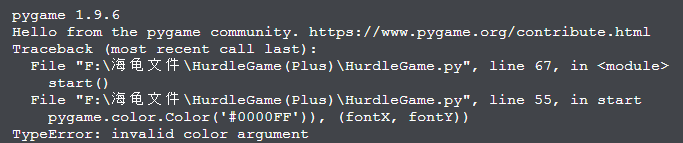
这次发一个求助帖,遇到了一个问题,望小伙伴们快快帮忙!!!
【作品源代码】
import pygame, random, time, sys, os
from pygame.locals import *
from pygame import Color
pygame.init()
pygame.mixer.init()
pygame.font.init()
pygame.mixer.music.load('files/bgm.mp3')
pygame.mixer.music.play(loops=-1)
FILE_PATH = os.path.join(os.path.dirname(__file__), 'files')
os.chdir(FILE_PATH)
canvas = pygame.display.set_mode((821, 545))
clock = pygame.time.Clock()
group = pygame.sprite.Sprite()
pygame.display.set_caption('Hurdle Game')
state = 'start'
nowBGNum = 1
def handleEvent():
    global eventType, state, nowBG, nowBGNum
    if state == 'start':
        for eventType in pygame.event.get():
            if eventType.type == QUIT:
                pygame.quit()
                exit()
            elif eventType.type == KEYDOWN:
                if eventType.key == K_SPACE:
                    state = 'choice mode'
                elif eventType.key == K_LEFT:
                    if nowBGNum == 1:
                        pass
                    if nowBGNum > 1:
                        nowBGNum -= 1
                elif eventType.key == K_RIGHT:
                    if nowBGNum == 3:
                        pass
                    if nowBGNum < 3:
                        nowBGNum += 1
    elif state == 'choice mode':
        for eventType in pygame.event.get():
            if eventType.type == QUIT:
                pygame.quit()
                exit()
def start():
    global bg, nowBGNum, nowBG, canvas, font
    bg = []
    for i in range(1, 4):
        bg.append(pygame.image.load('background%s.png'%i))
    nowBG = bg[nowBGNum-1]
    canvas.blit(nowBG, [0,0])
    fontX = 10
    fontY = 200
    font = pygame.font.Font('字魂80号-萌趣小鱼体.ttf', 50)
    time.sleep(0.05)
    if int(time.time())%2 == 0:
        canvas.fill(font.render('Press space to choice mode!', 1,
            pygame.color.Color('#0000FF')), (fontX, fontY))

        canvas.fill(font.render('Press space to choice mode!', 1,
            pygame.color.Color('#000000')), (fontX + 10, fontY + 10))

def choice_mode():
    print('开始选择模式')
    exit()
while True:
    clock.tick(10)
    handleEvent()
    if state == 'start':
        start()
    elif state == 'choice mode':
        choice_mode()
    pygame.display.update()
【提示】
部分含有Python第三方库相关内容的作品,在海龟编辑器网页端无法运行哦!如遇到这种情况,可以打开下面的链接,下载海龟编辑器客户端:
https://python.codemao.cn