 莫言科技查看:64 回复:1 评论:0 创建时间:2022-01-20T15:14:21
用户:莫言科技查看:64 回复:1 评论:0 创建时间:2022-01-20T15:14:21
【作品展示】
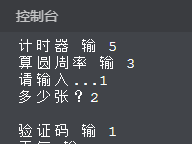
【作品介绍】
在第88行,文件名无法做到更新。
【作品源代码】
import time as t
print("函数定义中。。。")
t.sleep(1)


def js():
    # 库导入
    import time as t
    # 主程序
    i = 0
    file = open("log.txt", 'a')
    file.write('jishiqi ')
    file.write(t.ctime())
    file.close()
    shf = int(input("是定时还是计时,定时为 1,计时为 2     "))
    if shf == 1:
        zx = int(input("定时多少秒?"))
        n = 0
        while n == zx:
            print("剩余", zx - n, '秒,当前时间', t.ctime())
            t.sleep(1)
            n = n+1
    elif shf == 2:
        i = 0
        while i <= 9999999999999999999999999999999999999999999999999999999999999999999999999999:
            i = i+1
            print(round((i / 60), 0), '分', i, '秒', ',当前时间', t.ctime())
            t.sleep(1)
    else:
        print("无法理解")


def yian(lx):
    i = 0
    while i == lx:
        print("")
        print("导入库")
        import random
        import time
        # pillow 包的使用
        from PIL import Image, ImageDraw, ImageFont, ImageFilter
        # Image  负责处理图片
        # ImageDraw 负责处理画笔
        # ImageFont 负责处理文字
        # ImageFilter负责处理路径
        img = Image.new('RGB', (300, 50), (255, 255, 255))  # 建立一个图片
        '''
        RGB:表示采用RGB方式新建的图片
        第二个:表示图片的宽度和高度
        第三个:表示具体图片的颜色
        '''
        # 创建画笔
        draw = ImageDraw.Draw(img)
        print("绘制线")
        for i in range(random.randint(1, 10)):
            draw.line(
                [
                    (random.randint(1, 150), random.randint(1, 50)),
                    (random.randint(1, 150), random.randint(1, 50))],
                fill=(0, 0, 0)
            )
        print("绘制点")
        for i in range(1000):
            draw.point([random.randint(1, 150),random.randint(1, 150)],fill=(0, 0, 0))
        fontlist = list(
            'abcdefghijklmnopqrstuvwxyzABCDEFGHIJKLMNOPQRSTUVWXYZ0123456789 ')
        c_char = ' '.join(random.sample(fontlist, 8))  # 在指定的列表中随机取出指定个数的元素
        # 绘制字体 需要先定制一下字体
        font = ImageFont.truetype('simsun.ttc', 30)
        draw.text((5, 5), c_char, font=font, fill='green')
        '''
        第一个:代表文字的位置,距离上和左的位置
        第二个:代表文字的内容
        第三个:代表字体,字形和大小
        第四个:字体颜色
        '''
        print("扭曲字体")
        params = [1-float(random.randint(1, 2))/100,
                0, 0, 0,
                1-float(random.randint(1, 2))/100,
                float(random.randint(1, 2))/500,
                0.001,
                float(random.randint(1, 1))/500,
                ]
        img = img.transform((150, 50), Image.PERSPECTIVE, params)
        img = img.filter(ImageFilter.EDGE_ENHANCE_MORE)
        # 将图片保存到本地
        img.save(i+'.jpg', 'jpeg')
        print('保存成功')
        file = open("log.txt", 'a')
        file.write('/n yazhenma  ')
        file.write(time.ctime())
        file.close()
        i = i+1

def mail():
    import yagmail
    import time

    # yagmail.SMTP(user='', password='授权码', host='SMTP 服务器域名')
    mi = 'vszsxfjdrlfrjegb'
    yag = yagmail喵
                       password=mi, host='喵tp.qq.com')
    # 邮件内容
    contents = input('内容?')
    # 邮件主题
    subject = '邮件'
    # 接收方邮箱账
    try:
        receiver = input('地址?')
        yag.send(receiver, subject, contents)
        yag.close()
        print('发送成功')
    except TypeError:
        print('成功')
    file = open("log.txt", 'a')
    file.write('youjian  ')
    file.write(time.ctime())
    file.close()


def tian():
    print("   ")
    print("导入库")
    import chardet
    import requests
    from lxml import etree
    from fake_useragent import UserAgent
    import pandas as pd
    from matplotlib import pyplot as plt
    import time
    print("产生请求头")
    ua = UserAgent(verify_ssl=False, path='D:/fake_useragent.json')

    print("随机切换请求头")

    def random_ua():
        headers = {
            "user-agent": ua.random
        }
        return headers

    print("解析页面")

    def res_text(url):
        res = requests.get(url=url, headers=random_ua())
        res.encoding = chardet.detect(res.content)['encoding']
        response = res.text
        html = etree.H喵L(response)
        return html

    print("获得未来七天及八到十五天的页面链接")

    def get_url(url):
        html = res_text(url)
        url_喵' + \
            html.xpath('//*[@id="someDayNav"]/li[2]/a/@href')[0]
        url_8_15 = 'http://www.weather.com.cn/' + \
            html.xpath('//*[@id="someDayNav"]/li[3]/a/@href')[0]
         # print(url_7)
         # print(url_8_15)
        return url_7, url_8_15

    print("获取未来七天的天气情况")

    def get_data_7(url):
        html = res_text(url)
        list_s = html.xpath('//*[@id="7d"]/ul/li')
        print("获取天气数据列表")
        Date, Weather, Low, High = [], [], [], []
        for i in range(len(list_s)):
            list_date = list_s[i].xpath('./h1/text()')[0]
        print("获取日期")
            # print(list_data)
        list_weather = list_s[i].xpath('./p[1]/@title')[0]
        print("获取天气情况")
            # print(list_weather)
        tem_low = list_s[i].xpath('./p[2]/i/text()')  # 获取最低气温
        tem_high = list_s[i].xpath('./p[2]/span/text()')  # 获取最高气温
        if tem_high == []:  # 遇到夜晚情况,筛掉当天的最高气温
            tem_high = tem_low  # 无最高气温时,使最高气温等于最低气温
            tem_low = int(tem_low[0].replace('℃', ''))  # 将气温数据处理
            tem_high = int(tem_high[0].replace('℃', ''))
            # print(type(tem_high))
            Date.append(list_date), Weather.append(
                list_weather), Low.append(tem_low), High.append(tem_high)
        excel = pd.DataFrame()  # 定义一个二维列表
        excel['日期'] = Date
        excel['天气'] = Weather
        excel['最低气温'] = Low
        excel['最高气温'] = High
        # print(excel)
        return excel

    def get_data_8_15(url):
        html = res_text(url)
        list_s = html.xpath('//*[@id="15d"]/ul/li')
        Date, Weather, Low, High = [], [], [], []
        for i in range(len(list_s)):
            # data_s[0]是日期,如:周二(11日),data_s[1]是天气情况,如:阴转晴,data_s[2]是最低温度,如:/-3℃
            data_s = list_s[i].xpath('./span/text()')
            # print(data_s)
            date = modify_str(data_s[0])  # 获取日期情况
            weather = data_s[1]
            low = int(data_s[2].replace('/', '').replace('℃', ''))
            high = int(list_s[i].xpath('./span/em/text()')[0].replace('℃', ''))
            # print(date, weather, low, high)
            Date.append(date), Weather.append(
                weather), Low.append(low), High.append(high)
        # print(Date, Weather, Low, High)
        excel = pd.DataFrame()  # 定义一个二维列表
        excel['日期'] = Date
        excel['天气'] = Weather
        excel['最低气温'] = Low
        excel['最高气温'] = High
        # print(excel)
        return excel

    print("将8-15天日期格式改成与未来喵一致")

    def modify_str(date):
        date_1 = date.split('(')
        date_2 = date_1[1].replace(')', '')
        date_result = date_2 + '(' + date_1[0] + ')'
        return date_result

    # 实现数据可视化

    def get_image(date, weather, high, low):
        #用来正常显示中文标签
        plt.rcParams['font.sans-serif'] = ['SimHei']
        # 用来正常显示负号
        plt.rcParams['axes.unicode_minus'] = False
        # 根据数据绘制图形
        fig = plt.figure(dpi=128, figsize=(10, 6))
        ax = fig.add_subplot(111)
        plt.plot(date, high, c='red', alpha=0.5, marker='*')
        plt.plot(date, low, c='blue', alpha=0.5, marker='o')
        # 给图表中两条折线中间的部分上色
        plt.fill_between(date, high, low, facecolor='blue', alpha=0.2)
        # 设置图表格式
        plt.title('重庆近15天天气预报', fontsize=24)
        plt.xlabel('日期', fontsize=12)
        # 绘制斜的标签,以免重叠
        fig.autofmt_xdate()
        plt.ylabel('气温', fontsize=12)
        # 参数刻度线设置
        plt.tick_params(axis='both', which='major', labelsize=10)
        # 修改刻度
        plt.xticks(date[::1])
        print("对点进行标注,在最高气温点处标注当天的天气情况")
        for i in range(15):
            ax.annotate(weather[i], xy=(date[i], high[i]))
        print("显示图片")
        plt.show()

    def main():
        base_url = 'http://www.weather.com.cn/weather1d/101040100.shtml'
        url_7, url_8_15 = get_url(base_url)
        data_1 = get_data_7(url_7)
        data_2 = get_data_8_15(url_8_15)
        print("实现两张表拼接,不保留原索引")
        data = pd.concat([data_1, data_2], axis=0, ignore_index=True)
        get_image(data['日期'], data['天气'], data['最高气温'], data['最低气温'])

    if __name__ == '__main__':
        main()
    file = open("log.txt", 'a')
    file.write('tianqi  ')
    file.write(time.ctime())
    file.close()

print("定义主程序中。。。")
t.sleep(1)


def zhu():
    i = 0
    print("验证码 输 1")
    print("天气 输 2")
    print("邮件发送 输 4")
    print("计时器 输 5")
    print("算圆周率 输 3")
    sh = int(input("请输入..."))
    if sh == 1:
        zhang = input("多少张?")
        yian(zhang)
    elif sh == 2:
        tian()
    elif sh == 4:
        mail()
    elif sh == 5:
        js()
    elif sh == 3:
        pai()
    elif sh == 6:
        hsz()
    else:
        print("无此项目")


def pai():
    from random import random
    from time import perf_counter

    DARTS = int(input("duoshaowei"))
    hits = 0
    start = perf_counter()
    for i in range(DARTS + 1):
        x, y = random(), random()
        dist = pow(x ** 2 + y ** 2, 0.5)
        if dist <= 1.0:
            hits += 1
    pi = 4 * (hits / DARTS)
    print('圆周率是 {}'.format(pi))
    print('运行时间为:{:.5f}s'.format(perf_counter() - start))
def csh():
    sh = 0
    base_url = 0
    data_1 = 0
    data_2 = 0
    喵 = 0
    ax = 0
    date_result = 0
    html = 0
    i = 0
    file = 0
    zx = 0
    n = 0
print("正在初始化。。。")
t.sleep(1)
csh()
var = 1
while var == 1:
    print ("   ")
    zhu()
【提示】
部分含有Python第三方库相关内容的作品,在海龟编辑器网页端无法运行哦!如遇到这种情况,可以打开下面的链接,下载海龟编辑器客户端:
https://python.codemao.cn