 韦幸查看:80 回复:2 评论:0 创建时间:2021-12-08T21:10:18
用户:
【作品展示】
【作品介绍】
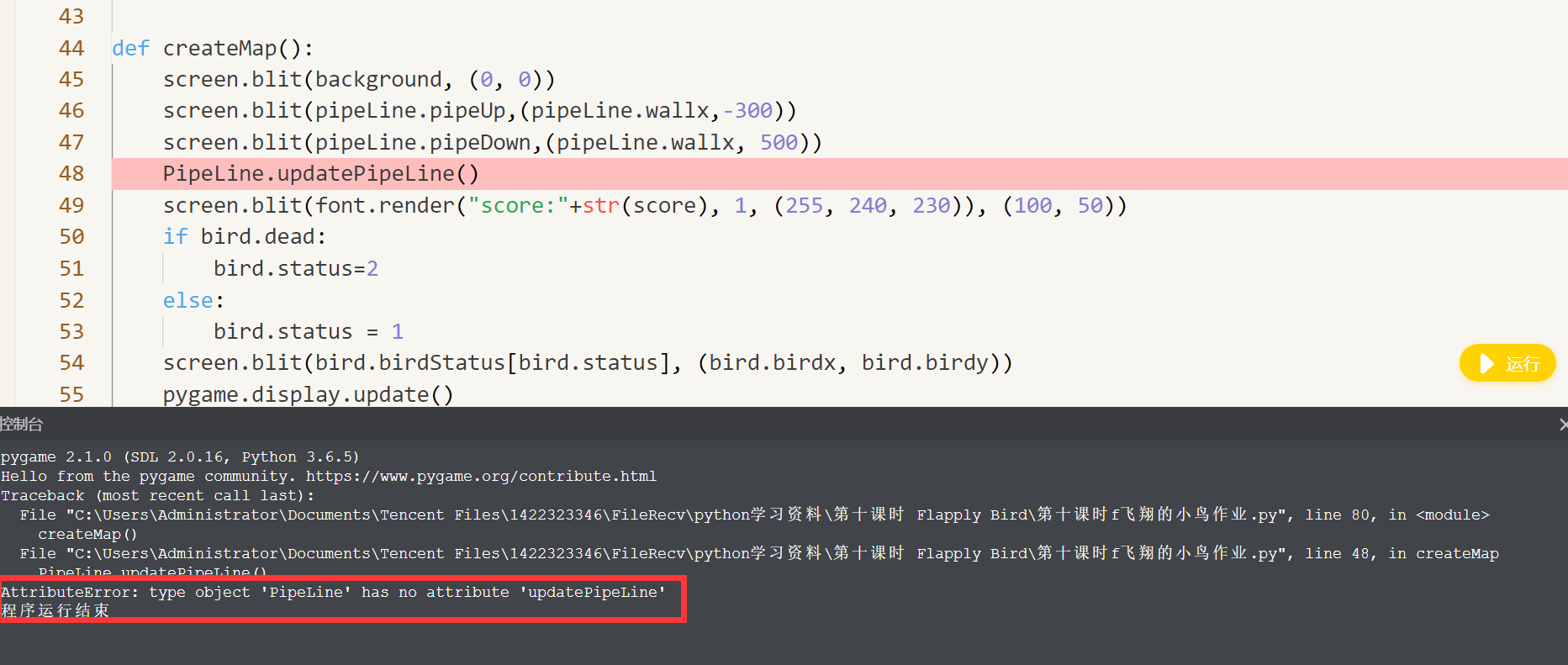
不知道怎么解决问题
【作品源代码】
import pygame
import sys
#定义小鸟类
class Bird(object):
#定义类得构造方法
     def __init__(self):
        self.birdStatus=[pygame.image.load("1.png"),pygame.image.load("2.png"),pygame.image.load("dead.png")]
        self.status=0
        self.birdx= 120
        self.birdy= 150
        self.jump=False
        self.jumpSpeed=10
        self.gravity=5
        self.dead=False

     def Birdupdate(self):
        if self.jump:
            self.jumpSpeed-=1
            self.birdy-=self.jumpSpeed
        else:
            self.gravity+=0.2
            self.birdy+=self.jumpSpeed


#  定义小鸟的移动方法

class PipeLine(object):
     #定义类得构造方法
    def __init__(self):
        self.wallx=400
        self.pipeUp = pygame.image.load("top.png")
        self.pipeDown = pygame.image.load("bottom.png")


def updatePipeLine(self):
    self.wallx -= 5
    if self.wallx<-80:
        global score
        score+=1
        #重置管道位置
        self.wallx=400


def createMap():
    screen.blit(background, (0, 0))
    screen.blit(pipeLine.pipeUp,(pipeLine.wallx,-300))
    screen.blit(pipeLine.pipeDown,(pipeLine.wallx, 500))
    PipeLine.updatePipeLine()
    screen.blit(font.render("score:"+str(score), 1, (255, 240, 230)), (100, 50))
    if bird.dead:
        bird.status=2
    else:
        bird.status = 1
    screen.blit(bird.birdStatus[bird.status], (bird.birdx, bird.birdy))
    pygame.display.update()


if __name__=="__main__":
    pygame.init()
    size=width,height=400,600
    screen=pygame.display.set_mode(size)
    pygame.display.set_caption("FlappyBird")
    clock=pygame.time.Clock()
    bird=Bird()
    pipeLine = PipeLine()
    font=pygame.font.SysFont(None,50)
    score=0
while True:
    clock.tick(60)
    for event in pygame.event.get():
        if event.type==pygame.QUIT:
            sys.exit()

        if (event.type == pygame.KEYDOWN or event.type==pygame.MOUSEBUTTONDOWN)and not bird.dead:
            bird.jump=True
            bird.jumpSpeed=10
            bird.gravity=5
    bird.Birdupdate()
    background=pygame.image.load("background.png")
    createMap()
pygame.quit()
【提示】
部分含有Python第三方库相关内容的作品,在海龟编辑器网页端无法运行哦!如遇到这种情况,可以打开下面的链接,下载海龟编辑器客户端:
https://python.codemao.cn