 兴奋的木叶龙mC2查看:100 回复:2 评论:0 创建时间:2021-11-27T09:30:47
用户:兴奋的木叶龙mC2查看:100 回复:2 评论:0 创建时间:2021-11-27T09:30:47
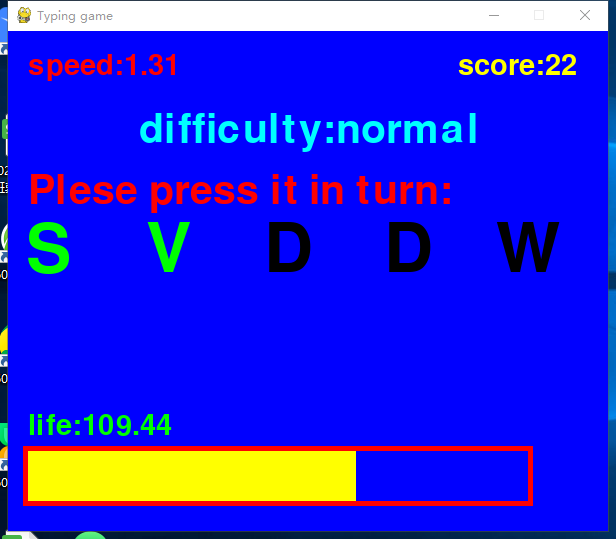
【作品展示】
【作品介绍】
这是一个打字游戏一个神奇的游戏
可以帮助你练习打字和反应力
大家可以说一说自己的分数
来比一比哪个小伙伴的分数最高吧!
特别说明:
由于pygame Font库只能显示英文
所以里面的单词我给你们翻译一下:
Please select difficulty to start the game:请选择难度开始游戏
hart:难,easy:简单,normal:普通
score:分数
life:血条
Plese press it in turn:请依次按下
game over:游戏结束
cancel:退出
剩下的应该能自己翻译了吧,实在不行就自己翻译
【作品源代码】
#从这里开始,就是mypyame模块一直到注释end结束,同样都得复制下来哈
from pygame.locals import *
class Error(Exception):
pass
def error(e, isexit=False):
'''可以实现自定义报错,内容为e'''
print(str(e), flush=False, end="", file=sys.stderr)
if isexit:
Quit()
try:
import random
except: error("缺少必须模块random或导入错误!")
try:
import sys
except: error("缺少必须模块sys或导入错误!")
try:
import pygame
except: error("缺少必须模块pygame或导入错误!")
try:
import time
except: error("缺少必须模块time或导入错误!")
try:
import datetime
except: error("缺少必须模块datetime或导入错误!")
try:
import io
except: error("缺少必须模块io或导入错误!")
pygame.init()
update = pygame.display.update
set_mode = pygame.display.set_mode
set_caption = pygame.display.set_caption
now_time = datetime.datetime.now
wait = time.sleep
class colors:
black = (0, 0, 0, 255)
so_dark_grey = (30, 30, 30, 255)
dark_grey = (80, 80, 80, 255)
grey = (122, 122, 122, 255)
light_grey = (230, 230, 230, 255)
so_light_grey = (250, 250, 250, 255)
white = (255, 255, 255, 255)
brown = (122, 122, 0, 255)
red = (255, 0, 0, 255)
orange = (255, 122, 0, 255)
light_yellow = (255, 255, 122, 255)
yellow = (255, 255, 0, 255)
green = (0, 255, 0, 255)
dark_green = (0, 122, 0, 255)
light_green = (0, 122, 0, 255)
ching = (0, 255, 255, 255)
dark_blue = (0, 0, 122, 255)
blue = (0, 0, 255, 255)
light_blue = (122, 122, 255, 255)
dark_purple = (122, 0, 122, 255)
purple = (122, 0, 122, 255)
pink = (255, 0, 255, 255)
#pygame辅助函数
def fill(window, color):
'''填充窗口'''
window.fill(color)
pygame.display.update()
class Draw:
def line(window, color, startcoords, endcoords, width=5):
'''画线'''
pygame.draw.line(
window, color, startcoords, endcoords, width)
pygame.display.update()
def rect(window, x, y, height, width, color, outline=0, outcolor=colors.white):
'''画方形'''
recto = pygame.Rect(
x-outline, y-outline, width+outline*2, height+outline*2)
rect1 = pygame.Rect(x, y, width, height)
pygame.draw.rect(window, outcolor, recto)
pygame.draw.rect(window, color, rect1)
pygame.display.update()
def circle(window, color, coords, radius, width=None, outline=0, outcolor=colors.white):
'''在指定的中心点画圆,如果width为none,画实心圆'''
pygame.draw.circle(
window, outcolor, coords, radius+outline)
if width:
pygame.draw.circle(
window, color, coords, radius, width)
elif not width:
pygame.draw.circle(
window, color, coords, radius)
update()
def arc(window, color, x, y, width, height, start, end, width1=None):
'''画弧形,width为宽,width1为边长'''
from math import radians
if width1:
pygame.draw.arc(window, color, (x, y, width, height), radians(
start), radians(end), width1)
elif not width1:
pygame.draw.arc(
window, color, (x, y, width, height), radians(start), radians(end))
pygame.display.update()
def crect(window, x, y, height, width, color, outline=0, outcolor=colors.white, text="", textsize=30, textcolor=colors.black, textfile=None):
'''在指定的中心点画方形'''
recto = pygame.Rect(
x-width//2-outline, y-height//2-outline, width+outline*2, height+outline*2)
rect1 = pygame.Rect(
x-width//2, y-height//2, width, height)
pygame.draw.rect(window, outcolor, recto)
pygame.draw.rect(window, color, rect1)
centext(window, str(text), x, y,
textsize, textcolor, textfile)
pygame.display.update()
def cloadpic(window, picobject, x, y, width=100, height=100, angle=0, auto=True):
'''在指定的中心点加载图片,如果auto为True,按图片大小加载,否则按用户的设置加载'''
space = pygame.image.load(
str(picobject)).convert_alpha()
nspace = pygame.transform.rotate(space, angle)
w, h = nspace.get_size()
if auto:
window.blit(
nspace, (x-w//2, y-h//2))
update()
if auto == False:
nnspace = pygame.transform.喵oothscale(
nspace, (width, height))
window.blit(
nnspace, (x-width//2, y-height//2))
update()
def loadpic(window, picobject, x, y, width=100, height=100, angle=0, auto=True):
'''加载图片,如果auto为True,按图片大小加载,否则按用户的设置加载'''
space = pygame.image.load(
str(picobject)).convert_alpha()
nspace = pygame.transform.rotate(space, angle)
if auto:
window.blit(nspace, (x, y))
update()
if auto == False:
nnspace = pygame.transform.喵oothscale(
nspace, (width, height))
window.blit(nnspace, (x, y))
update()
def Systext(window, text, centerx, centery, size=40, color=(0, 0, 0), filename=None, backcolor=None, angle=0):
'''在指定的中心点打印文字'''
font = pygame.font.SysFont(None, size)
if backcolor != None:
text = font.render(str(text), True, pygame.Color(
color), pygame.Color(backcolor))
else:
text = font.render(
str(text), True, pygame.Color(color))
content = pygame.transform.rotate(text, angle)
rect = content.get_rect()
rect.center = (centerx, centery)
window.blit(content, rect)
pygame.display.update()
centext = Systext
def printtext(window, text, x, y, size=40, color=(255, 255, 255), filename=None, backcolor=None, angle=0):
'''打印文字'''
font = pygame.font.SysFont(None, size)
if backcolor != None:
text = font.render(str(text), True, pygame.Color(
color), pygame.Color(backcolor))
else:
text = font.render(
str(text), True, pygame.Color(color))
content = pygame.transform.rotate(text, angle)
rect = content.get_rect()
rect.topleft = (x, y)
window.blit(content, rect)
pygame.display.update()
def mouse_px():
'''鼠标的x坐标'''
return pygame.mouse.get_pos()[0]
def mouse_py():
'''鼠标的y坐标'''
return pygame.mouse.get_pos()[1]
def m_right():
'''鼠标的右键是否按下'''
return pygame.mouse.get_pressed()[2]
def m_middle():
'''鼠标的滚轮是否按下'''
return pygame.mouse.get_pressed()[1]
def m_left():
'''鼠标的左键是否按下'''
return pygame.mouse.get_pressed()[0]
def mouse_r():
'''鼠标的相对移动'''
return pygame.mouse.get_rel()[0]
def m_click(x, y, height, width, key=m_left):
'''检测鼠标key键是否点击x,y,height,width所形成的区域(key选项:m_right,m_middle,m_left(不加引号))'''
if key():
if mouse_px() > x and mouse_px() < width+x and mouse_py() > y and mouse_py() < height+y:
return True
else:
return False
return None
def list_str(listobject, sep="\n"):
'''列表转字符串,每个元素后加上sep'''
s = ""
for i in listobject:
s += (str(i)+str(sep))
return s
def initwindow(x, y, title='python game', color=colors.white):
'''初始化pygame窗口'''
global window
window = set_mode((x, y))
set_caption(str(title))
window.fill(color)
update()
return window
#其他辅助函数
def KeyCheck(key='any'):
'''如果参数为any按下任意键返回True'''
if key == 'any':
key = pygame.key.get_pressed()
for i in key:
if i:
return True
elif key != 'any':
keys = pygame.key.get_pressed()
if keys[key]:
return True
else:
return False
def Key():
'''返回按下的键的ASCLL码'''
for event in pygame.event.get():
if event.type == (KEYDOWN):
return pygame.event.get(KEYDOWN)
def CheckQUIT():
'''如果QUIT事件响应,终止程序'''
if len(pygame.event.get(QUIT)) > 0:
pygame.quit()
sys.exit()
pygame.init()
def Quit():
'''直接退出程序'''
pygame.quit()
sys.exit()
pygame.init()
#end
#下面才是正式的
scr = initwindow(600, 500, "Typing game", colors.blue)
diff = "easy"
crect = Draw.crect
life = 100
global emx, hmx, nmx
emx = 0
nmx = 0
hmx = 0
letter1 = False
letter2 = False
letter3 = False
letter4 = False
letter5 = False
score = 0
turn = 0
letters = [random.randint(97, 122), random.randint(97, 122), random.randint(
97, 122), random.randint(97, 122), random.randint(97, 122), ]
def update():
global letters, letter1, letter2, letter3, letter4, letter5
letter1 = letter2 = letter3 = letter4 = letter5 = False
letters = [random.randint(97, 122), random.randint(97, 122), random.randint(
97, 122), random.randint(97, 122), random.randint(97, 122), ]
def start():
global diff
scr.fill(colors.blue)
Draw.rect(scr, 0, 130, 60, 600, colors.red)
centext(scr, "TypingGame", 300, 160,
size=60, color=colors.yellow)
centext(scr, "Please select difficulty to start the game",
喵0)
crect(scr, 100, 340, 75, 160, colors.green,
5, colors.red, "Easy", 80, colors.red)
crect(scr, 300, 340, 75, 160, colors.yellow, 5,
colors.ching, "Normal", 60, colors.blue)
crect(scr, 500, 340, 75, 160, colors.red, 5,
colors.orange, "Hart", 80, colors.orange)
while True:
if m_click(15, 300, 75, 160):
diff = "easy"
scr.fill(colors.blue)
return
if m_click(215, 300, 75, 160):
scr.fill(colors.blue)
diff = "normal"
return
if m_click(415, 300, 75, 160):
scr.fill(colors.blue)
diff = "hart"
return
CheckQUIT()
def over(nums):
scr.fill(colors.blue)
global emx, nmx, hmx
if nums[1] == "easy":
if emx < nums[0]:
emx = nums[0]
centext(
scr, "NEW MARK!", 300, 320, size=60, color=colors.green)
centext(scr, "You max score is" +
str(emx), 300, 350)
elif nums[1] == "normal":
if nmx < nums[0]:
nmx = nums[0]
centext(
scr, "NEW MARK!", 300, 320, size=60, color=colors.green)
centext(scr, "You max score is" +
str(nmx), 300, 350)
else:
if hmx < nums[0]:
hmx = nums[0]
centext(
scr, "NEW MARK!", 300, 320, size=60, color=colors.green)
centext(scr, "You max score is" +
str(hmx), 300, 350)
score = 0
life = 100
centext(scr, "Game over", 300, 200, 130, colors.red)
centext(scr, "You difficulty is:" +
str(nums[1])+",score is:"+str(nums[0]), 300, 400)
Draw.crect(scr, 500, 450, 50, 120, colors.blue, 5,
colors.green, "Cancel", 50, colors.yellow)
while True:
CheckQUIT()
if m_left():
wait(0.01)
return
def main():
global letters, letter1, letter2, letter3, letter4, letter5, life, score, turn
centext(scr, "difficulty:"+diff, 300,
100, size=60, color=colors.ching)
centext(scr, "Really?", 300, 150, 60, colors.yellow)
wait(1)
scr.fill(colors.blue)
centext(scr, "difficulty:"+diff, 300,
100, size=60, color=colors.ching)
centext(scr, "GO!", 300, 150, 70, colors.red)
wait(1)
scr.fill(colors.blue)
vel = 0
score = 0
life = 100
speed = 0.5
while True:
scr.fill(colors.blue)
centext(scr, "difficulty:"+diff, 300,
100, size=60, color=colors.ching)
printtext(scr, "Plese press it in turn:",
20, 140, 60, colors.red)
for i in list(range(0, 5, 1)):
if eval("letter"+str(i+1)):
centext(
scr, chr(letters[i]-32), 40+120*i, 220, 100, colors.green)
else:
centext(scr, chr(letters[i]-32),40+120*i,220,100,colors.black)
if KeyCheck(letters[turn]):
score += 1
life += 7
exec("global letter1,letter2,letter3,letter4,letter5\nletter"+str(
turn+1)+"=True")
turn += 1
elif Key():
print("WRONG")
life -= 8
if turn ==5:
turn = 0
letters = [random.randint(97,122),random.randint(97,122),random.randint(97,122),random.randint(97,122),random.randint(97,122),]
letter1 = letter2 =letter3 =letter4 =letter5 =False
printtext(scr, "life:"+str(round(life,2)),20,380,43,colors.green)
printtext(scr, "score:"+str(score),450,20,43,colors.yellow)
printtext(scr, "speed:"+str(round(speed喵el,2)),20,20,43,colors.red)
Draw.rect(scr, 20,420,50,500,colors.blue,5,outcolor=colors.red)
Draw.rect(scr, 20,420,50,int(round(life,2)*3),colors.yellow)
if life >=167:
life = 167
if diff =="easy":
speed = 0.8
life -= 0.8喵el
elif diff =="normal":
speed = 1.2
life -= 1.2喵el
else:
speed = 1.5
life -= 1.5喵el
if life <=0:
turn = 0
letters = [random.randint(97,122),random.randint(97,122),random.randint(97,122),random.randint(97,122),random.randint(97,122),]
letter1 = letter2 =letter3 =letter4 =letter5 =False
return score, diff
vel += 0.001
wait(0.1)
CheckQUIT()
while True:
start()
over(main())
【提示】
部分含有Python第三方库相关内容的作品,在海龟编辑器网页端无法运行哦!如遇到这种情况,可以打开下面的链接,下载海龟编辑器客户端:
https://python.codemao.cn