 MathCalculus查看:5937 回复:4 评论:2 创建时间:2021-11-14T19:54:10
用户:MathCalculus查看:5937 回复:4 评论:2 创建时间:2021-11-14T19:54:10
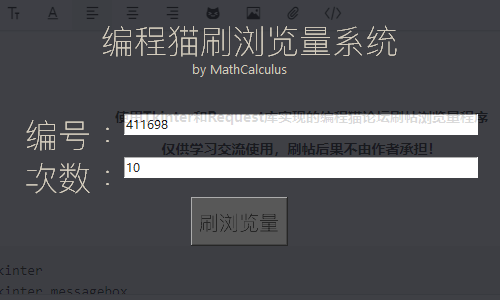
【效果图】
使用Tkinter和Request库实现的编程喵坛刷帖浏览量程序
仅供学习交流使用,刷帖后果不由作者承担!
源代码:
"""
Author:MathCalculus[数学微积分]
Annotation:该工具仅为学习交流使用,刷帖后果不由作者承担!
"""
import tkinter
import tkinter.messagebox
window = tkinter.Tk()
try:  # 尝试导入requests库
    import requests
except:
    errorwindow = tkinter.Tk()
    errorwindow.withdraw()  # 退出默认 tk 窗口
    result = tkinter.messagebox.showerror('错误', 'Python requests库未安装,请去安装!')
    import sys
    sys.exit()
def getpost(id=411698,num=10):
    geturl = "https://api.codemao.cn/web/forums/posts/"+str(id)+"/details"
    for i in range(0,int(num)):
        print("刷了第"+str(i+1)+"次")
        information = requests.get(geturl)
def runget():
    if tkinter.messagebox.askokcancel('提示', '该工具仅为学习交流使用,刷帖后果不由作者承担,是否继续?'):
        print("尝试刷浏览量,帖子号",code_input.get(),"次数",getnum.get())
        try:
            int(code_input.get())
            int(getnum.get())
            #尝试将输入框的值转换为整数,如果不能转则异常
        except:
            tkinter.messagebox.showerror('错误', '请输入合法数字')
            import sys
            sys.exit()
            return 0
        if int(code_input.get()) >= 100000 and int(getnum.get()) >= 1:
            getpost(id=code_input.get(),num=getnum.get())
        else:
            tkinter.messagebox.showerror('错误', '请输入合法数字')

window.geometry("500x300")  #设置窗口大小
window.title("编程猫刷帖浏览量 - MathCalculus")    #设置标题
window.attributes("-alpha", 0.85)   #设置窗口透明度
window.resizable(width=False, height=False) #固定大小
window["background"] = "#1d1f25" #设置背景颜色
title = tkinter.Label(window,text="编程猫刷浏览量系统",font=("Segoe UI", 25),bg="#1d1f25",fg="#ccc3b0")
title.place(x = 136-114/3,y = 14)
author = tkinter.Label(window,text="by MathCalculus",font=("Segoe UI", 10),bg="#1d1f25",fg="#ccc3b0")
author.place(x = 158+92/3,y = 57)
code = tkinter.Label(window,text="编号:",font=("Segoe UI", 25),bg="#1d1f25",fg="#ccc3b0")
code.place(x = 22,y = 108)
code_input = tkinter.Entry(window,width=50,textvariable=tkinter.StringVar(value='411698'))
code_input.place(x = 124,y = 114)
get = tkinter.Label(window,text="次数:",font=("Segoe UI", 25),bg="#1d1f25",fg="#ccc3b0")
get.place(x = 22,y = 151)
getnum = tkinter.Entry(window,width=50,textvariable=tkinter.StringVar(value='10'))
getnum.place(x = 124,y = 157)
runbutton = tkinter.Button(window, text ="刷浏览量", command = runget,bg="#3b3b3b",font=("Segoe UI", 15))
runbutton.place(x = 191,y = 197)

# 进入消息循环
window.mainloop()