 MathCalculus查看:6575 回复:10 评论:4 创建时间:2021-11-14T10:09:38
用户:MathCalculus查看:6575 回复:10 评论:4 创建时间:2021-11-14T10:09:38
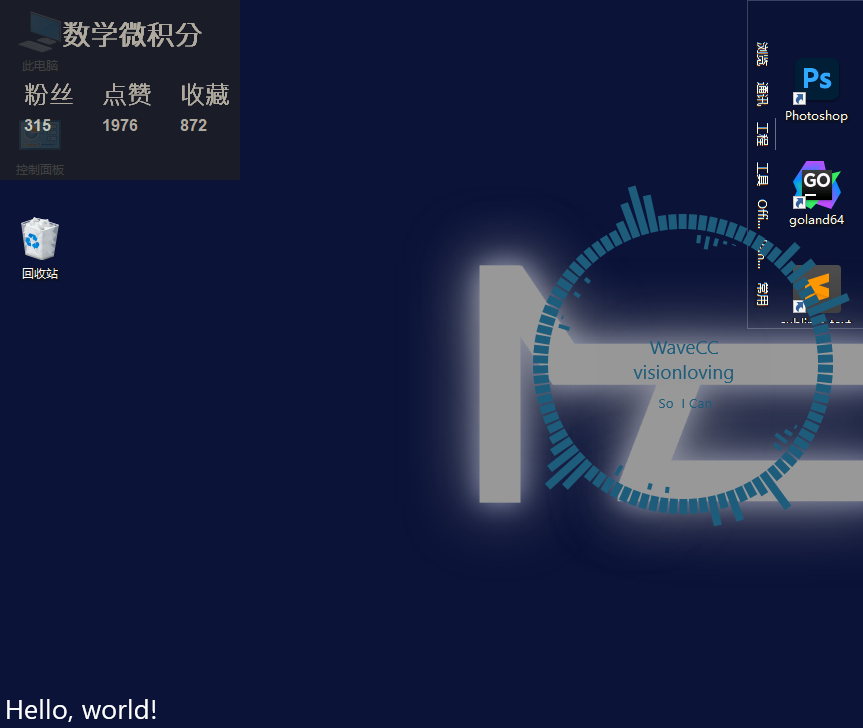
效果图↑
代码:
"""
@author:MathCalculus【数学微积分】
"""

def log(msg,error=False):
    """输出日志
    msg : 输出日志内容
    error : 是否为错误
    """
    if error:
        print("-----日志 错误! "+str(msg)+"-----")
    else:
        print("-----日志 "+str(msg)+"-----")


import time
import tkinter  # 导入tkinter库
import tkinter.messagebox
from threading import Thread #导入多线程
import json  # 导入json库
try:  # 尝试导入requests库
    import requests
    print(log("导入requests模块成功"))
except:
    errorwindow = tkinter.Tk()
    errorwindow.withdraw()  # 退出默认 tk 窗口
    result = tkinter.messagebox.showerror('错误', 'Python requests库未安装,请去安装!')
    print(log("导入requests模块失败",True))
    import sys
    sys.exit()
finally:
    print(log("尝试导入requests模块"))

def getcodemao(userid=2621809):
    """获取编程猫用户信息
    userid : 用户编号"""

    geturl = "https://api.codemao.cn/creation-tools/v1/user/center/honor?user_id="+str(userid)
    information = requests.get(geturl).text
    return information

window = tkinter.Tk()
window.geometry("240x180")  #设置窗口大小
window.title("编程猫信息监控") #设置标题
window.attributes("-alpha", 0.85) #设置窗口透明度
window.attributes("-toolwindow", True) #设置窗口为工具栏窗口
window.resizable(width=False, height=False) #固定大小
window["background"] = "#1d1f25" #设置背景颜色
window.wm_attributes("-topmost", True)   # 窗口总在最前
window.overrideredirect(True)    # 窗口去边框

text_font = "Arial Bold"

user_name = tkinter.Label(window, text="user_name",font=(text_font, 20),bg="#1d1f25",fg="#ccc3b0")
user_name.place(x = 59,y = 16)

fans = tkinter.Label(window,text="粉丝",font=(text_font,18),bg="#1d1f25",fg="#ccc3b0")
fans.place(x = 21,y = 77)
fans_num = tkinter.Label(window,text="fans_num",font=(text_font, 12),bg="#1d1f25",fg="#ccc3b0")
fans_num.place(x = 21,y = 113)

like = tkinter.Label(window,text="点赞",font=(text_font, 18),bg="#1d1f25",fg="#ccc3b0")
like.place(x = 99,y = 77)
like_num = tkinter.Label(window,text="like_num",font=(text_font, 12),bg="#1d1f25",fg="#ccc3b0")
like_num.place(x = 99,y = 113)

collect = tkinter.Label(window,text="收藏",font=(text_font, 18),bg="#1d1f25",fg="#ccc3b0")
collect.place(x = 177,y = 77)
collect_num = tkinter.Label(window,text="coll_num",font=(text_font, 12),bg="#1d1f25",fg="#ccc3b0")
collect_num.place(x = 177,y = 113)


def getcodemaotowindow(userid=2621809):
    user_data = getcodemao(userid)
    user_json = json.loads(user_data)
    user_name['text'] = user_json["nickname"]
    fans_num['text'] = user_json["fans_total"]
    like_num['text'] = user_json["liked_total"]
    collect_num['text'] = user_json["collected_total"]

#若想把这个窗口数据改成你的,请把getcodemaotowindow的参数改成你的训练师编号

ntime = time.time()

getcodemaotowindow()

if __name__ == '__main__':
    while True:
        if time.time()-ntime >= 30:
            ntime = time.time()
            getcodemaotowindow()
        window.update()
该程序在python3.10下测试通过
年轻人写的第一个python程序,请大家多提建议