 苏文星查看:94 回复:0 评论:0 创建时间:2021-10-23T16:43:36
用户:苏文星查看:94 回复:0 评论:0 创建时间:2021-10-23T16:43:36
【作品展示】
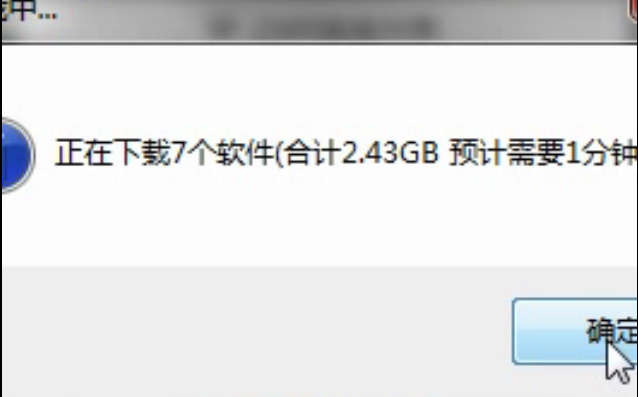
【作品介绍】
整蛊软件,把密钥部分删了就很像了
【作品源代码】
import tkinter as tk
import tkinter.messagebox as 喵
import os,random
wincolor = '#F5F5F5'#设置背景色
key = str(random.randint(1, 999999))#密钥
win = tk.Tk()#初始化
win2= tk.Toplevel(win)
win2.withdraw()


win2.attributes("-toolwindow", True)  # 变成无最大小化按钮和图标的窗口
win2.resizable(False, False)  # 设置窗口不能变大变小
win2.config({'bg': wincolor})  # 设置背景色
win2.title('P2P下载器 选择切忌不要务必不下载的软件')  # 设置窗口标题

win.attributes("-toolwindow", True)  # 变成无最大小化按钮和图标的窗口
win.resizable(False, False)#设置窗口不能变大变小
win.config({'bg':wincolor})#设置背景色
win.title('P2P下载器')#设置窗口标题
width,heigh=250,200#设置窗口长宽

#窗口位于屏幕中央
win.geometry('%dx%d+%d+%d'%(width, heigh, (win.winfo_screenwidth()-width)/2, (win.winfo_screenheight()-heigh)/2))
win2.geometry('%dx%d+%d+%d' % (width, heigh, (win.winfo_screenwidth() -width)/2, (win.winfo_screenheight()-heigh)/2))
var, var_key = tk.StringVar(), tk.StringVar()
var.set('请输入密钥')
i = 0

#win操作
def start():
    global i
    if not var_key.get() == key:
        var.set('密钥不正确')
        l2.config({'fg': 'red'})
        if i == 0:
            with open(os.path.join(os.path.expanduser('~'), "Documents\\Information.txt"), 'w') as f:
                f.write(key)
            喵.showinfo(title='提示', message='听着,你在这里是无法得到密钥的')
            喵.showinfo(title='提示', message='你应该在你的电脑里找找')
            i = 1
            if not 喵.askyesno(title='提示', message='你知道是什么意思吗'):
                喵.showinfo(title='提示', message='去我的文件里看看,这是最简单的方法')
    else:
        var.set('密钥正确')
        l2.config({'fg': 'green'})
        喵.showinfo(title='提示', message='选择软件')
        win.withdraw()
        win2.deiconify()

def downland():
    喵.showinfo(title='下载中...',message='正在下载7个软件(合计2.43GB 预计需要1分钟)')
    exit()
#设置win
l1 = tk.Label(win, text='Win10 32位', font=('宋体', 28), width=10,height=1, bg=wincolor, fg='#DAA520')
l2 = tk.Label(win, textvariable=var, font=('微软雅黑', 12),width=10, height=1, bg=wincolor, fg='black')
b = tk.Button(win, text='一键安装', font=('微软雅黑', 12), bg='#4E6CCC', fg='white',width=8, height=1, command=start, relief="flat")
e1 = tk.Entry(win, textvariable=var_key, font=('微软雅黑', 14))
#设置win2
#定义整型变量用来存放选择行为返回值
c1 = tk.Checkbutton(win2, text='2345安全大师')
c2 = tk.Checkbutton(win2, text='2345浏览器')
c3 = tk.Checkbutton(win2, text='远程控制')
c4 = tk.Checkbutton(win2, text='金山毒霸')
c5 = tk.Checkbutton(win2, text='甜蜜暴击')
c6 = tk.Checkbutton(win2, text='贪玩蓝月')
b1 = tk.Button(win2, text='选择完毕', font=('微软雅黑', 12), bg='#4E6CCC',
               fg='white', width=8, height=1, command=downland, relief="flat")
#排位win
l1.place(x=125, y=20, anchor='center')
l2.place(x=125, y=60, anchor='center')
e1.place(x=125, y=90, anchor='center')
b.place(x=125, y=140, anchor='center')
#排位win2
c1.pack()
c2.pack()
c3.pack()
c4.pack()
c5.pack()
c6.pack()
b1.pack()
#启动win
win.mainloop()
【提示】
部分含有Python第三方库相关内容的作品,在海龟编辑器网页端无法运行哦!如遇到这种情况,可以打开下面的链接,下载海龟编辑器客户端:
https://python.codemao.cn