 刘岱oG8M查看:38 回复:0 评论:0 创建时间:2021-10-16T19:05:52
用户:刘岱oG8M查看:38 回复:0 评论:0 创建时间:2021-10-16T19:05:52
【作品展示】
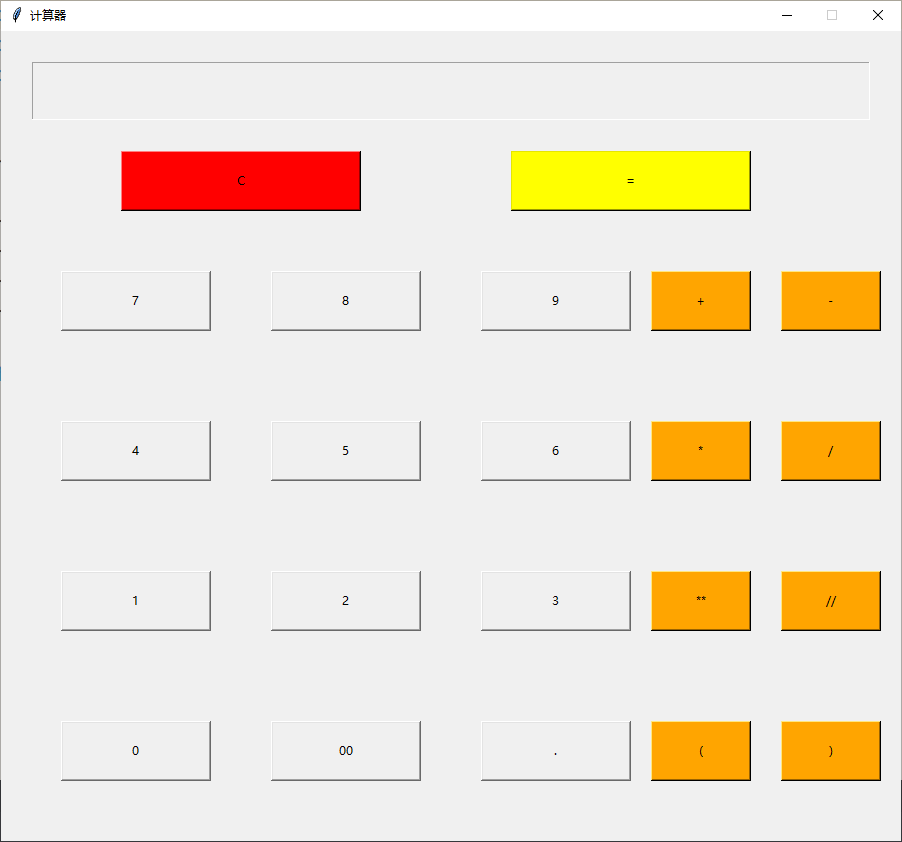
【作品介绍】
小小的一个计算器,各位大佬们不要嫌弃!!!
【作品源代码】
import re
import tkinter
import math


Error = 0

window = tkinter.Tk()
window.geometry(str(900) + 'x' + str(810) + '+' + str(400) + '+' + str(100))
window.resizable(False, False)
window.title('计算器')

def ButtonOperation(m):

    global Error
    theme = themeVar.get()
    if m in '00123456789()':
        theme += m
    elif m == '.':
        Segmentationpart = re.split(r'\+|-|\*|/', theme)[-1]
        if '.' in Segmentationpart:
            tkinter.messagebox.showerror('Error', '小数点不允许重复出现')
            Error += 1
            print('#' + Error, 'Error')
            return
        else:
            theme += m
    elif m == 'C':
        theme = ''
    elif m in operators:
        if theme.endswith(operators):
            tkinter.messagebox.showerror('Error', '运算符不允许重复出现')
            Error += 1
            print('#' + Error, 'Error')
            return
        else:
            theme += m
    elif m == '=':
        try:
            theme = str(eval(theme))
        except:
            tkinter.messagebox.showerror('Error', '算式错误')
            Error += 1
            print('#' + Error, 'Error')
            return
    if theme.startswith('.'):
        theme = '0' + theme
    themeVar.set(theme)


themeVar = tkinter.StringVar(window, '')
themeEntry = tkinter.Entry(window, textvariable=themeVar,
                           font="Helvetica 44 bold", justify="right", width=6, highlightthickness=1)
themeEntry['state'] = 'readonly'
themeEntry.place(x=30, y=30, width=840, height=60)

figure = list('7894561230')+['00', '.']
index = 0
for row in [0, 1, 2, 3]:
    for col in [0, 1, 2]:
        a = figure[index]
        index += 1
        m_figure = tkinter.Button(
            window, text=a, command=lambda x=a: ButtonOperation(x))
        m_figure.place(x=60+col*210, y=240+row*150, width=150, height=60)


operators = ('+', '-', '*', '/', '**', '//', '(', ")")
for index, operator in enumerate(operators):
    m_Operator = tkinter.Button(
        window, text=operator, bg='orange', command=lambda x=operator: ButtonOperation(x))
    if index % 2 == 0:
        m_Operator.place(x=650, y=240+index/2*150, width=100, height=60)
    else:
        m_Operator.place(x=780, y=240+math.floor(index//2*150), width=100, height=60)

m_clear = tkinter.Button(window, text='C', bg='red',
                         command=lambda: ButtonOperation('C'))
m_clear.place(x=120, y=120, width=240, height=60)
m_equalsign = tkinter.Button(window, text='=', bg='yellow',
                         command=lambda: ButtonOperation('='))
m_equalsign.place(x=510, y=120, width=240, height=60)

window.mainloop()
【提示】
部分含有Python第三方库相关内容的作品,在海龟编辑器网页端无法运行哦!如遇到这种情况,可以打开下面的链接,下载海龟编辑器客户端:
https://python.codemao.cn