用户:代码荣耀者查看:69 回复:3 评论:6 创建时间:2021-08-08T12:40:50
【作品展示】
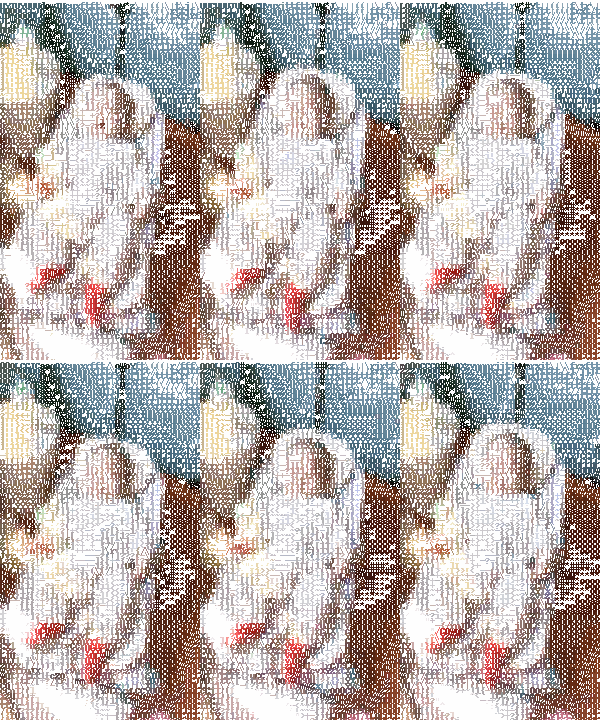
【作品介绍】
改进上课代码,可交互,
转换图片需要大一些,太小了转换效果不好
【作品源代码】
from PIL.Image import *
from PIL.ImageDraw import *
from PIL.ImageSequence import *
from easygui import *
import os

def img_To_char(imgobj):
    scale = 5
    if imgobj.width < 450 or imgobj.height < 450:
        imgobj.resize((imgobj.width*scale,imgobj.height*scale))

    width, height = (int(imgobj.width/scale),int(imgobj.height/scale))
    ASCII_HIGH = '''$@B%8&WM#*oahkbdpqwmZO0QLCJUYXzcvunxrjft/\|()1{}[]?-_+~<>i!lI;:,\"^`'. '''
    img_original = imgobj.resize((width,height))
    img_gray = imgobj.convert("L").resize((width, height))
    img_new = Image.new("RGBA", (width*scale, height*scale), "white")
    draw = Draw(img_new)

    for y in range(height):
        for x in range(width):
            pos = (x,y)
            gray = img_gray.getpixel(pos)
            index = int(gray/256 * 70)
            txt = ASCII_HIGH[index] + ' '
            color = img_original.getpixel(pos)
            draw.text((x*scale,y*scale),txt,fill=color)

    return img_new

def gif_To_char(gif_original):
    frames = Iterator(gif_original)
    img_colorchars = []
    for frame in frames:
        colorchar = img_To_char(frame)
        img_colorchars.append(colorchar)

    return img_colorchars


imgname = enterbox(msg="请输入想处理的图片(静动态都行)(含后缀名)", title="图像处理", strip=True, image=None, root=None)
f = enterbox(msg="请输入该图片的路径(相对绝对路径都行)(不含图片名)(不输入默认为F:/鲁常欣 与竹独行/编程素材)", title="图像处理", strip=True, image=None, root=None)
name,ext = os.path.splitext(imgname)
if f == None:
    f = "F:/鲁常欣 与竹独行/编程素材"
img = open(f+os.sep+imgname)
f1 = enterbox(msg="你想保存到哪?请输入保存路径(相对绝对路径都行)(不含图片名)(不输入默认为F:/鲁常欣 与竹独行/编程素材)", title="图像处理", strip=True, image=None, root=None)
if f1 == None:
    f1 = "F:/鲁常欣 与竹独行/编程素材"

if ext == ".gif":
    img_colorchars = gif_To_char(img)
    msgbox("动态图片处理完成", '通知', '保存')
    img_colorchars[0].save(f1+os.sep+name+"_colorchar彩色动态字符画.gif",
        append_images=img_colorchars[1:],
        save_all=True,
        loop=0,
        duration=120,
        )
else:
    img_colorchar = img_To_char(img)
    msgbox("静态图片处理完成", '通知', '保存')
    img_colorchar.save(f1+os.sep+name+"_colochar彩色静态字符画.png")
【提示】
部分含有Python第三方库相关内容的作品,在海龟编辑器网页端无法运行哦!如遇到这种情况,可以打开下面的链接,下载海龟编辑器客户端:
https://python.codemao.cn 与竹独行
与竹独行做了好久,欢迎下载
点赞0
评论
作者好,我可以那你的源码去改进嘛?
贴出来就是方便大家的
当然可以,
这个代码有个致命的缺陷,图片太小就会很难看,也不清楚
只要注明原作者就好了,改进完了记得让我也学习学习哦!谢谢
 lsk666666
imgsrc="https://static.cod喵/emoji/codemao/%E7%BC%96%E7%A8%8B%E7%8C%AB_%E7%82%B9%E8%B5%9E.gif"alt="emotion_编程猫_点赞"
点赞0
评论
谢谢你的赞