 战狼3查看:68 回复:0 评论:0 创建时间:2021-07-30T17:55:25
用户:
【作品展示】
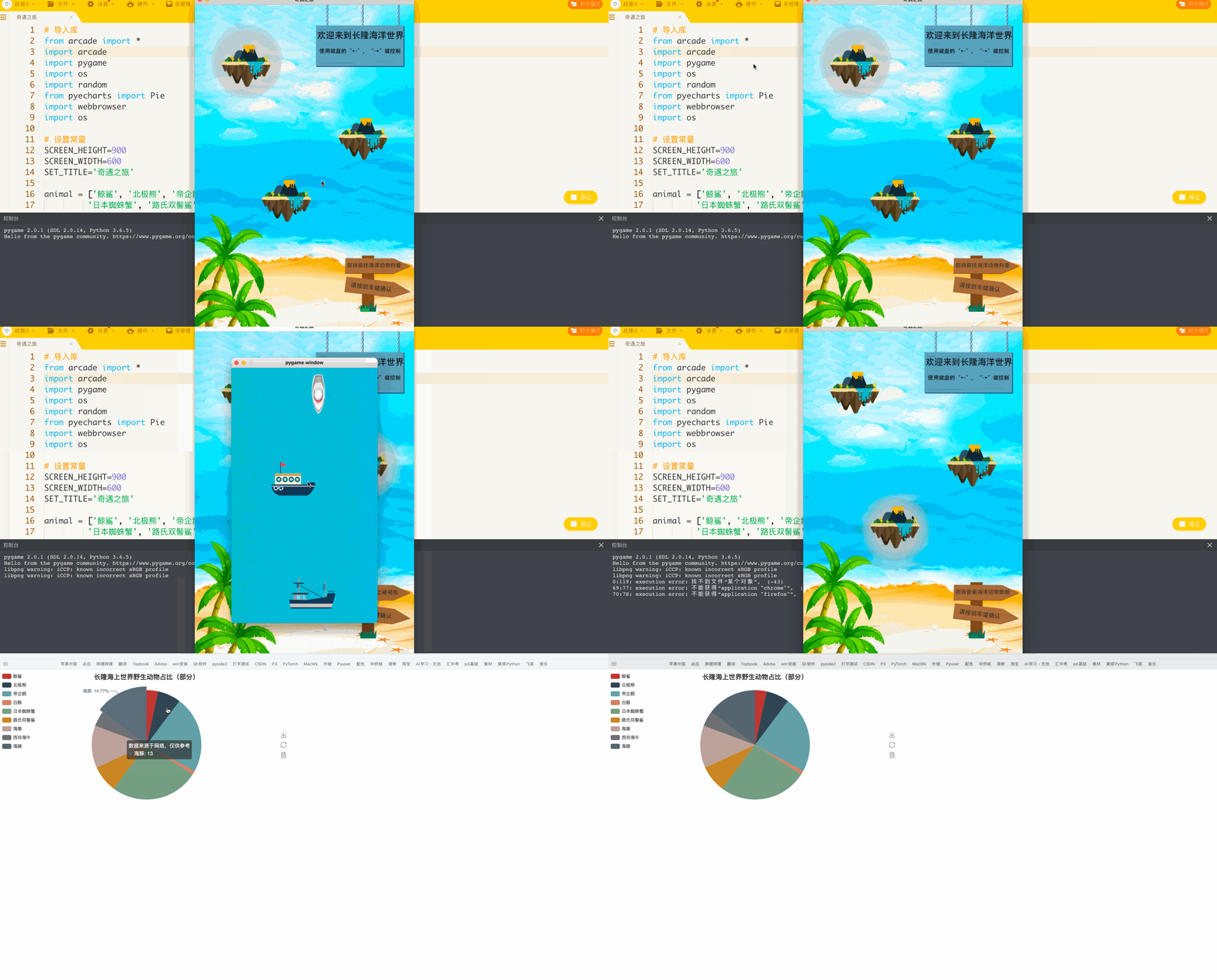
【作品介绍】
本作品的主题是长隆海洋世界的奇遇之旅。首先迎接你的是一个由海洋和海岛组成的界面,通过键盘的方向键来控制选项(海岛背部有阴影)。选中后按回车键打开相应的页面。第一个是动物的科普,使用空格键可以切换不同的动物,使用鼠标点击可以切换同一种动物的不同图片。第二个是海上碰碰船的游戏,通过键盘的方向键来控制小船的动向,使其躲避其它的船只。最后一个就是关于长隆野生动物总类的科普,使用饼状图来直观地展示(数据来源于网络,仅供参考)。最后素材可以从代码开头分享的链接中下载,网址去掉空格即可。
【作品源代码】
# 素材链接: h t t p s://pan.喵/s/1h_2XcsQH25yq7YDdGEc15A
# 密码: qhwe
#### 务必去掉空格 ####

# 导入库
from arcade import *
import arcade
import pygame
import os
import random
from pyecharts import Pie
import webbrowser
import os

# 设置常量
SCREEN_HEIGHT=900
SCREEN_WIDTH=600
SET_TITLE='奇遇之旅'

# 初始化动物列表
animal = ['鲸鲨', '北极熊', '帝企鹅', '白鲸',
         '日本蜘蛛蟹', '路氏双髻鲨','海象','西非海牛','海豚']
# 初始化动物数据
data=[3,6,20,1,23,7,11,4,13]

# 定义主程序
class Main(Window):
    # 初始化
    def __init__(self, width, height, title):
        super().__init__(width, height, title)
        # 调用初始化函数
        self.setup()

    # 定义初始化函数
    def setup(self):
        # 海岛影子
        self.喵_pos=[(140,740),(460,530),(250,356)]
        self.喵=Sprite('喵.png')
        self.喵_index=0

        # 指示牌
        self.lead_list = [Sprite('lead1.png'), Sprite(
            'lead2.png'), Sprite('lead3.png'), ]

        # 加载背景
        self.bg=Sprite('start.png')
        self.bg.center_x=300
        self.bg.center_y=450

        # 加载海岛
        self.island1=Sprite('island.png')
        self.island1.center_x=140
        self.island1.center_y=750

        self.island2 = Sprite('island.png')
        self.island2.center_x = 460
        self.island2.center_y = 550

        self.island3 = Sprite('island.png')
        self.island3.center_x = 250
        self.island3.center_y = 380

        self.notice=Sprite('notice.png')
        self.notice.center_x=450
        self.notice.center_y=820

    # 定义指示牌函数
    def lead_notice(self):
        self.lead=self.lead_list[self.喵_index%3]
        self.lead.center_x=500
        self.lead.center_y=140

    # 定义渲染函数
    def on_draw(self):
        # 开始渲染
        start_render()
        # 渲染各种角色
        self.bg.draw()
        self.喵.draw()
        self.island1.draw()
        self.island2.draw()
        self.island3.draw()
        self.notice.draw()
        self.lead.draw()

    # 定义刷新函数
    def on_update(self, delta_time: float):
        # 更新海岛影子的坐标
        self.喵.center_x=self.喵_pos[self.喵_index%3][0]
        self.喵.center_y=self.喵_pos[self.喵_index%3][1]

        # 更新其它角色
        self.lead_notice()
        self.bg.update()
        self.喵.update()
        self.island1.update()
        self.island2.update()
        self.island3.update()
        self.notice.update()
        self.lead.update()


    # 定义按键检测函数
    def on_key_release(self, symbol, modifiers):
        # 左键
        if symbol == arcade.key.LEFT:
            self.喵_index-=1
        # 右键
        if symbol == arcade.key.RIGHT:
            self.喵_index+=1
        # 回车判断
        if symbol == arcade.key.ENTER:
            # 启动游戏
            if self.喵_index%3==0:
                self.start_game()
            if self.喵_index%3==1:
                self.start_game2()
            if self.喵_index%3==2:
                self.show_pie()

    # 定义科普类程序
    def start_game(self):
        # 初始化
        pygame.init()
        screen = pygame.display.set_mode((900, 534))
        # 初始化参数
        animal_list = ['日本蜘蛛蟹', '海象', '白鲸', '海豚']
        keep_going = True
        show_notice = True
        img_num = 0
        animal_num = 0

        # 显示提示
        while show_notice:
            for event in pygame.event.get():
                if(event.type == pygame.MOUSEBUTTONDOWN):
                    show_notice = False
            notice = pygame.image.load('告示_2.png')
            screen.blit(notice, (75, 0))
            pygame.display.update()

        # 主循环
        while keep_going:
            for event in pygame.event.get():
                if event.type == pygame.QUIT:
                    keep_going = False
                if event.type == pygame.MOUSEBUTTONDOWN:
                    img_num += 1

                if event.type == pygame.KEYDOWN:
                    if event.key == pygame.K_SPACE:
                        animal_num += 1
                        if animal_num > 3:
                            animal_num = 0

            # 加载素材
            animal = pygame.image.load(
                os.path.join(animal_list[animal_num], '{}.jpg'.format(img_num % 4)))
            picture = pygame.image.load('{}.png'.format(animal_list[animal_num]))

            # 把素材绑定在窗口上
            screen.blit(animal, (0, 0))
            screen.blit(picture, (532, 0))

            # 刷新
            pygame.display.update()

        # 退出游戏
        pygame.quit()

    # 定义游戏类程序
    def start_game2(self):
        # 初始化
        pygame.init()
        # 加载窗口
        screen = pygame.display.set_mode((400, 700))

        # 初始化参数
        show_over=True
        keep_going=True
        show_notice=True
        bg1_y,bg2_y=0,700
        boatX,boatY=0,0
        moveX,moveY=0,0
        n=0
        abc=[]
        blockY=[i for i in range(800,10000,300)]

        # 加载背景
        background1=pygame.image.load('bg.png')
        background2=pygame.image.load('bg.png')
        boat=pygame.image.load('boat.png')
        # 加载障碍物
        blocks = [pygame.image.load('block1.png')\
            , pygame.image.load('block2.png'),\
                pygame.image.load('block3.png')]

        for i in range(30):
            List = []
            List.append(random.choice(blocks))
            List.append(random.randint(0,320))
            List.append(blockY[i])
            abc.append(List)

        # 捕捉报错
        try:
            while show_notice:
                for event in pygame.event.get():
                    if event.type == pygame.QUIT:
                        show_notice = False
                        pygame.quit()
                    if event.type == pygame.MOUSEBUTTONDOWN:
                        show_notice = False
                screen.blit(pygame.image.load('告示_1.png'), (43, 230))
                pygame.display.update()
        except:
            return

        # 捕捉报错
        try:
            # 出程序循环
            while keep_going:
                # pygame事件检测
                for event in pygame.event.get():
                    if event.type == pygame.QUIT:
                        pygame.quit()
                    # 按键检测
                    if event.type == pygame.KEYDOWN:
                        # 移动
                        if event.key == pygame.K_LEFT:
                            moveX=-5
                        if event.key==pygame.K_RIGHT:
                            moveX=5
                        if event.key==pygame.K_UP:
                            moveY=-5
                        if event.key==pygame.K_DOWN:
                            moveY=5
                    if event.type==pygame.KEYUP:
                        # 停止移动
                        if event.key==pygame.K_LEFT\
                            or event.key==pygame.K_RIGHT:
                            moveX=0
                        if event.key == pygame.K_UP\
                                or event.key == pygame.K_DOWN:
                            moveY = 0

                # 参数自变化
                bg1_y -= 3
                bg2_y-=3
                n+=1
                boatX+=moveX
                boatY+=moveY

                # 给小船添加边界
                if bg1_y<=-700:
                    bg1_y=700
                if bg2_y<=-700:
                    bg2_y=700
                if boatX<=-30:
                    boatX=-30
                if boatX>=300:
                    boatX=300
                if boatY<=0:
                    boatY=0
                if boatY>=500:
                    boatY=500

                # 小船碰撞检测
                for i in abc:
                    if boatY+100 >i[2]-n*5 and\
                        boatYi[1] and\
                        boatX
【提示】
部分含有Python第三方库相关内容的作品,在海龟编辑器网页端无法运行哦!如遇到这种情况,可以打开下面的链接,下载海龟编辑器客户端:
https://python.code喵