飞熊jSrt查看:120 回复:6 评论:10 创建时间:2021-07-26T13:17:20
用户:飞熊jSrt查看:120 回复:6 评论:10 创建时间:2021-07-26T13:17:20
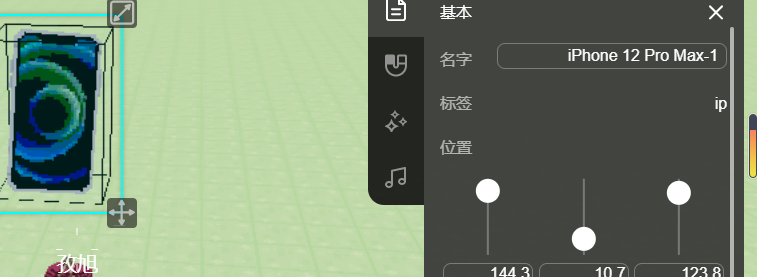
互动的NPC名称要求有什么?明明有一个叫星星的NPC可它报错了
飞熊jSrt开发那里复制来的
// 先在场景中放置一个名称为 NPC 的实体。
const npc = world.querySelector('#马桶');
npc.enableInteract = true; // 允许进行互动
npc.interactRadius = 5;   // 实体的互动范围
npc.interactHint = npc.id; // 互动提示框显示实体的名称
npc.interactColor = new Box3RGBColor(1,0,1);  // 互动提示的文字颜色

// 玩家与实体进行交互时触发
npc.onInteract(async({entity}) => {
    const result = await entity.player.dialog({
        type: Box3DialogType.TEXT,   // 对话框的类型,TEXT是文本框。
        title: npc.id,               // 对话框标题为NPC名字,表示正在说话的是NPC
        lookEye: entity,             // 将相机放在玩家位置
        lookTarget: npc,             // 相机镜头对准NPC
        content: `你好,${entity.player.name},很高兴认识你。`,
    });
});点赞0
评论
唯一要求,名称相同,你该不会名称是#马桶吧
实在不行你可以在马桶前的#删掉,换成点(.)然后在实体里添加“马桶”标签
是呀,星星是个例子
.马桶?
我给你发代码
 孜旭
孜旭// 先在场景中放置一个名称为 NPC 的实体。
c喵t npc = world.querySelector('.马桶');
npc.enableInteract = true; // 允许进行互动
npc.interactRadius = 5; // 实体的互动范围
npc.interactHint = npc.id; // 互动提示框显示实体的名称
npc.interactColor = new Box3RGBColor(1,0,1); // 互动提示的文字颜色
// 玩家与实体进行交互时触发
npc.onInteract(async({entity}) => {
c喵t result = await entity.player.dialog({
type: Box3DialogType.TEXT, // 对话框的类型,TEXT是文本框。
title: npc.id, // 对话框标题为NPC名字,表示正在说话的是NPC
lookEye: entity, // 将相机放在玩家位置
lookTarget: npc, // 相机镜头对准NPC
content: `你好,${entity.player.name},很高兴认识你。`,
});
});点赞0
评论
在实体里添加马桶标签就行了
或者改一个标签名
什么是标签
。。。