 凌_墨水查看:467 回复:16 评论:4 创建时间:2021-06-20T17:53:38
用户:凌_墨水查看:467 回复:16 评论:4 创建时间:2021-06-20T17:53:38
——————————————————————————————————————————————————————————————
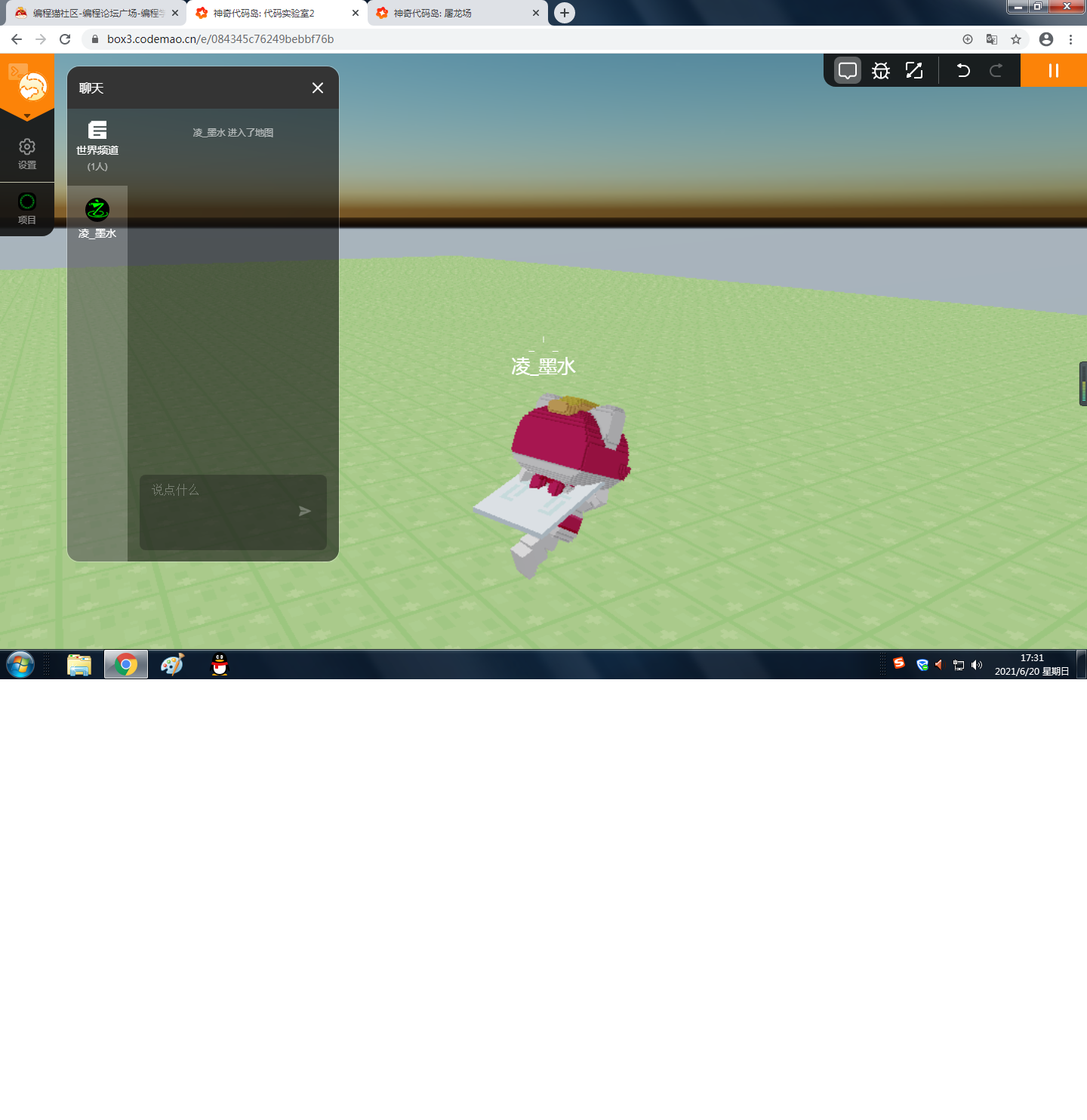
如图所示
我,墨水,正在披风乱跑(划掉)披风疾行
而这,付出帅气的背后
需要强大的代码支持
让我们先梳理一下思路/原理:
//首先得有个披风
//披风用代码固定好位置
//然后用循环定义变量去定义皮肤的倾斜度
//……以及他的往上路程(一般来说,披风模型的中心点在正中央,所以当他倾斜的时候需要微微往上做点调整以至于保持中心点在脖子)
//做好
……
……
……
……
……
……
……
……
梳理完了?
上代码吧
world.onPlayerJoin(({ entity }) => {//玩家进入游戏作为触发目标
    setInterval(() => {//无限循环
        const allWearables = entity.player.wearables();//这个从API抄的awa大意是取消玩家的装备
//////////////////////////////////
                if(entity.velocity.x<0&&entity.velocity.z<0){//当玩家的x坐标速度小于0,z坐标速度小于0时
                            allWearables.forEach((item) => {//执行删装备代码,为了防止装备重复出现,看起来像你背后背了个大精灵球
            item.remove();
        });
        entity.player.wind=entity.velocity.x*-1+entity.velocity.z*-1//定义变量wind(风),作为玩家的各种速度,一定要保证他们都是正数,所以要加这么多if
        entity.player.addWearable({//装备代码,此处省略十万字
            bodyPart: Box3BodyPart.TORSO,
            mesh: 'mesh/TEST_1.vb',
            orientation: new Box3Quaternion(0, 1, 0, 0).rotateZ(Math.PI / 1-entity.player.wind),
            scale: new Box3Vector3(1,0.9,1.1),
            offset: new Box3Vector3(0, -0.2+entity.player.wind/5, -0.3),
        });
        return//返回值,因为只需要做到这  ps在这种情况中
        }
                if(entity.velocity.x>0&&entity.velocity.z<0){//当玩家x速度大于0z速度小于0
                            allWearables.forEach((item) => {//以下部分省略10万字
            item.remove();
        });
        entity.player.wind=entity.velocity.x+entity.velocity.z*-1
        entity.player.addWearable({
            bodyPart: Box3BodyPart.TORSO,
            mesh: 'mesh/TEST_1.vb',
            orientation: new Box3Quaternion(0, 1, 0, 0).rotateZ(Math.PI / 1-entity.player.wind),
            scale: new Box3Vector3(1,0.9,1.1),
            offset: new Box3Vector3(0, -0.2+entity.player.wind/5, -0.3),
        });
        return
        }
                if(entity.velocity.x<0&&entity.velocity.z>0){//当玩家x<0/z>0
                            allWearables.forEach((item) => {//万字
            item.remove();
        });
        entity.player.wind=entity.velocity.x*-1+entity.velocity.z
        entity.player.addWearable({
            bodyPart: Box3BodyPart.TORSO,
            mesh: 'mesh/TEST_1.vb',
            orientation: new Box3Quaternion(0, 1, 0, 0).rotateZ(Math.PI / 1-entity.player.wind),
            scale: new Box3Vector3(1,0.9,1.1),
            offset: new Box3Vector3(0, -0.2+entity.player.wind/5, -0.3),
        });
        return
        }
                if(entity.velocity.x>0&&entity.velocity.z>0){//x>0/z>0
                            allWearables.forEach((item) => {//万
            item.remove();
        });
        entity.player.wind=entity.velocity.x+entity.velocity.z
        entity.player.addWearable({
            bodyPart: Box3BodyPart.TORSO,
            mesh: 'mesh/TEST_1.vb',
            orientation: new Box3Quaternion(0, 1, 0, 0).rotateZ(Math.PI / 1-entity.player.wind),
            scale: new Box3Vector3(1,0.9,1.1),
            offset: new Box3Vector3(0, -0.2+entity.player.wind/5, -0.3),
        });
        }


    }, 100)//每次循环间隔100毫秒(1/10秒)
})
//
//
//
//此处注意,使用模型为TEST_1,其他模型请自行调整方向
然后,你就能做到上图效果啦
学会了吗
不喜勿喷
BUG还请指出
墨水代码
墨水图文