lsk666666查看:186 回复:10 评论:6 创建时间:2021-06-12T08:10:05
用户:lsk666666查看:186 回复:10 评论:6 创建时间:2021-06-12T08:10:05
用树莓派和一块小液晶屏做了个钟
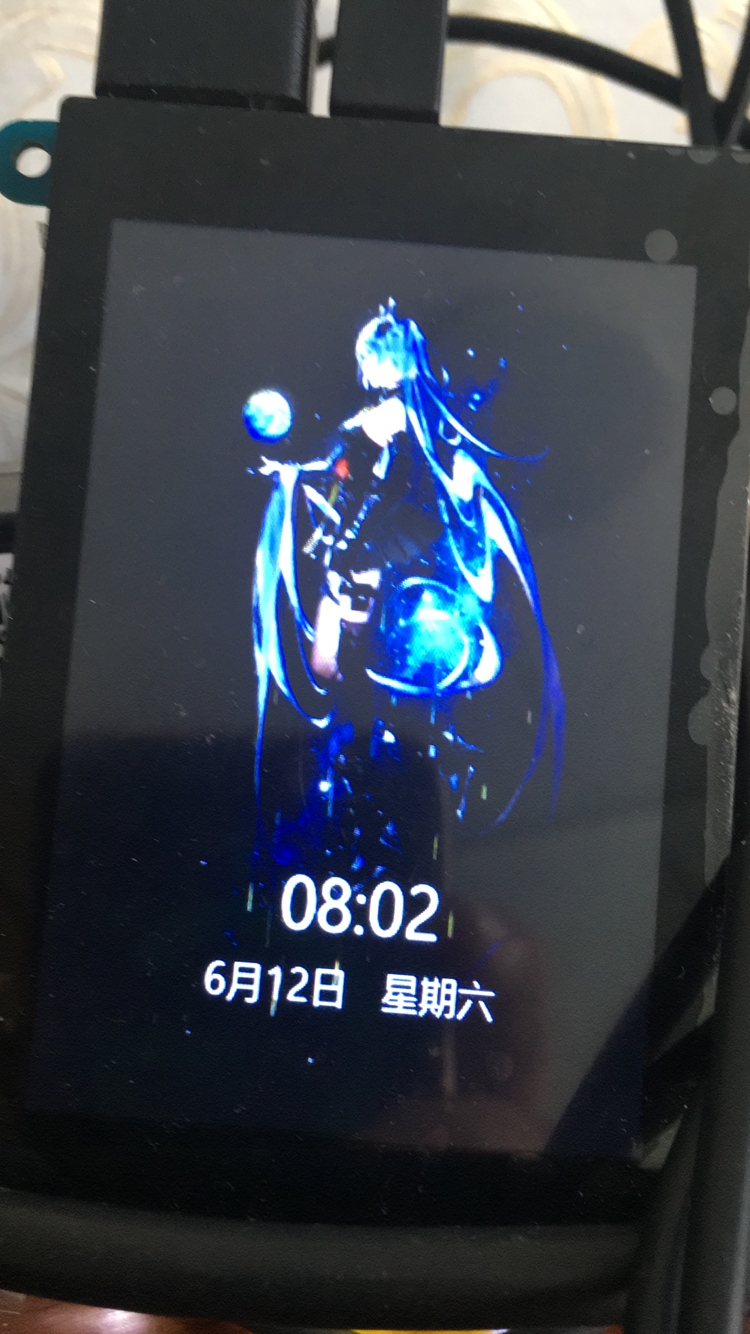
源码:
main.py
from PIL import Image, ImageDraw, ImageFont
import ctypes
import numpy as np
from numpy.ctypeslib import ndpointer
import time

space = round(1 / 9, 3)
font = ImageFont.truetype("./msyh.ttc",50)
font2 = ImageFont.truetype("./msyh.ttc",30)

so = ctypes.CDLL("../2/libmain3.so")
so.init()
so.init()
drawImage = so.writeImage
drawImage.argtypes = [ndpointer(ctypes.c_int)]
drawImage.restype = None

def getDate(now):
        month = now.tm_mon
        day = now.tm_mday
        wday = now.tm_wday + 1
        week = ""
        if wday == 1:
                week = "星期一"
        elif wday == 2:
                week = "星期二"
        elif wday == 3:
                week = "星期三"
        elif wday == 4:
                week = "星期四"
        elif wday == 5:
                week = "星期五"
        elif wday == 6:
                week = "星期六"
        else:
                week = "星期日"
        return str(month) + "月" + str(day) + "日   " + week

try:
        while True:
                for i in range(61):
                        start = time.time()
                        img = Image.open("frames/"+str(i)+".jpg")
                        draw = ImageDraw.Draw(img)
                        now = time.localtime()
                        draw.text((185, 450), time.strftime("%H:%M", now), fill=(255,255,255), font=font)
                        draw.text((130, 520), getDate(now), fill=(255,255,255), font=font2)
                        img = img.transpose(Image.FLIP_LEFT_RIGHT)
                        img = np.asarray(img, dtype="int32")
                        drawImage(img)
                        end = time.time()
                        cost = end-start
                        print("cost:" + str(cost) + "s")
                        time.sleep((space - cost) if (space - cost) > 0 else 0)
except Exception as e:
        so.close()
        raise e
except KeyboardInterrupt:
        so.close()
背景图预处理:
from PIL import Image

framesDir = "/home/pi/tmp" #放图片的路径
framesCount = 61 #图片的数量

for i in range(framesCount):
        img = Image.open(framesDir+"/"+str(i+1)+".jpg")
        newHeight = int(img.size[0] / 5 * 3)
        newWidth = int(img.size[1] / 5 * 3) + 2
        img = img.resize((newHeight, newWidth))
        padding = int((喵0 - newHeight) / 2)
        canvas = Image.new("RGB", (480, 喵0), (0, 0, 0))
        canvas.paste(img, (int(padding / 2), 0))
        canvas.save("frames/"+str(i)+".jpg")
动态库源码:
#include <fcntl.h>
#include <stdio.h>
#include <stdlib.h>
#include <unistd.h>
#include <sys/ioctl.h>
#include <linux/fb.h>
#include <sys/mman.h>

int fbfd;
struct fb_fix_screeninfo finfo;
struct fb_var_screeninfo vinfo;
char *fbdata;

void init()
{
    fbfd = open("/dev/fb0", O_RDWR);
    if (fbfd > 0 )
    {
        int fb_width = vinfo.xres;
        int fb_height = vinfo.yres;
        int fb_bpp = vinfo.bits_per_pixel;
        int fb_bytes = fb_bpp / 8;
        ioctl(fbfd, FBIOGET_FSCREENINFO, &finfo);
        ioctl(fbfd, FBIOGET_VSCREENINFO, &vinfo);
        int fb_data_size = fb_width * fb_height * fb_bytes;
        fbdata = mmap(0, fb_data_size, PROT_READ | PROT_WRITE, MAP_SHARED, fbfd, (off_t)0);
        memset(fbdata, 0, fb_data_size);
    }
}
void writeImage(int image[喵0][480][3])
{
    if (fbfd > 0)
    {
        int fb_width = vinfo.xres;
        int fb_height = vinfo.yres;
        int fb_bpp = vinfo.bits_per_pixel;
        int fb_bytes = fb_bpp / 8;
        int fb_data_size = fb_width * fb_height * fb_bytes;
        int stride = finfo.line_length;
        for (int i = 0;i < fb_height; i++)
        {
            for (int j = 0;j < fb_width; j++)
            {
                int index32 = (i * stride) + (j * fb_bytes);
                if (index32 >= fb_data_size)
                    break;
                fbdata[index32++] = image[j][i][2];
                fbdata[index32++] = image[j][i][1];
                fbdata[index32++] = image[j][i][0];
                fbdata[index32] = 0xFF;
            }
        }
    }
}
void clean()
{
    if (fbfd > 0)
    {
        int fb_width = vinfo.xres;
        int fb_height = vinfo.yres;
        int fb_bpp = vinfo.bits_per_pixel;
        int fb_bytes = fb_bpp / 8;
        int fb_data_size = fb_width * fb_height * fb_bytes;
        munmap(fbdata, fb_data_size);
        close(fbfd);
    }
}
注意,系统的分辨率要设置为喵0*480,否则可能会报错