 ML愛意隨風起查看:201 回复:2 评论:0 创建时间:2021-05-31T18:09:34
用户:ML愛意隨風起查看:201 回复:2 评论:0 创建时间:2021-05-31T18:09:34
【作品展示】
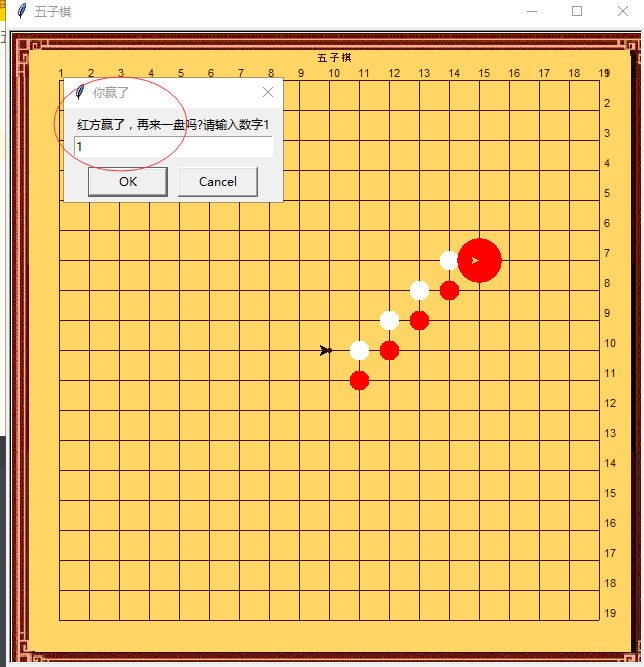
【作品介绍】
可以电脑判胜负
一局完成后,在对话框里输入数字1再来一盘
【作品源代码】
import turtle
turtle.title("五子棋")

iLine = 19   #网格行列数
iHalf = 9    #网格行列数的一半
H = 30       #间隔距离点数
runFlag = 1  #第一个下棋者为1,第二个为-1
isWin = 0    #是否已经胜出
chessData = [[0 for i in range(iLine)]for i in range(iLine)] #落子数据,0为未下,1白,-1红

StartX = -iHalf*H  #网格起始左上角X
StartY = iHalf*H  # 网格起始左上角Y

#检测是否已经五子连珠
def checkFive(row, col, nFlag):
    iPcs = 0
    for N in range(9):
        if col-4+N < 0:
            continue
        if col-4+N > iLine-1:
            break
        if chessData[row][col-4+N] == nFlag:
            iPcs = iPcs + 1
            if iPcs > 4:
                return iPcs
        else:
            iPcs = 0

    iPcs = 0
    for N in range(9):
        if row-4+N < 0:
            continue
        if row-4+N > iLine-1:
            break
        if chessData[row-4+N][col] == nFlag:
            iPcs = iPcs + 1
            if iPcs > 4:
                return iPcs
        else:
            iPcs = 0

    iPcs = 0
    for N in range(9):
        if row-4+N < 0 or col-4+N < 0:
            continue
        if row-4+N > iLine-1 or col-4+N > iLine-1:
            break
        if chessData[row-4+N][col-4+N] == nFlag:
            iPcs = iPcs + 1
            if iPcs > 4:
                return iPcs
        else:
            iPcs = 0

    iPcs = 0
    for N in range(9):
        if row-4+N < 0 or col+4-N < 0:
            continue
        if row-4+N > iLine-1 or col+4-N > iLine-1:
            break
        if chessData[row-4+N][col+4-N] == nFlag:
            iPcs = iPcs + 1
            if iPcs > 4:
                return iPcs
        else:
            iPcs = 0

    return 0

#响应鼠标点击
def getPos(x, y):
    global runFlag
    global chessData
    global isWin

#    print(x, y)
#已经决出胜负了
    if isWin >0:
        return
#限制下棋区域
    if y < -iHalf*H-5 or y > iHalf*H+5:
         return
    if x < -iHalf*H-5 or x > iHalf*H+5:
         return
#允许稍微一点点偏差
    if y > 0:
         y = y+H/3
    else:
         y = y-H/3

    if x > 0:
         x = x+H/3
    else:
         x = x-H/3
#换算出以中心为0,0的行列值
    row = int(y/H)
    col = int(x/H)
#要转换成左上角为0,0的数组
#要放棋的位置上已经有棋了
    if chessData[iHalf-row][iHalf+col] != 0:
        return

#    print(H*col, H*row, runFlag)
    strWin = "白方"
    if runFlag > 0:
       wmyPen.pencolor("#ff0000")
       runFlag = -1
       strWin = "红方"
    else:
       wmyPen.pencolor("#ffffff")
       runFlag = 1
       strWin = "白方"
    chessData[iHalf-row][iHalf+col] = runFlag
    isWin = checkFive(iHalf-row, iHalf+col, runFlag)

    wmyPen.penup()
    wmyPen.goto(H*col, H*row)
    wmyPen.pendown()
    wmyPen.dot(20+isWin*5)
    wmyPen.penup()
    if isWin==5:
        if (turtle.numinput('你赢了', strWin+'赢了,再来一盘吗?请输入数字1') == 1):
            isWin = 0
            drawLine()

    return

def cursorxy(event):
    x = event.x - 240
    y = 180 - event.y
    return


#画棋盘
def drawLine():
#初始化变量
    runFlag = 1  # 第一个下棋者为1,第二个为-1
    isWin = 0
    for i in range(iLine):
        for j in range(iLine):
            chessData[i][j] = 0

#画个正方形清空屏幕
#    turtle.clearscreen() #这个不安全,不好用
    scr.bgpic("fivechess.gif")  # 不认识jpg
    # turtle.bgcolor("#ffd565")
    wmyPen.begin_fill()
    wmyPen.fillcolor("#ffd565")
    wmyPen.pencolor("#ffd565")  # 255,213,102
    wmyPen.penup()
    wmyPen.goto(H*(iHalf+1), -H*(iHalf+1))
    wmyPen.pendown()
    wmyPen.left(45)
    wmyPen.circle(H*(iHalf+1)*1.414, steps=4)
    wmyPen.right(45)
    wmyPen.end_fill()

    wmyPen.pencolor("#401000")
    wmyPen.penup()
    wmyPen.goto(-10, iHalf*H+15)
    wmyPen.pendown()
    wmyPen.write("五子棋")
    wmyPen.penup()

#奇怪,必须要手工多画一条,否则就看不到第一条线===================
    wmyPen.pencolor("#401000")
    wmyPen.goto(StartX, StartY)
    wmyPen.pendown()
    wmyPen.forward(H*(iLine-1))
    wmyPen.penup()
    # 画横线
    for N in range(iLine):
        wmyPen.goto(StartX, StartY-N*30)
        wmyPen.pendown()
        wmyPen.forward(H*(iLine-1))
        wmyPen.write('  '+str(N+1))
        wmyPen.penup()

    #画竖线
    wmyPen.right(90)
    for N in range(iLine):
        wmyPen.goto(StartX+N*30, StartY)
        wmyPen.pendown()
        wmyPen.write(str(N+1))
        wmyPen.forward(H*(iLine-1))
        wmyPen.penup()
    wmyPen.left(90)
#正中心画个点
    wmyPen.setpos(0, 0)
    wmyPen.pendown()
    wmyPen.dot(5)
    wmyPen.penup()
    return

#***************正文开始**************************#
# 五子棋 (电脑判胜负)
# 20200312 吴铭杨
#************************************************#

scr = turtle.getscreen()    # 获取当前的屏幕/画布
scr.setup(喵0, 喵0)
turtle.Turtle().screen.delay(0)  # 取消画布延迟

wmyPen = turtle.Pen()
wmyPen.speed(0)
#画棋盘
drawLine()

#定义响应鼠标事件
scr.cv.bind("", cursorxy)
scr.onclick(getPos, btn=1)

#space 空格重来,重画棋盘
scr.onkey(drawLine, "space")
scr.listen()

#海龟窗口停留
turtle.done()
【提示】
部分含有Python第三方库相关内容的作品,在海龟编辑器网页端无法运行哦!如遇到这种情况,可以打开下面的链接,下载海龟编辑器客户端:
 我需要复制粘贴
import pygame,sys#导入模块
pygame.init()#游戏初始化
pygame.mixer.init()
pygame.font.init()#汉字初始化
screen = pygame.display.set_mode((650,450))#创建游戏窗口
pygame.display.set_caption("五子棋")#设置游戏窗口的标题
pos=[]#记录棋盘上每一个点的坐标
x=10#记录点的x坐标
y=10#记录点的y坐标
p=[]#记录点的地图位置
n=0#判断棋子的颜色
color=[]#记录棋子的颜色
map1=[]#判断哪些项有点
i=0#判断胜负查看每一个点的循环变量
for a in range(16):#表示棋盘的行的点
for a in range(16):#表示棋盘列的点
pos.append((x,y))#将点的位置用元祖的方式记录到列表
map1.append(0)#添加元素0代表点,1代表白棋,2代表黑棋
x+=30#记录下一个点
x=10#记录下一行的第一个
y+=30#记录下一行
pygame.mixer.music.load("5a41_37f5_ac53_b2f6f7c0ea87d23a393503caa67a2c5f.mp3")
while True:#游戏循环
if pygame.mixer.music.get_busy()==False:
pygame.mixer.music.play()
x=10#重设x坐标
y=10#重设y坐标
screen.fill((139,69,19))#设置为棋盘的颜色
for event in pygame.event.get():#遍历所有按键
if event.type == pygame.QUIT:#如果按下关闭键
pygame.quit()#关闭窗口
sys.exit()#关闭程序
if event.type==pygame.MOUSEBUTTONDOWN:#判断是否点击鼠标
for b in range(len(pos)):#遍历所有的点的位置
#设置一个虚拟的圆,判断是否鼠标点击每个圆中
if pos[b][0]-15<pygame.mouse.get_pos()[0] and pos[b][0]+15>pygame.mouse.get_pos()[0]:
if pos[b][1]-15<pygame.mouse.get_pos()[1] and pos[b][1]+15>pygame.mouse.get_pos()[1]:
if n==0:
n+=1
p.append(b)#添加点的项
if b!=p[-1]:
n+=1
p.append(b)#添加点的项
if n%2==0:#判断奇偶数
color.append((255,255,255))#将棋子颜色添加到列表
map1[b]=1
else:
color.append((0,0,0))
map1[b]=2
break
for a in range(14):#表示棋盘行的点
for a in range(15):#表示棋盘列的点
pygame.draw.rect(screen,(0,0,0),(x,y,30,30),1)#绘制矩形
x+=30#绘制下一个圆
x=10#绘制下一行的第一个的圆
y+=30#绘制下一行的圆
pygame.draw.circle(screen,(255,0,0),(pygame.mouse.get_pos()[0]+5,pygame.mouse.get_pos()[1]+5),15,1)
i+=1
#绘制一个跟随鼠标的圆
for c in range(len(p)):#判断有多少个点,将这些点都绘制出来
pygame.draw.circle(screen,color[c],pos[p[c]],15,0)#绘制圆形
screen.blit(pygame.font.SysFont("simhei",25).render("棋子数量: "+str(n),0,(255,255,0)),(466,10))
if i==250:#看循环是否结束
i=0#重新检测
#判断横
if map1[i]==1 and map1[i+1]==1 and map1[i+2]==1 and map1[i+3]==1 and map1[i+4]==1:
print("白棋赢")
break
if map1[i]==2 and map1[i+1]==2 and map1[i+2]==2 and map1[i+3]==2 and map1[i+4]==2:
print("黑棋赢")
break
#判断竖
if map1[i]==1 and map1[i+16]==1 and map1[i+32]==1 and map1[i+48]==1 and map1[i+喵]==1:
print("白棋赢")
break
if map1[i]==2 and map1[i+16]==2 and map1[i+32]==2 and map1[i+48]==2 and map1[i+喵]==2:
print("黑棋赢")
break
#判断反斜
if map1[i]==1 and map1[i+16+1]==1 and map1[i+32+2]==1 and map1[i+48+3]==1 and map1[i+喵+4]==1:
print("白棋赢")
break
if map1[i]==2 and map1[i+16+1]==2 and map1[i+32+2]==2 and map1[i+48+3]==2 and map1[i+喵+4]==2:
print("黑棋赢")
break
#判断斜
if map1[i]==1 and map1[i+16-1]==1 and map1[i+32-2]==1 and map1[i+48-3]==1 and map1[i+喵-4]==1:
print("白棋赢")
break
if map1[i]==2 and map1[i+16-1]==2 and map1[i+32-2]==2 and map1[i+48-3]==2 and map1[i+喵-4]==2:
print("黑棋赢")
break
#显示棋子数量,因为一共256个交叉点,所以空三格
pygame.display.flip()#刷新游戏点赞0
评论
 KIHIO
KIHIOdef jd(x):
try:
x = float(x)
except ValueError:
return 0
if x-(float(int(x))) > 0:
return 0
x = int(x)
if x < 1 or x > 10:
return 0
return x
def sy(a, b, c, a2, b2, c2, s):
x = 0
while x <= a2:
y = 0
while y <= b2:
n = 0
lxh = 0
lxb = 0
while n <= c2:
if s[x+y+n] == '黑':
lxh += 1
else:
lxh = 0
if s[x+y+n] == '白':
lxb += 1
else:
lxb = 0
n += c
if lxb == 5:
return 0
if lxh == 5:
return 2
y += b
x += a
return 1
def xsy(xx, xs, yx, ys, js, js2, s):
x = xx
while x <= xs:
y = yx
while y <= yx:
lxb = 0
lxh = 0
n = 0
while n <= 4:
if s[(y+n*js2)*10+x+n*js] == '黑':
lxh += 1
else:
lxh = 0
if s[(y+n*js2)*10+x+n*js] == '白':
lxb += 1
else:
lxb = 0
n += 1
if lxb == 5:
return 0
if lxh == 5:
return 2
y += 1
x += 1
return 1
print("棋盘为10*10。")
s = []
a = 0
while a < 100:
s.append('无')
a += 1
print("你告诉我黑棋还是白棋先下?(输入A代表黑,输入B代表白):")
while True:
hb = input()
if hb != 'A' and hb != 'B':
print("输入错误,请重试:")
else:
break
b = 0
while True:
f = 0
fh = 0
hqs = 0
bqs = 0
if sy(10, 1, 1, 90, 5, 4, s) == 2:
hqs = 1
if sy(1, 10, 10, 9, 50, 40, s) == 2:
hqs = 1
if sy(10, 1, 1, 90, 5, 4, s) == 0:
bqs = 1
if sy(1, 10, 10, 9, 50, 40, s) == 0:
bqs = 1
if xsy(0, 5, 0, 5, 1, 1, s) == 2:
hqs = 1
if xsy(4, 9, 4, 9, -1, -1, s) == 2:
hqs = 1
if xsy(0, 5, 0, 5, 1, 1, s) == 0:
bqs = 1
if xsy(4, 9, 4, 9, -1, -1, s) == 0:
bqs = 1
if xsy(0, 5, 4, 9, 1, -1, s) == 2:
hqs = 1
if xsy(0, 5, 4, 9, 1, -1, s) == 0:
bqs = 1
if xsy(4, 9, 0, 5, -1, 1, s) == 2:
hqs = 1
if xsy(4, 9, 0, 5, -1, 1, s) == 0:
bqs = 1
while f < 100:
k = 0
bs = ' '
while k < 10:
if k == 0:
bs = s[f+k]
else:
bs = bs+' '+s[f+k]
k += 1
print(bs)
f += 10
if hqs == 1:
print("黑棋赢!")
break
if bqs == 1:
print("白棋赢!")
break
if hb == 'A':
if b % 2 == 0:
jhb = 'A'
else:
jhb = 'B'
else:
if b % 2 == 0:
jhb = 'B'
else:
jhb = 'A'
if jhb == 'A':
print("黑棋的x坐标(从左到右,1~10):")
while True:
x = input()
if jd(x) == 0:
print("输入错误,请重试:")
else:
x = jd(x)
break
print("黑棋的y坐标(从上到下,1~10):")
while True:
y = input()
if jd(y) == 0:
print("输入错误,请重试:")
else:
y = jd(y)
break
if (s[(y-1)*10+x-1] == '黑') or (s[(y-1)*10+x-1] == '白'):
print("禁止重叠,下次做决策看棋盘现状。")
fh = 1
else:
s[(y-1)*10+x-1] = '黑'
else:
print("白棋的x坐标(从左到右,1~10):")
while True:
x = input()
if jd(x) == 0:
print("输入错误,请重试:")
else:
x = jd(x)
break
print("白棋的y坐标(从上到下,1~10):")
while True:
y = input()
if jd(y) == 0:
print("输入错误,请重试:")
else:
y = jd(y)
break
if (s[(y-1)*10+x-1] == '黑') or (s[(y-1)*10+x-1] == '白'):
print("禁止重叠,下次做决策看棋盘现状。")
fh = 1
else:
s[(y-1)*10+x-1] = '白'
if fh == 0:
b += 1点赞0
评论