 极光AXE查看:73 回复:0 评论:0 创建时间:2021-05-23T21:01:18
用户:极光AXE查看:73 回复:0 评论:0 创建时间:2021-05-23T21:01:18
本作品使用turtle,tkinter,os,time,PIL和Easygui实现了创造出属于自己的航天明信片
图片如下(虽然给老师发了但还是想加上)
 背景1.jpg
背景2.jpg
背景3.jpg
 创建文字.gif
国旗.gif
 火箭.gif
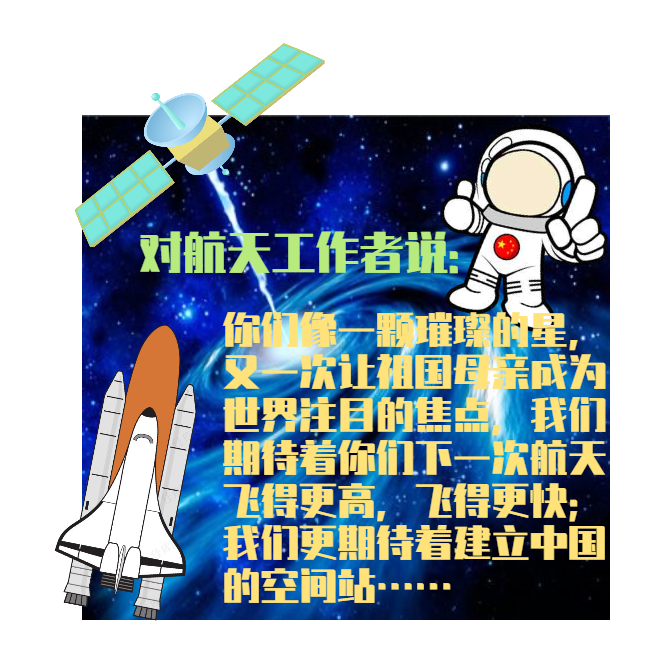 示例.png
卫星.gif

宇航员.gif
代码如下:
# 导入所需要的库
import turtle
from tkinter.colorchooser import askcolor
import os
import time
from PIL import Image, ImageDraw, ImageFont
import easygui as ui

# 初始化图片数据
for temp in ['宇航员.gif', '火箭.gif', '国旗.gif', '卫星.gif']:
    ig = Image.open(temp)
    ig.save(temp.split('.')[0]+'.png')
# 初始化数据
Img = Image.new('RGBA', (800, 800))
X, Y = 0, 0
state = 0
name = ''
text = ''
size = 0
List = []
index = 0
X, Y = 0, 0
color = (0, 0, 0)
textcolor = ''
# 定义需要的函数


def OnClick(x, y):
    global Img, state, name, index, X, Y, List, text, size, color, textcolor
    if state == 0:
        if x > -300-78 and x < -300+78 and y > -270-115 and y < -270+115:
            name = "火箭.gif"
            temp = turtle.Pen()
            temp.penup()
            temp.shape("火箭.gif")
            temp.showturtle()
            List.append(temp)
            X, Y = 0, 0
            index = len(List)-1
            state = 1
        elif x > 150-80 and x < 150+80 and y > -270-80 and y < -270+80:
            name = "宇航员.gif"
            temp = turtle.Pen()
            temp.penup()
            temp.shape("宇航员.gif")
            temp.showturtle()
            List.append(temp)
            X, Y = 0, 0
            index = len(List)-1
            state = 1
        elif x > 300-70 and x < 300+70 and y > -270-70 and y < -270+70:
            name = "国旗.gif"
            temp = turtle.Pen()
            temp.penup()
            temp.shape("国旗.gif")
            temp.showturtle()
            List.append(temp)
            X, Y = 0, 0
            index = len(List)-1
            state = 1
        elif x > -20-77 and x < -20+77 and y > -270-77 and y < -270+77:
            X, Y = 0, 0
            name = "卫星.gif"
            temp = turtle.Pen()
            temp.penup()
            temp.shape("卫星.gif")
            temp.showturtle()
            List.append(temp)
            index = len(List)-1
            state = 1
        elif x > -180-80 and x < -180+80 and y > -270-25 and y < -270+25:
            text = str(ui.enterbox('请输入自定义文本:', '【36强进10】创建自己的航天明信片吧'))
            size = int(ui.enterbox('请输入文本大小:', '【36强进10】创建自己的航天明信片吧'))
            color = askcolor()
            textcolor = color[1]
            color = color[0]
            color = list(color)
            for i in range(len(color)):
                color[i] = int(round(color[i]))
                if color[i]/255 > 1:
                    color[i] = 255
            color = tuple(color)
            name = "创建文字.gif"
            temp = turtle.Pen()
            temp.penup()
            temp.shape("创建文字.gif")
            temp.showturtle()
            List.append(temp)
            X, Y = 0, 0
            index = len(List)-1
            state = 1


def Save_Img():
    global Img
    path = ui.filesavebox('选择明信片保存位置:', '【36强进10】创建自己的航天明信片吧', 'ShowImg.png')
    Img.save(path)
    choose = ui.choicebox('是否发送到宇宙空间站?', '【36强进10】创建自己的航天明信片吧', ['是', '否'])
    if choose == '否':
        ui.msgbox('好的', '【36强进10】创建自己的航天明信片吧')
    else:
        for i in range(3):
            ui.msgbox('光速传送向宇宙空间站中......', '【36强进10】创建自己的航天明信片吧')
        ui.msgbox('传送成功,非常谢谢你的明信片', '【36强进10】创建自己的航天明信片吧')


def move1():
    global X, index, List
    if state == 1:
        X -= 5
        List[index].goto(X, Y)


def move2():
    global Y, index, List
    if state == 1:
        Y += 5
        List[index].goto(X, Y)


def move3():
    global Y, index, List
    if state == 1:
        Y -= 5
        List[index].goto(X, Y)


def move4():
    global X, index, List
    if state == 1:
        X += 5
        List[index].goto(X, Y)


def Yes():
    global state, Img, name, X, Y, text, size, color, index, List, textcolor
    if state == 1:
        if name == "创建文字.gif":
            font = ImageFont.truetype("simkai.ttf", size*2)
            draw = ImageDraw.Draw(Img)
            draw.text((X+200, Y+200), text, fill=color, font=font)
            state = 0
            List[index].pencolor(textcolor)
            List[index].goto(X-80.5, Y)
            List[index].pensize(20)
            List[index].write(text, font=('楷体', size, 'bold'))
            List[index].hideturtle()
        else:
            igm = Image.open(name.split('.')[0]+'.png').convert("RGBA")
            X += igm.width//2+160
            if Y == 0:
                Y += igm.height//2+180
            elif Y > 0:
                Y -= Y+igm.height//2
                Y += 118
            elif Y < 0:
                Y -= Y+igm.height
                Y += 600
            Img.paste(igm, (X, Y), igm)
            state = 0


# 处理图片
BackPic = ['背景1.jpg', '背景2.jpg', '背景3.jpg']
for img_name in BackPic:
    img = Image.open(img_name)
    img = img.resize((200, 200))
    img.save(img_name.split(".")[0]+'.gif')
BackPic = ['背景1.gif', '背景2.gif', '背景3.gif']
choose = ui.buttonbox('请选择:', '【36强进10】创建自己的航天明信片吧', ['自己创造', '查看示例'])
if choose == '自己创造':
    # 实现选择明信片背景
    pic = ui.buttonbox(
        '请选择背景图片:',
        '【36强进10】',
        choices='',
        images=BackPic)
    BackPic = ['背景1.jpg', '背景2.jpg', '背景3.jpg']
    # 再次处理图片为合适
    for img_name in BackPic:
        img = Image.open(img_name).resize((600, 600))
        img.save(img_name)
        img = Image.open(img_name).resize((600, 600))
        img.save(img_name.split('.')[0]+'.gif')
    Img = Image.open(pic.split('.')[0]+'.jpg')
    # 创建Turtle窗口及设置Turtle窗口的参数
    Screen = turtle.Screen()
    Screen.setup(850, 850)
    Screen.register_shape('火箭.gif')
    Screen.register_shape('宇航员.gif')
    Screen.register_shape('创建文字.gif')
    Screen.register_shape('卫星.gif')
    Screen.register_shape('国旗.gif')
    Screen.register_shape(pic)
    # 创建背景
    backpic = turtle.Pen()
    backpic.penup()
    backpic.speed(0)
    backpic.goto(0, 120)
    backpic.shape(pic)
    # 创建画笔及绘制底座
    pen = turtle.Pen()
    pen.color("gray")
    pen.fillcolor("gray")
    pen.pensize(10)
    pen.speed(0)
    pen.penup()
    pen.goto(-380, -400)
    pen.pendown()
    pen.begin_fill()
    pen.hideturtle()
    pen.goto(-380, -160)
    pen.goto(380, -160)
    pen.goto(380, -400)
    pen.goto(-380, -400)
    pen.end_fill()
    # 火箭展示图
    rocket_show = turtle.Pen()
    rocket_show.speed(0)
    rocket_show.penup()
    rocket_show.shape('火箭.gif')
    rocket_show.goto(-300, -270)
    # 文字展示图
    text_show = turtle.Pen()
    text_show.speed(0)
    text_show.penup()
    text_show.shape('创建文字.gif')
    text_show.goto(-180, -270)
    # 卫星展示图
    satellite_show = turtle.Pen()
    satellite_show.speed(0)
    satellite_show.penup()
    satellite_show.shape('卫星.gif')
    satellite_show.goto(-20, -270)
    # 宇航员展示图
    astronauts_show = turtle.Pen()
    astronauts_show.speed(0)
    astronauts_show.penup()
    astronauts_show.shape('宇航员.gif')
    astronauts_show.goto(150, -270)
    # 国旗展示图
    chinese_show = turtle.Pen()
    chinese_show.speed(0)
    chinese_show.penup()
    chinese_show.shape("国旗.gif")
    chinese_show.goto(300, -270)
    # 保留窗口以及键盘鼠标检测
    Screen.listen()
    Screen.onclick(OnClick, 1)
    Screen.onkeypress(Save_Img, 'x')
    Screen.onkeypress(move1, 'a')
    Screen.onkeypress(move2, 'w')
    Screen.onkeypress(move3, 's')
    Screen.onkeypress(move4, 'd')
    Screen.onkeypress(Yes, 'q')
    turtle.done()
else:
    show = Image.open('示例.png')
    show.show()
# 删除图片数据
for temp in ['宇航员.png', '火箭.png', '国旗.png', '卫星.png', '背景1.gif', '背景2.gif', '背景3.gif']:
    name = temp
    os.remove(name)